First question: do you have footage yet?
Most lists of Descript alternatives assume you already have something to edit. They swap one editor for another. That advice is sound if a recording is already sitting in a folder.
Often there isn't. Say the product launches next month, the demo exists only as a live app, and nobody has had an afternoon to record and narrate a walkthrough. A better editor does nothing for that problem, because there is nothing to cut.
So the first question isn't which editor. It's whether you have footage yet. If you do, the replacement is another editor or recorder. If you don't, the job is getting a product video made at all, and that calls for a different kind of tool.
The film below is a walkthrough of a live GPU marketplace app, made with no screen recording on anyone's side.
Your answer decides which tools on this page are worth your time, starting with why people leave Descript at all.
Why people look for a Descript alternative
Descript is on most shortlists for good reasons. Here is what it does well, according to its own pages as of 2026-10-09.
The main draw is how you edit. You cut by deleting words in a transcript, and Descript says most people make their first cuts within minutes. The timeline is there for fine control, but you can make a whole video without touching it. Underlord, its AI co-editor, can tighten cuts, remove silences or filler words, improve audio and add visuals or captions. Regenerate fixes a mistake in your voice or video without re-recording: you type the right word.
Recording is covered too. There is a screen recorder, multitrack podcast editing, and Rooms, a remote studio in the browser where everyone records locally in up to 4K. Descript runs on macOS and Windows, with a web version. Pricing starts free, with paid plans from $16/month.
| Plan or strength | What Descript says | Source |
|---|---|---|
| Free | Starts free, paid plans from $16/month | Descript pricing, 2026-10-09 |
| Hobbyist | $16 per person per month billed annually, or $24 monthly. 10 media hours and 400 AI credits a month, 1080p export without a watermark | Descript pricing, 2026-10-09 |
| Business | $50 per person per month billed annually, or $65 monthly. 40 media hours and 1500 AI credits a month | Descript pricing, 2026-10-09 |
| Transcript editing | Delete words to cut, timeline optional | Descript homepage, 2026-10-09 |
| Underlord | Tightens cuts, removes silences and filler words, improves audio, adds visuals or captions | Descript video editing, 2026-10-09 |
| Regenerate | Fixes a word in your voice or video without re-recording | Descript video editing, 2026-10-09 |
| Recording | Screen recorder, multitrack podcast editing, Rooms with local recording in up to 4K | Descript homepage and Descript Rooms, 2026-10-09 |
| Platforms | macOS, Windows and a web version | Descript tutorial, 2026-10-09 |
People who leave are rarely unhappy with the editing. They leave because their job is a different one:
- Someone has to record first. Descript's editing works on a recording: it transcribes your footage, and you cut by deleting words. If nobody has time before launch day to click through the product and talk over it, there is nothing to edit yet.
- You think in timelines. Some people would rather cut on a multitrack timeline and treat the transcript as a helper.
- You want screen and camera, shared fast. For a walkthrough with your face in the corner, a recorder built to capture and share a link can be the shorter route.
- You have no footage and just need the product video. Then the editing model doesn't matter yet. What's missing is the film itself.
Find your situation among those four, and the rest of this page sorts itself, starting with the most common case: the footage exists, and the only question is where to edit it. uscale is our product. We've put it where we think it fits, and said where others fit better.
Camtasia: when you have recordings and want a timeline
If you are leaving Descript with a folder of screen recordings, Camtasia is the closest like-for-like move. It records and edits, and TechSmith sells it in three yearly plans. The feature a Descript user will look for first is not in the cheapest plan. Text-based video editing sits in Essentials, not Starter.
| Plan | Price | What it adds |
|---|---|---|
| Starter | $39.00 per year, billed yearly | Unlimited 4k/60fps recordings; Camtasia Editor (watermarked) |
| Essentials, "for video and audio editing" | $179.88 per year | Text-based video editing, automatic filler word removal, speech-to-text transcription, editable multitrack recording |
| Pro | $599.00 per user per year, billed yearly | Unlimited access to 100+ million video, audio, image and effects assets |
Source: TechSmith, Buy Camtasia and Buy TechSmith Assets for Camtasia, checked 2026-10-09.
Starter is a recorder with an editor attached, and that editor is watermarked. Essentials is the plan that feels like Descript. It makes cuts from a transcript, removes filler words for you and lets you edit recordings track by track. Pro adds unlimited access to TechSmith's asset library on top.
The habit worth keeping applies to every tool on this page. Compare plans by the feature you would miss on day one, not by the entry price. A Descript user who sets Descript's paid plans against Camtasia's $39.00 Starter is comparing two different jobs. The fair match for transcript editing is Essentials.
Who it fits
Camtasia suits someone who already has screen recordings and wants transcript-style cuts plus a multitrack timeline. For footage you already shot, choose Camtasia over uscale. uscale is not an editor for footage you bring.
Camtasia's job is recording and editing. You bring the footage or capture it in Camtasia, then edit it track by track, or by transcript in Essentials. The finished video is built from takes you chose, so what ends up on screen is what you captured.
Camtasia vs uscale: Camtasia edits the footage you have, track by track. uscale makes a narrated product video from your live product when there is no footage yet. If the footage you plan to make should have your own face in it, the next tool fits that job.
Tella: when you want to be on camera with your screen
Tella fits when you are part of the message. Its homepage, checked on 2026-10-09, calls it screen recording software for Mac, Windows and the web. It records your screen, camera, microphone and system audio, edits with AI, and shares or exports in up to 4K. You can try the full Pro plan free for 7 days, with no credit card required, and paid plans start at $13 per month.
| What Tella's homepage says | Detail |
|---|---|
| Runs on | Mac, Windows and the web |
| Records | Screen, camera, microphone and system audio |
| Editing | Edit with AI |
| Output | Share or export in up to 4K |
| Clip length | Up to 6 hours per clip, combine as many clips as you need |
| Trial | 7-day free trial of the full Pro plan, no credit card required |
| Paid plans | From $13 per month |
Source: Tella homepage, 2026-10-09.
A worked example (hypothetical)
Say you're a founder launching a SaaS product next week. You open Tella with your camera on. You click through sign-up, the main dashboard and the first report, and you talk the viewer through each screen in your own voice. You tidy it up with Tella's AI editing. Then you share a link with your waitlist the same afternoon. The viewer sees the product and hears from the person who built it.
That last point is why you would choose Tella over uscale. When your own face and real voice should carry the video, record yourself. A launch note from a founder is a message from a person, and no stock voice can stand in for you.
Tella's job is capture. It records what you do on screen and on camera, so clicking through the product and speaking the narration stay with you.
If you're weighing Descript against Loom for quick messages rather than a launch video, our guide to Loom alternatives for product demos covers that choice.
Tella vs uscale: Tella records you and your real voice. uscale films the product for you and voices it with its own voices, since it can't use your voice today.
Camtasia and Tella both still need someone to sit down and record. Back to the launch from the top, then: what if nobody has that afternoon?
uscale: when there's no footage yet
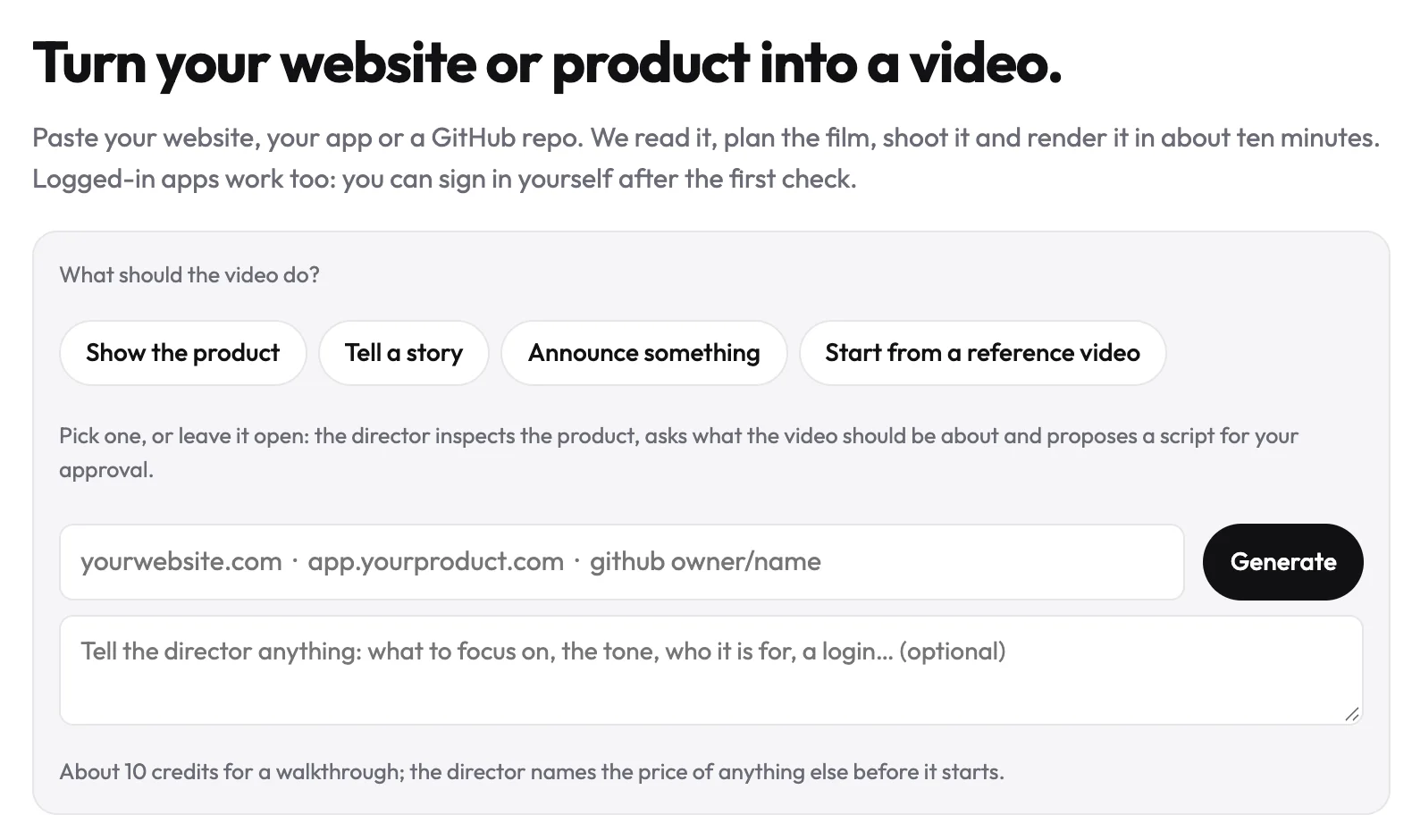
If nothing has been recorded yet, uscale gives you a narrated product video without anyone recording a screen. Paste your site or app address, or a GitHub repo. uscale opens the live product and films each screen sharp. If the screens sit behind a sign-in, you sign in once yourself, in a browser streamed into the page. From a repo, it can plan a film of the project before there is a live site to film.
Approve the words before anything is filmed
Before any filming, you get a storyboard with every narration line on it.
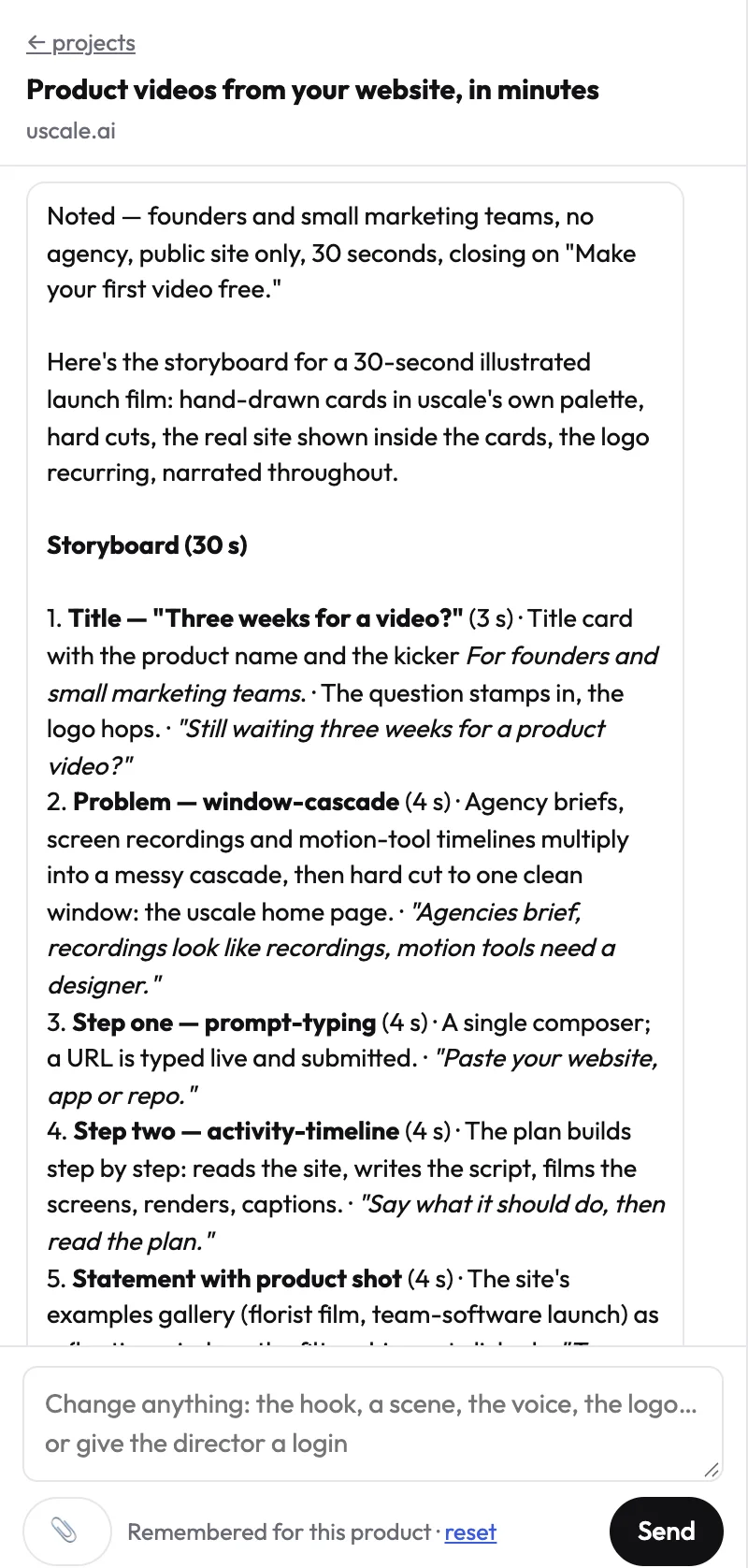
This is the step that takes the place of transcript editing. In a recorder-first tool, you speak first and then cut the transcript into shape. Here the script is settled first, and the film is made to match it. The cheapest moment to change a line is before it has been filmed. Once you approve, the film gets a natural voice, captions that follow every word and a music bed underneath.
You ask for changes in a chat with the director. Name the moment and say what should change. There is no timeline, and the chat is free. See how this works for a product demo video, or watch finished films on the examples page.
What it costs
You buy credit packs once, with no subscription and no seats. The packs are listed on uscale's pricing page:
| Pack | Price | Credits | Per credit | Roughly |
|---|---|---|---|---|
| Starter | $49 | 50 | $0.98 | About 5 product walkthroughs |
| Growth | $129 | 150 | $0.86 | About 15 product walkthroughs |
| Studio | $399 | 500 | $0.80 | About 50 product walkthroughs |
A product walkthrough is about 10 credits: filming 4, direction and copy 4, render 1–3. Each change has its own price in credits, and the director names it before it starts.
What it is not
uscale does not edit footage you have already shot, and it has no multitrack timeline. It voices films with its own voices, not yours, and captions are burned into every film. If you already have recordings, the tools above fit better.
Descript vs uscale: Descript edits what you recorded, and uscale makes the film when nothing is recorded.
Try it: make a product demo video from your live site, and approve every narration line before anything is filmed.
There is one more case, though, and in it none of these video tools is the right answer.
Clickable demo tools: when buyers should click through themselves
Some product demos shouldn't be a video at all. When buyers want to explore the product at their own pace, a clickable, interactive demo does that job better than any video, whether it was edited in Descript, recorded in Tella or made by uscale.
The argument is short. A video plays the same path for every viewer, in the order it was cut. An evaluator who wants to test one screen has to wait for it or scrub to find it. So when exploring is the point, the format that lets them explore is the better fit.
Here is a hypothetical. Say you sell a developer tool, and evaluators care most about the settings screen: which options exist and what each toggle changes. A narrated walkthrough can show that screen clearly. It can't let them flip the toggles. A clickable demo can, and for that buyer we'd pick one over uscale.
A video answers the questions you picked. A clickable demo answers the ones the buyer brings.
| The buyer wants to | Better fit |
|---|---|
| Get the point without effort | A narrated video |
| Follow a story in order | A narrated video |
| Try a specific screen themselves | A clickable demo |
| Skip around at their own pace | A clickable demo |
Search for "interactive demo" or "clickable demo" tools by name, since they are a separate category from editors and recorders. For everything meant to be watched, the table below puts the video tools side by side.
Descript alternatives compared: Descript, Camtasia, Tella and uscale
Four things separate these tools for a product video. uscale is our product, and it sits in the grid on the same terms as the others.
- What you start from. This decides whether someone has to record first, and who.
- How you edit. Transcript, timeline, AI and chat each suit a different working habit.
- Whose face and voice appear. Some videos need the founder on screen. Others only need the product.
- Starting price. Each price comes from the tool's own page, because the billing units differ.
| What you start from | How you edit | Whose face and voice appear | Starting price | |
|---|---|---|---|---|
| Descript (baseline) | A recording you have, or one you make with its screen recorder or Rooms | Delete words in the transcript, with the timeline for fine control and the Underlord AI co-editor | Yours, from your recording. Regenerate can fix a word in your voice | Free, paid plans from $16/month (Descript pricing, 2026-10-09) |
| Camtasia | A recording you make (unlimited 4k/60fps on Starter) or footage you bring | Multitrack editing, with text-based editing in Essentials | Yours, if you record yourself | Starter $39.00 per year. Text-based editing is in Essentials at $179.88 per year (TechSmith store, 2026-10-09) |
| Tella | A recording you make of screen, camera, microphone and system audio | Edit with AI | Yours, on camera with your screen | 7-day free trial of the full Pro plan, paid plans from $13 per month (Tella homepage, 2026-10-09) |
| uscale | Your live site or app address, or a GitHub repo | Chat with a director, no timeline | Your product's screens, voiced with uscale's voices. Your own voice can't be used today | Packs from $49 (uscale pricing) |
Descript, Camtasia and Tella were checked on their own pages on 2026-10-09. uscale's details come from its pricing page.
The billing units are not the same. Descript charges per person per month, Camtasia per year and Tella per month. uscale sells one-off credit packs with no subscription and no seats. Don't line the numbers up side by side. Count how many videos you expect to make and how many people will edit, then price each option against that. uscale's pricing page puts its Starter pack at about 5 product walkthroughs, which helps with that count.
Which one fits your situation
- Choose Descript if you already work from recordings, podcasts or interviews and like cutting by text.
- Choose Camtasia if you have screen recordings and want a multitrack edit. Pick Essentials if you want transcript-style cuts.
- Choose Tella if you are a founder whose own face and voice should carry the launch video.
- Choose uscale if you are a solo founder before launch with no footage and no time to record. It also fits a developer-relations team with a repo and no live site to film yet (see videos for developer tools).
- For an agency with many clients, use Camtasia or Descript when clients hand over footage. Use uscale when they hand over only a web address, since it renders each film in the client's own logo, colours and fonts, read from their site (see video for agencies and studios).
Rule of thumb: if footage exists, choose the editor that matches how you like to cut. If it doesn't, choose the tool that makes the film.
A rule of thumb has exceptions, though. Two are worth spelling out: when to stay put, and when uscale is the wrong pick.
When to stay with Descript, and when not to choose uscale
If most of what you make is podcasts and remote interviews, you may not need an alternative at all. Descript Rooms is a remote studio that runs in your browser, where everyone records locally in up to 4K, so a shaky connection doesn't ruin the session. For business and enterprise users, Control Room lets up to 10 producers run the recording. Descript's multitrack podcast editing works like editing text, and Regenerate fixes a mistake in your voice or video without re-recording. No single tool on this page covers all of that, and uscale doesn't try to. For a show with guests, staying where you are is often the honest answer.
The same honesty applies to uscale. It makes a narrated product video when nothing has been recorded, which is a narrower job than it sounds. Skip it in these cases, each true today:
| Your situation | Pick |
|---|---|
| You already shot the footage and want to edit it | Camtasia, or stay in Descript |
| You want a multitrack timeline | Camtasia Essentials, with editable multitrack recording, or Descript |
| Your own voice should narrate | Tella. uscale voices films with its own voices and can't use yours today |
| Captions must be off | Descript, Camtasia or Tella. uscale burns captions into every film today |
| The film must be in Chinese, Japanese, Korean or Arabic | Not uscale yet. It makes films in 21 languages, all in Latin or Cyrillic script |
| Buyers should click through the product themselves | A clickable demo tool |
| You need a live shoot with your real team | A camera crew, or Tella for screen plus camera |
If none of those rows describes you, and the real problem is that there's nothing to edit yet, that is the case uscale was built for.
Pick by what you have
The question from the top of the page still sorts everything: do you have footage yet?
If you do, keep it and edit it. Open Camtasia's plans and look at Essentials if you want transcript-style cuts on a timeline. If your own face and voice should carry the video, start Tella's free trial instead. Either way, you're working with what you already shot.
If you don't, paste your product's address into uscale and get a narrated product demo video, with a storyboard you approve line by line before anything is filmed. Your first video is free: 10 credits, 20 with a work email, no card needed. Software teams can see how this fits their kind of product on the software products page. If your product lives in a repository, read the developer tools page and paste the repo instead.
A product video doesn't start with an editor. It starts with knowing whether there's anything to edit.
Make your descript alternatives from your website — it’s free →
Questions
What are Descript alternatives?
Descript alternatives are other tools for editing, recording or making videos, used instead of Descript, such as Camtasia, Tella and uscale. The right pick depends on whether you already have footage. Camtasia edits recordings on a multitrack timeline, Tella records your screen and camera together, and uscale makes a narrated product video from a live site or app when nothing has been recorded yet.
What's a free alternative to Descript for product demos?
A free alternative to Descript for product demos depends on whether you have footage. Tella offers a 7-day free trial of its full Pro plan with no credit card required, then paid plans from $13 per month, suited to recording yourself with your screen. If nothing is recorded yet, uscale's first video is free: 10 credits, 20 with a work email, one full first video, no card needed.
Can uscale edit a video I already recorded?
No. uscale does not edit footage you have already shot, and it has no multitrack timeline. It makes a narrated product video by filming your live site or app, so no recording is needed. For editing existing recordings, Camtasia Essentials offers text-based editing and editable multitrack recording at $179.88 per year, and Descript lets you cut by deleting words in a transcript.
Do I need to record my screen to make a product demo video?
Not necessarily. A product demo video can be made by recording your screen and narrating it, with tools like Tella or Camtasia, which suits founders who want their own face and voice in it. Without footage, uscale opens your live site or app and films each screen itself; if screens sit behind a sign-in, you sign in once in a browser streamed into the page. Narration uses uscale's voices, not yours.
What does uscale cost?
uscale's first video is free: 10 credits, 20 with a work email, no card needed. After that you buy credit packs once, with no subscription and no seats: Starter is $49 for 50 credits, Growth $129 for 150 credits and Studio $399 for 500 credits. A product walkthrough is about 10 credits, and the director names each price before it starts. Chatting with the director is free.

The team behind uscale, which turns a website, web app or GitHub repo into a narrated product video.