Not every Loom alternative is a screen recorder
Most lists of Loom alternatives start from one assumption: the replacement has to be another screen recorder.
That holds when the video is a quick message to a teammate. A product demo for buyers is a different job, and it comes in three shapes. In the first, you still present it: your screen, your voice, your face in the corner, with more polish than a raw recording. In the second, nobody presents it, because buyers click through the product themselves at their own pace. In the third, nobody records it either. The product is filmed as it runs, with narration, captions and music, and you approve every line.
The walkthrough above was made from a live app, and nobody on the maker's side pressed record. Knowing which shape your demo needs narrows the field fast. Before you choose, it helps to know what Loom already does well, and what you would give up by leaving it.
Why people look for a Loom alternative for product demos
Loom is good at the job it was built for. You can start on the free Starter plan and record from the Chrome extension. On Business, Business + AI and Enterprise, recording time is unlimited, and Business + AI adds full access to Loom's AI capabilities. Editing features such as trim and stitch aren't part of the free plan. Atlassian's trial FAQ says you lose them if you drop back to Starter after a Business + AI trial.
| Loom plan | What you get (Atlassian's Loom support pages, checked 2026-10-05) |
|---|---|
| Starter (free) | 5-minute recording limit; up to 25 videos and screenshots, and archived videos count; no editing features such as trim and stitch |
| Business | Unlimited recording time and storage |
| Business + AI | Everything in Business, plus full access to Loom's AI capabilities |
| Enterprise | Unlimited recording time |
For current plans and prices, see loom.com/pricing. We've left the figures out here because they change.
Where the fit changes
Starter's terms suit quick messages: a walkthrough for a teammate, a bug report, an answer in a thread. A buyer-facing demo library is a different shape. It might hold one demo per feature, one per persona, a launch cut, and a fresh cut when the settings page moves. Archived videos count toward the 25, so that library can outgrow the free plan quickly. A paid plan solves the storage side.
The bigger reason is the job itself. A message to a teammate can be rough. They know the product, and they'll wait while you find the right tab. A buyer won't. Someone deciding whether to book a call watches the demo on your landing page or in a sales follow-up. That demo needs the words settled before recording starts, screens in a clear order, and captions for people watching with the sound off. And it has to be redone every time the UI changes, usually by whoever recorded it last.
None of that means Loom is doing its job badly. A buyer demo is a different job, and the tools that suit it take the three forms above. Each one trades something away, whether that's Loom's speed or your own face and voice on screen. The first form changes least, because you still press record.
uscale is our product. We've put it where we think it fits, and said where others fit better.
So start with the form that keeps you on screen.
Tella: when you still want to record it yourself, with more polish
Tella is the closest swap from Loom. You still present the demo yourself, and editing and hosting come built in. In its own words, Tella "pairs polished recordings with AI editing, hosting, and analytics, on Mac, Windows, and the web" (Tella, checked 2026-10-05). If you came here looking for a screen recorder for Mac, Tella runs on Mac as well as Windows and the browser.
Where it fits
Choose Tella when the presenter is part of the message. A founder walking a buyer through the product in their own voice brings something a narrated film can't: the person who built it, vouching for it. Tella keeps the demo in your own recording and your own voice. uscale's films can't do that today, because they use uscale's voices. When the presenter should be you, pick Tella over uscale.
What it isn't built for
Tella's page describes polished recordings. It does not describe demos that buyers click through themselves, or videos nobody has to record. Most switchers get that second point backwards. A better recorder makes the editing easier. It doesn't make the recording session go away. You still have to find a quiet hour, get a clean take and re-record each time the app changes. A new recorder moves that work around but doesn't remove it. uscale needs no recording session on your side.
| Tella | What its own pages say |
|---|---|
| What it is | Recordings with AI editing, hosting and analytics (tella.com/mac, 2026-10-05) |
| Platforms | Mac, Windows, web |
| Free start | 7-day free trial |
| Paid plans | Pro $13, Premium $19 (USD) (tella.com/mac, 2026-10-05) |
| Clip length | Up to 6 hours per clip on paid plans, 2 hours on the trial (Tella's comparison table, 2026-01) |
Sometimes the buyer should drive the demo instead of you. That is a different job, and the next tool is built for it.
Arcade: when you want a clickable demo and a short video on one plan
Arcade is the pick when buyers should click through the product themselves and you want a short video of it on the same plan. Its Free plan gives you one of each.
Arcade's plans and AI credits doc, dated May 2026, sets out what each plan includes.
| Arcade (own docs, May 2026) | Detail |
|---|---|
| Free plan | $0 a month |
| Free plan includes | 1 Published Interactive Demo, 1 AI Video, Record anywhere, Arcade MCP, AI Voiceover, AI Creation with Avery, 200 AI Credits a month |
| Growth plan | $50 per seat a month, or $510 per seat a year |
| Capture listed on the plan | Record anywhere |
Where it fits
Arcade bridges the recorder job and the clickable-demo job. Buyers step through the product at their own pace, and the AI video sits alongside it. That suits a product marketer whose buyers arrive with a specific question, such as whether a feature works the way their team needs. The rule to carry into any demo: when buyers already know what they want to check, let them click. When they don't yet know what the product is, tell them in order.
The plans doc lists Record anywhere but doesn't say whether a demo can be made with nobody capturing the product. If that is the job you're hiring for, check it with Arcade.
Arcade or uscale
Arcade lets buyers click through the product, which uscale's films don't. uscale films your live product for you, and when the app changes it can film the same tour again. Choose Arcade over uscale when buyers should explore the product themselves. If you need a narrated film that plays with no one recording and no one clicking, the next section covers it.
uscale: when you want a narrated demo video without recording
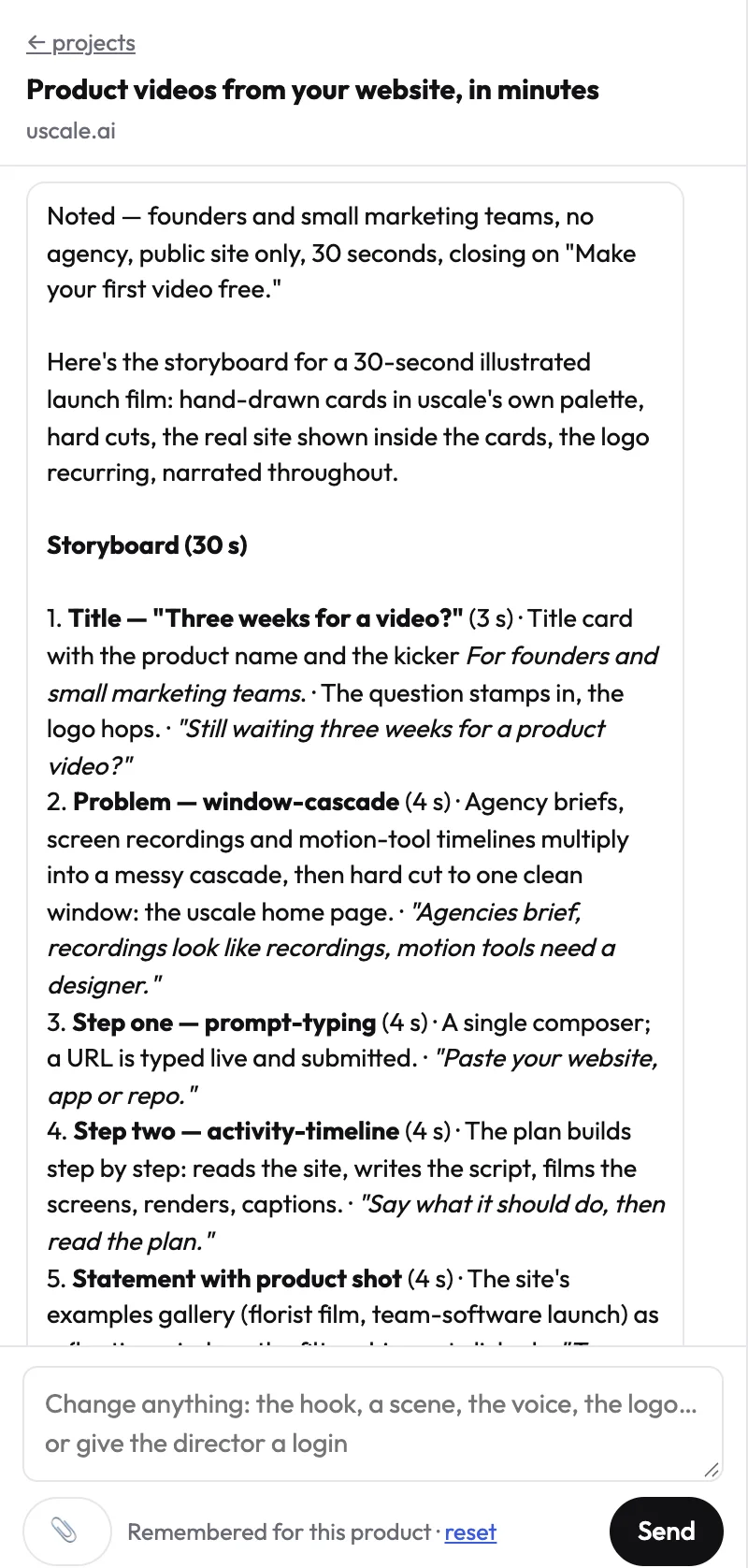
uscale fits the third job: a narrated demo video that nobody records. You paste your site, app or GitHub repo, and the director proposes a storyboard with every narration line for your approval. uscale then films the real product, sharp and never cropped. It adds a natural voice, word-by-word captions and a music bed, in the logo, colours and fonts it reads from your site.
The beats you'd approve
Say you're making a buyer demo for a deploy tool. A four-beat storyboard might read:
| Beat | Screen | Narration line |
|---|---|---|
| 1 | Dashboard | "Every deploy you ran this week, in one place." |
| 2 | One deploy, opened | "Open any deploy to see what changed and who shipped it." |
| 3 | Rollback | "If a release breaks, put the last good version back from here." |
| 4 | Team settings | "Invite your team, and everyone sees the same history." |
Most people plan to fix a demo after it's filmed. Here the words come first, so cutting beat 3 costs a sentence, not a retake. Approve the script while it's cheap to change, because footage is the expensive place to change your mind.
Signed-in screens work too. You sign in once in a browser streamed to you, and SSO and two-factor codes work. Changes go through a free chat with the director, and every render is a new version. When the app changes, film it again, because the tour is saved with the project. The guide to turning a URL into a video shows each stage.
Best for: founders and product marketers who need a buyer-facing demo without recording, editing or re-recording. Not built for: a quick message to a teammate, buyers clicking through, or narration in your own voice, which isn't possible today.
Price, from uscale's pricing page: 10 credits on sign-up, 20 with a work email, no card needed. After that come credit packs, with no subscription and no seats: Starter $49 (50 credits, about 5 walkthrough videos), Growth $129 (150 credits, about 15 videos, $0.86 per credit) and Studio $399 (500 credits, about 50 videos, $0.80 per credit). A walkthrough video is about 10 credits, and a re-render is 2.
uscale gives you a finished, narrated film without a recording session, as the product demo video page shows. When buyers should click rather than watch, the next tool fits better.
Supademo: when you want to start clickable demos free, without a card
Supademo is the lowest-risk way on this list to find out whether buyers want to click through your product. Its own site (August 2026) says it starts free with 5 interactive demos and 50 4K recordings, and the free plan needs no credit card. That is enough to put a few demos in front of real prospects before anyone signs off on a budget.
| Supademo | |
|---|---|
| Free plan | 5 interactive demos, 50 4K recordings |
| Card needed to start | No |
| Entry paid plan | Scale, $38 per creator a month |
| Viewers on Scale | Unlimited free viewer seats |
| Source | Supademo, 2026-08 |
Best for
Supademo suits a small team trying clickable demos before committing. It also suits a team that shares demos with many viewers. Look at how the paid plan is priced. On Scale, you pay for the people who build demos, and viewer seats are free. Say one product marketer builds the demos and a whole sales team sends them out. In that case, budget for the builders, not the audience.
What it isn't built for
Supademo's page describes interactive demos and recordings. It does not describe narrated films for a feed or a launch post. That is a different job. A clickable demo waits for the buyer to act. A feed video has to make its point to someone who is still scrolling.
Supademo or uscale
Pick Supademo over uscale when buyers should explore at their own pace and you want to start free. uscale gives you a narrated video that plays without a click. The cheapest tool for the wrong job is still the wrong tool.
Once one demo turns into dozens across a funnel, you need a tool built for that scale.
Storylane: when interactive demos become a sales and marketing program
Storylane fits once clickable demos stop being one asset and become something a team runs across the funnel. Storylane publishes all its pricing and says you can start on a full free plan and scale without a sales call (Storylane's blog, September 2026). That matters when you are budgeting a program rather than a single demo, because every tier is visible before anyone books a call.
| Storylane plan | Price (Storylane's own page, 2026-09) |
|---|---|
| Free | $0 |
| Starter | $40/mo, billed annually |
| Growth | $500/mo, billed annually |
| Premium | $1,200/mo, billed annually |
| Enterprise | Custom |
A worked example (hypothetical)
Say a B2B SaaS team puts one clickable demo on its pricing page, so visitors can try the core workflow before they talk to anyone. After each sales call, a rep sends that prospect a version built around what they asked about. The same product now reaches two buyers at two moments through two different people. Once more than one person on the team makes and sends demos, you are running a program, and the tool should be chosen for the team, not for the one demo.
What its pricing is built for
Its cited page prices interactive demo programs, not one-off narrated films. The paid tiers are monthly prices billed annually, which suits a standing program. uscale covers the one-off job: a narrated film of the live product, paid for with credit packs that have no subscription and no seats (uscale pricing). Choose Storylane when buyers should explore the product and a whole team will keep the demos running. The side-by-side table below shows why its prices can't be ranked against the others directly.
Loom alternatives compared side by side: Tella, Arcade, uscale, Supademo and Storylane
Read this table by job first and price last. Three columns decide most choices. What you make matters because a recording, a clickable demo and a narrated film do different work. Who records tells you whose time goes into it. Free start shows how you can try the tool before paying. uscale is our product.
| Tool | What you make | Who records the product | Free start | Entry paid price (source, date) | Best for |
|---|---|---|---|---|---|
| Loom | Recording | You | Starter plan: 5-minute recording limit, 25-video storage limit (Atlassian Support, 2026-10-05) | See Loom's pricing page (loom.com/pricing) | Quick messages to teammates |
| Tella | Polished recording | You | 7-day free trial (tella.com, 2026-10-05) | Pro $13 (USD) (Tella's Mac page, 2026-10-05) | Presenting the demo yourself, with editing and hosting |
| Arcade | Interactive demo and AI video | Not stated in the cited docs (lists Record anywhere) | Free plan: 1 published interactive demo, 1 AI video (Arcade docs, 2026-05) | Growth $50 per seat / month, or $510 per seat / year (Arcade docs, 2026-05) | A clickable demo with a short video alongside |
| uscale | Narrated film | uscale films it; nothing recorded on your side | 10 credits on sign-up, 20 with a work email, no card needed | Starter $49, no subscription, no seats (uscale pricing) | A narrated demo video without recording |
| Supademo | Interactive demo | Not stated on the cited page (checked 2026-08) | Free: 5 interactive demos, 50 4K recordings, no card (supademo.com, 2026-08) | Scale $38 per creator / month (Supademo, 2026-08) | Trying clickable demos free, shared with many viewers |
| Storylane | Interactive demo | Not stated on the cited page (checked 2026-09) | Free plan, $0 (storylane.io, 2026-09) | Starter $40 / month, billed annually (Storylane, 2026-09) | Interactive demos across a sales and marketing funnel |
Prices and limits come from each vendor's own page or docs on the dates shown. Loom's limits come from Atlassian Support. Check current figures before you buy.
The price column doesn't line up, so a straight ranking would mislead. Arcade charges per seat and Supademo per creator. Storylane charges per month, billed annually. uscale sells a one-off credit pack. A sales team and a solo founder would sort the same column in opposite orders, so rank by job instead.
Your shortlist by situation
- A solo founder before launch: choose uscale if you don't want to record. Choose Tella if you want to present the demo yourself.
- A product marketer whose buyers should click through: start Supademo or Arcade on the free plan. Pick Arcade if you also want a short AI video on the same plan.
- Software teams running demos across a sales funnel: choose Storylane.
- A developer-relations team with a repo: choose uscale. For developer tools, it can plan a film from a GitHub repository, even before there's a live site.
- Quick updates to teammates: stay with Loom.
Rule of thumb: if you want to be on camera, pick a recorder. If buyers should drive, pick a clickable demo. If nobody should record, pick a narrated film.
Before picking anything from that table, though, ask whether you need to switch at all.
Which Loom alternative to choose, and when not to choose uscale
The strongest case against this whole list is that you may not need an alternative at all. If most of your videos are quick messages to a teammate, such as a bug walkthrough, a reply to a question or a status update, Loom already does that job well. You record from the Chrome extension, send a link, and the free Starter plan covers short clips. Switching tools for a job you don't have is wasted effort.
That is fair, and for internal messages it holds. The answer is that a demo for buyers is a second job, not a replacement for the first. Keep Loom for the quick messages. Add one more tool only when the buyer-facing demo becomes its own task, and choose it by that job. If you want to present the demo yourself, in your own voice, or want buyers to click through, the comparison above already gives you the shortlist.
When not to choose uscale
- You need the narration in your own voice. Films use uscale's voices, and its presenter films put your photo on screen with a stock voice.
- Buyers need to click through the product. A film plays from start to end and doesn't let them explore.
- You need captions off. They're burned into every film today.
- Your site is in Chinese, Japanese, Korean or Arabic. These languages aren't supported yet, so you'd get an English film.
- You mainly need to edit footage you've already shot. uscale films your product for you.
If none of those apply, and the job is a narrated product demo video that nobody on your team wants to record, that is the case uscale is built for. Loom stays where it already works.
Try it: make a product demo video: a narrated film of your live product, with every line approved before filming.
Pick by the job, then try it
The tool matters less than the job you hand it. Three things you can do today:
- Write down the job in one line. Is the demo you talking a buyer through it, the buyer clicking through it, or a narrated film nobody has to record?
- Start the matching tool on its free plan or trial. Make one real demo of your own product, not a test clip.
- If the job is a narrated film, make a product demo video with uscale. Paste your site's address, approve the narration lines, and get back a finished film with voice, captions and music. Your first video is free.
Want to judge the result first? Watch finished films.
A buyer-facing demo doesn't need a recording day. It needs a clear job and the product doing what it does.
Make your loom alternatives from your website — it’s free →
Questions
What are Loom alternatives?
Loom alternatives are tools used in place of Loom, the screen recorder for quick video messages such as bug walkthroughs, status updates and replies to teammates. For product demos aimed at buyers, they fall into three kinds: polished recorders such as Tella when you present the demo yourself, clickable demos such as Arcade, Supademo and Storylane when buyers should drive, and narrated films such as uscale when nobody wants to record.
What's a free alternative to Loom for product demos?
A free alternative to Loom for product demos depends on the demo. Supademo's free plan includes 5 interactive demos and 50 4K recordings with no credit card. Arcade's Free plan costs $0 a month and includes one published interactive demo and one AI video. Storylane has a free plan at $0. Tella's own page lists a 7-day free trial. uscale's pricing page lists 10 credits on sign-up, 20 with a work email, with no card needed.
Can I switch from Loom without re-recording everything?
Switching from Loom for buyer demos doesn't have to mean re-recording everything. Keep Loom for quick messages. If you drop to Loom's free Starter plan after a Business + AI trial, Atlassian says you keep access to all your videos, but you can't create new recordings until you upgrade or delete videos to get under the 25-video limit, and you lose trim and stitch. uscale films your live product, so nobody records the new demos.
What does uscale cost?
According to uscale's pricing page, uscale sells credit packs with no subscription and no seats. Your first video is free: 10 credits on sign-up, 20 with a work email, no card needed. Starter is $49 for 50 credits, about 5 walkthrough videos; Growth is $129 for 150 credits, about 15 videos; Studio is $399 for 500 credits, about 50 videos. A walkthrough video is about 10 credits, and a re-render is 2 credits.
Is a screen recording or an interactive demo better for a product demo?
A screen recording or an interactive demo each suits a different buyer. When buyers already know what they want to check, such as whether a feature fits their team, an interactive demo lets them click through at their own pace. When they don't yet know what the product is, a recording or narrated film tells them in order. If you want both, Arcade's Free plan includes one published interactive demo and one AI video.

The team behind uscale, which turns a website, web app or GitHub repo into a narrated product video.