Interactive demo or demo video: the wrong either-or
Interactive demos now sit on 18% of about 5,000 B2B SaaS websites, up 40% in a year. That is Navattic's own count, and Navattic sells interactive demo software, so this is a vendor measuring its own market. We have a stake too: uscale is our product; it makes narrated demo videos, not clickable tours.
Now a number that pulls the other way. In Wyzowl's 2026 data, 63% of people say they would rather watch a short video to learn about a product or service.
So more SaaS sites are adding clickable tours, while most people say they would rather be shown. Either one of these numbers misleads, or the tour and the video were never competing for the same job. If it's the second, the choice in front of a founder or product marketer this quarter is not which format wins. It is which one to make first. Answering that means looking at what each one does well, starting with the tour.
What interactive demo software does well
A clickable tour hands the buyer the controls. They move through a capture of your real product at their own pace, open the screen they care about and skip the rest. That is the job interactive demo software is built for.
The clearest numbers come from Navattic's State of the Interactive Product Demo 2026, which looks at more than 40,000 demos built on Navattic in the past year. Read it as Navattic's benchmark of the best demos on its own platform, not an industry average. In the top 1%, 56% of viewers got past step 1, the completion rate was 48%, and viewers spent 2.2 minutes on average. Navattic also found that 86% of top-performing demos use HTML/CSS captures rather than screenshots, and 52% edit those captures.
The lesson you can reuse is simple. A tour works when it behaves like the product. A buyer who clicks a button expects something to happen. A capture keeps that promise, and a stack of screenshots doesn't.
Which tour tool fits your team
| Tool (pricing checked) | Free plan | Paid plans | Best for |
|---|---|---|---|
| Arcade (2026-10-15) | $0, with 200 AI credits a month, plus 1 published demo and 1 published video with a watermark and no time limit (Arcade's pricing guide, 2026-06-12) | $50 per seat per month, or $42.50 on annual billing | A founder testing one tour |
| Storylane (July 2026) | Free | Starter at $40 per seat per month. HTML demos from Growth at $500 a month with 5 seats. Salesforce and SSO on Premium at $1,200 a month. Custom Enterprise | Sales teams that need HTML demos, seats and a Salesforce link |
| Navattic (April 2026) | Starter: 1 seat, 1 HTML or media demo, unlimited views, basic analytics | Base at $500 a month, Growth at $1,000 a month | A founder testing one tour, or a sales team |
| Supademo (September 2026) | Not stated in our sources | Scale at $38 per creator per month on annual billing. Growth at $350 a month for five creators adds guided HTML demos and sandbox demos | Teams where a sandbox demo matters |
Arcade also makes short videos. Its interactive demos use no AI credits, while AI-generated videos cost 50 credits per 30 seconds.
For any job where the buyer must click, these tools are the right choice over uscale, which makes narrated videos that play in order. If you searched for Storylane or Arcade alternatives, the best alternatives to each tool are the others in this table. A tour can't reach the viewer who won't click, and that viewer needs a different format.
What a demo video does well
A video plays in order with a voice, so it works where nobody will click: the top of a landing page, a launch post, a GitHub README, a sales email or a social feed. The viewer only has to watch.
People say they prefer it. In Wyzowl's 2026 data, 63% of people would rather watch a short video to learn about a product, and 12% would rather read an article. Wistia's platform data shows where video earns its place:
- Homepage videos get a 24% play rate.
- Marketing videos under one minute average a 52% engagement rate.
- Almost 20% of viewers who see a lead-gen form inside a video fill it out.
Plan the format too. In a separate finding, Wistia reports that vertical HD uploads rose 24% year over year. That figure is about uploads, not plays. It suggests cutting a tall version for feeds alongside the wide one.
The rule to reuse: a tour asks the buyer for effort, and a video asks only for attention. Where attention is all you get, the video is the better ask.
How teams make one
Wyzowl found that 39% of video marketers made product demo videos, and 63% have used AI video tools to create or edit marketing videos. Most teams take one of three routes:
- a screen recorder plus an editor (see Loom alternatives for product demos)
- an agency
- an AI tool
uscale is an AI tool of the narrower kind. It makes the video, not a tour.
- You start from your website, web app or GitHub repo.
- It films your real product with no screen recording on your side, or it illustrates it.
- For screens behind a sign-in, you sign in once in a streamed browser.
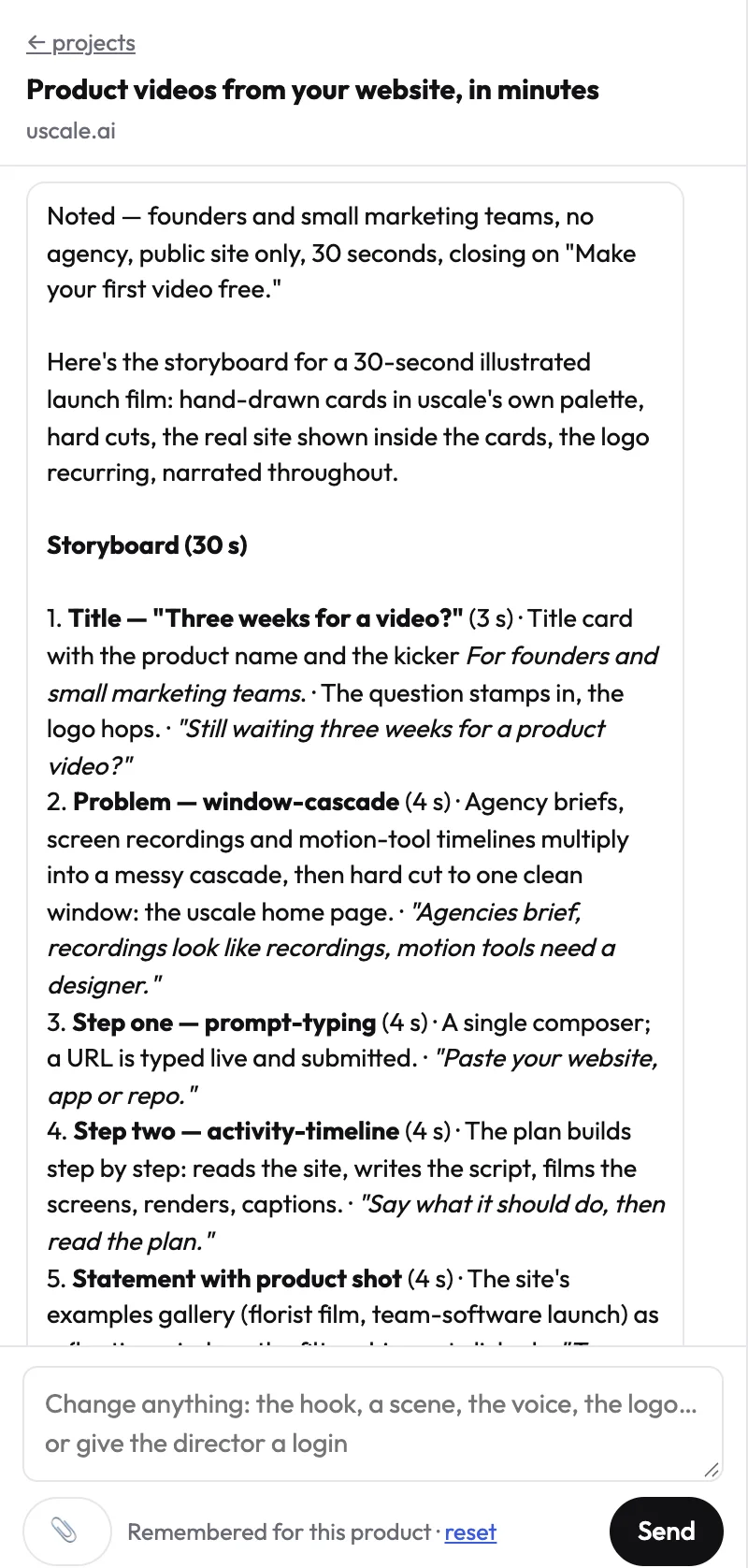
- You approve a storyboard with every narration line, then ask for changes in a chat with the director.
- Voice, captions and music are included.
- You buy credits with no subscription.
More films are on our examples page.
The limits
- The viewer can't explore, because the video plays in order.
- Voices are uscale's, not your own.
- Captions are always burned in.
- Chinese, Japanese, Korean and Arabic aren't supported yet.
If any of these is a dealbreaker, the tour tools above fit better. If not, the side-by-side table below shows where each format belongs.
Interactive demo software vs a demo video, side by side
uscale is our product, and it fills one column below. The rows are the questions that decide the format: what the viewer does, where it will be seen, what you begin with, whether it speaks, what a sales team can add and what it costs to start. Price sits last on purpose.
| Clickable tour (interactive demo software) | Narrated demo video (made with uscale) | |
|---|---|---|
| What the viewer does | Explores at their own pace | Watches it play in order |
| Where it works best | Product page tour, sales follow-up | Landing page, launch post, README, sales email, feeds |
| What you start from | A capture of your product | Your website, web app or GitHub repo |
| Sound | Not stated on their pages | Voice, captions and music included |
| Extras for sales teams | Salesforce and SSO on Storylane Premium ($1,200 a month); sandbox demos on Supademo Growth | Not stated on our pricing page |
| Cost to start | Free plans at Arcade, Storylane and Navattic; team plans such as Supademo Growth at $350 a month, Storylane Growth or Navattic Base at $500 a month | Free plan with 10 credits (20 with a work email); Lite $29 for 25 credits, Starter $49 for 50, Growth $129 for 150; Starter's 50 credits make about 5 product walkthroughs; no subscription, no seats |
Prices and features from each tool's own page, checked on the dates shown (Arcade 2026-10-15, Storylane July 2026, Navattic April 2026, Supademo September 2026; Walnut as reported by Storylane; uscale from our pricing page).
Read the first row before any other. If your buyer needs to click through the product, a tour is the right format whatever the cost row says. If they will give it a few seconds in a feed or an inbox, a video is. Tour platforms and video platforms report engagement in different ways, so their figures can't settle this for you.
By situation
- A solo founder before launch: a video for the launch post and landing page, plus Arcade's or Navattic's free plan if early users ask to click around.
- A developer-relations team with a repo: a video made from the GitHub repo for the README, where readers skim.
- A sales team running evaluations: a tour tool with seats and CRM links, and a short video for the first email.
Rule of thumb: let the first row pick the format, and let the cost row pick the tool. That rule settles one decision at a time. So how do you apply it across every page where your product is shown?
Interactive demo or demo video: which to use when
Give every place your product is shown a format.
List every place a buyer meets your product: product page, homepage, launch post, README, sales emails, onboarding. This is your quick win. You can finish it within the hour, and it's done when there is one line per place.
Mark each line "tour" or "video". Write "tour" where a buyer is evaluating and wants to click: the "take the tour" button, or a champion sharing your product after a sales call. Write "video" where attention is short or clicking isn't possible: above the fold on a landing page, a launch post, a sales email, an onboarding video, or a README made from the GitHub repo (videos for developer tools).
Flag the lines that need both. Take a hypothetical small SaaS. It puts a short narrated video on its homepage and a "take the tour" link under it. The video tells everyone what the product does, and the tour lets serious buyers check for themselves.
Script the homepage video first
Write the narration in a doc and fill in the brackets:
- Hook: "[The job] shouldn't take [the painful part]."
- Problem: "Today, [who] [does it the slow way], and [what goes wrong]."
- Screen one, where the work starts: "In [product], you [first action] here."
- Screen two, the result: "Then [product] [does the dreaded step], and you [see the result]."
- Call to action: "[Outcome in the buyer's words]. [Start free] at [your site]."
Keep every line to one sentence.
When uscale is the wrong pick
Choose a tour tool if buyers need to explore hands-on, or if you need sandbox demos or CRM-linked tracking. Supademo and Storylane offer these on their team plans. uscale is also the wrong pick if you need your own voice, or a film in a script other than Latin or Cyrillic.
Film it this week
The free route is to read your script over a screen recording you make yourself. With uscale, you make a product demo video by pasting your site or repo. You approve the storyboard, where you can paste your own lines, and ask for changes in the chat. uscale says this takes minutes. See how a URL becomes a video and films for software products.
If you do only one thing, film your busiest "video" line. Success looks like a video on the launch page, a README with a demo, one link sales can send, and a tour behind the button for buyers who want to click.
Try it: make a product demo video from your site or repo, and approve every narration line before anything is filmed.
The rule of thumb
The two numbers from the top only look like a contest. Navattic counted an interactive demo on 18% of about 5,000 B2B SaaS websites, up 40% in a year. Wyzowl found 63% of people would rather watch a short video to learn about a product. Both hold because each format answers a different question, not because one is winning. A tour answers "does it work for me?" A video answers "what is this, and why should I care?"
For the glance, turn your site or repo into a product demo video. The first one is free.
If buyers need to click, make a tour; if they need to get it at a glance, make a video.
Make your interactive demo software from your website — it’s free →
Questions
What is interactive demo software?
Interactive demo software is a tool for building clickable tours of a software product, from captures or screenshots of the real interface, so a buyer can move through it at their own pace and open the screens they care about. Navattic, which sells such software, reports that 18% of about 5,000 B2B SaaS websites now have an interactive demo, up 40% in a year. Arcade, Storylane, Navattic and Supademo are examples.
Which is better for a SaaS demo, an interactive demo or a demo video?
Neither an interactive demo nor a demo video is better for every SaaS demo; it depends on what the viewer will do. Choose an interactive demo when buyers are evaluating and want to click through the product. Choose a narrated demo video where attention is short or clicking isn't possible: a landing page, launch post, README, sales email or feed. Wyzowl's 2026 data shows 63% of people would rather watch a short video to learn about a product.
Can I use an interactive demo and a demo video together?
Yes, an interactive demo and a demo video can work together, because they do different jobs. One way to combine them puts a short narrated video on the homepage with a "take the tour" link under it. The video tells every visitor what the product does, and the tour lets serious buyers check for themselves. A sales team might send a short video in the first email and share a tour after the call.
How much does interactive demo software cost compared with a demo video?
Interactive demo software ranges from free plans to team plans. As listed on their own pages, Storylane (July 2026) and Navattic (April 2026) offer free plans; Supademo Growth costs $350 a month (September 2026), Storylane Growth $500 a month (July 2026) and Navattic Base $500 a month (April 2026). uscale's pricing page lists a free first video, then credit packs with no subscription: Lite $29 for 25 credits, Starter $49 for 50, Growth $129 for 150.
Can I make a demo video of screens behind a sign-in?
Yes, a demo video can show screens behind a sign-in. With uscale, you sign in yourself, once, in a browser streamed into the page, so SSO, two-factor codes and captchas work, and your password isn't shared with uscale. The streamed browser can't reach passkeys or Touch ID on your device, so use a password or a phone code instead. The film shows whatever the signed-in account shows, so a demo account with sample data is safer.

The team behind uscale, which turns a website, web app or GitHub repo into a narrated product video.