The assumption behind every search for VEED alternatives
Most lists of VEED alternatives rest on one quiet assumption: if you are leaving one video editor, you need another video editor. For most people typing that search, the assumption holds. They already have footage, they know their way around a timeline, and something about their current setup no longer fits, whether that's the plan, the exports or the way captions behave.
Some readers, though, don't need a different editor. They need the thing they were about to edit: a finished, narrated video of their own product. The film above shows launch cards for AlpacaRelay, one of the published example films, made from its website. Nobody opened a timeline, trimmed a clip or dragged a caption into place. That's an odd thing to find on a page about video editors.
If you edit, which editor should you switch to? And when does it make more sense not to edit at all? Both answers start with VEED itself.
Why people look for a VEED alternative (and what VEED does well)
Start with what you'd be giving up. Everything below comes from VEED's own pages, checked on 13 October 2026.
| What VEED offers | What its own pages say |
|---|---|
| Text-based editing | You edit a video by editing its transcript |
| Auto Edits | Adds subtitles, cleans up audio and inserts B-roll, with no software download |
| Captions | Styled to your brand or animated; VEED says they're 99.9% accurate |
| Languages | Transcribes and translates into more than 125 languages |
| Templates | Hundreds of free, editable templates, from marketing clips to training videos |
| Recording | A browser screen and webcam recorder for Mac, Windows or Linux |
| Free plan | Exports carry a watermark; removing it needs a paid plan |
That's a capable editor for footage you already have. If your week is captioning clips and turning one recording into several social posts, VEED does that job well. The accuracy figure is VEED's claim, not one we tested.
VEED's paid plans are priced per user. On its pricing page (13 October 2026), billed annually:
| Plan | Per user, billed annually | What the page lists |
|---|---|---|
| Creator | $12 a month | No watermark, unlimited auto subtitles |
| Pro | $22 a month | Everything in Creator, multiple brand kits, translation into 50+ languages |
| Studio | $39 a month | Everything in Pro, custom templates |
| Enterprise | Custom pricing | Team management, review mode, privacy controls |
VEED's editor page speaks of more than 125 languages; its pricing page lists translation into 50+ languages on the Pro plan.
People leave for two reasons, and neither is that VEED does its job badly.
The first is the watermark. Free exports carry one, so publishing clean video means a paid plan, from $12 per user a month. If you want watermark-free exports without paying, another browser editor may suit you better.
The second is the job. VEED pitches itself to marketers who need high-quality, on-brand social videos at scale. That's a real job. A finished product video of your own website is a different one. You don't have footage to cut. You have a landing page, a launch date and a product whose screens keep changing. Each change means another round of recording and cutting. The question there isn't which timeline to use. It's whether you need one.
uscale is our product. We've put it where we think it fits, and said where others fit better.
Clipchamp: when you want a free browser editor without a watermark
Clipchamp is the closest swap if a clean free export is what you miss on VEED. Microsoft's own Clipchamp pricing page (checked 2026-10-13) says the free plan includes:
- AI video and audio editing tools
- a screen, camera and voice recorder
- animated text
- watermark-free exports
That last item settles most comparisons at this price. A free plan is only free if you'd post what it exports.
Its premium features, including 4K UHD exports, premium stock assets and a brand kit, come with Microsoft 365 Personal and Family subscriptions. If you already pay for one of those plans, look there first.
| What you need | What Clipchamp's page lists | Which plan |
|---|---|---|
| Edit and trim your own clips | AI video and audio editing tools | Free |
| Record a quick walkthrough or voiceover | Screen, camera and voice recorder | Free |
| Titles on screen | Animated text | Free |
| Post without a watermark | Watermark-free exports | Free |
| Sharper exports | 4K UHD exports | Microsoft 365 Personal or Family |
| More stock to cut with | Premium stock assets | Microsoft 365 Personal or Family |
| Your logo and colours on hand | Brand kit | Microsoft 365 Personal or Family |
Who it fits
Use Clipchamp when you have the footage, or can record it, and want to shape the cut yourself: trim clips you shot, cut social versions or record something quick. For that job it is a better pick than uscale, which isn't a general editor for footage you already have.
Clipchamp vs uscale: Clipchamp edits any footage you have and exports it free without a watermark. uscale makes the narrated product video from your website with no edit to do.
CapCut: when you cut social video from templates
CapCut is the pick when most of what you publish is short social video and you'd rather start from a template than an empty timeline. Its online video editor page (checked 2026-10-13) describes a free browser editor with templates, auto captions, text to speech and an audio library. You drag clips onto a timeline to trim, crop and split them, and export at 720p, 1080p, 2K or 4K.
| Plan | Listed price | What the page lists |
|---|---|---|
| Free | $0 | Free templates, basic editing tools |
| Pro | $19.99 a month | 1,200 AI credits a month, all premium templates, 1 TB of storage |
| Ultra | $79 a month | 8,645 AI credits a month |
Source: CapCut's pricing page, 2026-10-13. CapCut says displayed prices are for reference and the final price shows after you sign in.
Who it fits
CapCut fits creators and marketers cutting clips for TikTok, Reels and YouTube from footage they have. If that's your week, choose it over uscale.
CapCut vs uscale: CapCut gives you templates and a timeline for footage you bring. uscale makes the product video from your website, so there is no footage to bring.
Canva: when video sits next to the rest of your brand design
Canva is the pick when the people making your videos already make your slides, social graphics and one-pagers in Canva. Its video editor page (checked 2026-10-13) describes a free online editor with no watermarks: a multi-layered timeline to trim, split and layer clips, captions generated in one click, and free stock footage.
| Plan | Price | What the page lists |
|---|---|---|
| Free | $0 | Drag-and-drop editor, 1 brand kit with 3 colours, 5 GB of storage |
| Pro | $144 a year for one person | AI tools such as resize, translate and remove background, 5 brand kits, 100 GB of storage |
| Business | $250 a year per person | 100 brand kits with approvals, 500 GB of storage |
Source: Canva's pricing page, 2026-10-13.
Who it fits
Canva fits a marketing team that wants video in the same place, and the same brand kit, as everything else it designs. For editing your own clips into on-brand posts, choose it over uscale.
Canva vs uscale: Canva is a design tool with a video editor inside it. uscale reads your site's logo, colours and fonts itself and returns the finished product video.
Kapwing: when a team edits on shared, per-member plans
Kapwing is the pick when several people edit the same videos and you want a price you can plan seat by seat. Its pricing page (checked 2026-10-13) sells its paid plans per member, so your bill follows how many people edit, not how many videos you make.
| Plan | Per member, billed annually | Per member, billed monthly | Included |
|---|---|---|---|
| Free | n/a | n/a | Exports with a watermark, videos up to 4 minutes at 720p, 5 GB of cloud storage |
| Pro | $16 a month ($192 a year) | $24 a month | 1,000 credits a month |
| Business | $50 a month ($600 a year) | $64 a month | 4,000 credits a month |
Source: Kapwing's pricing page, 2026-10-13.
Who it fits
Kapwing fits teams that edit and repurpose footage together. One marketer cuts the clips, a teammate trims the draft, and someone else exports the final version. For that job, choose Kapwing over uscale. You bring the footage, and the team shapes it in one place.
How to read the price
Price Kapwing by the seats that edit, not by the team that watches: a seat bought for someone who reviews a draft once a quarter is an easy cost to miss. Annual billing lowers the per-member rate, but it commits you for the year.
What the free plan tells you
The free plan exports with a watermark and stops at 4 minutes and 720p. Use it to test the editor on a short clip before you buy seats. Don't treat it as a plan for publishing.
Kapwing vs uscale: Kapwing gives a team a shared editor for footage it already has. uscale makes a product video from your website with no editing, and it sells one-off credit packs with no subscription and no seats.
Descript: when you rework recordings by editing the words
Descript is the pick when your raw material is a recording you keep reworking: a demo call, a webinar or a talking-head take that needs a new intro for one audience and a shorter cut for another. Judge an editor like that by the fifth cut, not the first.
Descript's video editing page (checked 2026-10-09) says you edit by deleting words in a transcript, with a timeline for fine control. Its AI co-editor, Underlord, can tighten cuts, remove silences and filler words, improve audio and add captions.
| Plan | Per person, billed annually | Per person, billed monthly | Included |
|---|---|---|---|
| Free | $0 | $0 | Text-based editing and a try of the AI tools |
| Hobbyist | $16 a month | $24 a month | 10 media hours a month, 1080p exports with no watermark |
| Creator | $24 a month | $35 a month | 30 media hours a month, 4K exports with no watermark |
| Business | $50 a month | $65 a month | 40 media hours a month |
Source: Descript's pricing page, 2026-10-13.
VEED edits by transcript too, so if that is the feature you'd miss, Descript is the closest match. Our Descript comparison goes through it in detail.
uscale: when you want the finished product video, not an edit
uscale isn't another editor. Paste your website, web app or GitHub repo and you get back a finished, narrated product video. First comes a storyboard with every narration line, which you approve before anything is filmed. That order is the reason to look at it: the cheapest place to fix a video is the script, before a single frame exists.
What you approve first
As an illustration, a launch storyboard for an invoicing app might read:
| Beat | Narration line |
|---|---|
| The problem | "Month-end shouldn't mean copying numbers between spreadsheets." |
| The dashboard | "Every open invoice sits on one screen, sorted by who owes what." |
| The export | "When the books close, send everything to your accountant in a single export." |
| The close | "Try it on your own invoices this week." |
If a line sounds wrong, you fix it there, in words.
Then uscale films the real product, including screens behind a sign-in. You sign in yourself, once, in a browser streamed into the page. Or it illustrates the product instead. You get a voice, captions that follow every word, and music, in your site's logo, colours and fonts with no brand kit to upload. It works in 21 languages.
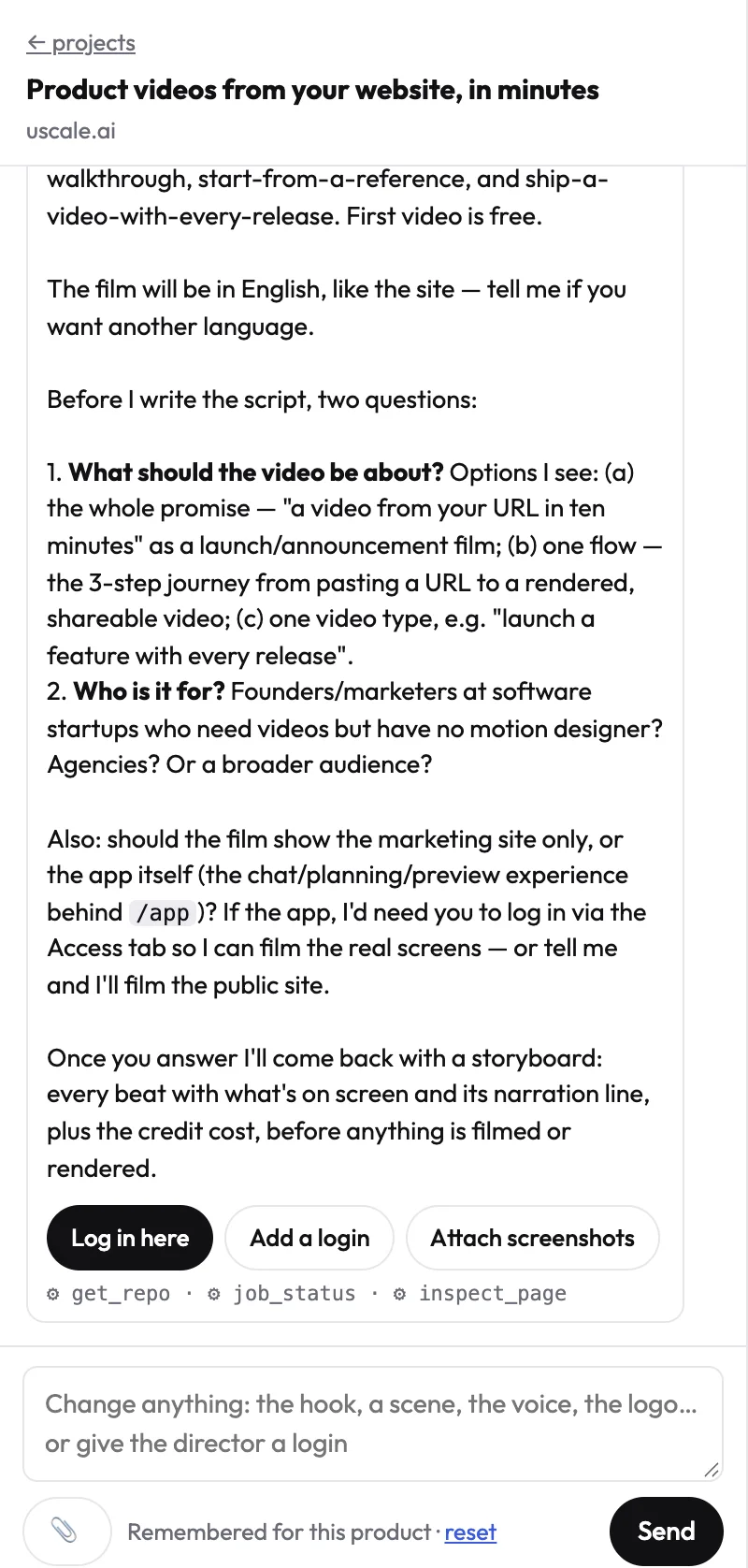
Changes go through a free chat with the director, not a timeline. Name the moment, such as "start on the dashboard and end on the export," and that moment changes.
Who it's for
It suits founders and product marketers who need a demo, launch or explainer video of a software product. See the AI product video generator, the example films and how it fits software products. It isn't a general editor for social clips or footage you already shot. You can't use your own voice today, and captions are always burned in.
What it costs
uscale's pricing page starts with a free plan: 10 credits on sign-up, 20 with a work email, no card needed. Then come credit packs with no subscription and no seats: Lite at $29 for 25 credits (about 2 product walkthroughs), Starter at $49 for 50 credits, and Growth at $129 for 150 credits. A product walkthrough is about 10 credits, and the director names each price before it starts. The full list is on the pricing page.
VEED vs uscale: VEED edits and captions any footage you bring, and says it translates into more than 125 languages. uscale delivers the finished product video from your site without an edit.
Try it: make a product video from your website: approve every narration line, then get a narrated, captioned film.
VEED alternatives compared side by side
uscale is our product. Four things decide which tool fits: what you hand it, the job its own pages point it at, whether you can try it free without a watermark, and where paid plans start. Prices are from each tool's pricing page, checked 2026-10-13.
| Tool | What you hand it | Best for | Free option | Paid plans start at |
|---|---|---|---|---|
| VEED | Footage, a screen recording, or a script | Editing by transcript; captions and translation | Free plan; exports carry a watermark | $12 per user a month, billed annually |
| Clipchamp | Your footage, or a recording made in it | Editing your own clips | Free plan; no watermark | Premium comes with Microsoft 365 Personal and Family |
| CapCut | Footage and a template | Short social video | Free plan; templates and basic tools | $19.99 a month |
| Canva | Footage and your brand kit | Video alongside the rest of your design work | Free plan; no watermark | $144 a year for one person |
| Kapwing | Footage a team shares | Teams editing together | Free plan; watermark, up to 4 minutes at 720p | $16 per member a month, billed annually |
| Descript | A recording to rework | Editing a recording by its transcript | Free plan | $16 per person a month, billed annually |
| uscale | A website, web app or GitHub repo address | A finished, narrated product video | 10 credits free, 20 with a work email, no card | $29 once for 25 credits, about 2 product walkthroughs |
Sources: each tool's own pages, checked 2026-10-13.
The editors bill per person, by the month or the year. uscale sells packs you buy once. No single number compares the two, so start from your own volume. For an editor, multiply the people who will edit by the per-person price and by the months you'll need it. For uscale, multiply the videos you expect by their credit cost (a product walkthrough is about 10 credits). Then pick the smallest pack that covers the total.
Your shortlist
- A solo founder before launch who needs a demo of the site: uscale.
- A product marketer cutting social clips from your own recordings: Clipchamp for free exports with no watermark, or CapCut if you work from templates. Stay on VEED if you rely on its translation.
- A marketing team that already designs in Canva: Canva, so video shares the brand kit.
- An agency or content team editing client footage together: Kapwing, priced per seat.
- Anyone reworking the same long recording again and again: Descript, which edits by the transcript as VEED does.
- A developer-relations team with a repo: uscale, which can start from GitHub before there's a live site.
Rule of thumb: if you already have the footage, pick an editor. If all you have is a web address, start with uscale.
Should you just stay on VEED? A decision guide
The strongest case for not switching is that much of what people look for elsewhere is already inside VEED. Its Demo Creator records your screen, window or tab while you read from a built-in teleprompter. It adds auto-subtitles and text overlays, and offers voice cloning and custom avatars if you'd rather not record yourself. Its screen recorder includes eye-contact correction. For teams publishing in several markets, VEED offers a Subtitles API, a Subtitle Translator and a Video Translator. All of this is on VEED's own pages as of 13 October 2026.
If those are the features you use every week, staying may be the right call. Moving would mean rebuilding a workflow that already works.
Check what you'd lose before you switch
List the VEED features you used in the last month. Then check each one against the candidate's own pages:
- Transcript editing. VEED lets you edit a video by editing its transcript. If that is how you cut, the new editor needs it too.
- Translation. VEED says it translates into more than 125 languages. uscale makes films in 21. Check every candidate against the languages you actually publish in.
- Demo Creator. If you record yourself with the teleprompter, any editor still needs that recording. uscale films the product from its address, so there's nothing to record.
If a feature you rely on every week has no match, stay.
When not to choose uscale
Skip uscale if any of these apply:
- You're editing footage you already shot, or cutting social clips from your own recordings.
- You want your own voice in the film. That isn't possible today.
- You need captions off. They're burned into every film.
- You need Chinese, Japanese, Korean or Arabic narration. That isn't offered yet.
- Your buyers should click through the product themselves. An interactive demo is the better tool.
- You need a live-action shoot with people and a set.
If none of those apply, and what you were going to make in VEED was a product video of your own site, you don't need a different editor. You need a finished product video of your website, and that is the one job here that doesn't need a timeline.
Which VEED alternative to try first
You don't need to test every tool on this page. Pick the move that matches the job in front of you this week.
- Editing your own clips for free: open Clipchamp and export a short cut. Its free plan exports without a watermark.
- Editing as a team: price Kapwing per member for the people who will actually sit in the editor. Then check that figure against how many videos you make each month.
- Reworking one long recording: run it through Descript's free plan and see whether cutting by the transcript suits you.
- A product video of your website: paste its address into the AI product video generator and approve the storyboard. Your first video is free, with no card needed. After that, credit packs are bought once, with no subscription.
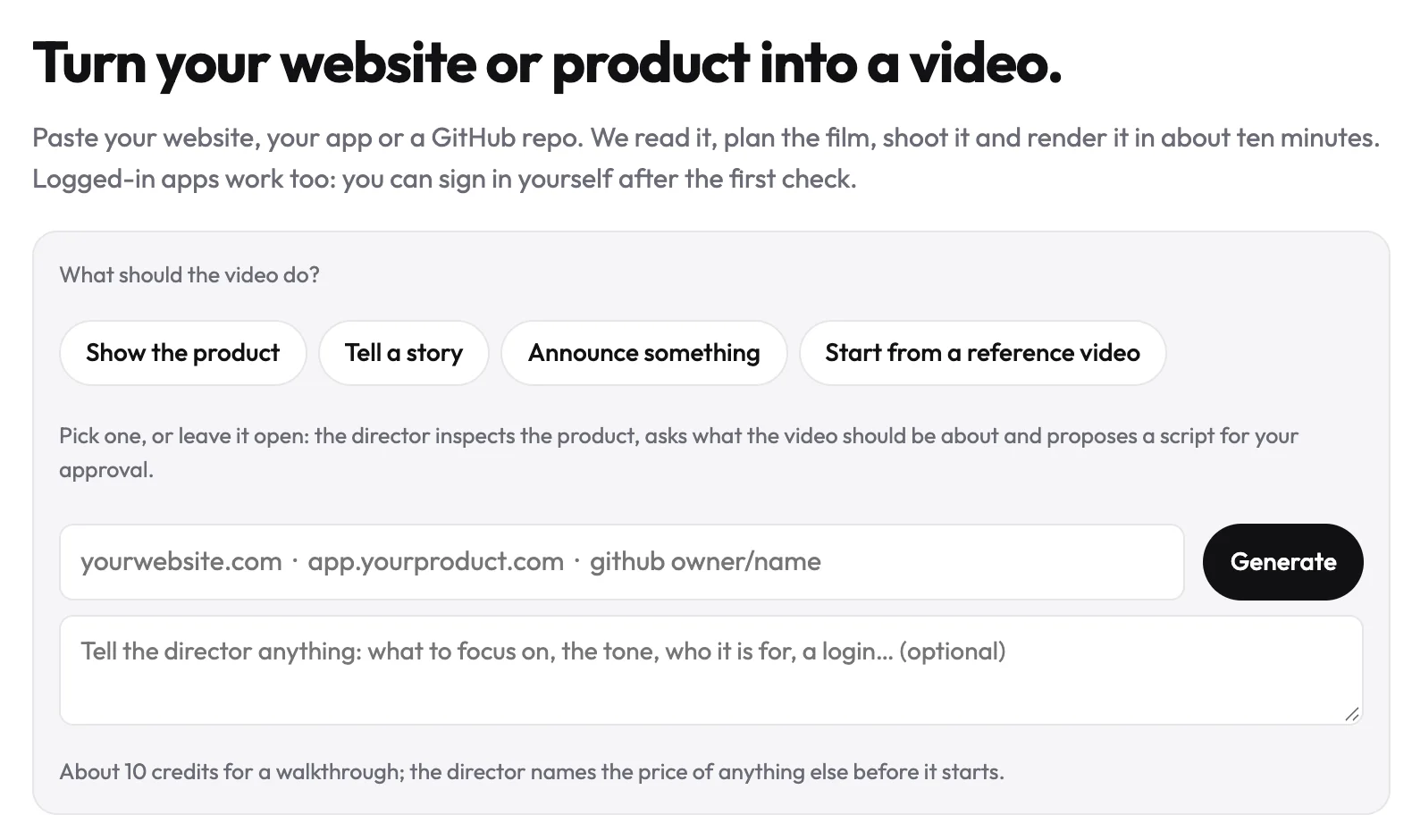
An editor is the right tool when you have footage. When what you have is a website, the video can start there.
Make your veed alternatives from your website — it’s free →
Questions
What are VEED alternatives?
VEED alternatives are the tools people switch to instead of VEED, an online video editor that edits and captions footage in the browser. For footage you already have, they are other editors: Clipchamp and Canva for free exports with no watermark, CapCut for template-led social video, Kapwing for teams and Descript for editing by transcript. For a product video of your website, uscale makes the finished film without any editing.
What's a free alternative to VEED for product videos?
The right free alternative to VEED depends on what you start from. If you have footage or can record it, Clipchamp's free plan includes editing tools, a screen, camera and voice recorder and watermark-free exports, and Canva's free video editor also exports with no watermark. If you want a finished, narrated product video of your website without editing, uscale's pricing page lists a free plan with 10 credits on sign-up, 20 with a work email, with no card needed.
Can I make a product video without editing it myself?
Yes. uscale makes a finished, narrated product video from your website, web app or GitHub repository, with no timeline to edit. You first approve a storyboard with every narration line, then uscale films the real product, including screens behind a sign-in, and adds a voice, captions and music in your site's logo, colours and fonts. Changes go through a free chat with the director rather than a timeline.
Can I switch from VEED without re-recording everything?
Switching from VEED without re-recording depends on what you switch to. Footage you exported from VEED can be edited in another editor such as Clipchamp, Canva, CapCut, Kapwing or Descript, so you keep your existing recordings; check that the new editor has the features you rely on, such as transcript editing or translation. For a product video of your website, uscale films the product from its address, so there is nothing to record.
What does uscale cost?
uscale starts free: your first video is free, with 10 credits on sign-up, 20 with a work email, and no card needed. After that, uscale's pricing page lists credit packs you buy once, with no subscription and no seats: Lite at $29 for 25 credits, Starter at $49 for 50 credits and Growth at $129 for 150 credits. A product walkthrough costs about 10 credits.

The team behind uscale, which turns a website, web app or GitHub repo into a narrated product video.