How long can an AI-generated video be, really?
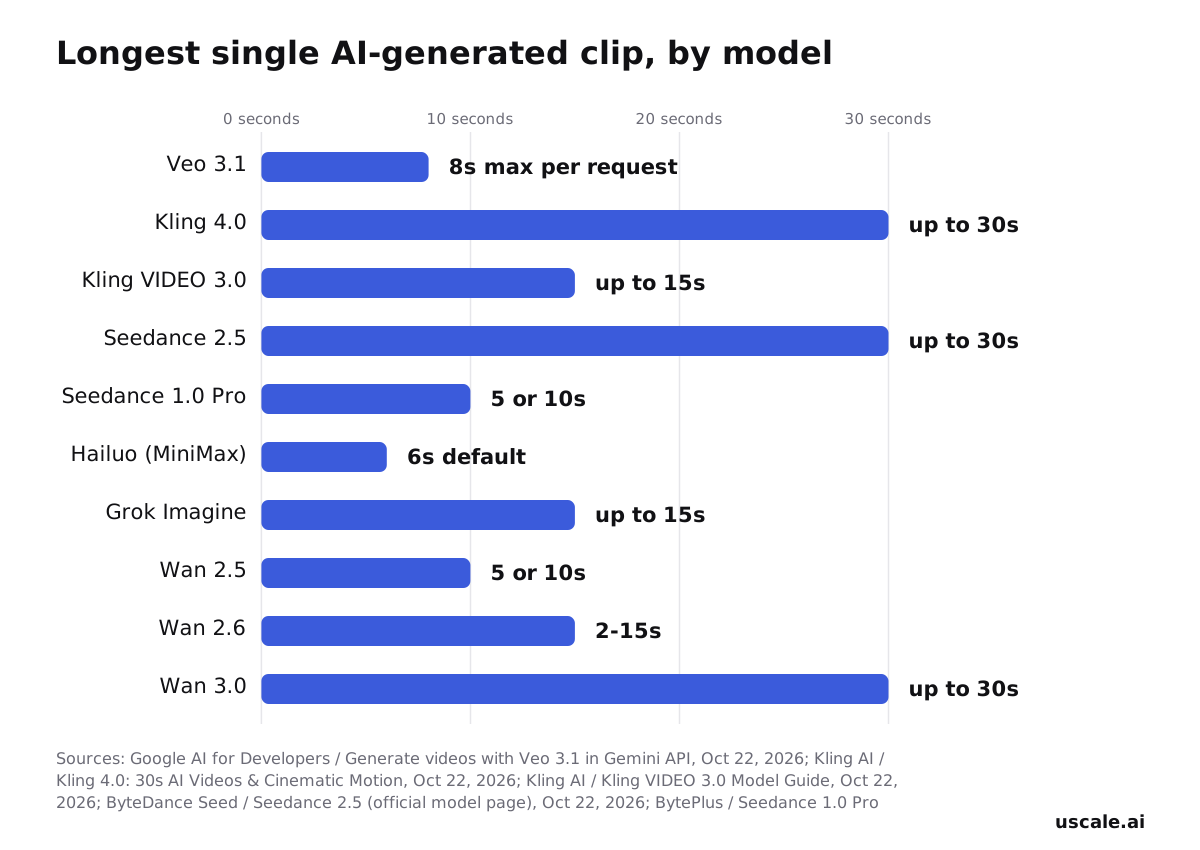
How long can an AI-generated video be? It is shorter than most product teams expect. Google's Veo 3.1 stops at 8 seconds per request. MiniMax sets its Hailuo models to 6 seconds by default. The ceiling for a single pass, reached by Kling 4.0, is 30 seconds.
That is barely enough time for a narrator to say what a dashboard does. It leaves nothing for sign-up, the first result or the export.
This post checks the documented limits of the models people actually use: Veo 3.1, Kling, Seedance, Hailuo, Grok Imagine and Wan. Each maker publishes its own number, and the numbers are far apart.
That leaves the more useful question open. No model will hand you a full launch film in one generation. So how does a finished, narrated product video like the one above get made at all?
To get there, first pin down exactly where each model stops.
How long can an AI-generated video be, model by model?
The answer depends entirely on which model you ask. Across the major models, one generation runs from a 6-second default to a 30-second ceiling. No two providers drew the line in the same place. The figures below come from each maker's own documentation, as published in October 2026.
Up to 30 seconds in one pass
Three models reach the top of the range. Kling 4.0 generates native clips from 3 to 30 seconds in a single pass. ByteDance's Seedance 2.5 generates up to 30 seconds per pass. Alibaba documents its wan3.0-video model as supporting up to 30 seconds per generation.
Up to 15 seconds
Kling VIDEO 3.0 runs from 3 to 15 seconds. xAI's Grok Imagine API generates videos up to 15 seconds long, with generated audio. Alibaba's wan2.6-t2v accepts any whole number of seconds from 2 to 15 and defaults to 5.
10 seconds or less
Seedance 1.0 Pro offers 5 or 10 seconds per video. Alibaba's wan2.5-t2v-preview accepts the same two values and defaults to 5. Google's Veo 3.1 generates 4, 6 or 8 seconds per request through the Gemini API, so 8 seconds is its maximum for one generation. MiniMax sets 6 seconds as the default for Hailuo-2.3, Hailuo-2.3-Fast and Hailuo-02.
Read the default, not only the ceiling
Most people compare the biggest number and stop there. The default matters just as much. Send a request to Wan 2.5 or 2.6 without setting a duration and you get 5 seconds back. Hailuo gives you 6, whatever the model can do. Choose a model by the length of the shot you need, not by its rank on a leaderboard. A 6-second dashboard reveal gains nothing from a 30-second model.
A model's maximum is what it allows, not what it gives you. Why these ceilings sit so far apart, from Veo's 8 seconds to Kling's 30, is the next question.
Why do AI video clips stay so short?
A model's clip limit is a ceiling set by its maker, not a setting you forgot to change. Once you read it that way, the spread between models makes sense.
The reasoning has three steps. First, every extra second adds frames that must stay consistent with the frames before them: the same face, the same screen, the same light. Second, that consistency gets harder to hold, and more costly to compute, as the clip grows. You can see the cost side in ByteDance's Seedance 1.0 Pro API, which prices each video partly by its duration. Third, each provider picks the point where quality and cost still hold, and stops there.
That is why two leading models end up far apart:
| Model | Longest single generation | What it tells you |
|---|---|---|
| Veo 3.1 | 8 seconds | Google drew its line early |
| Kling 4.0 | 30 seconds | Kling drew its line later |
Neither number makes one model "better AI." Each is a trade-off between length, consistency and price, chosen by a different team. No wording in your prompt moves that line.
So when a shot needs more time than a model allows, a cleverer request will not help. You need another clip, joined to the first.
Or can you just make the first clip longer?
How do you get a longer finished video out of these short clips?
Every major maker offers a way to stretch a clip. A finished product video, though, comes from cutting several shots together, not from stretching one.
Each maker documents its own extension path. Veo 3.1's Extend adds 7 seconds per call, up to 20 times, to a ceiling of 148 seconds for one continuous video. Kling 4.0's Video Extension runs continuation passes before or after an existing clip, to a total of up to 2 minutes. Seedance 2.5 gives the option to extend a generation twice for longer storytelling.
Each of these continues the same shot. A product video rarely stays in one shot: it moves from the dashboard to a setting to the result. An extension is the wrong tool for a cut to a new screen, so a real product video is built a different way:
- Write the script as a list of short shots.
- Fill each shot with a live screen from the product. Where the story needs it, use a generated clip instead, kept within its own model's limit.
- Cut the shots together in order.
- Lay one continuous voice-over across every cut, then add captions and music on top.
The beat to reuse: plan in shots, not in seconds. The continuous voice, not the length of any one clip, is what makes a sequence of cuts feel like one film.
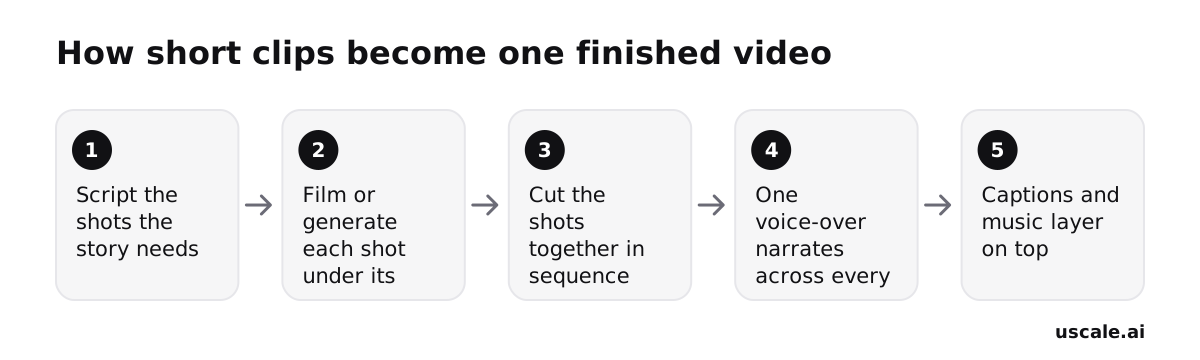
Once a video is a list of shots, the length question changes from what a model allows to what the story needs. That is where sizing the finished video starts.
How long should the finished video actually be?
Size the video from its shot list, not from a model's maximum. A finished launch film, product demo video or onboarding video is several short shots under one script. No single shot has to come close to the limits covered above.
The outer ceilings are worth knowing so expectations stay realistic. They are edge cases, not the default:
| Model | Extension feature | Documented ceiling for one continuous video |
|---|---|---|
| Veo 3.1 | Extend, 7 seconds per call, up to 20 calls | 148 seconds |
| Kling 4.0 | Video Extension, several passes before or after a clip | Up to 2 minutes |
Those numbers mark how far one generation can be pushed. They are not the length a shot should run.
Say you're planning a product launch video for a new reporting feature. The shot list might read:
- The problem in one line.
- The dashboard opening.
- The new report being built.
- The export.
- A closing line on what changed.
Each beat moves the story forward, and none needs more time than a native generation or a short screen shot gives it. The total running time is whatever those beats add up to.
The decision: write the shot list first, then let the length follow the story. Viewers judge a video's length by whether each beat earned its place, not by how close it came to a model's seconds counter. Ignoring that order is where most long AI videos go wrong.
What goes wrong when you push past these limits?
The extend features are real, and they are long. Veo 3.1's Extend adds 7 seconds per call, up to 20 times, to a documented ceiling of 148 seconds of continuous video. Kling 4.0's Video Extension runs several continuation passes and reaches up to 2 minutes. That is roughly the length of a full product demo. So why not take one generation and keep extending it until the video is done?
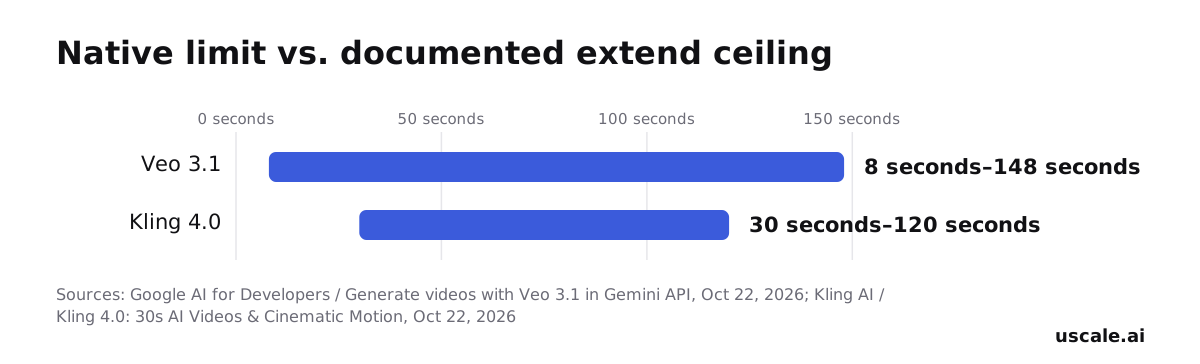
The first problem is that these numbers are ceilings. Past them the feature stops, and so do the maker's tested limits.
The second problem sits inside them. Each pass starts from the clip before it, not from your brief. Veo extends a Veo-generated source video, and Kling continues before or after an existing clip. So anything that has slipped by pass five, such as a button label, a colour or the cursor's position, becomes the starting point for pass six. Twenty chained calls can carry twenty small departures from what you asked for.
The third problem is the story itself. A product video rarely needs one continuous take. It moves from a dashboard to a setup step to a key feature, and each of those is its own shot.
The fix is to cut to a new shot before quality drifts. Keep each generation inside its documented range, give every shot a fresh prompt, and let one voice-over carry the story across the cuts. A film built from ten short shots stays on brief because no single shot has to carry it alone.
So what does that plan look like on paper?
How do you plan a product video around these limits?
Plan the film as a list of shots, then let each shot fit inside a model's single-pass limit. These four decisions follow from each other.
Write the shot list in a doc. Name the screens a buyer needs to see: the dashboard they land on, the onboarding step that gets them started, the key feature they came for, and a closing screen. This is your quick win. A doc and an hour are enough, and the list is done when each shot shows one thing.
Write one narration across all the shots. A single voice-over makes separate clips read as one film. Give each shot one or two lines. The script is done when you can read it aloud from start to finish without stopping.
Decide which shots are real screens and which need generating. Real product screens can come from the screen recorder you already have, at no cost. Generate a shot only when the story needs something you can't film, such as a scene of the problem before your product arrives. Keep each generated shot within one model's native limit rather than stretching it with extends. This step is done when every line in the shot list is marked as either "film" or "generate".
Cut the shots together under the narration. If you have the time, any editor will do. uscale works the same way: it films your live product's screens, illustrates the shots the script calls for, and adds voice, captions and music. You approve a storyboard with every narration line first, then ask for changes in a chat. The films on uscale's examples page were each cut from several shots under one narration.
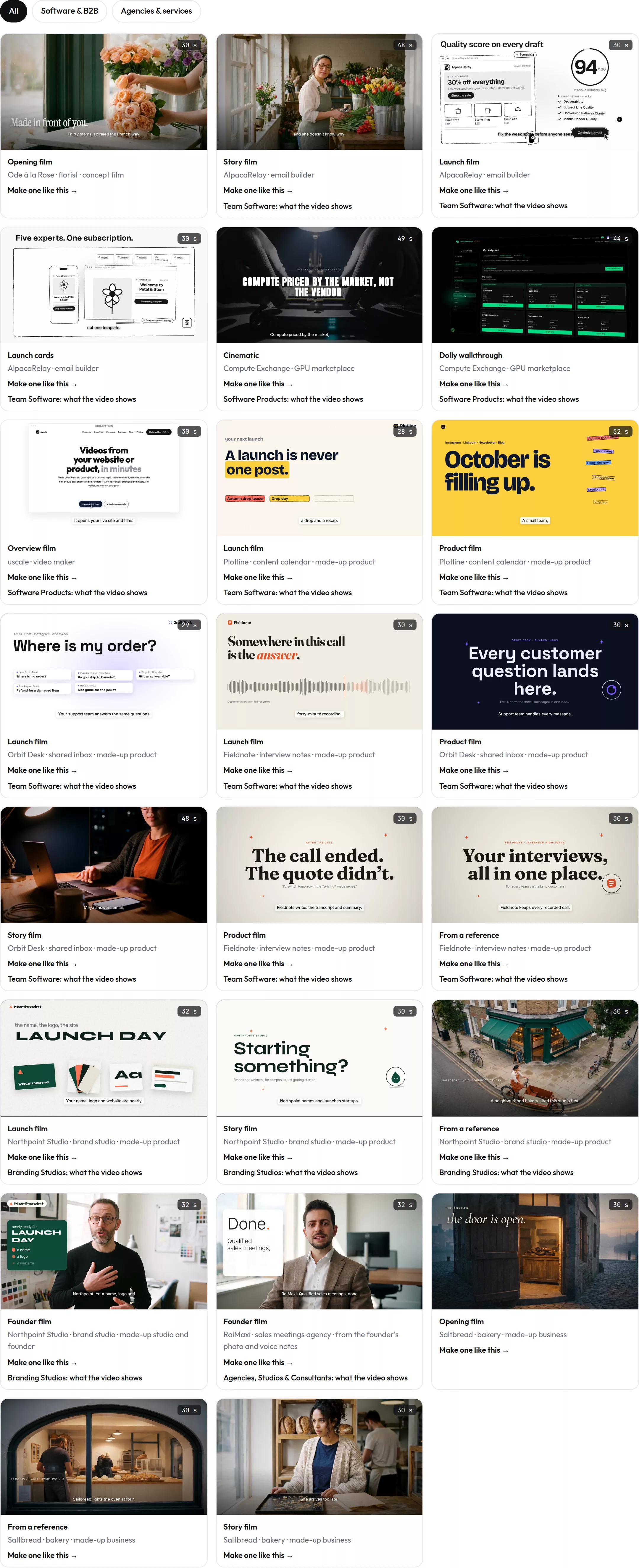
For software teams, the AI product video generator use case and the page on videos for software products show which shots tend to belong in the film.
If you do only one thing, write the shot list. A good outcome is a narrated video on your launch page, a README with a demo in it, and one link sales can send.
Try it: turn your live product into a narrated video: a storyboard to approve, real screens filmed, one voice across every cut.
What to do with these limits today
The ceilings are fixed for now. A good product video fits inside them anyway.
- Pick the model for the shot, not for the film. Check that its native limit covers the single moment you need on screen.
- Know the extend ceiling before you lean on it. Treat it as the outer edge of one continuous scene, and cut before you reach it.
- Script in shots. Write the narration first, list the shots it needs, and let the length follow the story.
If you'd rather not assemble that by hand, the AI product video generator reads your product, writes a storyboard for your approval and films the real screens under one voice. Your first video is free, and pricing has the rest.
Nobody watching needs a longer clip. They need the next shot.
Make your how long can an ai generated video be from your website — it’s free →
Questions
How long can an AI-generated video be?
An AI-generated video can run up to about 30 seconds in a single generation today. Kling 4.0, Seedance 2.5 and Alibaba's wan3.0-video reach 30 seconds per pass, Kling VIDEO 3.0 and Grok Imagine reach 15, and Google's Veo 3.1 stops at 8. Extend features push one continuous video further: up to 148 seconds with Veo 3.1 and up to 2 minutes with Kling 4.0. Longer product videos are cut from many short clips.
Why are AI-generated video clips so short?
AI-generated video clips are short because every extra second adds frames that must stay consistent with the ones before them: the same face, screen and light. Holding that consistency gets harder and costlier as a clip grows, and ByteDance, for example, prices Seedance 1.0 Pro videos partly by duration. Each maker picks the length where quality and cost still hold, which is why Veo 3.1 stops at 8 seconds and Kling 4.0 at 30.
Can you extend an AI video past its native limit?
Yes, some AI video models can extend a clip past its native limit. Google's Veo 3.1 Extend adds 7 seconds per call, up to 20 times, to a documented ceiling of 148 seconds. Kling 4.0's Video Extension runs continuation passes to a total of up to 2 minutes, and Seedance 2.5 can extend a generation twice. Each pass continues the same shot from the previous clip, so small errors carry forward; cutting to fresh shots holds up better.
How long should a product demo video be?
A product demo video should be as long as its shot list needs, and there is no right number. Write the shots first: the problem, the screen the buyer lands on, the key feature, the result and a closing line. Give each shot one or two narration lines, then read the script aloud. The running time is what those beats add up to. If a shot does not move the story forward, cut it instead of padding.
What does it cost to make a longer AI-generated product video?
With uscale, the first video is free: a new account gets 10 credits, or 20 with a work email. After that, credits are bought once with no subscription: Lite is $29 for 25 credits, Starter $49 for 50 credits and Growth $129 for 150 credits. Starter covers about 5 product walkthroughs or 5 launch films. Films with AI film shots cost more, and the price of each step is shown before it starts.

The team behind uscale, which turns a website, web app or GitHub repo into a narrated product video.