When the recording already looks filmed
The usual fix for a stiff product demo is a better screen recorder, which makes the search for a Screen Studio alternative a strange one. Screen Studio already smooths raw cursor paths into a steady glide, can add click ripples, and adds motion blur so fast movements look as if a camera filmed them.
If the recording already looks filmed, polish is rarely the missing piece. Turned over, the assumption hides one of three wants, the three jobs this page sorts:
- A different platform or price. You still want to perform the demo yourself, in a tool that fits your machine or budget.
- A recording someone else drives. Buyers click through the product at their own pace instead of watching it.
- No recording at all. The demo still needs to exist, with a voice and captions, but nobody wants to perform it.
What each line gives up is less obvious, and it starts with what Screen Studio already does.
Why people look for a Screen Studio alternative
Screen Studio does what it sets out to do well. Its homepage, checked on 15 October 2026, describes automatic zoom. It looks at what you did during the recording, such as where you clicked, and zooms in on the key moments. Smart framing balances those zooms so your webcam never covers the cursor.
One detail matters more than it first appears. Most recorders bake the cursor into the video, so you can't add cursor effects later. Screen Studio applies them after recording, including smoothing the movement and changing the cursor's size and shape. The listed extras include masking sensitive data, 4K 60FPS export and vertical export.
So the reasons people look elsewhere are rarely about polish. They're trade-offs.
The trade-offs
| What you need | How Screen Studio fits |
|---|---|
| A polished demo you perform on a Mac | Built for this: auto zoom, smart framing, cursor effects after recording |
| Recording on Windows | Currently supports only macOS |
| A demo nobody has to record | Zooms follow what you did, so someone still performs it |
| Current price | Not quoted here. See screen.studio |
Platform. If the person who knows the product best works on a Windows laptop, Screen Studio isn't an option for them today, however good the output looks.
Performance. The zooms follow your clicks. That's the point, and it's also the catch. Someone still has to click through the product in the right order and say the right words, often over several takes. The polish is applied to a performance. If the launch copy isn't settled, the recording waits for it. When the settings page moves after launch day, someone records it again. Some teams would rather have the demo planned, written and voiced without anyone recording.
Price. We haven't quoted one, because we couldn't confirm it on Screen Studio's own pricing page. Check screen.studio for current pricing.
If one of those trade-offs is yours, the useful question isn't which recorder is better. It's who should perform the demo. uscale is our product. We've put it where we think it fits, and said where others fit better.
Start with the simplest case: you're happy to perform the demo, but the machine you record on is the problem.
FocuSee: when you're on Windows, or want captions in the recorder
FocuSee is the closest like-for-like swap for Screen Studio, and it also runs on Windows. Its homepage (15 October 2026) describes a recorder for Mac and Windows with auto zoom on mouse clicks, captions, spotlight, AI audio enhancement, and AI removal of filler words and silence. Screen Studio currently supports only macOS. If your demo machine is a Windows laptop, FocuSee changes the least about how you work.
Best for
FocuSee suits a founder who wants to perform the demo personally, on Windows, and do the cleanup in the same tool. You record the walkthrough and the zooms follow your clicks. You add captions and cut the pauses and filler words without opening a second editor. For that founder, we'd pick FocuSee over uscale, because it keeps your hands on the product and your voice on the track.
Here is a reason you can reuse: if the machine is what pushes you off Screen Studio, not the job, replace the recorder and keep your workflow.
A different job
FocuSee polishes a demo that someone records. Some teams want a demo with no take and no script read aloud. That is a different job, and a better recorder isn't built for it.
What it costs
These prices come from FocuSee's pricing page, checked on 15 October 2026. The free trial lets you export one video in up to 4K, which is enough to test one real demo before you pay.
| Plan | Price | Platform | Source, date |
|---|---|---|---|
| Free trial | Free; exports one video in up to 4K | Mac and Windows | FocuSee homepage, 15 Oct 2026 |
| Standard | $49.99 a year, or $19.99 a month | 1 Windows or Mac computer | FocuSee pricing page, 15 Oct 2026 |
| Advanced | $199.99 one-time | Not listed in our sources | FocuSee pricing page, 15 Oct 2026 |
Standard includes unlimited videos, unlimited recording time and 4K/60 FPS export.
vs uscale: FocuSee keeps your own performance and your own voice. uscale writes the storyboard and every narration line, then voices the demo for you.
If you're leaving Screen Studio over price rather than platform, compare these numbers with Cap's license model next.
Cap: when you want a low-cost license for recordings you share
Cap prices the app on your computer separately from the place your videos live. You can pay once for local recording, or pay monthly for sharing features. Which one makes sense depends on where your viewers watch.
| Cap plan | Price (cap.so/pricing, 15 October 2026) | What you get |
|---|---|---|
| Free | $0 | Personal use only, no commercial use; shareable links capped at 5 minutes |
| Desktop License | $29 per license per year, or $58 once (never renews) | Commercial license for unlimited local recording and editing, no cloud subscription |
| Pro | $12 per user per month, or $8.16 a month billed annually | Unlimited cloud storage; auto-generated titles, summaries, clickable chapters and transcriptions |
A worked example (hypothetical)
Say you're a solo founder who records a demo update every week for early users and investors. The free plan is out from the start. It doesn't cover commercial use, and a 5-minute cap on shared links is tight for a full walkthrough.
If you export each update and post the file yourself, on a changelog or in a newsletter, the Desktop License covers it. The one-time $58 equals two years at $29. It breaks even at the end of year two and costs less only if you keep recording after that. If you're not sure Cap will stick, start at $29 a year.
If you send each update as a link, Pro earns its price. Viewers get a title, a summary, clickable chapters and a transcript you didn't have to write. Recordings sit in unlimited cloud storage. Billed annually, that's $8.16 a month for one user.
The rule to reuse: pay for the part your viewer touches. Someone opening a link skims by chapter. Someone watching a posted file only needs a clean edit.
For quick updates shared with chapters and transcripts, Cap fits better than uscale. Cap keeps your own voice and your live walkthrough. uscale writes the storyboard, narration and captions, and films the product without anyone recording. Once more than one person records, the cost is counted per seat, and that's where a shared workspace like Tella comes in.
Tella: when a team shares one video workspace
Tella prices like a team tool. You pay per seat, and the seats share one workspace. The plans below are from Tella's pricing page, checked on 15 October 2026. That page lists the features we don't cover here.
| Plan | Price (15 October 2026) | What the plan includes |
|---|---|---|
| Pro | $13 per user per month, billed annually | Unlimited videos, 3,000 Tella agent credits a month, 4K export |
| Premium | $19 per user per month | Adds a custom domain, Tella branding removal and 60 FPS export |
What pooled credits mean for a month of demos
Tella's credits pay for the Tella agent. The allowance is counted per user per month and pooled across the workspace. Whatever is left expires at the end of the month. Each seat adds to a shared pot, so whoever makes this month's launch demo can use teammates' allowances as well as their own.
A pooled allowance rewards a team that plans its month. A team that saves credits for later loses them. If your demos cluster around one launch, schedule the agent-heavy work inside that month.
Who it suits
Tella suits a team that wants seats, a shared workspace and branded hosting. Premium's custom domain and branding removal put your name on the page buyers see. A solo founder who makes the occasional demo still pays per seat, for a workspace nobody else uses.
Tella vs uscale: Tella gives a team seats and a branded workspace. uscale has no seats and no subscription. You buy credits once for the videos you make (see uscale pricing). The deciding question is how many people on your team make demos each month.
FocuSee and Cap both assume someone sits down and records the demo. The next option drops that assumption.
uscale: when you'd rather not record at all
uscale removes the recording step. You paste your site's or app's address, or a GitHub repo, and it films the live product itself. If the screens you want are behind a sign-in, you sign in once in a browser streamed into the page. SSO and two-factor codes work as they do on your laptop. A repo works even before there is a live site, which suits developer tools filmed from their repository.
Before anything is filmed, the director writes a storyboard with every narration line for you to approve. Most demos are made the other way round: someone records, then writes words to fit the footage. Write the words first, and the film says what you meant rather than what you happened to click.
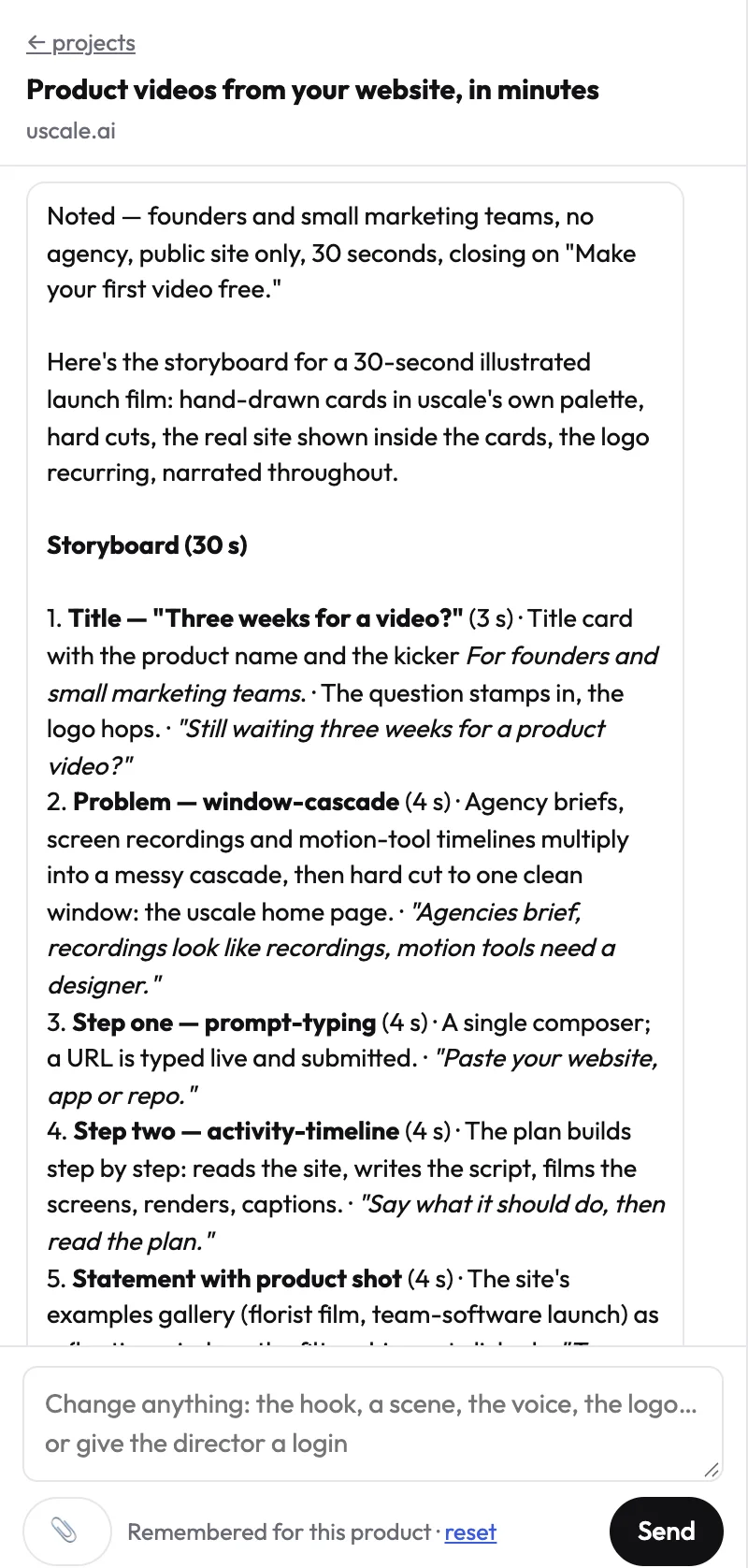
The finished film has a natural voice, captions that follow every word and a music bed. It uses your brand's colours and fonts, read from your live site. You ask for changes in a free chat with the director. Name the moment, and it changes that one.
Where it fits, and where it doesn't
It suits founders and product marketers who want a narrated product demo video without performing it. It is not built for three cases:
- your own voice on the film (not available today)
- captions turned off (not available today)
- a demo you perform live
The difference from Screen Studio is simple. Screen Studio polishes the demo you perform, and uscale plans and films it without you. The full flow is in how a URL becomes a video.
What it costs
| Pack | Price | Credits | Roughly |
|---|---|---|---|
| Free | $0 | 10, or 20 with a work email | One full first video, no card needed |
| Lite | $29 | 25 | About 2 product walkthroughs |
| Starter | $49 | 50 | About 5 product walkthroughs |
| Growth | $129 | 150 | About 15 product walkthroughs |
You buy credits once, with no subscription and no seats. A product walkthrough is about 10 credits, and filming alone is 4 of them. Chatting is free, and the director names each step's price before it starts. Current terms are on the pricing page.
Try it: make a product demo video from your live site, and approve every narration line before anything is filmed.
Every option so far, Screen Studio included, ends in a film someone watches. The next one asks whether buyers should watch at all.
Arcade: when buyers should click through the product themselves
Arcade fits a different moment from every other tool on this page: the buyer is already on your site and wants to try the product before talking to anyone. Arcade makes interactive demos that buyers click through rather than watch.
If a self-guided click-through on a pricing or sign-up page is the goal, choose Arcade over both Screen Studio and uscale. A recording, however polished, asks the viewer to sit back. A click-through lets them pick the path, skip what they know and stop on the screen that answers their question.
The prices below come from Arcade's own blog post on interactive demo software in 2026, dated March 2026. Because that is a blog post and not a pricing page, check Arcade's pricing page for current terms before you budget.
| Arcade plan | What the source lists | Price (March 2026) |
|---|---|---|
| Free | 3 published demos, 200 AI credits | Free |
| Pro | Per-user plan | $32 per user per month |
| Growth | Team plan | $297.50 per month |
| Enterprise | Custom terms | Custom-priced |
Most teams get one thing backwards here. An interactive demo is built to be clicked, so it does its job on a page the buyer has chosen to open. It is less suited to a post in a feed or a link in a cold email, where nobody has decided to click yet. A click-through waits for the buyer to arrive; a film goes out to find them.
Arcade vs uscale: Arcade lets the buyer drive the product at their own pace, while uscale gives them a narrated film, with captions that follow every word, that works in a feed or an email. If your demo will only live on your own pricing page, you may not need a video at all.
That's five alternatives, each built for a different job. Side by side, the differences are easier to read.
Screen Studio alternatives compared: FocuSee, Cap, Tella, uscale and Arcade
Each column is a question that decides the choice. Who performs the demo sets the kind of tool. Platform tells you whether it runs on your machine. What's added shows the work you skip. The starting price comes from each vendor's own page. uscale is our product, and it sits in the table on the same terms as the others.
| Tool | Who performs the demo | Platform | What's added for you | Starting price (source, date) | Best for |
|---|---|---|---|---|---|
| Screen Studio | You record it | macOS only | Auto zoom on key moments, cursor smoothing, click ripples, motion blur | See screen.studio | A Mac user polishing a demo they perform |
| FocuSee | You record it | Mac and Windows | Auto zoom on clicks, captions, spotlight, AI audio enhancement, filler-word and silence removal | Standard $49.99 a year or $19.99 a month (focusee.imobie.com, 15 Oct 2026) | Performing the demo on Windows |
| Cap | You record it | Not listed in our sources | With Pro: titles, summaries, clickable chapters, transcriptions | Desktop License $29 per license per year, or $58 once (cap.so, 15 Oct 2026) | Low-cost recordings shared with chapters |
| Tella | You record it | Not listed in our sources | Pro: 4K export, 3,000 Tella agent credits a month | Pro $13 per user per month, billed annually (tella.com, 15 Oct 2026) | A team sharing one workspace |
| uscale | Nobody: it films your live product | Starts from a site address or GitHub repo | Storyboard with every narration line to approve, voice, captions, music, your brand's colours and fonts | Free: 10 credits · 20 with a work email. Lite $29, 25 credits (pricing) | A narrated demo without recording |
| Arcade | The buyer clicks through it | Not listed in our sources | Published interactive demos | Free plan with 3 published demos; Pro $32 per user per month (arcade.software, March 2026) | A self-guided click-through on a pricing page |
Sources: each vendor's own pricing or home page, checked 15 October 2026. Arcade's figures come from its own blog post dated March 2026. Screen Studio's price wasn't available to us from its own page. Check each page before you buy.
Read the first column before the others. If you'll perform the demo yourself, your shortlist is the recorders: Screen Studio on a Mac, FocuSee on Windows, Cap for a cheap license and shared links, Tella for a team. If the buyer should drive, it's Arcade. If nobody should record, and you want the script, voice and captions written for you, it's uscale.
Rule of thumb: decide who performs the demo, then let platform and price choose between the tools left. Which leaves the question the table can't answer for you: do you need to switch at all?
Should you just stay on Screen Studio?
If you're on a Mac and you like performing the demo yourself, the strongest case is not to switch at all. The polish described above is the reason: Screen Studio is built to make a demo you perform look filmed. If you searched for the best screen recorder for Mac, that is the plain answer. A new tool won't improve a demo you're already happy to perform. The one hard limit is the platform, because it currently supports only macOS. So the test isn't which tool adds more polish. It's whether the job itself has changed:
- If you're on Windows and still want to perform the demo, choose FocuSee.
- If you want low-cost recordings shared with chapters and transcripts, choose Cap.
- If a team needs seats and a branded workspace, choose Tella.
- If buyers should click through the product themselves, choose Arcade.
- If nobody wants to record, and you want the storyboard, narration and captions written for you, choose uscale.
When not to choose uscale
Skip it if you want your own voice on the film or need captions turned off, because neither is possible today. Skip it if buyers should click through (Arcade) or if you're sending a quick message to a teammate (Cap). Skip it too if you're editing footage you already shot (see our Descript comparison). If your site is in Chinese, Japanese, Korean or Arabic, uscale makes an English film for now.
Loom vs Screen Studio isn't really a contest. A quick shared message and a polished recording are different jobs, and our guide to Loom alternatives for product demos covers the first one.
Stay on Screen Studio when you perform the demo on a Mac. Switch when someone else should perform it, or no one should. If you're still unsure which of those is you, three questions settle it.
Three questions before you switch
- Who should perform the demo: you, the buyer, or nobody? If it's you, stay with a recorder. If the buyer should click through it, look at Arcade. If nobody, look at uscale.
- Which machine will you record on? Screen Studio supports only macOS. FocuSee runs on Mac and Windows. Cap suits quick shared recordings with chapters.
- Do you need the narration and captions written for you? If you'd rather speak your own lines, keep a recorder. If not, uscale writes every narration line for you to approve and adds voice, captions and music.
If you answered "nobody", start today from the product demo use case. You approve the storyboard first, and your first video is free. To see the result first, watch the example films.
A better demo rarely needs a better take, just the right person showing it, or no one.
Make your screen studio alternative from your website — it’s free →
Questions
What is a Screen Studio alternative?
A Screen Studio alternative is a tool you use instead of Screen Studio to make a product demo, usually because of platform, price or who performs the demo. Screen Studio itself is a macOS screen recorder that zooms in on key moments based on where you clicked and smooths the cursor so a demo you perform looks filmed. Alternatives include recorders like FocuSee, Cap and Tella, Arcade for interactive demos, and uscale for a narrated demo nobody records.
Is there a Screen Studio alternative for Windows?
Yes. Screen Studio currently supports only macOS, but FocuSee runs on Mac and Windows with auto zoom on clicks, captions, spotlight and filler-word removal. FocuSee Standard costs $49.99 a year or $19.99 a month for one computer, and its free trial exports one video in up to 4K, on FocuSee's pricing page as of 15 October 2026. uscale avoids the question, because it films your live product from a site address, so nothing is recorded on your computer.
What's a free alternative to Screen Studio for product demos?
It depends on how you'll use the demo. Cap's free plan, as of 15 October 2026, is for personal use only, with shareable links capped at 5 minutes, so commercial demos need its $29-a-year Desktop License. FocuSee's free trial, as of 15 October 2026, exports one video in up to 4K. Arcade's free plan includes 3 published demos, per Arcade's March 2026 blog post. uscale's free credits cover one full narrated first video, with no card needed.
Can I make a product demo video without recording my screen?
Yes. uscale makes a product demo video without screen recording: you paste your site's or app's address, or a GitHub repo, and it films the live product. For screens behind a sign-in, you sign in once in a streamed browser. You approve a storyboard with every narration line before filming, and the finished film has a natural voice, captions and music. Your own voice and captions turned off aren't available today.
What does uscale cost?
uscale sells credits once, with no subscription and no seats. Your first video is free: the free pack has 10 credits, or 20 with a work email, and needs no card. Lite costs $29 for 25 credits, Starter $49 for 50 and Growth $129 for 150. A product walkthrough is about 10 credits, chatting with the director is free, and each step's price is named before it starts.

The team behind uscale, which turns a website, web app or GitHub repo into a narrated product video.