The demo that starts with pressing record
A search for Tella alternatives usually carries one quiet assumption: a product demo starts when someone presses record, so the only real choice is which recorder.
For plenty of videos that holds. If your face and voice carry the demo, a screen-and-camera recorder is the right kind of tool, and Tella is a capable one.
But a demo for buyers doesn't have to start with a recording session. It can be something buyers click through themselves. Or it can be a film of the live product, narrated and captioned, with nobody on your team recording a thing.
That is a walkthrough of the live Compute Exchange app, a GPU marketplace. Nobody sat down to capture the screen.
So the question is wider than which recorder to switch to. The right tool depends on whether your next demo needs a recording at all. The reasons people look past Tella in the first place are where that starts.
Why people look for a Tella alternative
Start with what Tella does well, because it does a lot well. According to Tella's own pages (checked 16 October 2026), it is screen recording software for Mac, Windows and the web. It records your screen, camera, microphone and system audio in one session. It keeps screen and camera as separate streams, so you can change the layout after recording. Clips with both get presets such as Camera Bubble, Side-by-side, TV Presenter and Cut out. Tella also says it can add layouts, zoom effects and subtitles for you. If the demo is you walking through your product, that is a strong setup.
So people rarely leave because Tella does its job badly. They leave because the job in front of them is a different one.
The first trade-off is how you pay. Tella has two paid plans, both billed per user. Every new workspace starts with a 7-day free trial, and there is no forever-free plan. Without an active subscription you can still view and share the videos you have, but you can't record, edit or export. A team that records every week will find that a normal subscription. A team that ships one demo a quarter pays for seats between launches.
The second trade-off is who does the work. Tella's help docs call screen + camera + voice the most common setup for demos and walkthroughs. Someone still writes what to say, clicks through the product in the right order and narrates it, in one take or several. Tella makes that session look better afterwards. It doesn't take the session off your calendar.
The third trade-off is who the demo is for. Some buyer-facing demos work best when the buyer clicks through the product at their own pace. Others have to be ready by launch day when nobody on the team has an afternoon free to record. Neither is the job of recording yourself, and each calls for a different kind of tool.
That is how this list is built: by job, not by feature count. uscale is our product. We've put it where we think it fits, and said where others fit better. The tools below are in order of fit for product demos, and each section names the job it suits.
Supademo: when buyers should click through the demo
If your buyers should explore the product at their own pace, clicking through screens instead of watching a film, Supademo fits that job better than uscale. You can also start it for free.
Supademo's blog (checked 2026-10-16) says its free plan includes 5 interactive demos and 50 4K video recordings, with no credit card required. The entry paid plan, Scale, costs $38 per creator per month, and viewer seats are free. You pay for the people who build demos, not for the buyers or teammates who view them.
| Supademo, per its blog (2026-10-16) | Detail |
|---|---|
| What you make | Interactive demos and video recordings |
| Free plan | 5 interactive demos, 50 4K video recordings |
| Card to start | Not required |
| Entry paid plan | Scale, $38 per creator per month |
| Viewer seats | Free |
Who should hold the mouse
A product demo can work in one of two ways. A film sets the order: every viewer sees the same path, and the story lands the same way each time. An interactive demo hands the order to the buyer, who can skip to the screen they care about and ignore the rest. Many teams pick a format first and only then ask who will watch. That is backwards. Decide who should hold the mouse before you decide which tool to open.
So here is the yes or no. Say a prospect asks to try the reporting screen before a sales call. That buyer wants to click, so an interactive demo is the right answer, and Supademo's free plan lets you test the idea at no cost. If the viewer will only watch, for example in a launch post or on a landing page, a click-through asks for effort they didn't plan to give.
Supademo vs uscale: Supademo lets the buyer drive the click-through. uscale gives you a narrated film of your live product with nothing to record. If you want a demo and a short voiced video from the same tool, Arcade is the next option.
Arcade: demos and short AI-voiced videos from one place
Arcade puts demos and voiced videos under one plan, and its pricing tells you what to budget for. Demos use no credits, while videos cost credits by length. Arcade's pricing page and its own pricing post, both read on 2026-10-16, list the following.
| What Arcade lists | Detail (Arcade, 2026-10-16) |
|---|---|
| Free plan price | $0 |
| Free plan AI credits | 200 a month |
| Free plan includes | 1 published demo, 1 published video, AI voiceover |
| Free plan output | Watermarked |
| Paid seat | $42.50 a month, shown down from $50 |
| Paid seat AI credits | 100,000 a year |
| Credits per demo | None |
| Credits per video | 50 per 30 seconds |
What the credits mean for planning
Read the last two rows together. A demo doesn't draw on credits, so the number of demos you publish is not what the credits limit. A video does, and its cost grows with its length. The question to plan around is how much voiced video you expect to make, not how many demos. Keep videos short and the credits go further. Let them run long and they go faster. With Arcade, you budget for minutes of video, not for demos. The free plan lets you try each format once before you pay for a seat, with a watermark on what you publish.
Who it's best for
Arcade fits a team that wants a demo and a short voiced video from the same tool, and wants to start free. For that team it is a better pick than uscale. You get one place, one plan and both formats, with AI voiceover on the free plan. If your real question is whether buyers should click through a demo or watch one, that is a separate choice. It is covered in interactive demo vs demo video.
Arcade vs uscale: Arcade gives you demos and voiced videos side by side from a free start. uscale films your live product and writes every narration line for your approval, with nothing for you to record. That second route, a narrated film with no recording session, is the next tool on the list.
uscale: a product demo video with nothing to record
Paste your site's or app's address, and uscale returns a narrated film of the live product. Nobody on your team presses record. It films each screen of the site or app. For screens behind a sign-in, you sign in once yourself, in a browser streamed into the page. If there is no live site yet, it can start from a GitHub repo instead.
Approve the words before anything is filmed
A storyboard comes back first, with every narration line written out. You change what's wrong in a free chat with the director, for example "start on the dashboard and end on the export". Then you approve it.
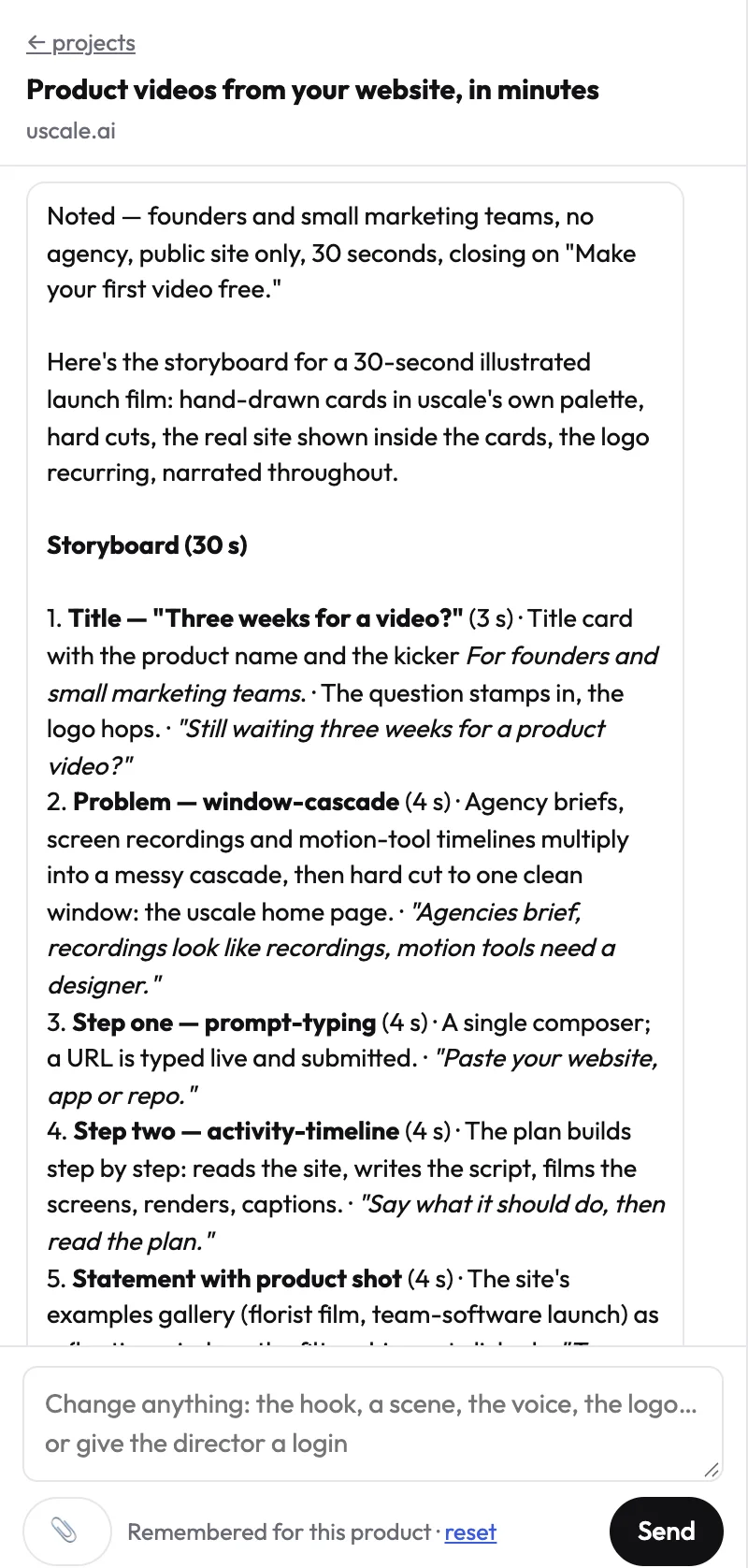
Most demo workflows get this step backwards. With a recorder, the script is fixed on camera, so a wrong line means another take. Here it is fixed on paper. A line changed in the storyboard costs a chat message; a line changed after recording costs a take.
The finished film gets a voice, captions that follow every word and a music bed. It uses your product's own logo, colours and fonts, read from your live site. When the app changes, you film it again from the saved tour, and the new cut picks up the new screens.
What it costs
A new account starts with 10 credits, or 20 with a work email, and no card needed. After that, you buy a pack once. This is how the pricing page sizes them:
| Pack | Price | Credits | About |
|---|---|---|---|
| Lite | $29 | 25 | 2 product walkthroughs |
| Starter | $49 | 50 | 5 product walkthroughs |
| Growth | $129 | 150 | 15 product walkthroughs |
There is no subscription and there are no seats. The director names each price before a step starts. The full list is on the uscale pricing page.
Where it fits
It is best for a founder or product marketer who needs a buyer-facing demo, or a refreshed one, without a recording session. There is more on that job in product demo videos and videos for software products. It is not built for your own face and voice on camera, or for a quick personal update to a teammate.
Against Tella, the split is simple. Tella keeps you and your layouts on screen; uscale writes and films the demo for your approval. Which one fits comes down to whether your next demo needs you in it.
Try it: make a product demo video from your own site, and approve every narration line before anything is filmed.
Loom and other recorders: when the video is a message, not a demo
The quickest test is this: if the viewer would reply to the video, it is a message. If they would forward it, it is a demo. A message is for someone who already knows you, about the product as it is today, and it gets watched once. A demo is for people you haven't met, gets watched many times, and has to hold up after the next release.
Teams often get this backwards in one of two ways. Some spend an afternoon polishing a two-minute update for a teammate. Others send buyers a quick recording that was really a message, with "ignore this bit, it's changing" halfway through.
| Sign | Message | Demo |
|---|---|---|
| Who watches | A teammate or one customer | Buyers you haven't met |
| How long it's useful | Until someone answers it | Until the product changes |
| Whose voice | Yours, by name | Any clear voice that fits the brand |
| Kind of tool | A recorder you open and talk into | A demo tool or a narrated film |
For a message, use a recorder. Tella still fits that job. Its help docs list a screen + voice setup that records a voiceover without showing your face. If Loom is on your list for this job, we weigh it and its alternatives in Loom alternatives for product demos.
uscale is not built for messages. Its films are voiced with uscale's voices, not yours, and a teammate expecting to hear from you will notice.
So before you compare prices, put your next video in one column. The table below covers the demo column: four tools for a video that strangers will watch.
Tella alternatives compared side by side
Five things decide the route. uscale is our product; its row comes from its own pricing page, like the others.
- What you make: a recording, a click-through or a film is what the buyer gets.
- Who records: whoever records spends time on it each time the product changes.
- Your face on camera: some demos are sold by a person.
- How you start free: how far you can test before paying.
- Entry paid price: on each tool's own billing basis.
| Tool | What you make | Who records | Your face on camera | How you start free | Entry paid price |
|---|---|---|---|---|---|
| Tella | Screen and camera recordings | You | Yes, or screen and voice only | 7-day trial, HD exports at 30 FPS | Pro $13 per user per month, annual billing |
| Supademo | Interactive demos and video recordings | You | Not stated on their page (checked 2026-10-16) | Free plan: 5 interactive demos, 50 4K recordings, no card | Scale $38 per creator per month; viewer seats free |
| Arcade | Demos and short AI-voiced videos | Your team; AI voiceover for videos | Not stated on their page (checked 2026-10-16) | $0 plan: 200 AI credits a month, watermarked | $42.50 a month per seat |
| uscale | A narrated film of your live product | Nobody | Only as a presenter made from one photo | 10 credits, 20 with a work email, no card | Lite $29 for 25 credits, paid once |
Sources: Tella's pricing page and help docs, Supademo's blog and Arcade's pricing page, all checked 2026-10-16. uscale's prices are from its pricing page. Tella's prices assume annual billing, which its page shows as a 50% discount. Premium is $19 per user per month, and Enterprise is custom.
Reading the prices
Per-user monthly billing suits a team that records every week. One-off packs suit a team that makes a demo now and then, because nothing renews in the months between. Tella's agent credits are allotted each month, and unused ones expire at the end of the month, as its pricing page says.
Which fits your situation
- Choose Tella if your own face and voice sell the demo and someone records most weeks.
- Choose Supademo if buyers should click through the product themselves and you want a free plan with room for several demos.
- Choose Arcade if you want a demo and a short AI-voiced video from one tool. Demos draw no credits there.
- Choose uscale if you're a solo founder before launch who needs a narrated demo with no recording session. It also fits a developer-relations team starting from a GitHub repo before the site is live.
- An agency with many clients can split it the same way. Per-seat tools suit clients who want weekly recordings, and packs suit clients who need a film now and then.
Rule of thumb: if someone on your team will press record every week, pay per seat for a recorder. If nobody will, choose a route with nothing to record.
A rule of thumb has exceptions, though, and both sides of this one have them.
When to stay with Tella, and when not to choose uscale
Tella's case is strong, and for some demos nothing on this list replaces it. Say you're a founder following up with a prospect after a first call. You open the screen they asked about and answer their question in your own words, with your face in the corner. The video works because it's you, the person they'll speak to again next week. The same goes for a weekly changelog recorded on camera, where users hear the update from someone who built it. Neither needs a storyboard approved in advance, and both are faster to record than to brief. If your next demo looks like that, stay with Tella.
The other side deserves the same plain answer. uscale is the wrong pick for several jobs, and some of them are common:
| If you need… | Choose… |
|---|---|
| Your own face and voice in the demo | Tella. uscale films use uscale's voices. A founder avatar film can put your face on a presenter from one photo, but it speaks with a uscale voice. |
| To change the layout after you record | Tella |
| A quick personal update | Tella |
| Buyers who click through the product themselves | Supademo, or Arcade. See interactive demo vs demo video. |
| A REST API to make videos in bulk | Not uscale. It has none. It works inside Claude, ChatGPT, Cursor and other apps through its MCP server, live since 2026-10-15. |
| Captions switched off | Not uscale today. Captions are burned into every film. |
| A film in Chinese, Japanese, Korean or Arabic | Not uscale yet |
| A narrated demo of the live product, with nobody recording | uscale |
Can I switch without losing my Tella videos?
Mostly. Without an active Tella subscription you can still view and share existing videos, but you can't record, edit or export. If you might re-cut an old demo, export it while your plan is active. On the uscale side there's nothing to carry over or re-record. You paste your product's address and it films the live product. When the app changes, you film it again from the saved tour.
So the question isn't which tool records better. It's whether your next demo needs you in it. If it does, stay with Tella. If it doesn't, the table shows where to go.
Pick your next demo tool
You came in asking which recorder to use. The more useful question is what your next demo has to do. Match the tool to that job:
- Your face and voice are the demo. Keep recording in Tella. It records screen and camera as separate streams and lets you change the layout after recording, which is what this job needs.
- Buyers should click through it themselves. Start on Supademo's or Arcade's free plan. Build one demo before you pay for a seat.
- You need a narrated demo of the live product, and nobody has time to record. Paste your site's or app's address into uscale and approve the storyboard with every narration line. You get a film with voice, captions and music. Your first video is free, and no card is needed. If you'd rather judge the result first, watch the real films on our examples page.
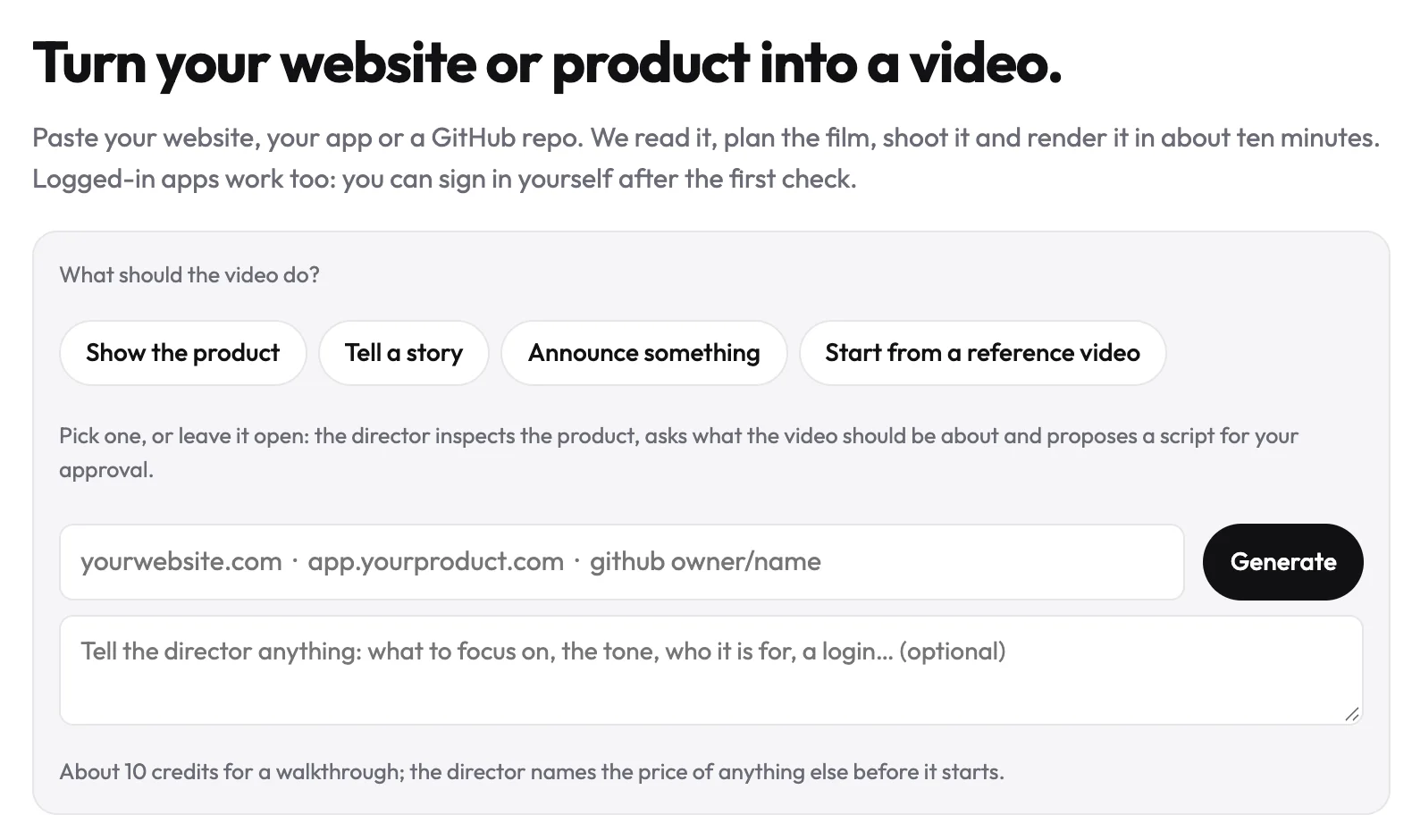
When you're ready, start a product demo video of your own product. You approve the storyboard first, then get a film of the product as it runs today.
A good demo doesn't start with pressing record. It starts with naming the job, then picking the tool built for it.
Make your tella alternatives from your website — it’s free →
Questions
What is Tella used for?
A Tella alternative is a tool for product demos that either records your screen differently, lets buyers click through the product themselves, or films the product with no recording session. Tella is screen recording software for Mac, Windows and the web. It records your screen, camera, microphone and system audio, and keeps screen and camera as separate streams so you can change the layout after recording, which suits demos led by your own face and voice.
Is there a free alternative to Tella for product demos?
Yes. Tella itself has a 7-day free trial and no forever-free plan. Per Supademo's blog, October 2026, its free plan includes 5 interactive demos and 50 4K video recordings, with no credit card required. Per Arcade's pricing page, October 2026, Arcade has a $0 plan with 200 AI credits a month, and its free output is watermarked. uscale gives a new account 10 credits, or 20 with a work email, for one full first video, with no card.
Can I still use my Tella videos if I cancel my subscription?
Partly. Without an active Tella subscription you can still view and share the videos you already have, but you can't record, edit or export, according to Tella's help docs. If you might want to re-cut or download an old demo later, export it while your plan is still active. Switching to a tool that films the live product, such as uscale, means there is nothing to carry over.
What does uscale cost compared with Tella?
Per Tella's pricing page as of October 2026, Pro costs $13 per user per month and Premium $19, both on annual billing, with Enterprise priced through sales. uscale has no subscription and no seats. The first video is free with 10 credits, or 20 with a work email. After that you buy a pack once: Lite is $29 for 25 credits, Starter $49 for 50 and Growth $129 for 150, about 15 product walkthroughs.
Can uscale put my face and voice on camera like Tella does?
Your face, yes; your voice, not today. uscale films are voiced with uscale's voices, so your own voice isn't used. A founder avatar film turns one clear photo of you into a presenter who speaks your approved lines to camera, but it speaks with a voice chosen from uscale's voices. If the demo has to be you speaking in your own voice, Tella, which records your camera and microphone, is the better fit.

The team behind uscale, which turns a website, web app or GitHub repo into a narrated product video.