Free framework, paid assistant
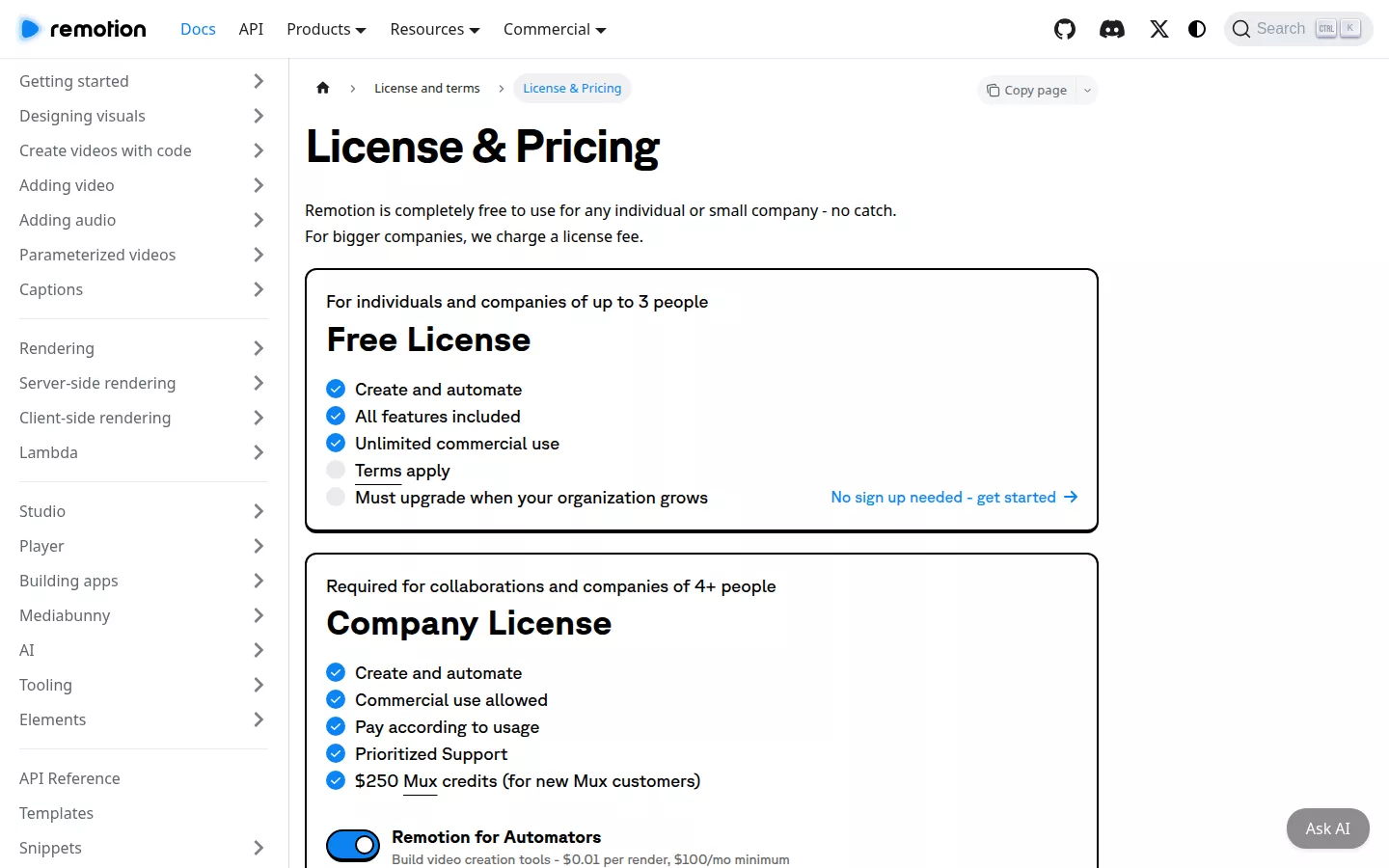
A launch video with Claude Code and Remotion comes with a bill that looks backwards. Remotion, the framework that turns your code into video, is free for individuals and companies of up to 3 people, with unlimited commercial use. Claude Code, the assistant that writes that code, isn't on Claude's Free plan. The cheapest way in is Pro, at $17 per month billed annually or $20 billed monthly.
So the part that renders the video costs nothing, and the part that types for you is the line item. That holds for one founder at one laptop. Add a fourth person, or a narrator whose voice you can legally publish, and the total moves in ways the "basically free" threads skip.
Every figure in this guide comes from the makers' own pricing pages, each with the date it was checked, and the costs are added up rather than guessed. So where does free stop for a team your size? The answer starts with Remotion's licence.
Launch video with Claude Code and Remotion: what 'free' covers
Remotion's licence costs nothing if three or fewer people work on your launch video, and that includes unlimited commercial use. A fourth person ends the free terms.
Remotion is a React framework, so each scene of your launch video is a component written in code and rendered to a video file. Claude Code edits that local Remotion project from your terminal and writes components from the copy and assets you give it. You still supply the voice, the music and the render. The setup also needs Node.js on your machine first.
What "free" covers
Remotion's licence page says the framework is completely free for individuals and companies of up to 3 people, with unlimited commercial use. A Company License is required only for collaborations and companies of 4 or more people. Free here is a headcount rule, not a feature tier. You get the same framework whether you are one person or three. You lose the free terms by adding people, not by rendering more.
Remotion also calls its code source-available, not open source under the Open Source Initiative definition, even though the source is published. Don't assume the terms of permissively licensed packages. Remotion's own licence governs how you use it.
The yes/no test for your team
Count every person who works on the video. The licence covers collaborations, not only companies, so a partner team working with you counts too.
- Three or fewer: yes, you can use Remotion free, commercially.
- Four or more: no, you need a Company License before you ship.
The point people get backwards is the trigger. It is people, not revenue or render volume. For a small team, the licence is the cheapest line in this stack. The first real bill comes from the coding assistant that writes the components.
Launch video with Claude Code or Cursor: what does the coding plan cost?
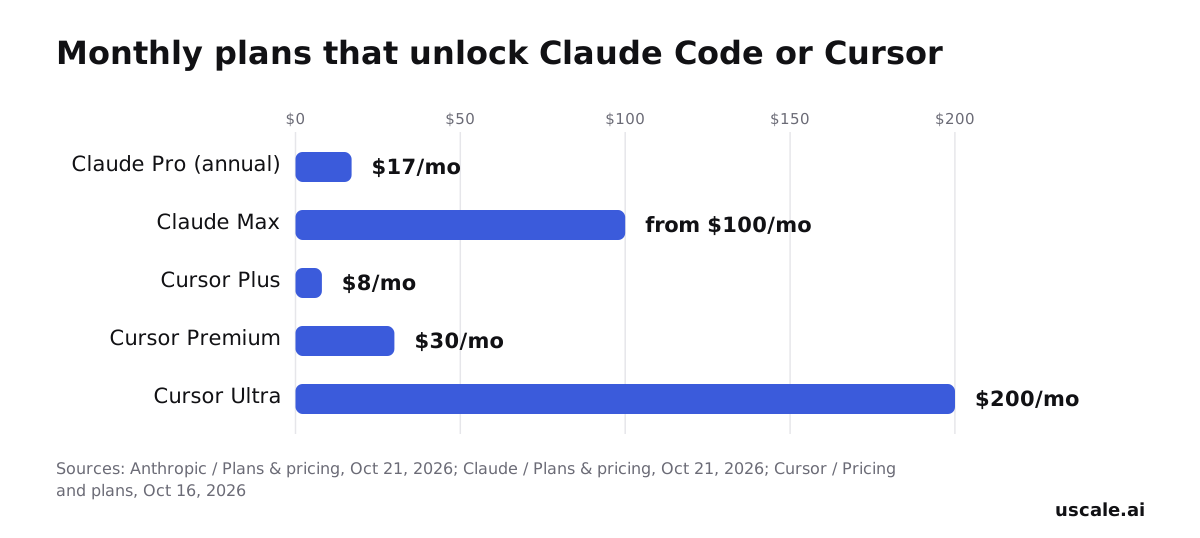
Claude Code starts at the Claude Pro plan: $17 a month billed annually, or $20 billed monthly. There is no free way in. Cursor, the usual alternative coding assistant, starts lower at $8 a month for Plus. For a launch video, the price tag matters less than how far a plan stretches in the week you're building.
Claude plans that include Claude Code
Claude's own comparison table lists Claude Code on Pro, Max 5x and Max 20x. It is not on the Free plan. Max starts from $100 a month and gives 5x or 20x more usage than Pro. Pro is the floor. Max is what you move to if Pro's limits stop you mid-build.
Cursor tiers side by side
Cursor's help center lists six tiers:
- Free ($0, limited usage)
- Plus ($8/mo, base usage)
- Premium ($30/mo, 4x Plus)
- Super ($100/mo, 15x Plus)
- Ultra ($200/mo, 50x Plus)
- Teams, at $30, $100 or $200 per seat per month
One detail changes the maths. Cursor is now sold as part of "The X Subscription", a single subscription covering Grok, Cursor and X. Paid plans share a weekly usage pool across Grok and Cursor models. If you also use Grok that week, it draws from the same pool your video components need.
Pick for your heaviest week
Most founders choose a plan by its monthly price. A launch video doesn't use a plan evenly. You spend a few days rewriting scenes, re-timing text and fixing renders, and after that very little. Size the plan to that burst, not to your average month.
If Pro or Plus already covers your normal coding, start there and move up only when limits actually stop you. If you already code daily in the assistant, the launch work lands on top of that load.
The coding assistant is only one line of the bill. Once your team grows, the next line to check is Remotion's licence.
What does Remotion's licence cost once you're a team?
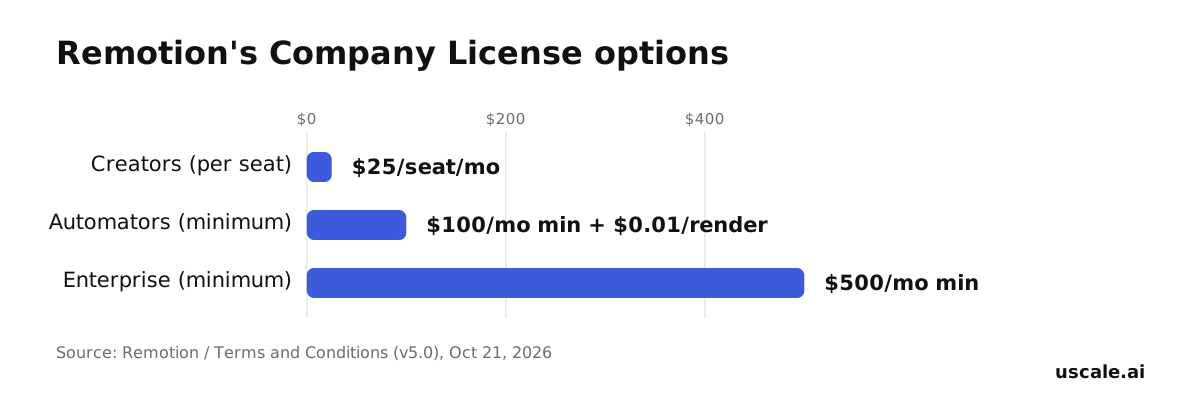
Once a fourth person joins, Remotion requires a Company License. Which one you need depends less on how many of you there are than on how your videos get made. Remotion's terms (v5.0, checked 21 October 2026) list three options.
The three options
- Remotion for Creators: $25 per seat per month, with no minimum number of seats. It is meant for organizations making low-volume videos for themselves, without automation.
- Remotion for Automators: $0.01 per render with a $100 per month minimum spend. It is meant for organizations building automations, such as video editors or prompt-to-video pipelines.
- Enterprise: a minimum spend of $500 per month, for advanced needs such as custom terms and private support.
Where your team lands
A founder making one launch video alone stays on the free licence, which covers individuals and companies of up to three people.
Now take a four-person team that writes its own launch video with Claude Code, edits the components by hand and renders a few cuts. That team fits the per-seat Creators option.
A company that wraps Claude Code and Remotion into a repeatable internal pipeline is automating. In that setup, a prompt or template turns into a rendered video without anyone building each one. That points to the Automators option.
How to plan for it
Budget by the way you make videos, not only by headcount. The cent-per-render price sounds like the cheap road, but the minimum spend is the real number to budget. You pay that $100 floor every month, however few videos you render.
Before you pick a tier, ask one question: is a person making each video, or is a system making them? That answer sets your Remotion line, which becomes one row in the full cost table that follows.
What does a launch video actually cost, line by line?
For a founder working alone, this route has two paid lines: the Claude plan that runs Claude Code and a voice plan with a commercial licence. Remotion adds nothing until a fourth person joins.
Copy the table, keep the rows that match your team, and total them yourself. Each figure is the maker's listed price on the date shown, so check it again before you budget.
| Line | Option | Listed price | Source, date |
|---|---|---|---|
| Remotion licence | Individual or team of up to 3 | Free, unlimited commercial use | Remotion License & Pricing, 21 Oct 2026 |
| Remotion licence | Team of 4 or more | Company License, tiers in the previous section | Remotion License & Pricing, 21 Oct 2026 |
| Coding assistant | Claude Pro (includes Claude Code) | $17/mo billed annually, or $20 billed monthly | Anthropic pricing, 21 Oct 2026 |
| Coding assistant, alternative | Cursor Plus | $8/mo, base usage | Cursor pricing, 16 Oct 2026 |
| Voice | ElevenLabs Free | 10,000 credits/mo, no commercial licence | Cartesia guide, 2 Oct 2026 |
| Voice | ElevenLabs Starter | $6/mo, commercial licence | Cartesia guide, 2 Oct 2026 |
| Voice | ElevenLabs Creator | $22/mo, adds Professional Voice Cloning | gradually.ai guide, 24 Sep 2026 |
| Music | Your choice | No sourced figure; confirm the licence allows published use | — |
The line most founders get backwards
The framework looks like the cost to watch and the voice looks optional. It runs the other way. Remotion stays free at small team size, but ElevenLabs' Free plan carries no commercial licence, so voice becomes a paid line the moment the video goes public. The voice licence is set by publishing, not by how much audio you make.
If teammates write components too, the assistant line multiplies: Cursor's Teams plan is priced per seat, at $30, $100 or $200 a month.
Every row here assumes the local, terminal route. Anthropic's own hosted editor sits on different Claude plans.
Claude Motion or Claude Code and Remotion: what's the difference?
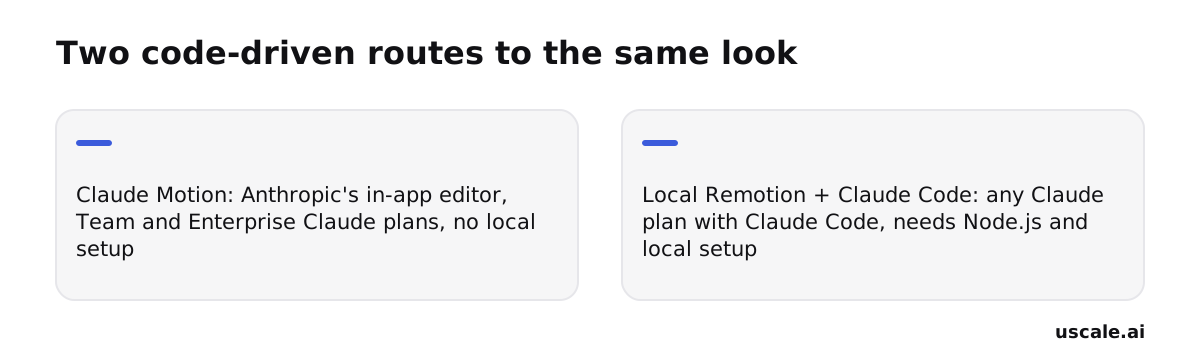
Both give you a similar code-animated look, but they are two separate routes, and Claude Motion does not run on Remotion. Anthropic launched Claude Motion in beta on October 8, 2026. It is an editor inside Claude, available on Team and Enterprise plans. Anthropic says it "doesn't use a video generation model." Instead, it writes code that animates the text, charts, shapes and images you supply, then exports an MP4.
The route this guide prices out runs on your own machine. Claude Code edits a local Remotion project from the terminal. That works on any Claude plan that includes Claude Code, but you install Node.js and set up the project yourself. Claude Motion skips that setup.
How to pick
Most people get one thing backwards: they treat the two as the same product at different prices. The look is close either way, so pick by where you want your changes to live.
- Choose Claude Motion if your company already pays for a Team or Enterprise Claude plan and you would rather work in a hosted editor than in project files.
- Choose Claude Code and Remotion if you are a lone founder on an individual plan, or you want the video as code you own and can reuse for the next launch.
A rule you can reuse: for a one-off video, convenience wins. For a video you will remake every release, owning the code is worth the setup.
For the Claude Motion route on its own, see our Claude Motion alternatives comparison and our guide to making product videos with Claude Motion.
Both routes share one limit: they animate only what you hand them. The next section starts from that limit.
What this route can't do — and the faster alternative
The Claude Code and Remotion route animates what you give it: text, shapes, charts and the images or clips you supply. It never opens your app and films it. To get your real dashboard on screen, you record it yourself, export the clips and add them to the project as assets. Each time the interface changes, you record those clips again and rebuild the scenes.
That is fine for a feature teaser or a pricing explainer. For a SaaS launch, it is the biggest gap. Founders often get this backwards. They spend their hours on transitions and type, then show the product last as a single still. A launch viewer is deciding whether the product is real and whether it is for them. Animated shapes can describe a product; only its own screens prove it exists.
The filmed route beside it
uscale starts where the code route needs a screen recording. On the Generate page, you paste your live site or app address, or a GitHub repository as owner/name. The director reads the product and proposes a storyboard with every narration line. Nothing is filmed until you approve it. uscale then clicks through the product and films each screen itself. For screens behind a sign-in, you log in once in a browser streamed to you. Voice, captions and music are added, and you ask for changes in the chat.
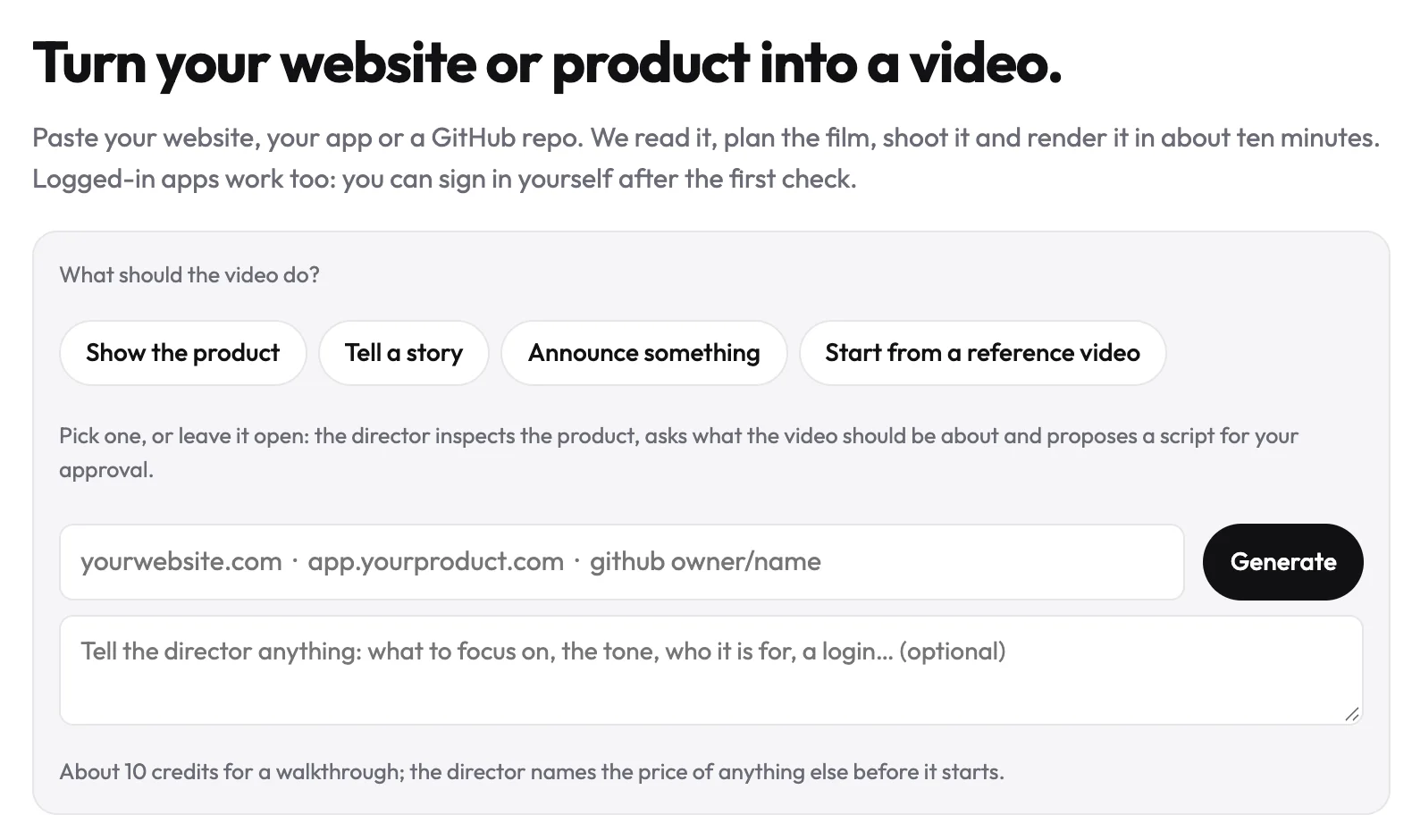
You give up line-by-line code control and gain time. When the app changes next week, you film the tour again instead of re-recording and re-cutting it. If you stay on the code route, the next section covers the mistakes that make its result look cheap.
What mistakes make a vibe-coded launch video look cheap?
A launch video built by prompting Claude Code to write Remotion components can look cheap, and you are right to worry that buyers will judge the product by it. The animation is rarely what gives it away. The bigger problems are a licence, a usage limit or a tool choice that fails at the worst moment. This guide has already covered four of them.
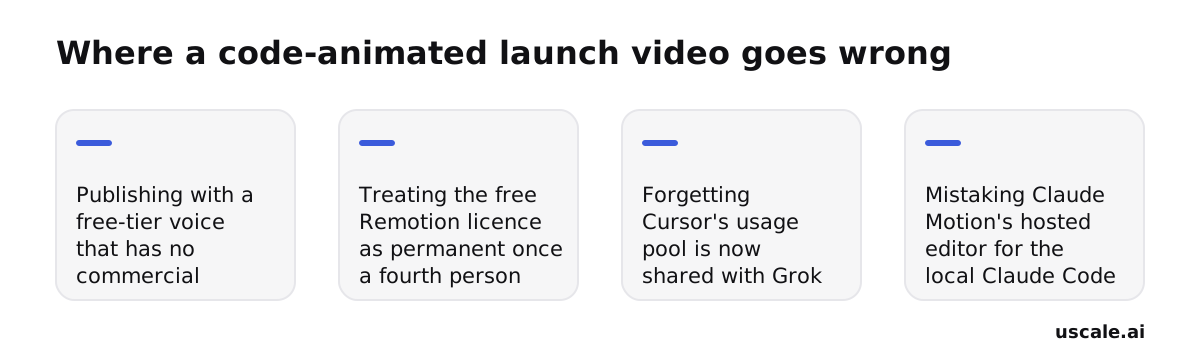
A free-tier voice on a published video. ElevenLabs' Free plan carries no commercial licence, so a narration that worked in testing can't go out with the launch. Voice gets its own row in the line-item cost table above for that reason. Pay for the voice tier before you publish.
Treating Remotion's free licence as permanent. The free terms cover individuals and companies of up to three people. Once a fourth person joins the project, you need a Company License. The section on Remotion's team licence shows which option fits.
Forgetting Cursor's usage pool is shared. Cursor is now sold as part of The X Subscription, and paid plans share a weekly usage pool across Grok and Cursor models. If you also use Grok, a busy video week can use up the plan sooner than expected. The plan comparison above helps you size for that.
Mixing up Claude Motion and the local route. Claude Motion is a hosted editor in beta on Team and Enterprise plans. The route this guide prices is a local Remotion project edited from the terminal. It needs Node.js and some setup, and it works on any plan that includes Claude Code. The comparison above, along with our guide to Claude Motion for product videos, explains the difference.
None of these is a reason to drop the route. Each one is a budget line or a setup choice. Catch all four before launch day, and the video reads as a deliberate style rather than a shortcut.
So much for what can go wrong. What's left is fitting all of it to your own launch.
How do you adapt this to your own product launch?
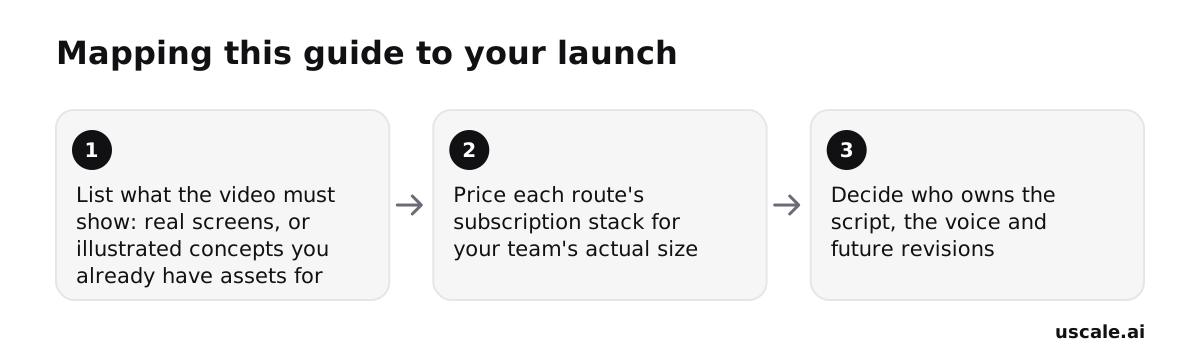
The line-by-line table above gives you every price. Three decisions are left, and you make them in this order.
Total your stack for your actual headcount. Copy the line items into a doc and fill in the team you have today, not the one you plan to hire. Remotion stays free for individuals and companies of up to three people, so headcount comes first. You're done when you have one monthly figure for the code route, voice included.
This is your quick win. It takes a few pricing tabs and a spreadsheet, and you can finish it within the hour. If you do only one thing from this guide, do this.
Decide whether the video must show the real app. The code route fits a launch built on ideas you can illustrate with assets you already have, such as a logo, a chart or a headline feature. If buyers need to see the actual screens, you have two choices. You can record them with the screen recorder already on your laptop and feed the clips into Remotion. Or you can use a route that films the product for you. You're done when "illustrated" or "real screens" sits at the top of your script doc.
Decide who owns the script, the voice and every revision. On this route there's no one to hand a change request to. Each new line, colour or timing is an edit that you or Claude Code make, then a fresh render. Book that iteration time before launch week. You're done when one named person owns the repo and the final render.
When the code route is still the right call
Keep it if your team wants full control of the code or already has an animation style it likes. It also makes sense if you make videos so often that a fixed monthly stack beats paying per render elsewhere. It suits a developer tool with a well-kept README and a team that lives in the terminal.
When a filmed route makes more sense
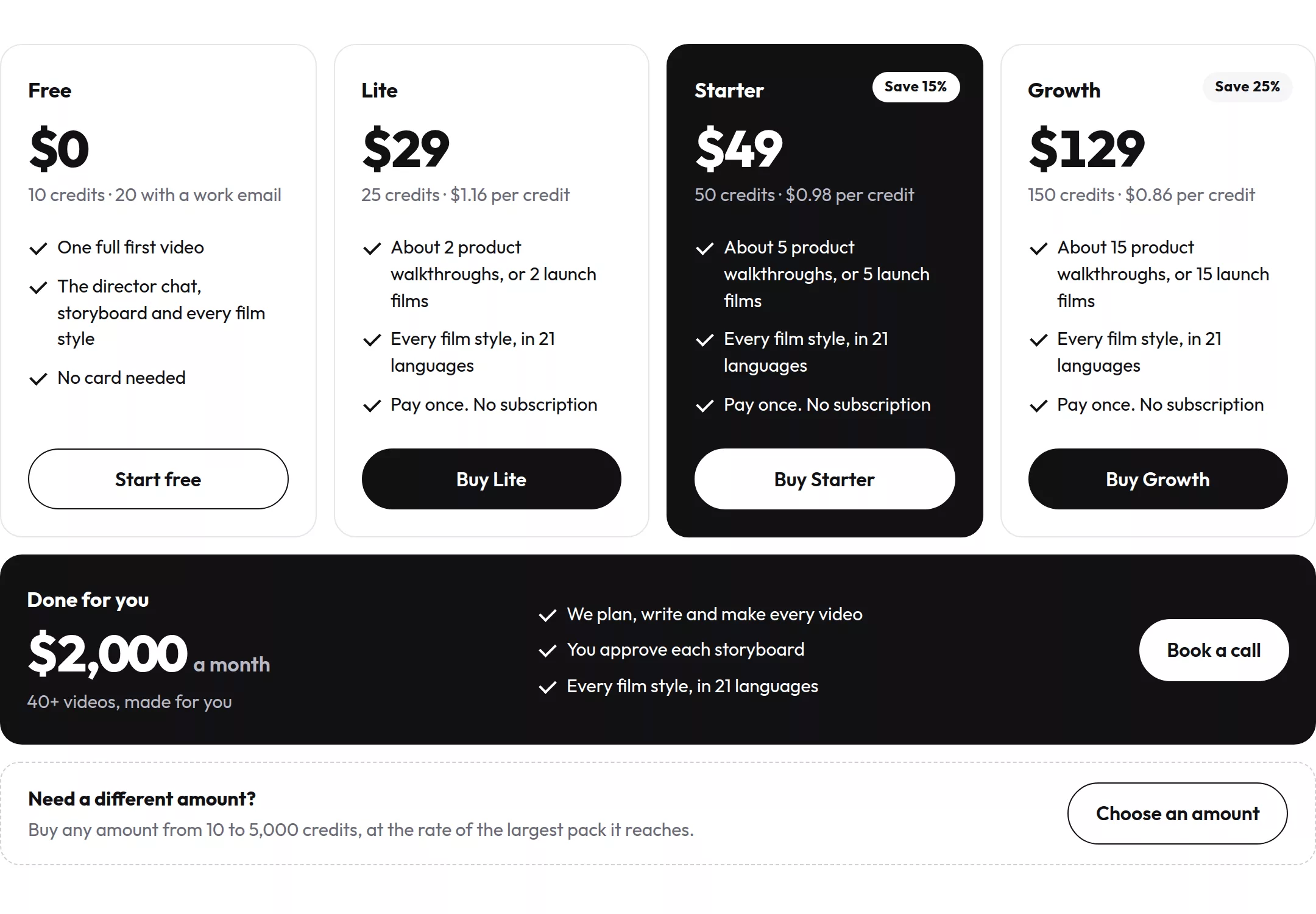
If you'd rather approve a storyboard than write components, uscale is the other option. By its own description, it turns a website, web app or GitHub repo into a narrated product video in minutes. It films the real screens and shows you every narration line for approval first. You ask for changes in a chat with the director. Credits are bought once, with no subscription and no seats. The product launch video use case shows the finished film, and uscale's pricing page lists the credit packs.
Either way, success looks the same: a finished video on your launch page, a README with a demo in it, and one link sales can send.
Try it: make a product launch video: your real screens filmed and narrated, with every line approved first.
Before you render the first frame
Three steps turn this guide into a decision:
- Total your own stack. Fill in the line-item table with your team size, coding plan and voice tier, and write down the monthly figure.
- Decide whether real footage matters. If buyers need to see the actual app, an illustrated video gets you halfway unless you record the screens yourself.
- Pick code or a filmed route. Full control and an animation style you already like point to Claude Code and Remotion. An approved storyboard and screens filmed for you point the other way.
The easiest way to settle step three is to put both results side by side. Your first product launch video on uscale is free, no card needed. Paste your site, approve the storyboard and get a narrated film of your real screens to set beside whatever your Remotion project renders. If you want to see a filmed launch before you start, watch the example films.
A launch video doesn't need the most tools. It needs a picture your buyers recognise as the product they'll log into.
Make your launch video with claude code and remotion from your website — it’s free →
Questions
What is a launch video made with Claude Code and Remotion?
A launch video made with Claude Code and Remotion is a code-animated video in which each scene is a React component that Claude Code writes from your copy and assets, and Remotion renders to a video file. It runs as a local project edited from the terminal, needs Node.js installed, and works on any Claude plan that includes Claude Code. You still supply the voice, music and any screen recordings.
How much does a launch video with Claude Code and Remotion cost?
A launch video with Claude Code and Remotion costs a lone founder about $23 a month at listed prices: Claude Pro at $17 a month billed annually ($20 monthly) plus ElevenLabs Starter at $6 for a commercially licensed voice. Remotion is free for teams of up to three people. A fourth person adds a Remotion Company License, such as Creators at $25 per seat per month, and teammates may need their own coding plans. Music is extra.
Do I need to pay for a Remotion licence to publish my video?
Remotion's licence is free for individuals and companies of up to three people, including unlimited commercial use, so a small team can publish without paying. A Company License is required for collaborations and companies of four or more people. The options are Remotion for Creators at $25 per seat per month, Remotion for Automators at $0.01 per render with a $100 monthly minimum, and Enterprise from $500 a month.
How do I write a product launch video script?
A product launch video script starts with one decision: whether buyers need to see the real app or an illustrated version of it. Write the narration around that choice, keep each line tied to something on screen, and name one person who owns the script, voice and revisions. On the Claude Code and Remotion route every changed line means an edit and a fresh render, so settle the words before building scenes.
Can this route film my real product, or only animate it?
The Claude Code and Remotion route only animates what you supply: text, shapes, charts, images and clips. It never opens your app and films it. To show real screens, you record them yourself, add the clips as assets, and record again whenever the interface changes. A filmed tool such as uscale opens your live site or app, clicks through it and films each screen, with sign-in screens handled by logging in once.

The team behind uscale, which turns a website, web app or GitHub repo into a narrated product video.