One launch clip, turned on its side
The first time we ran Veo 3.1 vertical video in Flow, the test clip was the launch film from AlpacaRelay, one of our own published examples. Google's announcement says Veo 3.1 now outputs native 9:16 video for platforms like YouTube Shorts, alongside upscaling to 1080p and 4K. On paper, that fills the Shorts slot of a launch in one generation.
We asked for a tall cut. Turning a wide product film vertical is usually a manual crop, and the screen you meant to show ends up outside the frame. Does native 9:16 fix that, or move the problem somewhere else?
Below: what changed, what each clip costs, and whether it's worth a product team's time this week. First, how we ran the test.
How we tested
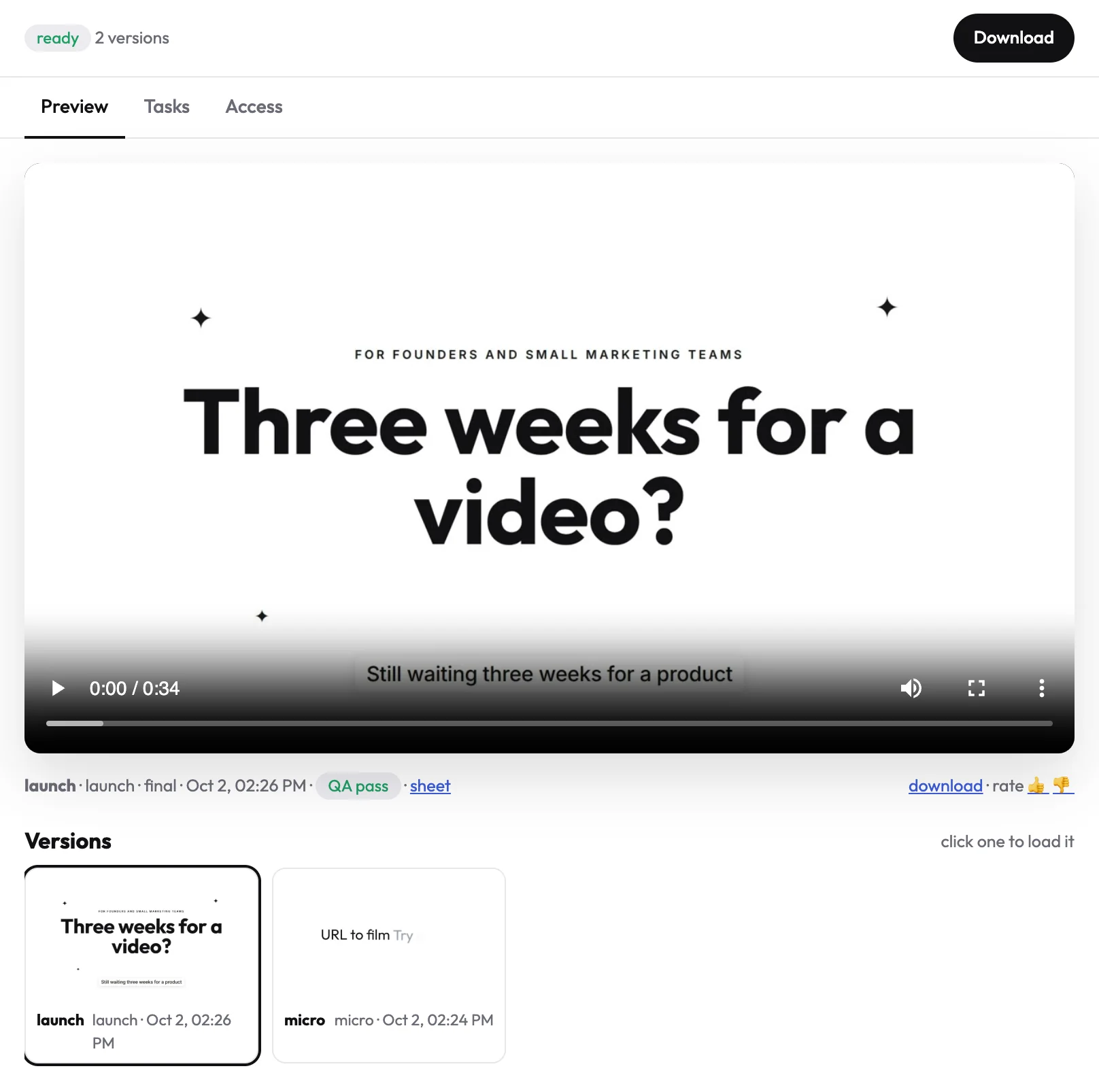
We didn't judge the update from Google's announcement alone. That announcement says Veo 3.1 now supports native vertical (9:16) output for platforms like YouTube Shorts. We ran the update ourselves on AlpacaRelay, the demo product and launch clip shown above. AlpacaRelay is one of our own published example films, not a customer project.
In uscale, we pasted AlpacaRelay's live URL. We approved a launch storyboard with every narration line written out, and uscale filmed the real product. We then took that same launch clip into Flow, one of the places the updated Ingredients to Video launched. We asked for a 9:16 cut and paid with Flow's free daily credits. The product, the footage and the request stayed the same. We compared the vertical cut with the launch clip it came from.
This tests the vertical-output change only. It is not a review of Veo 3.1 overall. It covers one product, one request and one session in October 2026, and Google's pages can change after that. uscale is our product, so we are not neutral. First, here is where the new format is available.
Where can you make a Veo 3.1 vertical video?
You can make one wherever the updated Ingredients to Video shipped. Google lists the Gemini app, YouTube Shorts, Flow, the Gemini API, Vertex AI and Google Vids. It also says Shorts and the YouTube Create app get the feature for the first time. The main change is native 9:16 output, alongside upscaling to 1080p and 4K.
| Where | Good first stop if you are | New in this update |
|---|---|---|
| Flow | Testing cuts by hand | — |
| Gemini app | Trying a prompt from chat | — |
| YouTube Shorts | Making the clip where it will be posted | First time |
| YouTube Create app | Already working in YouTube's own app | First time |
| Gemini API | Scripting a batch of cuts | — |
| Vertex AI | A team already on Google Cloud | — |
| Google Vids | A team already making videos in Vids | — |
Choose by where the clip will end up. A teaser for Shorts is quickest to make inside Shorts. A set of launch cuts belongs where you can rerun the same prompt.
On fit, Google says Veo 3.1 in Flow excels "in physics, realism and prompt adherence," with expanded creative controls and native audio. That suits believable short scenes better than explaining what a product does. Where you run it also decides how you pay. Clip length comes first, because the API bills by the second.
How long are Veo 3.1 vertical videos, and what do they cost per second?
Veo 3.1 clips run 4, 6 or 8 seconds, and you choose 16:9 or 9:16 for each one, according to Google's Vertex AI prompting guide. A vertical cut for Shorts is one short clip, not a sequence. Anything longer means several generations joined together.
On the Gemini Developer API, the price depends on the tier and the resolution. Here is the per-second rate at 1080p:
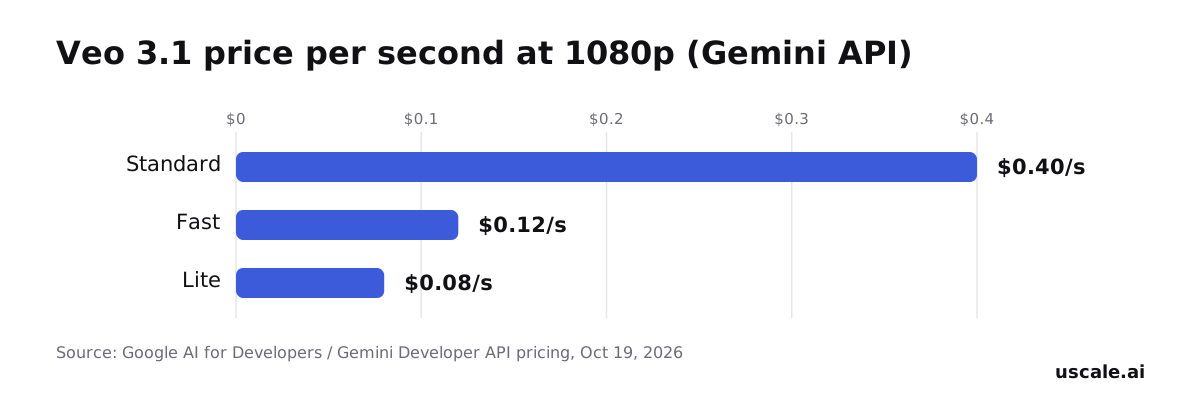
The same page also lists Standard at $0.40 per second at 720p and $0.60 per second at 4K. Fast runs $0.10 per second at 720p and $0.30 at 4K. Lite drops to $0.05 per second at 720p and has no 4K option.
Budget for takes, not clips
It is easy to price only the clip you keep. The API bills every generation by the second, so a rejected take of the same length on the same tier costs as much as the one you use. A fair estimate is clip length, times the per-second rate, times the number of tries you expect before one works. You can draft on Lite or Fast and save Standard for the final take, so the retries are not all billed at the top rate.
Those are raw API prices. Flow charges for the same generations in credits instead, and that changes the maths.
Is Google Veo 3.1 free to use?
Not on the API. Veo 3.1 is left out of the Gemini API's free tier, so every generation there is billed per second. Flow works differently. Every account, with or without a Google AI subscription, gets 50 daily Flow credits, and Ingredients to Video is a free-tier feature. That is how we ran our test without a per-second bill.
Flow charges per generation, and a 4, 6 or 8 second clip costs the same:
| Veo 3.1 in Flow | Credits per generation | Ultra subscribers | Clips from 50 free daily credits (our math) |
|---|---|---|---|
| Lite | 10 | 5 | 5 |
| Fast | 20 | 10 | 2 |
| Quality | 100 | No discount listed | 0 |
The last column is our own arithmetic from Google's credit prices. Google does not publish it.
Free credits cover drafts, not finals. A day buys five Lite clips or two Fast ones, and a single Quality clip costs twice the daily allowance. Draft vertical cuts on Lite and spend on Fast or Quality only for the take you post. The free tier can cover a teaser. The harder question is whether a teaser is all your launch needs.
How to choose between a Veo teaser and a full launch film this week
OpenAI's Sora 2 API has been shut down since September 24, 2026, and OpenAI has named no replacement. If your team was waiting on it, Veo 3.1 is the model to test now.
Run one existing clip through Flow's vertical mode. Use the 50 free daily credits rather than the per-second API. This is your quick win: you'll see whether a generated 9:16 cut still looks like your product. Done when you have one clip you'd actually post.
Decide what the Shorts or Reels slot has to do. If it only teases the launch and sends people elsewhere, one cut of up to 8 seconds can carry it. If viewers need to see real screens and hear what changed, you need a narrated walkthrough. The free route is the screen recorder you already have plus a script in a doc. Or paste your site into uscale, which says it turns a website into a narrated video of the real product in minutes. See the product launch video use case and what it covers for software products.
Keep both as versions of one launch. uscale saves every render as a new version in the project, so the full film and later cuts stay in one list. File the Veo teaser under the same launch name beside them.
If you do only one thing, run the free Flow test today. Success looks like a vertical teaser on Shorts and one narrated film on the launch page that sales can link to.
Try it: make a product launch video from your live site, with every narration line approved before filming.
Before your next vertical cut
Before you budget anything:
- Test one clip free. Take a demo clip you already have into Flow and ask Veo 3.1 for a 9:16 cut on the 50 daily credits every account gets, before paying per second on the API.
- Decide what the slot needs. One generated cut can fill a Shorts or Reels teaser. If the launch needs the real product narrated screen by screen, plan a filmed walkthrough too. Your first uscale video is free. After that, the credit packs are paid for once, with no subscription.
- Check back. Google keeps shipping Veo updates, so today's limits may change.
For the fuller picture beyond this one update, read how long an AI-generated video can be. A vertical clip earns the glance; the walkthrough explains the product.
Make your veo 3.1 vertical video from your website — it’s free →
Questions
What is Veo 3.1?
A Veo 3.1 vertical video is a native 9:16 clip made with the updated Ingredients to Video in Veo 3.1, Google's video generation model, for platforms like YouTube Shorts. Google first released Veo 3.1 in October 2025 with improved audio and more granular editing controls. The January 2026 update added native vertical output and upscaling to 1080p and 4K, and Google describes the model as strong in physics, realism and prompt adherence.
How do you use Veo 3.1 to make a vertical video?
To make a Veo 3.1 vertical video, open a tool where the updated Ingredients to Video shipped, such as Flow, the Gemini app or YouTube Shorts, and ask for 9:16 output before generating. Each clip runs 4, 6 or 8 seconds. In Flow, the 50 free daily credits cover a few drafts: Lite costs 10 credits per generation and Fast costs 20. Keep the higher tiers for the take you post.
How long are Veo 3.1 videos?
A single Veo 3.1 clip runs 4, 6 or 8 seconds, in either 16:9 or 9:16, according to Google's Vertex AI prompting guide. Anything longer means several generations joined together. On the Gemini Developer API, length also sets the price, because every second is billed: Standard costs $0.40 per second at 720p and 1080p, and a rejected take costs as much as the one you keep.
How do you access Google Veo 3.1?
Google Veo 3.1, with the updated Ingredients to Video, is available in the Gemini app, YouTube Shorts, Flow, the Gemini API, Vertex AI and Google Vids, and it reaches Shorts and the YouTube Create app for the first time. Choose by where the clip will end up: Shorts for a teaser posted there, Flow for testing cuts by hand, and the Gemini API or Vertex AI for scripting batches of cuts.
Is Google Veo 3.1 free?
Google Veo 3.1 is free within Flow's daily credits, but not on the API. Every Flow account, with or without a Google AI subscription, gets 50 daily credits, and Ingredients to Video is a free-tier feature. That covers five Lite clips or two Fast clips a day; a Quality clip costs 100 credits. The Gemini API leaves Veo 3.1 out of its free tier, so every generation there is billed per second.

The team behind uscale, which turns a website, web app or GitHub repo into a narrated product video.