Why Supademo alternatives come up on launch day
Say you shipped a tidy Supademo guide for the help center on Monday. Every click is highlighted, and it sits right where customers get stuck. Then launch planning lands on your desk. Marketing wants a short narrated video for the LinkedIn post, and that guide is the only demo you have. That is often when the search for Supademo alternatives starts.
You open the guide and see the problem. It waits for a click at every step. Supademo can export a demo as a video or an AI-narrated version, so you can get a file. But the file is still the guide, paced for someone learning a workflow, not for someone scrolling a feed.
The guide did its job well. A launch video is a different job, and the tools built for it are not all the same kind of tool. Which kind fits comes down to one question about the person watching. First, though, it's worth being clear about why anyone leaves a tool that works this well.
Why look for a Supademo alternative?
Supademo doesn't fail. Teams look elsewhere when the next item on the launch list isn't a guide the viewer clicks through. It's a video that plays on its own: in a LinkedIn launch post, at the top of a README, inside an onboarding email.
Supademo's strengths are real, and worth naming before any comparison. From its own pricing page and homepage, as of October 2026:
| What Supademo does well | What you get |
|---|---|
| Free-forever plan | $0/month for 1 creator, with 5 guided interactive demos and 50 video recordings in 4K |
| Unlimited demo views | No cap on how many people see a demo, even on the Free plan |
| Sandbox demos | Viewers explore freely without provisioned accounts, real data or a staging environment |
| AI Demo Agent | A 24/7 agent that runs discovery, qualifies buyers and surfaces the right demos and proof assets |
This isn't a setup. If your help center, sales enablement or trial flow needs a clickable walkthrough, those are good reasons to stay.
Where the job changes
Picture launch week. The guide is live and the positioning is signed off. Then the launch post needs a 30-second narrated video. A feed post can't wait for anyone to click.
So the usual fix starts: open a recorder, do a take, talk over it, trim. Supademo's own Videos feature makes that take cleaner. It records screen and camera in up to 4K, lets you set zoom, background and cursor, and lets you trim, cut, crop or change playback speed. But someone still has to record it live, often before the script is final.
The cost arrives in rounds. A re-record when review changes the copy. Another when the settings page moves next sprint. Each one lands on whoever has the clean demo account and the steady voice.
The tool isn't the problem. The order is. Recording starts before the words are right, one person owns the edit, and the video gets made last, after the launch copy. Leave that order alone and the next launch ships with the same rushed screen recording, or with no video at all.
Before you swap tools, the better question is about your viewer, not the feature list. Start with the viewer who should still be clicking.
Storylane: when you want another click-through demo builder
Pick Storylane only if the job hasn't changed. If you still need a demo the viewer steers by clicking, such as a guide in the help center or a tour embedded on a product page, and the reason you're looking is vendor fit, a second click-through builder is the sensible shortlist. Storylane is the one this post puts in that slot.
We haven't quoted Storylane's features or price here because we found no dated figure from its own pages to cite. Check Storylane's own site for current plans. Our Storylane comparison shows how it sits next to uscale.
The test that matters is the format, not the logo. Supademo's Guided Interactive Demos walk users through curated, step-by-step experiences. Its free plan already includes unlimited demo views (Supademo homepage and pricing, October 2026). If your viewers liked clicking, a switch comes down to price, editor or support.
If the real gap is that a launch post or an onboarding email needs something that plays on its own, a new click-through tool leaves that gap where it was. Changing vendors changes the bill, not the format.
| Question | Click-through builder (Supademo, Storylane) | uscale |
|---|---|---|
| Who drives it | The viewer, click by click | No one. It plays itself |
| Where it fits | Websites, docs, help centers, apps | Launch posts, READMEs, onboarding emails |
| What you start from | A captured flow of your product | Your site's URL or a GitHub repo |
| Price | See each vendor's own pricing page | Credit packs from $29, no subscription |
vs uscale: Storylane keeps the viewer clicking. uscale hands them a finished, narrated video that plays itself.
The next pick starts from a different place: footage you've already recorded.
Descript: when you already have the footage
Reach for Descript when the recording already exists. If you or a teammate have screen or camera footage saved, the job is no longer capturing the product. The job is cutting a long take down, fixing the stumbles and adding captions. That is editing work, and an editor is the right tool for it.
Most teams pick a tool by the video they want at the end. The better question is what they are starting from. Two tools can both end in a narrated product video and still solve opposite problems: one assumes you have footage, the other assumes you don't.
We have no dated fact from Descript's own pages for this post, so we aren't quoting its feature list or its prices here. Check its site before you buy. Our longer comparison of Descript and uscale covers how the two differ.
| Descript | uscale | |
|---|---|---|
| You start with | Footage you already recorded | Your site's address or a GitHub repo |
| Recording step | Yours, done before editing | None. uscale films the live product |
| How you make changes | You edit the recording | You ask the director in a chat |
| When the app changes | Record again, then edit again | Film it again. The tour is saved with the project |
vs uscale: Descript edits the footage you give it. uscale films the live product itself, so there's no recording step. You approve a storyboard with every narration line before anything is filmed. You then get a video with voice, captions and music.
Choose by what you start with, not by what you want to end with. If the starting point is a quick personal take you haven't recorded yet, the next tool is the better fit.
Tella: when it's a quick async message, not a sales asset
Pick Tella when the video is a message, not an asset: a quick screen recording with your face in the corner, sent to one teammate or one prospect, watched once and done. It is not the pick for a polished demo that lives on a landing page or leads a launch post.
Tella is a screen recorder for people who explain things by talking over their own screen. We couldn't source a dated copy of its feature list or prices, so we don't quote either here. Check Tella's own pricing page, or read our Tella comparison for the longer view.
The reason to choose it is the audience, not the software. A recording made for one person can stumble; a video made for a thousand can't. A pause, a "wait, let me open that", your face reacting: these tell a prospect the clip was made for them, which is why you sent it. A launch post is the opposite. Strangers watch it, often muted, and every stumble costs a viewer.
| Quick async message (Tella's lane) | Narrated product video (uscale) | |
|---|---|---|
| Who watches | One teammate or prospect | Anyone who sees the launch post, README or email |
| How it's made | You record a live take | You approve a storyboard; uscale films the product |
| A face on screen | Yours, in the corner | An optional founder avatar, or none |
| A line goes wrong | Leave it in or record again | Ask the director to change that line |
| Sound off | Not the usual case | Captions on every film |
vs uscale: Tella is a live take recorded once, so the take has to be right. uscale writes a storyboard for your approval and films the product itself, so there is no take to get right, only lines to agree on.
If you want a face on screen but not your own take, the next question is whether a presenter should carry the whole video.
HeyGen: when a person or avatar should speak to camera
Pick HeyGen when the presenter is the video. If the message is a face talking to camera, such as a founder's welcome, a sales note or an internal update, and the product screens are secondary or missing, you want a tool built around the avatar. HeyGen is the avatar-led option on this list. For its current plans and price, check HeyGen's own pricing page; our HeyGen comparison sets it beside uscale.
Many teams get this backwards. They add a presenter to a product demo because a face feels personal. A face can tell viewers someone stands behind the product, but it can't show the product doing the job. Before you choose, decide what the viewer has to believe by the last frame: that a person vouches for this, or that the product works. The first calls for a presenter. The second calls for the screens.
| What the viewer should mostly see | Better fit |
|---|---|
| A person or avatar talking to camera for most of the video | HeyGen |
| A spoken message with few or no product screens | HeyGen |
| The real product screens, with a short presenter on some lines | uscale with a founder avatar |
| The real product screens, narrated, with no presenter | uscale |
vs uscale: in a HeyGen video the avatar carries the whole thing. uscale's founder avatar option puts a presenter next to filmed product screens, and only when you want one. One clear photo becomes a presenter who speaks your approved lines, each up to about 30 words, with up to six lines per film and the product composed around them. It costs 1 credit for the portrait, 30 for the avatar film and 2 for its render. The presenter uses a uscale voice, not your own.
When the screens should carry the film without a presenter, you need a different kind of tool.
uscale: a narrated video of the product itself, not a click-through guide
Pick uscale when the video has to play on its own: in a launch post, at the top of a README, inside an onboarding email. You paste your product's URL or a GitHub repo. A director in the chat reads the product and proposes a storyboard with every narration line. You approve it before anything is filmed. What comes back is a narrated product demo video of your real screens, with a voice, captions on every word and a music bed under it.
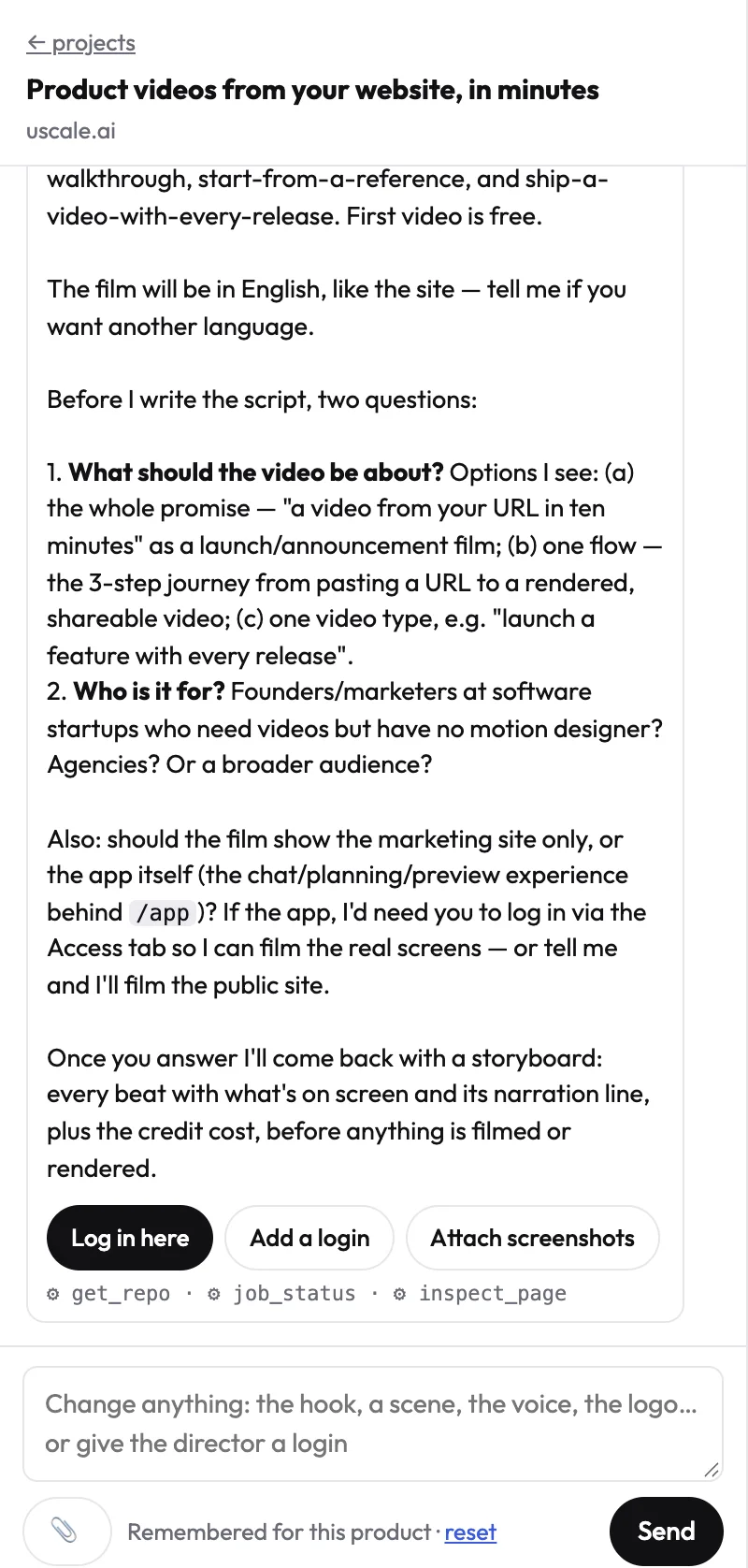
The approval step is where the video is decided. In the director chat you can say "start on the dashboard and end on the export," cut a line, or paste your own script. The chat is free, and the director names the price before any step that uses credits.
The rule you can reuse: a launch post, a README and an email give the viewer nothing to click, so the video has to carry the whole story by itself.
uscale isn't built for a guide the viewer clicks through at their own pace. That is Supademo's job. Its guided interactive demos walk users through curated, step-by-step experiences, and its sandbox demos let them explore freely without a staging environment. uscale doesn't make either.
vs Supademo: a Supademo guide moves when the viewer clicks. A uscale film plays itself, the way a launch post or email needs.
Price, as uscale's pricing page shows it: 10 credits to start (20 with a work email), no card needed. After that you buy credits once, starting with Lite at $29 for 25 credits, with no subscription and no seats. The comparison below sets that price beside every other tool's.
Try it: make a product demo video: a narrated video of your real screens, with every line approved before filming.
How do Supademo alternatives compare on job and price?
uscale is our product, so read its row the way you read the others: as the fit for one job. The rows split on one question first. Should the viewer click, or just watch? After that, what you start from and how you pay settle the rest. Prices are taken from each tool's own page.
| Option | Built for | Who it fits | Price, as its own page states it |
|---|---|---|---|
| Supademo | Guided, step-by-step demos that viewers click through, embedded in a site, docs, help center or app. It can also export as video. | Teams building self-serve demos | Free: $0/month, free forever for 1 creator, with 5 guided interactive demos and 50 video recordings in 4K. Scale: $50/month per creator (shown as $38/month with a 24% saving). AI agent demos at roughly $1 per call. |
| Storylane | Click-through demos from a different vendor | Teams comparing click-through demo builders | See their pricing page |
| Tella | A quick, personal screen recording for one teammate or prospect | Anyone sending async messages | See their pricing page |
| Descript | Cutting, captioning and cleaning footage you already have | Teams that record first and edit after | See their pricing page |
| HeyGen | Videos where a person or avatar speaking to camera is the point | Teams whose video centers on a presenter | See their pricing page |
| uscale | A narrated video of the real product that plays itself, made from a URL or a GitHub repo, with voice, captions and music | Solo founders before launch, developer-relations teams with a repo, agencies with client launches | Starts with 10 credits, 20 with a work email. Credit packs from $29 for 25 credits. Pay once, no subscription, no seats. See uscale pricing. |
Supademo and uscale prices come from their own pricing pages, checked October 2026. We had no dated figures for Storylane, Tella, Descript or HeyGen, so the table names none. Check each pricing page before you decide.
On price alone, Supademo's free plan gives one creator free demos every month. uscale's free credits are a one-time start, and after that you buy packs. That trade-off stays in.
Which row is yours
If buyers should explore the product themselves, compare Supademo and Storylane. If the footage already exists, open Descript. For a one-off async message, open Tella. If the presenter is the video, open HeyGen. If you're a solo founder before launch, a developer-relations team with a repo, or an agency with client launches, and you need a narrated film of the real product, open uscale.
Rule of thumb: if the viewer should click, pick a demo builder; if they should just watch, pick a video tool by what you're starting from. That rule cuts both ways, including against uscale.
When should you not choose uscale instead of Supademo?
The strongest case for staying with Supademo is about what a click-through demo can do that a video can't. In a Supademo sandbox, a viewer explores the product without an account or a staging environment. Conditional branching lets a security lead and a finance lead take different paths through the same demo. An embedded demo tells your site when someone starts, progresses or finishes, so you see how far each viewer got. A narrated video plays the same way for everyone and reports none of that. If your buyers want to drive, a film that drives for them is a step backwards.
That objection holds. In these cases, don't choose uscale:
- Viewers need to click through the product themselves. Stay with Supademo, or try Storylane as another click-through demo builder.
- You're editing footage you already shot. Use Descript to cut and caption your own recordings. uscale films the product itself and isn't a footage editor.
- It's a quick async message to one person. Tella records a personal screen clip in one take.
- A person or avatar is the center of the video. Use HeyGen for an avatar presenter. uscale's founder avatar speaks up to six short lines beside your product. It isn't built for a presenter-led video.
- The job is a live-action shoot with people, a location and a crew. Hire the crew.
- You need a REST API to make videos in bulk. uscale has no public REST API. It does work inside Claude, ChatGPT and Cursor through its MCP server, live since October 2026, where you ask for a video in the chat.
What's left is the job this post is about: a launch post, a README or an onboarding email. Nobody clicks there, and the video has to play on its own. The interactive demo vs demo video guide covers that split in more depth. Supademo's strengths live where the viewer drives. When the viewer only watches, a narrated film of the real product is the right tool, and that's the gap uscale fills.
So it comes back to the question from the top.
Which Supademo alternative fits you?
Ask what the viewer should do when the video opens: click, or watch. Then pick:
- They should click through the product. Stay with Supademo, or open Storylane if you want a different click-through builder.
- It's a quick note to one teammate or prospect. Record it in Tella.
- The footage is already shot. Cut and caption it in Descript.
- A presenter on camera is the point. Try HeyGen.
- It's a narrated video of the real product for a launch post, README or onboarding email. Paste your site or repo into uscale, approve the storyboard and get it back with voice, captions and music. Developer-tools teams can start from the repo before a live site exists.
To judge the format first, watch the example films made with uscale.
Your first uscale video is free, so test it on this week's launch rather than a sample: start a product demo video of your own product.
A help-center guide can wait for clicks. A launch post can't, and neither should the video inside it.
Make your supademo alternatives from your website — it’s free →
Questions
What are Supademo alternatives?
Supademo alternatives are tools people use instead of Supademo when the job is different from a click-through guide, such as a narrated video that plays on its own in a launch post, README or onboarding email. Supademo itself is used to build guided, step-by-step interactive demos that viewers click through, embedded in websites, docs, help centers and apps. Common alternatives include Storylane, Descript, Tella, HeyGen and uscale, each suited to a different job.
What's a free alternative to Supademo for a narrated product demo video?
uscale makes a first narrated product demo video free: a new account gets 10 credits, or 20 with a work email, with no card needed. You paste your site's address or a GitHub repo, approve a storyboard with every narration line, and get a video with voice, captions and music. Supademo's own Free plan, at $0/month for one creator, also includes 50 video recordings in 4K, but those are recordings you make yourself.
Can you switch from Supademo to video without re-recording everything?
Supademo can export a single recorded demo as a screenshot, video, embed or AI-narrated version, so an existing guide can become a video file without re-recording. That file keeps the guide's step-by-step pacing, though. For a launch-style video, uscale needs no recording at all: it films your live site or app from its address, and when the app changes you film it again, because the tour is saved with the project.
What does uscale cost?
uscale's first video is free, with 10 credits, or 20 with a work email, and no card needed. After that you buy credits once, with no subscription and no seats: Lite is $29 for 25 credits, Starter $49 for 50 credits, and Growth $129 for 150 credits. Each step has its own price in credits, and the director names the price before any step that uses them.
What's the difference between an interactive demo and a demo video?
An interactive demo moves when the viewer clicks: Supademo's guided demos walk users through curated, step-by-step experiences, and embedded demos can report when a viewer starts, progresses or completes. A demo video plays on its own, the same way for everyone, which suits a launch post, a README or an onboarding email where nobody clicks. Pick an interactive demo when buyers should explore, and a demo video when they should just watch.

The team behind uscale, which turns a website, web app or GitHub repo into a narrated product video.