The $20,000 minute
Professionally produced animation typically costs $5,000 to $20,000+ per finished minute, according to Yum Yum Videos' 2026 research across 125 production companies. At that rate, a single 60-second animated explainer video for a landing page can carry a five-figure invoice before anyone has written the script.
Some explainers need no character, no illustrator and no screen recording. In the film below, the words do all the moving.
The gap between a cheap explainer and an expensive one depends mostly on two choices: the style you pick, and who makes it (a freelancer, a studio or a tool). The sections below cover the four styles, when animation beats filming the real product, how one gets made, how long that takes, and what each route costs, with prices quoted from named studios and tools. First, though, comes the question most briefs skip: does this idea need animating at all?
The answer depends on what each kind of animation is good at, so start with the styles.
Four animated explainer styles, and what each one explains best
An animated explainer video is not one format. It comes in a handful of styles, and each one explains a different kind of thing well. The usual mistake is picking the style that looks best in a showreel.
Motion graphics
Yum Yum Videos defines motion graphics explainers as using typography, shapes, icons, charts and animated interfaces to explain information visually. It sets them apart from character-driven 2D and whiteboard styles. Nothing on screen has a face. The motion carries structure and cause and effect: a chart redraws, or a simplified interface highlights the one button that matters.
2D character animation
Drawn characters act out a situation. Someone has a problem, tries the old way and then finds the new one. Use this style when the subject is a human moment, such as a frustration or a hand-off between people, or when a recurring brand character is worth building.
Whiteboard and illustrated drawing
A hand or pen draws the picture while the narration speaks. Ideas appear in the order they are explained, which suits processes and step-by-step reasoning.
Kinetic typography
Videobolt defines kinetic typography as animating text by moving, scaling, rotating and recolouring it. The words become a moving layer of the film instead of static captions, so the script itself is the picture. It suits one strong message, such as a launch line or a short social cut.
| Style | What moves | Best for |
|---|---|---|
| Motion graphics | Type, shapes, icons, charts, simplified interfaces | Data, systems, how a feature fits together |
| 2D character animation | Drawn people or a mascot | A customer's problem, a story, a brand character |
| Whiteboard / illustrated | A drawing building up as the voice speaks | Processes and sequences the viewer follows in order |
| Kinetic typography | The words themselves | One message, a launch line, a short social cut |
Here is a test you can reuse. Write down the one thing a viewer must understand by the end, then ask what kind of thing it is:
- If it is a number or a system, use motion graphics.
- If it is a feeling or a situation, use characters.
- If it is a sequence, draw it.
- If it is a sentence, animate the sentence.
A style that doesn't match its subject spends the budget fighting it. A character film about a pricing model is one example. A chart-heavy film about a customer's bad day is another.
Choosing a style raises a bigger question: whether the video should be animated at all, or should film the real product instead.
Animate when there's nothing to film; film when the screens are the proof
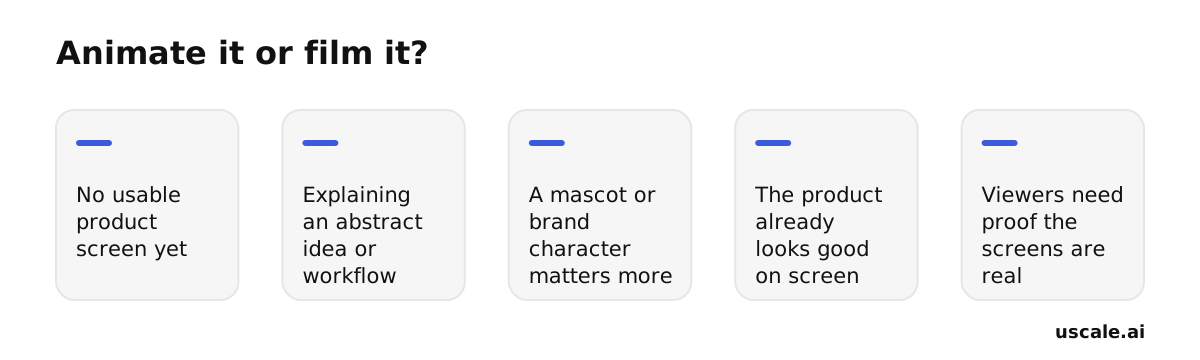
Animation earns its budget in three situations: there's no usable product screen yet, the idea is abstract, or a recurring character carries the brand better than the interface does. Once the product looks good on screen and the viewer needs to believe the screens are real, filming the product wins.
The format isn't the risk. In Wyzowl's survey of 266 video marketers conducted in late 2025, 68% said they had created explainer videos, the single most popular video-marketing use case. Wyzowl also reports that adding an explainer to a landing page can boost conversions by up to 80%, and that 96% of people say they've watched an explainer video to learn about a product or service. None of those findings depends on a style. Viewers want the explanation. Whether it's drawn or filmed should follow from what you have to show.
When to animate
- No usable product screen yet. This covers a pre-launch build, a beta UI you'll redo next month, or a backend with nothing to look at. Drawing the idea beats filming a placeholder.
- The idea is abstract. Examples include a workflow across three teams, a compliance policy, or a metaphor for what the product replaces. Shapes and icons can show relationships a screen can't.
- A mascot or brand character matters more than the UI. If the character runs across ads, onboarding and social, keeping it consistent is worth the cost.
When to film
- The product already looks good on screen. Redrawing a clean interface spends money to show less.
- Viewers need proof the screens are real. A buyer comparing tools trusts the actual dashboard over an illustration of one. A drawn interface can promise anything. A filmed one shows what exists.
The call for your next video
List your next three videos and ask one question about each: is the most convincing thing in it something a viewer could click today? If the answer is yes, film it. A product demo video made in uscale opens your live site or app and films each screen, with no screen recording on your side. If the answer is no, animate it and pick the style from the table above. Many products end up with both: an animated piece for the abstract why and a filmed one for the how.
That choice also sets your timeline, which the next section covers.
Map the five production steps and get a launch date you can trust
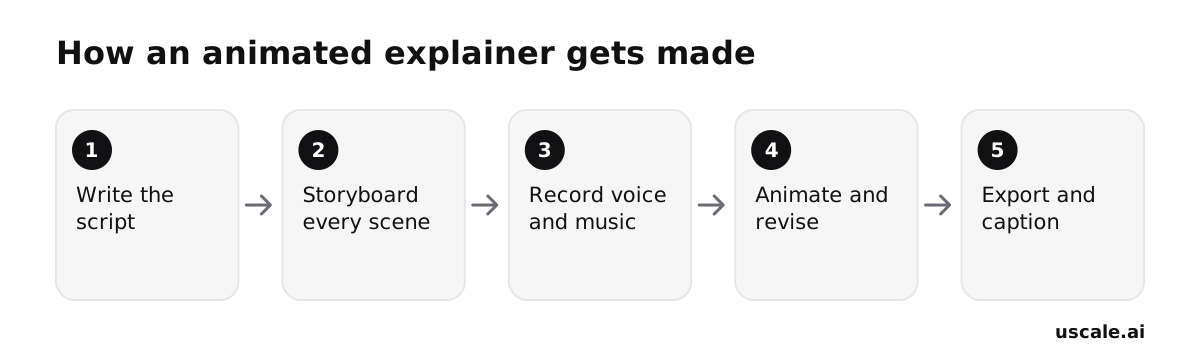
An animated explainer video is made in a fixed order, and that order is the schedule. Each step locks the one after it. The script decides what the storyboard shows. The storyboard decides what gets animated. The voice track decides how long each scene runs. If you change the script after animation starts, you pay to redo every frame that followed it.
What each step produces
- Write the script. A 60-second script runs about 140 words. That is shorter than most first drafts, so the cutting usually happens here, which is also the cheapest place to do it.
- Storyboard every scene. Each narration line gets a frame or sketch, so everyone agrees on what the viewer sees before anyone animates it.
- Record voice and music. The narration sets the timing. Animators work to the voice, not the other way round.
- Animate and revise. This is the longest stretch, and it is where review rounds add up.
- Export and caption. You get final files in the sizes you need, with captions for feeds that start muted.
The timeline to put on a calendar
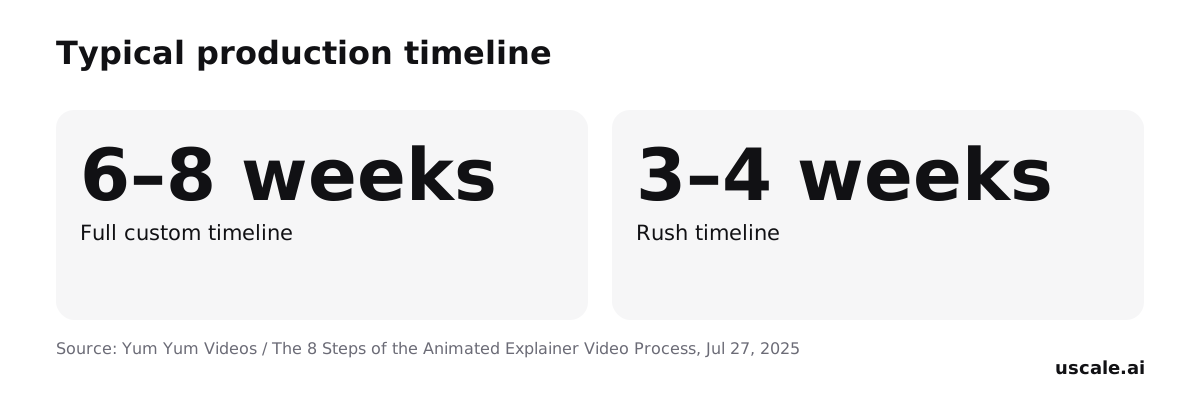
Yum Yum Videos puts a typical custom animated explainer at about 6 to 8 weeks including review time. Rush projects are sometimes finished in 3 to 4 weeks. The phrase "including review" matters. The studio's hours are only part of that span. Every round where your team reads a script, approves a storyboard or sends notes on an animation pass also runs on that clock.
Work backward from the launch
Say your launch is five weeks out. A full custom studio animation already needs more runway than you have, so you are in rush territory before the brief is written. A rush schedule leaves little room for a second round of notes. Most teams pick a style first and find out about the calendar later. It works better the other way round. Count the weeks to launch, take off the time your own approvals usually need, and see which routes still fit. That constraint, more than taste, often decides who makes the video. For a closer look at the script and storyboard stages, see how to make an explainer video.
Once you know which routes fit your timeline, the next question is what each one costs.
What an animated explainer costs, route by route
The route you choose sets the price of an animated explainer video more than its length does. The same 60 seconds can cost $120 or $25,000. Pick the route first and the budget follows from it.
Freelancers and studios, cheapest first
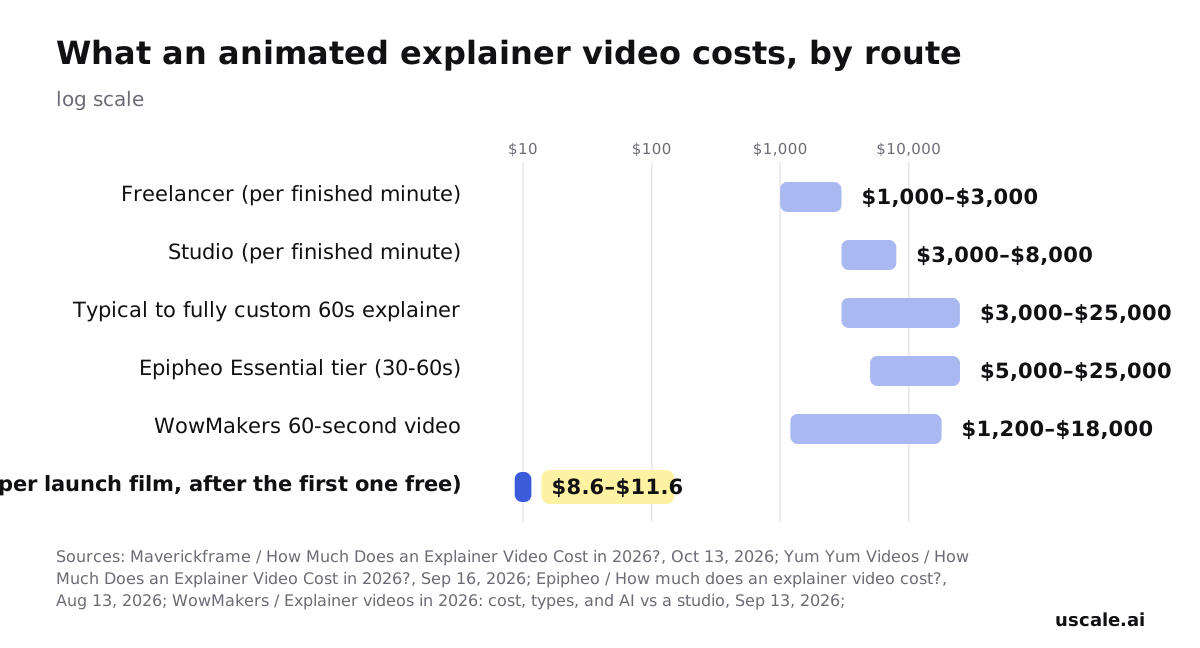
At the low end, a Fiverr freelancer offers a 2D animated explainer starting at $120, with delivery within 7 days. Across the market, freelancers charge about $1,000–$3,000 per finished minute, compared with $3,000–$8,000 per minute at a studio (Maverickframe).
Yum Yum Videos contacted 125 production companies and found that typical explainers cost $3,000 to $8,000. A fully custom 60-second 2D explainer commonly runs $8,000 to $25,000, and the studio's own custom work starts at $8,000. Its broader research puts professional animation at $5,000 to $20,000+ per finished minute.
Named studios fall inside that spread:
- Epipheo's Essential/Starter tier costs $5K–$25K for 30–60 seconds. Its 2D Animation style costs $15K–$45K.
- WowMakers quotes $1,200 to $18,000 for 60 seconds, depending on style and method.
- Broadcast2World's own rate card starts at $2,400. The studio puts US market pricing at $10,000–$25,000+.
Subscription tools bill by the month
| Tool and plan | Price | What's included |
|---|---|---|
| Vyond Starter | $99/month or $699/year | 10,000 credits per user per month |
| Vyond Professional | $199/month or $1,199/year | 20,000 credits |
| Vyond Agency | $1,999/year, annual only | Unlimited rights transfers |
| Vyond Government | $2,450/year | FedRAMP Certified |
| Synthesia Basic | Free | 500 credits / 10 minutes of video per month |
| Synthesia Pro | $89/month ($64/month billed yearly) | 6,000 credits/month |
Sources: Vyond FAQs, Synthesia pricing summary.
Many teams compare these the wrong way, setting a monthly fee against a per-video quote. A subscription is only cheap if you finish enough videos inside the billing period, and someone on your team still does the making. Divide the fee by the videos you will actually ship, not the ones on the roadmap.
Where uscale sits
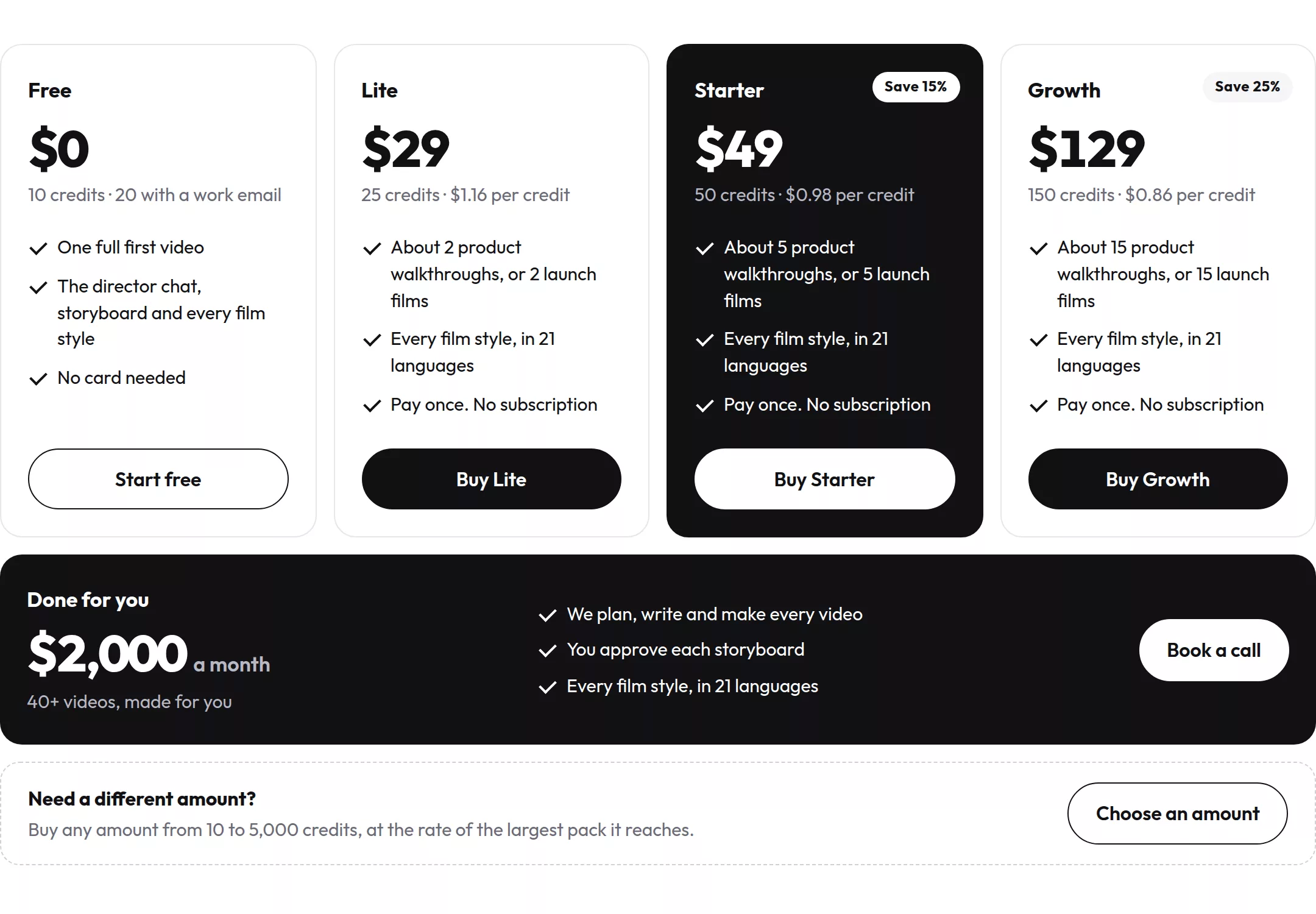
A new uscale account gets 10 credits, or 20 with a work email, and no card is needed. After that you buy credits once, with no subscription:
- Lite: $29 for 25 credits, about 2 launch films.
- Starter: $49 for 50 credits.
- Growth: $129 for 150 credits, about 15 launch films.
A launch film costs 10 credits. It is not a frame-by-frame character piece. It films or illustrates your product with voice, captions and music. Full prices are on the pricing page.
A number to budget against today: $8,000 for a fully custom studio explainer, and $1,000–$3,000 per minute for a freelancer. The full explainer video cost breakdown covers each line item. Whichever route you take, the costliest mistakes happen before the first frame is paid for.
Won't a skilled animator fix a weak brief?
A good studio does raise the polish of whatever you hand it, and a strong animator can rescue a clumsy transition or a flat scene. But the mistakes that waste an animated explainer's budget, or lose its first ten seconds, are made before the animator opens a file. Style, script, storyboard and captions are set in the brief. Polish on top of a wrong decision only makes the wrong decision cost more per minute.
Before you pay for a single frame, check your own brief against these five:
| Mistake | What it costs you | The fix to check in your brief |
|---|---|---|
| A style picked because it looks impressive, not because it fits the brand | A film that feels like someone else's company, often redone | Name the style and say why it suits what's being explained and how your site already looks |
| A script that explains the product instead of the problem it solves | Viewers leave before they know why it matters to them | The first line names the viewer's problem. The product appears only after that |
| Motion for its own sake | Movement pulls the eye away from the message | Every animated element points at the line being spoken at that moment |
| Skipping storyboard approval before animation starts | Changes land at the stage where they cost the most | Sign off every frame and every narration line before animation is paid for |
| No captions | Feeds that autoplay muted show a silent film with no message | Captions are in the deliverables list, and on-screen words make sense without sound |
Fixing these does not take a bigger budget. You need a script that opens on the problem, at about 140 words for 60 seconds, a style chosen on purpose and a storyboard you've signed off. Those three protect your money better than extra animation hours. A skilled animator makes a sound brief look good. Only the brief makes the film say the right thing.
So the brief carries the film. That still leaves the practical part: who makes it, and by when.
How to choose your route and get a first cut this month
Two things decide the route, and you can check both today: how many weeks you have, and whether a script exists yet. Work through these in order. Each one depends on the one before it.
Write the script before you choose who animates
Draft the script in a doc. A 60-second script runs about 140 words. That makes it a quick win you can finish within the hour, and it costs nothing. A studio, a freelancer or a tool will each ask for it first. You're done when you can read it aloud in about a minute and it names the problem before it names the product.
Count the weeks to your deadline
Put the launch date next to the production timeline. A custom animated explainer takes about 6 to 8 weeks including review. Rush projects sometimes land in 3 to 4. If you have that runway and the budget, brief a studio or freelancer against the cost ranges above, with the script attached. You're done when you have two or three quotes for the same brief.
Approve a storyboard before anything is paid for
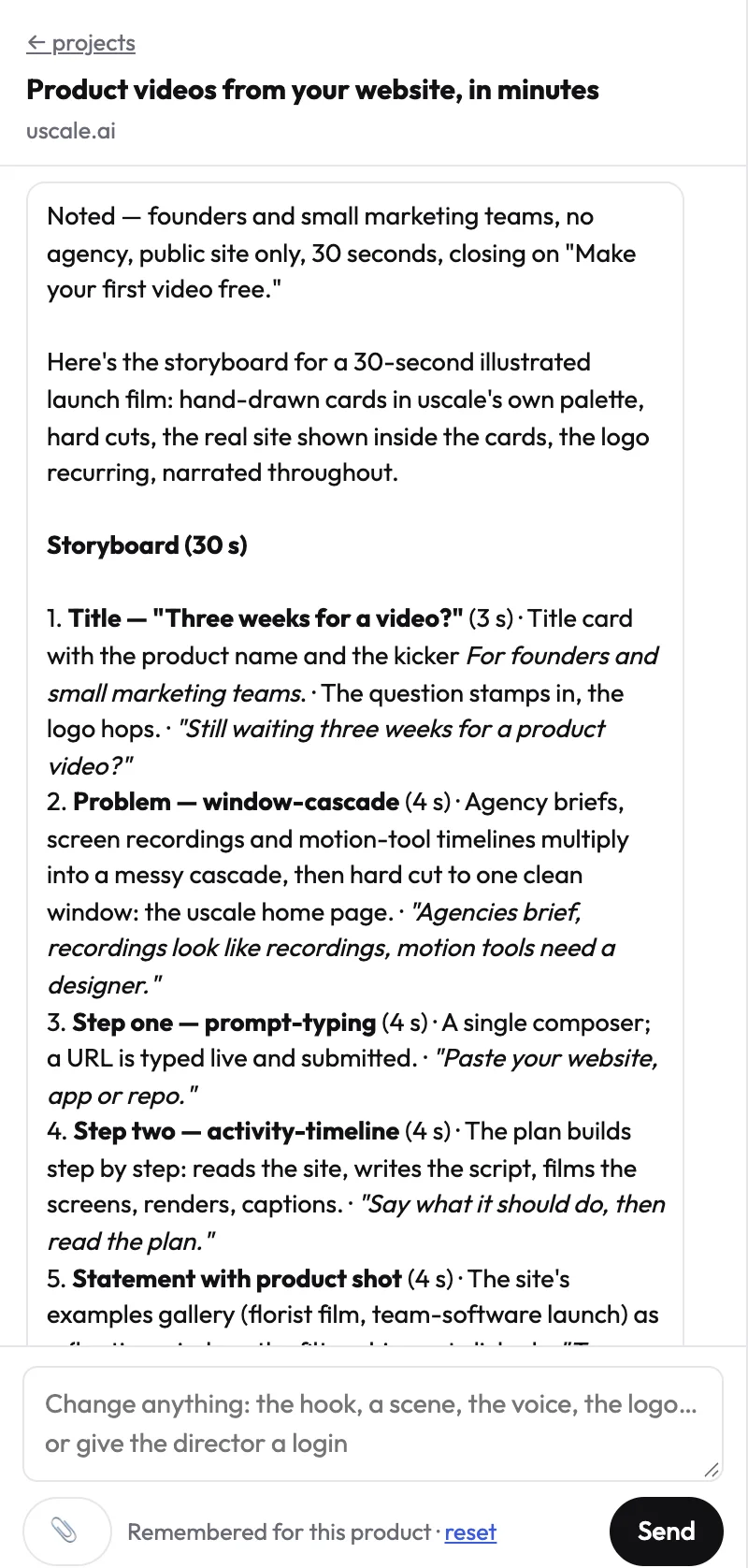
Turn the script into frames. The free route is a slide deck with one slide per narration line and a rough sketch or screenshot on each. uscale is the faster route. Its director reads your site or web app and proposes a storyboard with every narration line, and nothing is filmed or rendered until you approve it. The chat and every storyboard change cost nothing. You're done when every line has a picture and it's signed off. For agencies, that means your client has signed it off.
Decide whether the real product can carry it
Look at your screens honestly. If the product looks good on screen, a film of the real app gives viewers proof that an illustration can't. uscale films your live site or app and adds voice, captions and music, which uscale says takes minutes.
It is not a frame-by-frame custom 2D character piece. If you need a mascot acting out a metaphor, that's still a studio or freelancer job. Developer tools can start from the GitHub repo and README instead of a live site. For more, see product explainer videos and videos for software products.
Use the first cut as the brief
Show the studio a cut, not a description. A rough version tells an animator more about pace and emphasis than a paragraph can. You're done when the studio quotes against something you've actually watched.
If you do only one thing, write the 140-word script this week. Every route starts there.
Success looks like an approved storyboard and a first cut on the launch page or in the README. It also means one link sales can send while the custom piece, if you still want one, is in production.
Try it: make a product explainer video from your live site, and approve the storyboard before anything is filmed.
Before you brief anyone
Before anyone opens an animation tool or signs a quote, four checks decide most of the outcome:
- Pick the style for the idea. Use motion graphics for data and interfaces, character animation for a story, and kinetic typography when the words carry the message. Match what you're explaining, not what looks impressive.
- Write the script first. About 140 words fills 60 seconds. Lead with the problem, then the product.
- Choose the route by budget and calendar. Use the ranges above to pick between a freelancer, a studio that needs its weeks of runway, and a tool that bills by the video.
- See a cut before you commit. Watch real films made from live products, then make a first version of your own and judge it on screen.
Your first uscale video is free. After that, credits are bought once, with no subscription.
A rough cut you can watch beats a perfect plan you can't.
Make your animated explainer video from your website — it’s free →
Questions
What is an animated explainer video?
An animated explainer video is a short film that uses animation instead of live footage to explain a product, service or idea. It usually takes one of four styles: motion graphics built from type, shapes and charts; 2D character animation; whiteboard drawing; or kinetic typography, where the words themselves move. In Wyzowl's survey of 266 video marketers, 68% said they had created explainer videos, the most popular video-marketing use case.
How long should an animated explainer video be?
An animated explainer video is commonly quoted at 30 to 60 seconds; Epipheo's starter tier, for example, covers 30 to 60 second videos. A 60-second script runs about 140 words, according to Yum Yum Videos, so the script sets the length. One strong message fits a short cut, while a process or system may need the full minute. Write the script first and time it read aloud.
How much does an animated explainer video cost?
An animated explainer video costs anywhere from $120 to $25,000 or more, depending on who makes it. One Fiverr freelancer starts at $120; freelancers generally charge about $1,000 to $3,000 per finished minute, and studios $3,000 to $8,000. Yum Yum Videos found a fully custom 60-second 2D explainer commonly runs $8,000 to $25,000. Vyond starts at $99 a month, and uscale sells one-off credit packs from $29 with no subscription.
How long does it take to make an animated explainer video?
A custom animated explainer video typically takes about 6 to 8 weeks including review time, according to Yum Yum Videos, and rush projects are sometimes finished in 3 to 4 weeks. Epipheo quotes 4 to 6 weeks for its starter tier, while one Fiverr freelancer offers delivery within 7 days. Your own approval rounds run on the same clock, so subtract them when working backward from a launch date.
Can I use my own script for an animated explainer video?
Yes. Every route to an animated explainer video starts from a script, and a studio, freelancer or tool will ask for one first. A 60-second script runs about 140 words. In uscale, you paste the lines you want into the director chat and the director fits the scenes to them, or you name which lines to keep word for word. You approve the storyboard before anything is filmed.

The team behind uscale, which turns a website, web app or GitHub repo into a narrated product video.