


How much does an explainer video cost? Anywhere from $600 to $250,000
Ask 242 production companies what an explainer video costs, and the 116 that give a price answer with anything from $600 to $250,000. That is the explainer video cost range Wyzowl's 2024 survey found, with a median quote of $5,400.
In July 2026, Yum Yum Videos ran its own survey. It asked 125 video production companies and animation studios to quote one custom 60-second animated explainer. It got 61 usable quotes, and the median was $9,680.
It's the same product in two surveys, and neither median says what your video will cost. The spread isn't random. The price follows who does the work: an agency team, one freelancer, your own staff or a tool. Each one charges for something different: a team's skill, one person's hours, your own time or the steps you use. Before comparing routes, look at what the money pays for.
What drives explainer video cost
Every explainer quote, whatever the route, is built from the same few line items. Read them as the four cost drivers: picture, words, sound and delivery. Each driver covers two things that push a price up or down. They stack: a longer video costs more at every later step, because there is more to write, voice, change and translate.
Picture: length and style. Wyzowl defines explainers as usually running 60 to 120 seconds. In its 2026 report, 71% of respondents said videos of 30 seconds to 2 minutes are the most effective. Studios such as Yum Yum Videos price by the minute, so length multiplies the rest of the quote. Style sets the rate: filming the product itself, illustrating it, or shooting live action. Wyzowl and Yum Yum both name style and complexity as price drivers.
Words: script and rounds of changes. Someone has to write the script. If the quote includes it, you pay for that writer's time. If you supply it, the time moves to your team. Each round of changes is more paid time, so check how many rounds are included.
Sound: voice and music. A professional voice is its own line. Voquent's explainer voiceover rates start at $320. Wyzowl lists custom music and sound effects as extra fees.
Delivery: deadline and languages. A short deadline costs more. Wyzowl names a surcharge for faster turnaround, and Yum Yum names deadline as a price driver. Each extra language adds voice, captions and review work.
| Driver | What moves the price | Where it shows up in a quote |
|---|---|---|
| Picture: length and style | Longer runtime; illustration or live action instead of the filmed product; more complex motion | The per-minute rate or the style tier |
| Words: script and changes | Whether the seller writes the script; how many rounds of changes are included | A scripting line; a revision limit, with extra rounds billed |
| Sound: voice and music | A professional voice artist; custom music and sound effects | A voiceover fee; music and sound add-ons |
| Delivery: deadline and languages | Faster turnaround; each extra language | A rush surcharge; extra voice, caption and review work per language |
Picture comes first because it sets the unit the rest is priced in. If a quote leaves out a line item, that item is either priced somewhere else in the quote or left for you to do.
So what does each route charge for those lines? Start with the agencies and their fixed quotes.
Agency explainer video prices: what the fixed quote buys
Agencies publish their prices in different units, so check the unit before you compare numbers. Wyzowl starts at £2,000 ($2,700) for a fully animated video, at a fixed price agreed before production begins. Yum Yum Videos quotes $6,000 to $15,000 per minute. Yum Yum's FAQ page says an animated video usually costs $8,000 to $30,000. Wyzowl's survey also gives an average of $8,457 after the lowest and highest 5% of quotes are removed. That trimmed figure is Wyzowl's calculation, not ours.
| Agency | Published price | Unit | Source date |
|---|---|---|---|
| Wyzowl | From £2,000 ($2,700), fixed before production | Per fully animated video | 2026-09-30 |
| Yum Yum Videos | $6,000–$15,000 | Per minute | 2026-09-30 |
| Yum Yum Videos | $8,000–$30,000 | Per animated video (usual range) | 2026-09-30 |
| Wyzowl survey (2024) | $8,457 average | Per explainer, lowest and highest 5% of quotes removed | 2026-09-30 |
Why the number is that size
Yum Yum Videos estimates that one professional minute of custom animation takes 80 to 120 hours of specialist work. The quote pays for that team's time and skill. Wyzowl's price includes scripting, custom illustration, storyboarding, animation, professional voiceover, royalty-free music, sound effects and video editing. This is also why studios price per minute: each extra minute adds another block of those hours.
What an agency does well
Some videos need a team. Live action needs a crew and a shoot. A brand story told in custom illustration and motion needs designers and animators who work in your style. An agency can also shape the script with brand strategy. It can give you a producer who runs the project, so your team doesn't have to chase each stage. If your video needs these things, this is what the fee buys.
What it still leaves to you
A fixed quote doesn't take all the work off your desk. You still write the brief, give approvals at each stage and publish the finished file. When the product changes, check the agreement. A new screen may be a small edit or a new project, and that depends on the quote. A fixed quote fixes the scope, not the product.
A freelancer prices the same kind of work by the hour or by the project, and you take on more of the project management yourself.
Animated explainer video cost with a freelancer
Upwork's hiring page puts explainer video freelancers at $17–$32 per hour. It lists typical projects from $300 to $5,000, depending on the tier you hire for:
| Length | Style | Price (Upwork, 2026-09-30) |
|---|---|---|
| 30–60 seconds | Whiteboard | $300–$800 |
| 60–90 seconds | Standard 2D, with 1–2 revisions | $800–$2,500 |
| 60–120 seconds | Premium motion graphics | $2,500–$5,000 |
A freelancer's strength is focus. You get one specialist, a scope you agree up front and, in the standard tier, a known number of revisions. For a team that already knows what the video has to say, that is a clear deal.
Pricing one hire: a worked example
This is a hypothetical. A SaaS team hires a freelancer for the standard 2D tier. The quote covers animation and revisions but not voice. The line items sit side by side:
| Line item | Published price | Source |
|---|---|---|
| Standard 60–90-second 2D explainer, 1–2 revisions | $800–$2,500 | Upwork |
| Explainer voiceover, if the quote excludes it | from $320 | Voquent |
| Voquent's example: one experienced artist, 2–3-minute video | $450 | Voquent |
| Music | depends on the quote | none |
Voquent's $450 example covers a video longer than this tier, so treat it as a reference point, not a price for this hire. Most people compare the freelancer's headline number with an agency's and stop there. A more useful check is to read the quote for what it leaves out, then ask who covers each gap.
What it still leaves to you
The brief, and often the script. You also find the voice and the music, manage the project, approve each round, and start again when the product's screens change. A freelance quote prices the animation; the brief, the voice and the next update are still on your desk. That leftover work is your team's time. On the in-house route, that time is the whole bill.
Making it in-house: the cost is your team's time
The in-house route sends no invoice, so it looks like the cheapest. Its real price is the hours your own people spend, and those hours come out of other work. A video with no quote still has a price; you pay it in your team's calendar.
The route runs like this. Someone on the team writes the script, records the product with a screen recorder, edits the footage, finds a voice and music, and runs review rounds until everyone signs off. Each of those is a line to count. We found no published hours for screen-recorded video, so this post gives none. The worksheet later in the post turns your own hours into a number.
| Task | What to count | Tool cost |
|---|---|---|
| Script | Hours to write and rewrite | None |
| Recording | Hours at the screen recorder, including retakes | Varies by tool and plan |
| Editing | Hours in the editor | Varies by tool and plan |
| Voice | Hours to record or generate narration | AI voice plans, below |
| Music | Time to find and license a track | Depends on the track |
| Review rounds | Hours for each person in each round | None |
Two reference points help you size the job. If the team tries custom animation instead of a screen recording, the 80 to 120 hours of specialist work per minute cited earlier shows the scale of what it takes on. If you would rather hire that skill, the Bureau of Labor Statistics puts the median wage for US special effects artists and animators at $49.06 per hour in May 2025.
For voice, ElevenLabs lists these monthly equivalents on its annual plans: $5 for Starter, $18.33 for Creator, $82.50 for Pro, $249.17 for Scale and $825 for Business.
Most teams count the first cut and forget the second. This route leaves everything to you, including re-recording when the UI changes. Every release that moves a button reopens the recording, editing and review lines, and the next route prices that repeat cost differently.
AI explainer video cost: you pay for the steps you use
With an AI tool, the price comes from a plan or from the steps you run, not from anyone's hours. The route is already common. According to Wyzowl's 2026 video marketing report, 63% of video marketers say they have used AI video tools to create or edit marketing videos, up from 51% the year before.
Monthly plans: Synthesia
Synthesia's pricing page lists a $0/month Basic plan, Starter at $29/month and Creator at $89/month (billed monthly), plus custom Enterprise pricing. Each plan's contents are on that page. Check them against how many videos you expect to make in a year.
Credits per step: uscale
uscale reads your website, web app or GitHub repo and writes a storyboard with every narration line for you to approve. It then films the real product or illustrates it, and adds voice, captions and music. You ask for changes in a chat with the director.
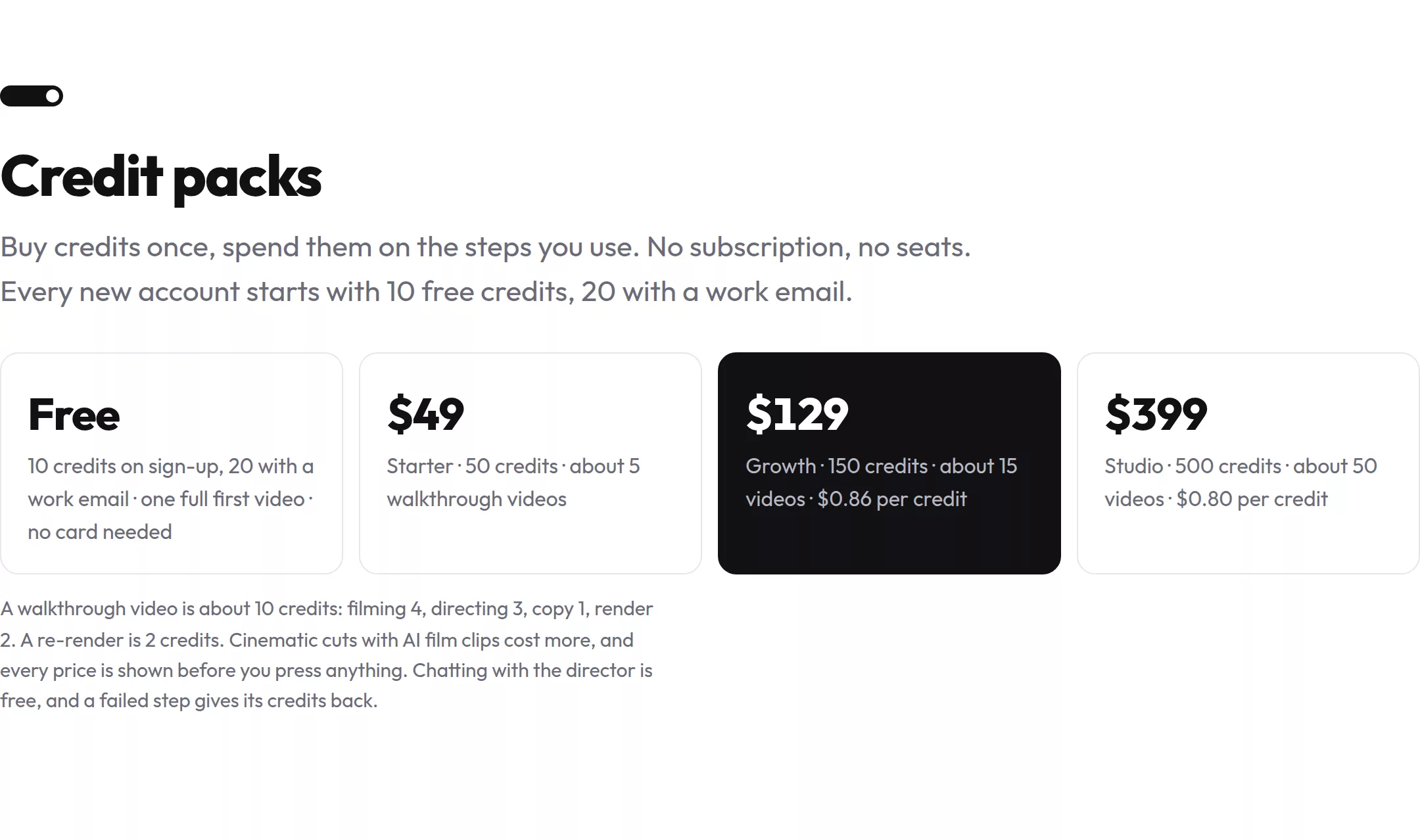
These are the prices on uscale's pricing page on 2026-09-30:
- Credit packs, no subscription, no seats: Starter $49 (50 credits, about 5 walkthrough videos). Growth $129 (150 credits, about 15 videos, $0.86 per credit). Studio $399 (500 credits, about 50 videos, $0.80 per credit).
- Per video: a walkthrough video is about 10 credits: filming 4, directing 3, copy 1, render 2. A re-render is 2 credits. Cinematic cuts with AI film clips cost more, and every price is shown before you press anything.
- Changes: chatting with the director is free, and a failed step gives its credits back.
Read the steps, not only the pack total. A product explainer has to keep up with the product after launch, so the cost that matters is what an update takes. With per-step pricing, an update costs only the steps you redo. It is not a new project. Put the re-render line next to any other route's revision terms when you compare quotes. You can see finished films on the examples page.
What it doesn't do, and what's left to you
uscale doesn't shoot live action, doesn't do brand strategy and doesn't give you a producer to run the project. You still write the brief, approve the storyboard, publish the video and re-run it when the product changes. Each route's price is now stated in its own unit, so the next step is to put them side by side.
Explainer video cost by route, side by side
Four criteria separate the routes. Price stays in each source's own unit, because fixed, per-minute, hourly, monthly and credit prices don't convert cleanly. What you get matters because a quote may or may not include voice and music. What you still do matters because your team's hours cost money too. Changes after delivery matter because a product explainer goes out of date when the product changes. uscale is our product, and it sits in the table on the same terms as the others.
| Route | Price (source, checked 2026-09-30) | What you get | What you still do | Changes after delivery |
|---|---|---|---|---|
| Agency | Wyzowl: from £2,000 ($2,700), fixed price agreed before production. Yum Yum Videos: $6,000–$15,000 per minute | Wyzowl: scripting, illustration, storyboarding, animation, voiceover, music, sound effects, editing | The brief, approvals at each stage | Depends on the quote |
| Freelancer | Upwork: $17–$32 per hour. Projects: $300–$800, $800–$2,500 or $2,500–$5,000 by tier | A whiteboard, 2D or motion graphics explainer, by tier | The brief, often the script, voice and music, managing the project | Standard tier: 1–2 revisions. Otherwise depends on the quote |
| In-house | Your team's hours plus tools. ElevenLabs voice: $5/month (Starter) to $825/month (Business), annual plans | What your team makes | Everything | Your team re-edits or re-records |
| AI video tool (Synthesia) | $0/month Basic, $29/month Starter, $89/month Creator (billed monthly), custom Enterprise | Not in the pricing details we checked | Not in the pricing details we checked | Not in the pricing details we checked |
| uscale | Packs from $49 for 50 credits, no subscription | A narrated video of your real product, filmed or illustrated, with voice, captions and music | The brief, approving the storyboard, publishing | Ask in the director chat (chatting is free). A re-render is 2 credits |
Prices from each company's own page, checked 2026-09-30: Wyzowl explainer pricing, Yum Yum Videos explainer services, Upwork explainer freelancers, ElevenLabs pricing, Synthesia pricing, uscale pricing.
The price column follows one pattern. An agency charges for a team's time and skill, a freelancer for their hours, in-house for your own hours, and a tool for the steps you use. The less of someone else's time a route buys, the more lands in the "What you still do" column.
Which route fits your situation
- A solo founder before launch whose video shows the product: start with uscale, or with Synthesia's $0/month Basic plan. For an illustrated story, Upwork's whiteboard tier is the lowest published project price.
- A developer-relations team with a repo: uscale starts from a GitHub repo (videos for developer tools). Stay in-house if you already own an editor and ship small updates.
- An agency with many clients: credit packs with no seats fit many product walkthroughs (uscale for marketing agencies). Keep custom animation with a studio or a freelancer.
- A brand story, live action or custom illustration: choose an agency. Wyzowl's fixed quote, for example, covers everything from the script to the edit.
Rule of thumb: pay for the time the video needs. For a brand story, that is a team's craft. For a product explainer, it is your product's own screens.
A rule of thumb still leaves one number out: what your own side of the work costs. The worksheet puts a figure on it.
Your explainer budget worksheet: how to choose a route
A quote shows what someone else charges, not what your own team spends around it. Put a number on your side first.
Put a number on your team's time
Fill in the hours and hourly cost for each line. In-house time never arrives as an invoice, and every route leaves some of these lines with you. Use your own estimate for the person who would do each task. In the last column, enter each quote's price, or write "included" where the quote covers that line.
| Line | Hours (you fill in) | × your hourly cost | Outside price |
|---|---|---|---|
| Writing the brief and script | |||
| Recording or supplying assets | |||
| Review rounds | |||
| Approvals | |||
| Publishing | |||
| Updates per product release |
This is the quick win. With your last launch in front of you, you can fill it in within the hour. You're done when every cell has a number or "included".
Match the route to what the video shows
Write one sentence on what the viewer must see. If it names people on camera, a custom-drawn brand story or a positioning question you haven't answered, that sentence decides the route, and the worksheet only shows your side of the cost. If it names your product's screens, the "updates per product release" row matters most, because those screens change with each release.
To test the free route today, record one flow with the screen recorder you already have and a script in a doc. Your in-house hours become real numbers instead of guesses. uscale is another option for product screens: you approve every narration line in a storyboard, then it films the real product or illustrates it. Product teams can check the fit on video for software products. For client work, see video for agencies and studios.
Don't choose uscale for live action or brand strategy. It does neither.
Compare the totals
Add your hours column to each route's outside price. You're done when you have two or three totals side by side and one route that shows what your video needs.
If you only do one thing, fill in the "updates per product release" row. It decides whether a one-off video still fits after your next release.
Success here is a filled-in sheet, one route you can justify in a sentence, and a brief ready to send.
Try it: make a product explainer video from your own site, and approve every narration line before anything is filmed.
What to do next
All four steps fit into one week.
- Decide what the video must show. It could be live action, a custom-illustrated brand story, or the product itself. That choice rules routes in and out before any price does.
- Fill in the worksheet above with your own hours and hourly cost, so the in-house line has a real number.
- Ask every quote what's included: the script, the voice, the music, how many rounds of changes, and any rush fee. Two quotes only compare when they cover the same lines.
- If it's a product explainer, see one made from your own product. Your first video is free when you make a product explainer video with uscale. You get one full first video with no card needed, and you approve every narration line in the storyboard.
The budget comes second. Start with what the viewer has to see, and the right route names itself.
Make your explainer video cost from your website — it’s free →
Questions
How much does an explainer video cost?
Explainer video cost is what you pay a seller for the video plus the hours your own team spends on it. In Wyzowl's 2024 survey, production company quotes ran from $600 to $250,000, with a median of $5,400. Yum Yum Videos' July 2026 survey found a median of $9,680 for a custom 60-second animated explainer. Freelancers on Upwork list projects from $300 to $5,000, and AI tools charge by plan or by step.
What is an explainer video?
An explainer video is a short video that uses visuals and a short narrative to explain a product or service. Wyzowl defines explainers as usually running 60 to 120 seconds. They are common: in Wyzowl's 2026 report, 68% of video marketers had made one, and 96% of people said they had watched an explainer video to learn more about a product or service.
Why do agency explainer video quotes vary so much?
Agency explainer video quotes vary because they price a team's time and skill, and that time depends on length, style, complexity and deadline. Yum Yum Videos estimates one professional minute of custom animation takes 80 to 120 hours of specialist work, and it quotes $6,000 to $15,000 per minute. Wyzowl starts at £2,000 ($2,700) for a fully animated video, and lists add-ons such as faster turnaround, custom music and sound effects that raise the price.
What's usually included in an explainer video quote?
An explainer video quote usually covers some mix of script, illustration or filming, animation, voiceover, music, sound effects, editing and a set number of revisions. Wyzowl's price, for example, includes scripting, custom illustration, storyboarding, animation, professional voiceover, royalty-free music, sound effects and editing. Freelance quotes may leave out voice and music; Voquent's explainer voiceover rates start at $320. Ask each seller which lines are included before comparing prices.
How much does an AI product explainer video cost?
An AI product explainer video costs a plan fee or the credits for the steps you use, not anyone's hours. Synthesia lists a $0/month Basic plan, Starter at $29/month and Creator at $89/month, billed monthly. uscale's first video is free; after that, credit packs start at $49 for 50 credits, and a walkthrough video is about 10 credits. A re-render is 2 credits, and cinematic cuts with AI film clips cost more.

The team behind uscale, which turns a website, web app or GitHub repo into a narrated product video.