Free until you press export
Every free promo video maker puts the same word on its sign-up page, and they don't all mean the same thing by it. Hear "free" and you picture a finished launch video you can post. Often it only means a video you can make.
The catch rarely shows up at sign-up. In Canva, a design exports without a watermark only while every element comes from the free library. Drop in one Pro asset and you get a watermark or an upgrade prompt. VEED's free export is 720p, watermarked and capped at 10 minutes. InVideo rations its AI generation by the week. Clipchamp breaks the pattern: unlimited exports, watermark-free, up to 1080p, at no cost.
So the useful question isn't which tool is free. It's where each one draws its line. Does a SaaS launch video, with your own product on screen, cross that line before you reach the export button?
Canva's line is the hardest to see, because it sits inside the design itself.
Can you make a free promo video in Canva without a watermark?
Yes. Canva's free plan exports video watermark-free at 1080p, but only while every element in the design comes from the free library. Add a single Pro asset and a watermark or an upgrade prompt appears. The limit isn't at the export button. It sits inside the design, one element at a time.
Most founders get this backwards. They check the plan, see free 1080p export and start building. Then they drop in a product screenshot and reach for a device frame, a font or an animated sticker to make it look like a launch, and one of those turns out to be Pro. In Canva, the watermark is attached to the element, not the plan. Filter the library to free items before you design, not after.
| Canva Free | Where it stops | |
|---|---|---|
| Video export | Watermark-free at 1080p | Only if every element is from the free library. One Pro asset brings a watermark or upgrade prompt |
| Storage | 5GB | Capped |
| AI allowance | Up to 200 Standard or 20 Premium AI uses a month | Capped monthly |
| AI video | 5 lifetime Magic Media generations, 4-second silent clips | Veo-3-powered generator is on Pro and higher plans |
| Price | $0 | Pro: $18/month, or $144/year (about $12/month) billed annually |
The ceilings past the watermark
The rest of the free plan is capped too: 5GB of cloud storage and up to 200 Standard or 20 Premium AI uses a month. Canva's AI video is tighter still. You get 5 Magic Media generations for the life of the account, each a 4-second silent clip. The Veo-3-powered AI video generator is reserved for Pro and higher plans. Five silent clips won't carry a launch video, so treat them as a way to try the feature.
What Canva is actually good for
Canva is strongest at a template-built social promo: a short, designed post that puts your headline, a screenshot and your brand colours into motion. It is not a product tour. You work from templates, stills and text you place yourself, so it suits a designed post more than a walkthrough of how your product works.
If that template needs Pro assets, price the upgrade honestly: Canva Pro is $18 a month, or $144 a year (about $12 a month) billed annually. That is what going watermark-free costs once you reach past the free library. VEED puts its limits somewhere else entirely.
What does VEED's free plan actually include?
VEED's free plan exports at 720p with a visible watermark, caps each video at 10 minutes and gives you 2GB of cloud storage. That is enough to cut a rough draft and send it to a cofounder for notes. It is not enough for the video on your launch page, where the watermark would be the first thing a visitor reads after your product's name.
| Limit | VEED Free | What VEED Creator changes |
|---|---|---|
| Export resolution | 720p | Up to 1080p |
| Watermark | Visible on export | Removed |
| Video length | 10-minute cap | Not stated in the source |
| Cloud storage | 2GB | Not stated in the source |
| Price | $0 | From $12/user/month, billed annually |
Source: UsagePricing, captured from veed.io/pricing, 2026.
What Creator removes
VEED's Creator plan starts at $12 per user per month, billed annually. It removes the watermark and allows 1080p exports. A launch asset can't carry either of those limits, so for most founders VEED's real starting price is Creator, not Free. The price is per user, so if two people on the team edit, budget for two seats.
The 10-minute cap is the limit least likely to matter for a promo, which seldom runs anywhere near that long. A full product walkthrough or a recorded demo call can reach it. Check your longest planned cut before you rely on the free plan.
Read the meter, not the feature list
What a plan measures tells you what it expects you to bring. VEED's free plan measures export resolution, video length and storage. Those are the limits of an editor working on footage you upload. None of them is about turning a URL or a set of screenshots into a promo.
If you already have a screen recording or founder footage, the free plan lets you shape it and judge the edit before you pay. If you have only a live product and nothing filmed, the storage has nothing to hold. See editing your own footage with AI and our VEED alternatives page.
The next tool measures something else: minutes of AI generation each week.
Is InVideo's AI video generator free to use?
Yes. InVideo's free plan gives you about 10 minutes of AI generation per week. Exports come out at 720p with a watermark, according to Luma Labs' InVideo pricing breakdown (2026). The first paid tier, Plus/Individual at $20 per month, adds watermark-free, higher-resolution exports, per SaaSPartout's InVideo pricing page (June 2026).
| InVideo Free | InVideo Plus/Individual | |
|---|---|---|
| Price | $0 | $20 per month |
| AI generation | About 10 minutes per week | Not stated in the source |
| Export | 720p, watermarked | Watermark-free, higher resolution |
| Source | Luma Labs, 2026 | SaaSPartout, June 2026 |
The number to plan around is the weekly one
Most founders read a free plan for the watermark, because that is what shows on the finished file. With InVideo, the limit you meet first is more likely the weekly allowance.
A launch video is rarely right on the first draft. The opening line is too slow, the features are in the wrong order, or the claim in the third beat needs softening. Every fix you regenerate instead of editing by hand draws on the same weekly minutes. The watermark decides what you can post; the weekly cap decides how many times you can change your mind.
The rule that follows is simple. If your launch date is close, count drafts, not finished videos. An allowance that covers one good video may not cover the rough versions it takes to get there.
Who InVideo fits
The free plan is measured in minutes of AI generation. That points to what the tool is built around: you describe a video and it generates one. It suits a founder who has nothing filmed and wants the footage made for them.
It suits a founder less well if they already have screen recordings or a rough demo and need an editor to trim, caption and tighten them. For that job you would be spending generation minutes you don't need.
The next tool starts from the opposite end, with footage you already have.
Does Clipchamp's free plan really have no watermark?
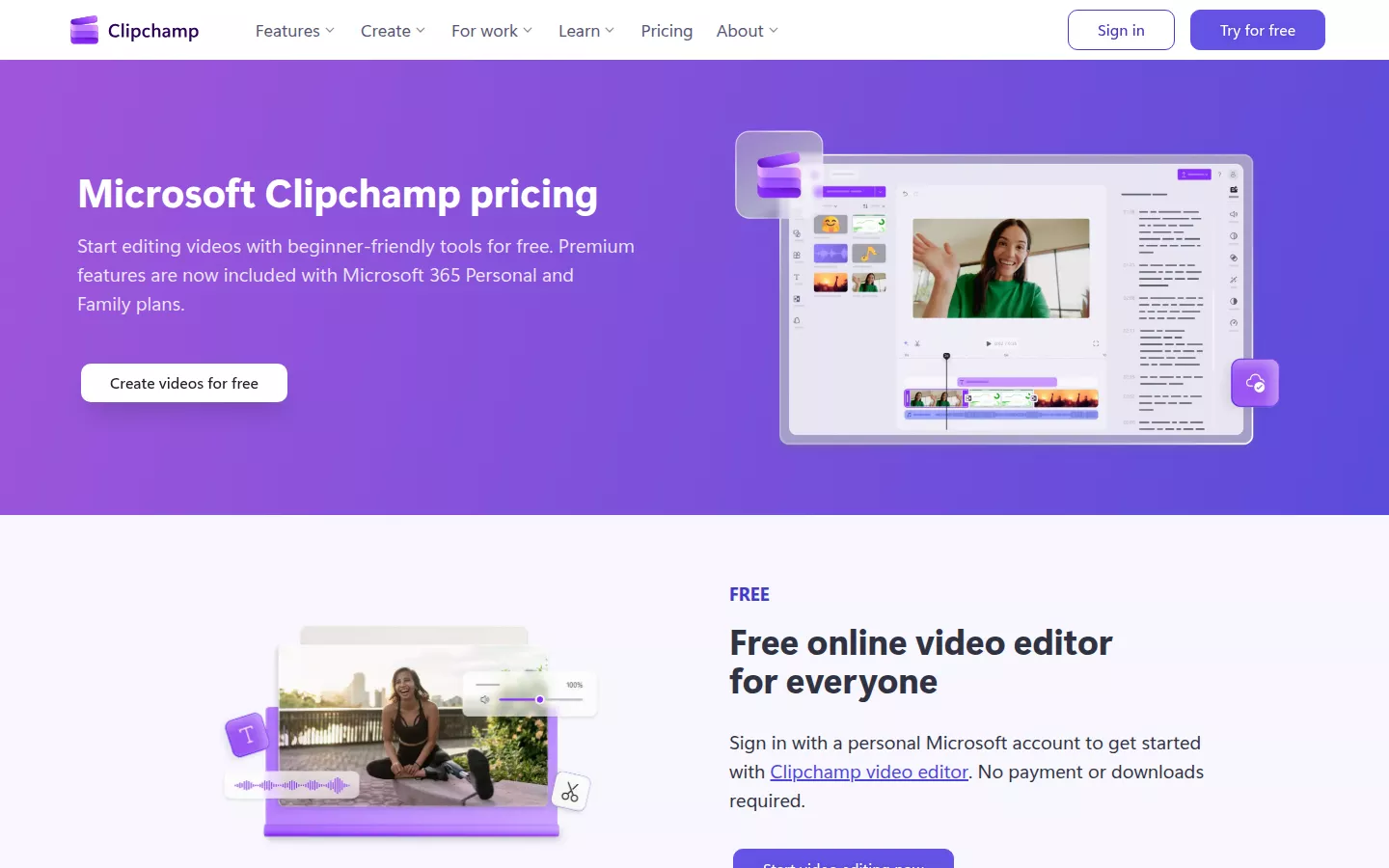
Yes. Microsoft's own Clipchamp pricing page, as captured in 2024, says the free plan lets you export as many videos as you like, watermark-free, at up to 1080p HD, at no cost. No other free plan in this post exports as generously. There is no badge in the corner, no 720p ceiling and no weekly quota to ration. Clipchamp is Microsoft's editor, and its free plan is built for real work.
The figures in this section come from that 2024 capture. The screenshot below is a newer capture of the same page, with its own date on the image, so you can check the 2024 terms against what Microsoft shows today.
What Premium actually buys
Most comparisons get this part backwards. On most tools, the first paid tier is what you pay to remove the watermark. Clipchamp has no watermark to remove, so Premium sells something else. The pricing page lists exports up to 4K UHD on Premium, compared with 1080p on the free plan. A 2026 review puts Premium at around $11.99 a month. The same review says it adds premium stock assets, filters and effects, and a brand kit.
| Free | Premium | |
|---|---|---|
| Watermark | None | None |
| Export resolution | Up to 1080p HD | Up to 4K UHD |
| What it adds | — | Premium stock, filters and effects, brand kit |
| Price | $0 | Around $11.99 a month |
For most SaaS launch videos, 1080p is enough. Premium is a choice about polish, not a toll you pay before you can post.
Where the limit really sits for a SaaS promo
The catch on Clipchamp isn't the export. It's the input. Everything either plan lists works on clips you bring or pick from a library. Nothing on that list turns a live website or a GitHub repo into a video.
If you already have a screen recording of your app, Clipchamp will cut it and export it free at a quality fit for launch. Our guide to AI video editors for your own footage covers that case. If you have only the product and nothing filmed, there is nothing yet to edit.
A free export is only as useful as the footage you feed it. That leaves the other case: a live product with no footage.
What's free about uscale's promo video maker?
A note first: uscale is our product. Every number in this section comes from uscale's own site, mostly the pricing page, so you can check each one there.
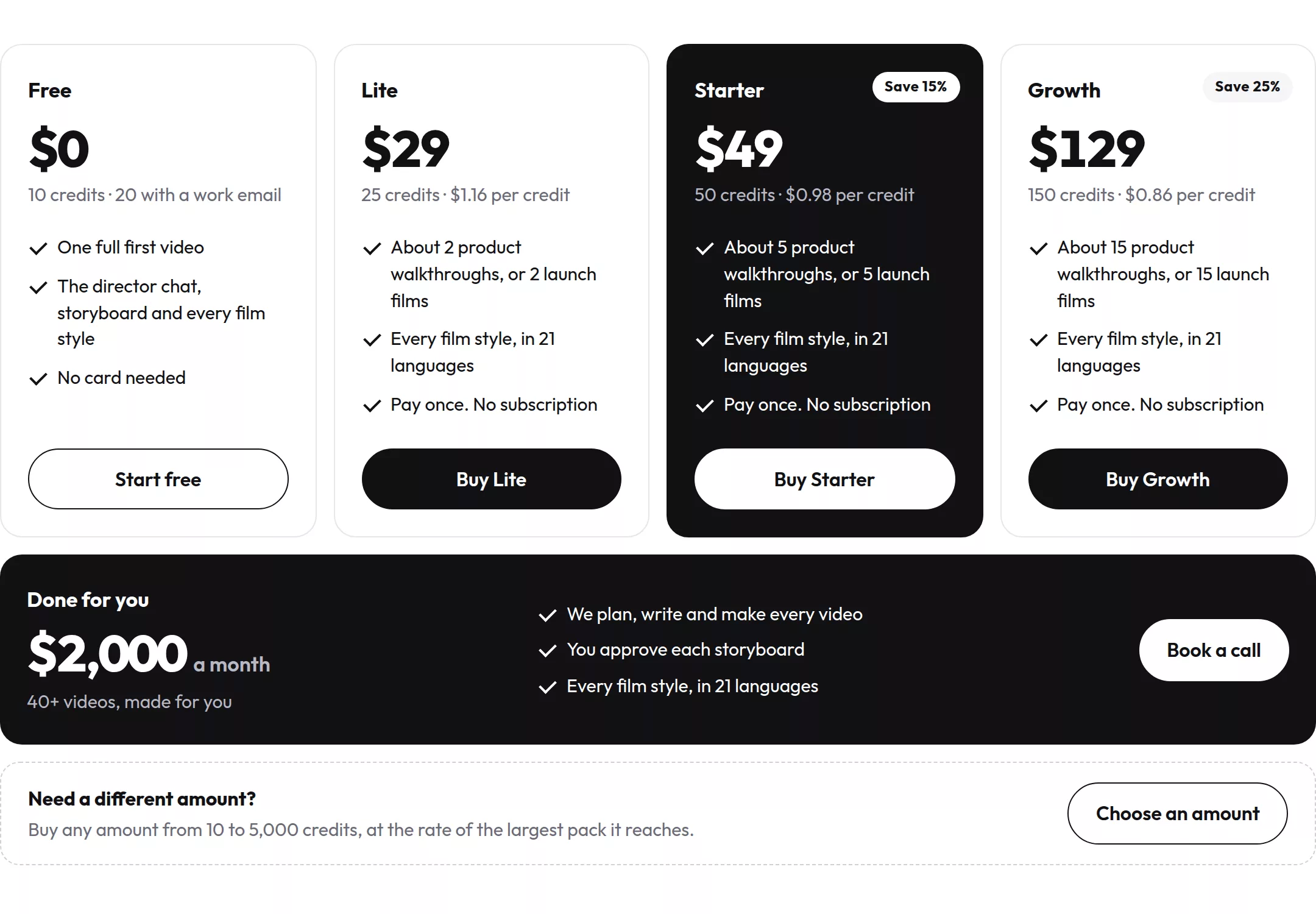
Here is what's free. You can sign up without a card. A new account gets 10 credits, or 20 if you use a work email. A product walkthrough costs about 10 credits, so the sign-up credits cover one full video. The free plan also includes the tools you need to finish that video. You can talk it through with the director, read and approve the storyboard, and choose any film style.
Different in kind, not in degree
The other four free plans give you an editor or a generator. Then they cap what comes out of it with a resolution limit, a length limit, a watermark or a weekly quota.
uscale's free plan ends in a finished film of your real product. You paste the address of your site or app, and uscale films the live product. Before anything is filmed, you approve a storyboard that shows every narration line. Voice, captions and a music bed come with that first video, so there is no later upgrade to buy. The chat is free, and it asks before it spends a credit.
Most comparisons get this backwards. They rank free plans by export quality. For a SaaS launch, the harder question is whether you end up with something to post. A free plan is only as useful as what you can post at the end of it.
Where the catch sits
Here the limit is credits, not resolution. Each revision costs 1–3 credits. With 10 credits you get one walkthrough and little room for changes, while 20 leaves room for a few rounds. Cinematic cuts with AI film clips cost more than a walkthrough.
When the free credits run out, paid use starts at Lite: $29 for 25 credits, paid once with no subscription. The pricing page counts that as about two product walkthroughs or two launch films.
When not to pick uscale
Some promos start from material you already have, such as demo-day footage or a folder of stock clips. That is an editing job. Clipchamp's free plan, which exports without a watermark, or Canva handles it better. A design-led social post built from a template is also Canva's job. If that describes your launch, read about cutting footage you already filmed. uscale fits when you have a live site or app and nothing filmed yet.
That covers all five free plans. Put them in one table and the pattern is easier to see.
Free promo video maker comparison: Canva, VEED, InVideo, Clipchamp and uscale side by side
Five things decide what a free plan is worth for a launch video. Export resolution tells you whether the file holds up on a landing page. The watermark tells you whether you can post it. The usage cap tells you how many attempts you get. What the first paid tier adds and its price tell you what upgrading buys. uscale is our product, and it gets the same columns as the others.
| Canva | VEED | InVideo | Clipchamp | uscale | |
|---|---|---|---|---|---|
| Free export resolution | 1080p | 720p | 720p | Up to 1080p | Not stated on /pricing (checked Oct 2026) |
| Watermark on free | None if every element is free; one Pro asset triggers it | Yes | Yes | No | Not stated on /pricing (checked Oct 2026) |
| Free length or usage cap | 5GB storage; up to 200 Standard or 20 Premium AI uses a month | 10-minute videos; 2GB storage | About 10 minutes of AI generation a week | As many exports as you like | 10 credits (20 with a work email): one full first video |
| First paid tier adds | Pro assets; Veo-3-powered AI video generator | No watermark; 1080p | No watermark; higher resolution | 4K; premium stock; brand kit | 25 credits: about 2 walkthroughs or 2 launch films |
| First paid tier price | Pro: $18/month, or $144/year | Creator: from $12/user/month, billed annually | Plus: from $20/month | Premium: around $11.99/month | Lite: $29 once, no subscription |
Sources: Clipchamp's pricing page (2024) and Aiarty (2026); UsagePricing's capture of veed.io/pricing (2026); Luma Labs (2026) and SaaSPartout (June 2026); Vidocu (2026), CostBench (11 October 2026) and Designrr (2026); uscale's pricing page, October 2026. Check each page again before you buy.
What going watermark-free costs a month
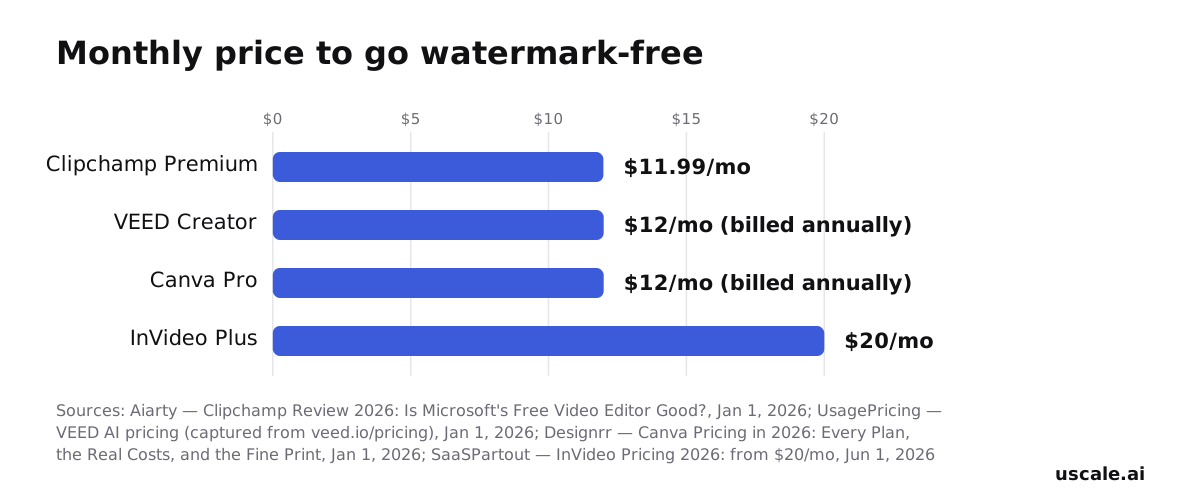
Chart sources: Aiarty (2026), UsagePricing's capture of veed.io/pricing (2026), Designrr (2026), SaaSPartout (June 2026).
The Clipchamp bar is different from the others. Its free plan already exports without a watermark, so the $11.99 pays for 4K, premium stock and a brand kit. uscale is not in the chart because it has no subscription: you buy credits once, starting at $29 for 25.
The real split is not free versus paid. It is what each tool lets you keep for free:
- Clipchamp keeps the export.
- Canva keeps its free library.
- InVideo keeps a weekly slice of AI generation.
- uscale keeps one finished video.
After that, each paid tier buys resolution, length, assets or a brand kit.
Which one fits your situation
- Choose Clipchamp if you're a solo founder before launch with footage already recorded. You get 1080p with no watermark, at no cost.
- Choose Canva if the promo is a social post built from a template and you can stay inside the free library.
- Choose VEED if your cut runs under ten minutes and you'll pay for Creator once 720p isn't enough.
- Choose InVideo if you want AI to generate the video and can plan around about ten minutes a week.
- Choose uscale if you have a live site, web app or GitHub repo and nothing filmed: a developer-relations team with a repo, or an agency making client films, each in its own brand.
Rule of thumb: if you already have footage, pick the editor whose free export you can post; if all you have is the product, start from the product.
Which free tool fits a SaaS launch video?
Side by side, the five free plans don't sort by price, and they don't sort by watermark. They sort by what you have to bring before the tool can do anything. That starting point decides whether a free plan is enough for a launch video.
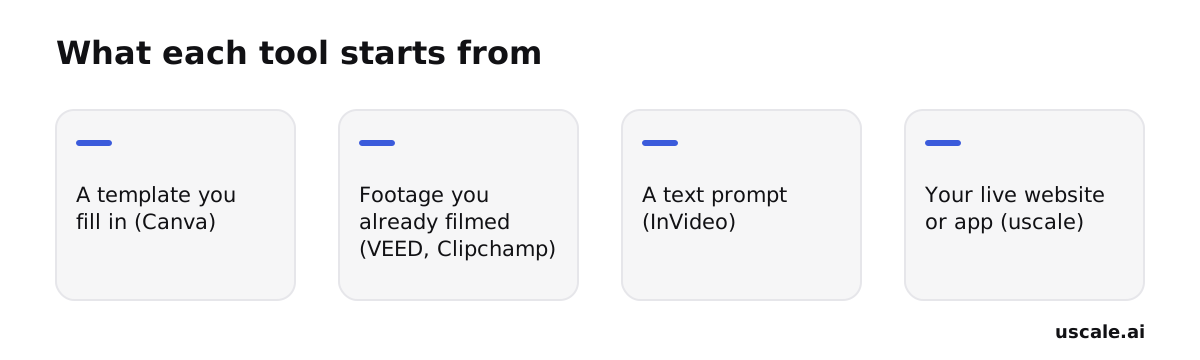
This is why the most generous plan here can be the wrong one for you. Clipchamp exports without a watermark at up to 1080p on its free plan, but that export only helps if you have footage to put through it. Say your product exists only as a live site and a changelog. An editor has nothing to work on, so you never reach its export limit. The work stops before export. Every limit in the comparison table only matters after this first question.
One rule per starting point
- A template you fill in: if your launch asset is a designed social post that moves, Canva's free plan holds as long as every element comes from its free library.
- Footage you already filmed: if you have a recorded demo, Clipchamp's free export can carry it to launch. VEED's free plan is for a rough cut. Both are editors for footage you already have.
- A text prompt: if you want a generated video and expect only a few drafts, InVideo's weekly allowance fits. A team testing many launch cuts will hit it.
- Your live website or app: if all you have is a working software product or a GitHub repo and nothing filmed, uscale starts from that product, and the film comes back narrated and captioned.
So the question that sorts the tools is not which one is free. It is what you have on launch day. Once you know that, the choice is a short one.
Try it: make a product launch video: a narrated, captioned film of your live site or repo, every line approved first.
Which free promo video maker should you start with?
Start from what you already have, not from the price tag.
- Footage on hand, or a template habit? Stay on Canva's or Clipchamp's free plan and cut the promo there. Pay only when an export asks you to.
- Only a live site or a GitHub repo, and nothing filmed? An editor has nothing to work on yet, so start from the product itself.
- Export a test cut this week. Free plans show their limits at export, and you want to meet yours while launch is still days away.
For the second case, make your launch video from your product's own site. You approve a storyboard with every narration line, then get back a narrated video with voice, captions and music. To judge the result first, watch the example films. Your first video is free, and signing up needs no card.
A launch video doesn't have to start in an editor. It can start with the product you already shipped.
Make your free promo video maker from your website — it’s free →
Questions
What is a free promo video maker?
A free promo video maker is an online tool that lets you create a short promotional video, such as a product launch clip or social ad, without paying. Each one limits something: Canva adds a watermark once a Pro asset is used, VEED and InVideo export at 720p with a watermark, and Clipchamp exports watermark-free up to 1080p. The right choice depends on whether you start from footage, a template, a prompt or a live product.
How do I make a promo video for free without a watermark?
To make a promo video free without a watermark, use an editor whose free export carries none. Microsoft Clipchamp's free plan exports as many videos as you like, watermark-free, at up to 1080p. Canva's free plan also exports watermark-free at 1080p, but only while every element comes from its free library; one Pro asset brings a watermark or upgrade prompt. VEED's and InVideo's free exports are watermarked at 720p.
How do I make a promo video online for free?
Making a promo video online for free starts with what you already have. With recorded footage, a free editor such as Clipchamp can cut it and export at up to 1080p. With a template idea, Canva's free library works. With only a text prompt, InVideo's free plan gives about 10 minutes of AI generation a week. With only a live site or app, uscale films the product, and new accounts get 10 sign-up credits, enough for one walkthrough.
What does a promo video maker cost once you outgrow the free plan?
A promo video maker's first paid tier usually costs about $12 to $29. VEED Creator starts at $12 per user per month billed annually; Clipchamp Premium is around $11.99 a month; Canva Pro is $18 a month or $144 a year; InVideo Plus starts at $20 a month. uscale has no subscription: Lite is $29 once for 25 credits, Starter $49 for 50, and Growth $129 for 150.
Which free promo video maker works best for a SaaS launch video?
The best free promo video maker for a SaaS launch video depends on what you have. With footage already recorded, Clipchamp's free plan exports watermark-free at up to 1080p. For a template-built social post, Canva's free library works. With only a live site, web app or GitHub repo and nothing filmed, uscale starts from the product itself and returns a narrated, captioned film after you approve a storyboard showing every narration line.

The team behind uscale, which turns a website, web app or GitHub repo into a narrated product video.