Same feed slot, three spec sheets
TikTok ad specs start at 540x960px for a vertical In-Feed video, and that is the number most teams export to. Buy the same vertical video as a TopView takeover and 540x960px still passes, but the file now needs a bitrate of at least 2,500 kbps. Run it as a Global App Bundle video and the floor moves up to 720x1280px or larger.
To someone scrolling, all three look like the same spot in the feed. To TikTok's ad review, they are three rulebooks. A cut that clears one can fail another on size, on bitrate, or on what ends up hidden under the caption.
So which numbers does your app promo video have to meet? The sections below go through them in order: sizes for each format, then file type, length and bitrate, then safe zones, then sound. Every number is TikTok's own, taken from its Ads Help Center pages as read on November 1, 2026. Start with the frame, because that is where the three formats split first.
Export one vertical size and it fits every TikTok ad format
A TikTok ad video should be vertical 9:16 at 720x1280px or larger. That one export meets the minimum for every format below. The lowest floor TikTok sets is 540x960px, but only the Global App Bundle bar covers all three formats.
Standard In-Feed ads are the only ones that accept three shapes. A non-Spark In-Feed video must be at least 540x960px vertical (9:16), 960x540px horizontal (16:9) or 640x640px square (1:1). TopView, the takeover that opens the app, accepts one shape: vertical 9:16 at 540x960px or larger. Global App Bundle video asks for more pixels: vertical 9:16 at 720x1280px or larger. All three pages were read on 2026-11-01.
| Ad format | Aspect ratio | Minimum resolution |
|---|---|---|
| In-Feed (non-Spark) | 9:16 vertical | 540x960px |
| In-Feed (non-Spark) | 16:9 horizontal | 960x540px |
| In-Feed (non-Spark) | 1:1 square | 640x640px |
| TopView | 9:16 vertical only | 540x960px or larger |
| Global App Bundle | 9:16 vertical | 720x1280px or larger |
Many teams treat square or horizontal as the safe universal crop because In-Feed takes them. That is backwards. The shape In-Feed accepts most loosely is the one TopView refuses. Vertical is the only shape every TikTok ad format accepts, so it is the only cut you never have to redo.
For a product demo running in the main feed, export vertical. A square or horizontal file would pass In-Feed, but it locks you out of a takeover later. If the same demo might be bought as a TopView, it has to be vertical anyway, at 540x960px or above. If an app install campaign could also run through Global App Bundle, export at 720x1280px or larger from the start. That file clears In-Feed and TopView too.
The frame is only half of the check. The file itself also has to meet each format's limits on type, length and bitrate.
Export as .mp4 and check your bitrate against the format's minimum
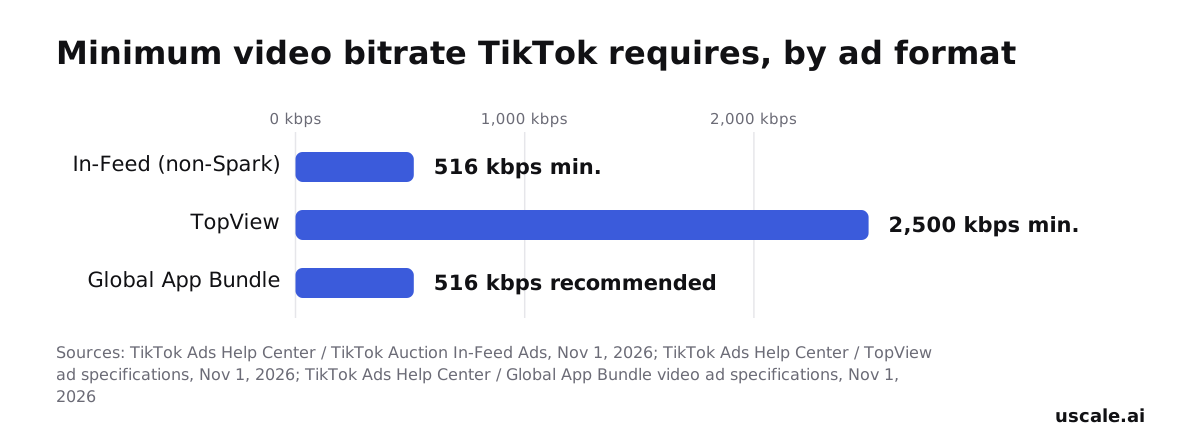
Export an .mp4, then check one number before you upload: your video's bitrate against the minimum for the ad format you're buying. File type and file size rarely cause trouble. Bitrate does, because TopView's minimum is far above In-Feed's. Dashes mark limits TikTok's pages cited here don't list.
| Ad format | File types | Length | File size | Bitrate |
|---|---|---|---|---|
| In-Feed (non-Spark) | .mp4, .mov, .mpeg, .3gp, .avi | up to 10 minutes | 500MB or less | at least 516 kbps |
| Spark Ad (from an organic post) | .mp4, .mov | no duration restriction | — | — |
| TopView | .mp4, .mov, .mpeg, .3gp | 5-60 seconds (9-15 recommended) | 500MB or smaller | at least 2,500 kbps |
| Reservation In-Feed | — | 5-60 seconds (9-15 recommended) | — | — |
| Global App Bundle | .mp4, .mov, .mpeg, .avi | 5-60 seconds (21-30 recommended) | within 500MB | at least 516 kbps recommended |
Why .mp4 is the safe default
.mp4 is the only file type on every list above. .avi works for In-Feed and Global App Bundle but not TopView. .3gp works for In-Feed and TopView but not Global App Bundle. If you export .mp4 once, the file type never becomes the reason a creative bounces.
Length: the 10-minute cap is the exception
Auction In-Feed allows up to 10 minutes, but every reserved format here stops at 60 seconds. TikTok's own Ads Manager preview tool lists standard in-feed video as 5-60 seconds, "but 15 seconds is recommended." Plan an app promo around that length. Only Global App Bundle asks for a longer cut, at 21-30 seconds.
The check that catches most re-exports
A file well under 500MB can still fall below 2,500 kbps, because squeezing a video to hit a size target lowers its bitrate. Read the bitrate in your export settings or a media inspector before upload. If you export at or above TopView's minimum, one file meets every bitrate rule on this page.
Once the file passes, the next risk is inside the frame: the parts of the picture TikTok's interface covers.
Keep text and logo centered, because TikTok's safe zone moves with the ad
TikTok does not publish one safe-zone margin you can design to once. On In-Feed ads, the clear area that the caption and buttons won't cover changes with three things: the video's shape, the length of the ad caption, and whether extra ad formats or add-ons are turned on. TikTok also ships separate downloadable safe-zone files for standard regions and for right-to-left (Arabic) regions.
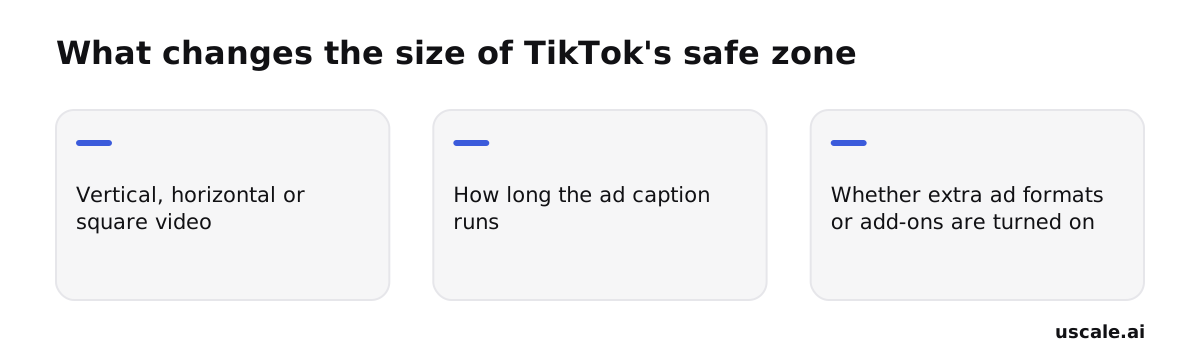
That is why a frame that looked clean in the edit can lose a headline under the caption once the ad runs. A longer caption takes up more of the screen, and an add-on places another element over the picture. The cut stays the same while the overlay changes.
TopView adds a second layer. Its safe zone has two parts: the open-screen moment when the ad first fills the screen, and the in-feed component that follows. The in-feed zone is the more restrictive of the two, and it shrinks further as the caption gets longer. A logo near the edge can sit cleanly in the open-screen moment and still end up covered once the ad drops into the feed.
The same logic holds at small scale. The optional In-Feed profile photo is a 98x98px square, and TikTok asks for its key element to stay centered inside a 66x66px safe area so it isn't cropped.
The rule to reuse: design for the smallest safe area the ad will ever show, not the one on your screen. Keep on-screen text and the logo centered and away from the edges, and download TikTok's current overlay for your format and region before you lock the cut. If the same video also runs on LinkedIn, run the matching check there with this guide to LinkedIn's logo overlay and mobile safe zone.
Placement keeps the picture readable. Whether the ad passes review also depends on what viewers hear.
Does a TikTok ad need sound? Yes, wherever TikTok writes a rule
Yes. Every TikTok ad format whose spec page includes a sound rule requires audio, and none of those pages allows a silent cut. TopView must be created for sound-on: the audio "must remain clear and be available," and the video "must not be completely silent." Reservation In-Feed ads, including Reach & Frequency, are stated just as plainly: "all video creatives must have sound."
| Ad format | TikTok's sound rule | Source, date read |
|---|---|---|
| TopView | Made for sound-on; audio "must remain clear and be available"; video "must not be completely silent" | TopView ad specifications, 2026-11-01 |
| Reservation In-Feed (incl. Reach & Frequency) | "All video creatives must have sound" | Reservation in-feed ad specifications, 2026-11-01 |
This rules out one habit many product marketers carry over from muted feeds: a captions-only cut with no voice and no music track. Captions serve the viewer who scrolls with the sound off. The audio track is what the format requires.
A narrated product video already passes this check without a rebuild. It has a voice reading the script, a music bed under it, and captions on every word. You get one cut that works for muted viewers and also meets the sound rule.
Sound is the rule people tend to notice too late. Three smaller details cause the same kind of rejection, and the next section covers them.
If the file meets every spec, isn't the ad ready to upload?
It's a fair assumption. Once the resolution, file type, length, bitrate and sound are right, the video file has nothing left to fail on, and that part holds. But three small rules sit outside your export settings, and each one can still get the creative sent back or cut off what viewers read.
The first three seconds. TopView's specifications rule out plain white in the first 3 seconds of the video, because white reduces how visible the TikTok logo is. A software demo that opens on a white dashboard or a blank sign-in page breaks this rule even when every other number is right.
The ad text. TikTok's Ads Manager preview tool allows a maximum of 100 English characters for ad text and recommends 4-60 characters so the line isn't truncated. A product description pasted from a landing page often runs longer than that.
The account name. The same tool caps the advertiser account name at 20 characters and recommends 4-10. A full company name with a legal suffix can stay under the cap and still crowd the ad.
None of these three shows up in a render setting. Check all of them before you upload, not after a rejection. So the checks are clear. The harder part is building one cut that passes all of them at once.
How to cut one product video that fits every TikTok ad format
The specs above become four decisions you can make before you open an editor. Make them in this order, because each one sets up the next.
Export vertical at 720x1280px or larger. A standard In-Feed video needs at least 540x960px for 9:16, and TopView asks for 540x960px or larger. A Global App Bundle video wants 720x1280px or larger. One export at 720x1280px clears all three, so you won't re-cut when you buy a new placement. You're done when the export settings read 9:16 at that size or above.
Open on colour, not white. TopView rules out plain white in the first 3 seconds because it hides the TikTok logo, and many software screens default to a white interface. Start on a coloured screen, a dark-mode view or a live shot instead. You're done when the first three seconds hold no blank white frame. If you do only one thing this week, check this.
Keep words and logo in the centre. TikTok's safe zone moves with orientation, caption length and add-ons, so a caption bar or call-to-action button can land on a word the viewer needs. For a quick win you can finish within the hour, download TikTok's current safe-zone file, lay it over your cut and move anything that sits under it.
Pick the route that builds the cut. The free route is the screen recorder and editor you already have: record the app in portrait and set the frame to 9:16. Or start from the same site or app with uscale. It makes a narrated video in minutes, with captions and on-screen words already in the film. The app promo video use case shows that tour as a vertical, captioned cut. You can also watch the example films before you build your own.
Success looks like one vertical file that uploads to any format you buy, opens on colour and keeps every word clear of TikTok's buttons.
Try it: make an app promo video from your live site or app, narrated, with captions on every word.
Before you hit export
TikTok gives you a different spec sheet for each format, so run this check against the format you are actually buying:
- Size and ratio. Match that format's minimum resolution and aspect ratio. Vertical 9:16 is the one cut every format here accepts.
- File type and length. Confirm the file type is on the format's list and the runtime sits inside its range.
- Bitrate. Read your export's bitrate and compare it with the published minimum. TopView's minimum is far higher than standard In-Feed's.
- Safe zone. Lay TikTok's current overlay over the cut, using your real caption length. Move any word or logo that lands under it.
- Sound. Play it with the volume up. You should hear a voice, music or both, never silence.
If your next ad shows an app, start with an app promo video made from your live site or product, narrated and captioned. The first video is free, and no card is needed; after that, the credit packs start at $29, paid once.
The spec sheet tells you what TikTok will accept. The checklist makes sure it accepts yours.
Make your tiktok ad specs from your website — it’s free →
Questions
What are TikTok's ad specs for video?
TikTok's ad specs for video are the size, file type, length, file size, bitrate, safe zone and sound rules an ad must meet, and they differ by format. A standard In-Feed ad needs at least 540x960px vertical, runs up to 10 minutes, stays at 500MB or less and needs at least 516 kbps. TopView needs vertical 9:16 at 540x960px or larger, 5-60 seconds, at least 2,500 kbps, and must not be silent.
What size should a TikTok ad video be?
A TikTok ad video should be vertical 9:16 at 720x1280px or larger, because that one export meets every format's minimum. Standard In-Feed accepts at least 540x960px vertical, 960x540px horizontal or 640x640px square. TopView takes only vertical 9:16 at 540x960px or larger, and Global App Bundle asks for 720x1280px or larger. Vertical is the only shape every TikTok ad format accepts.
How long can a TikTok video ad be?
A TikTok video ad's length limit depends on its format. A standard auction In-Feed ad can run up to 10 minutes, and a Spark Ad from an organic post has no duration restriction. TopView and Reservation In-Feed ads run 5-60 seconds with 9-15 recommended, and Global App Bundle runs 5-60 seconds with 21-30 recommended. TikTok's Ads Manager preview tool recommends 15 seconds for standard in-feed video.
What is TikTok's safe zone for ads?
TikTok's safe zone for ads is the part of the frame that the caption, buttons and other interface elements won't cover. It is not one fixed margin: on In-Feed ads it changes with the video's shape, the caption length and any add-ons, with separate files for standard and Arabic regions. TopView's in-feed zone is stricter than its open-screen zone, so keep text and logos centered.
What does it cost to make a TikTok ad video with uscale?
Making a TikTok ad video with uscale is priced in credits per step, and the director names each price before it starts. A new account gets 10 credits, 20 with a work email, enough for one full first video with no card. A launch film is 10 credits and a product walkthrough about 10. After that, packs are Lite at $29 for 25 credits, Starter at $49 for 50 and Growth at $129 for 150.

The team behind uscale, which turns a website, web app or GitHub repo into a narrated product video.