Twenty ads for $4: why look for Higgsfield alternatives?
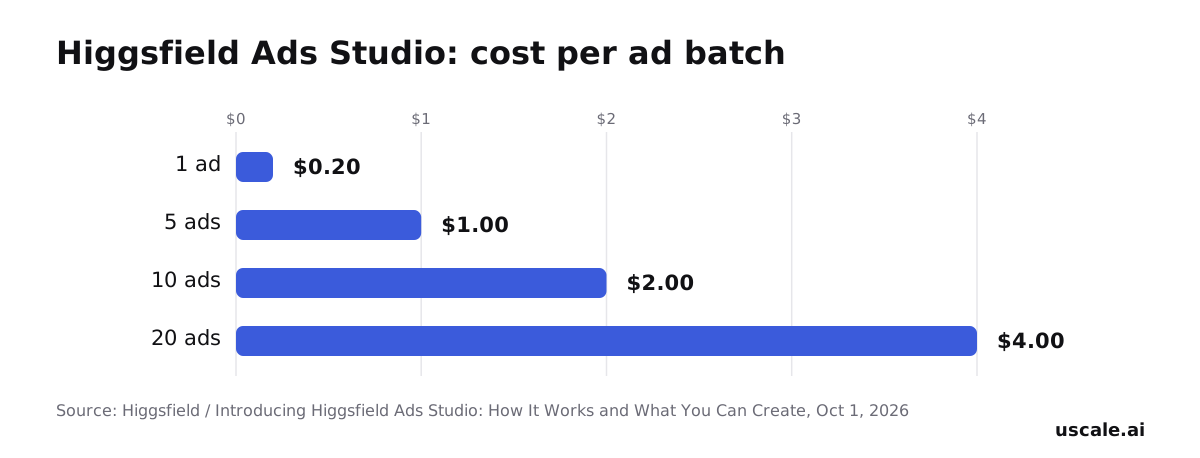
Twenty finished ads from one product page cost $4.00 in Higgsfield's Ads Studio, which makes a search for Higgsfield alternatives look strange at first. Paste a website, and it returns up to 20 variations of a single product in one run, priced at 4 credits an ad, about $0.05 a credit. Its sibling, Marketing Studio, takes a pasted product URL and returns publish-ready video ads in seconds.
So price is not what sends a product marketer looking, and neither is speed. The reason sits inside the ads. Each is built from what the tool lifts off the page: product images, the name, the description, the copy. That is a strong supply of creative to test in a feed. It is not a viewer watching the product do its job.
Picture the twentieth variant of a project-management app's ad. It has a new headline, a new crop and the same hero image. Nobody in it opens a board, drags a task or reaches the screen behind the sign-in. For some products that never matters. For others it is the whole sale.
So what is Higgsfield actually built for, and where does that job stop?
What is Higgsfield used for?
Higgsfield is built for one job, and it does that job fast: turning a product page into paid-social ad creative. On its AI ad generator page (checked October 2026), you paste a product URL, pick a format and get publish-ready video ads in seconds. Marketing Studio pulls the product name, description and images from that URL on its own, and offers 40+ ready-to-use AI avatars powered by Soul 2.0. Higgsfield's July 2026 walkthrough describes the rest of the chain. It reads key features and pricing, writes a script, adds native audio and lip sync, and exports a result ready to upload to Meta or TikTok.
Ads Studio, launched October 1, 2026, covers static ads. It turns a website into finished static ads with copy, visuals and brand style, and generates up to 20 variations of a single product in one run. At Higgsfield's published price, a full run of 20 costs $4.00.
For a performance team testing hooks on Meta, this is the right kind of tool. You get many variants at a low cost each, with no shoot. MarTech's October 2026 roundup described it the same way: product images and text scraped from the page, rendered into creative variations formatted for digital channels.
Where that job ends
The gap opens when the launch asset you need isn't an ad variant. Scraped images and page copy describe the product. They don't show it working. A buyer weighing a SaaS tool wants to see the dashboard load, the setting change and the export finish. Sales enablement needs a narrated tour a rep can send after a call. Some positioning works better with a real person speaking. And some buyers would rather click through the product themselves than watch anything.
None of this is a flaw in Higgsfield. It is a different job. The cost of treating the two jobs as one is easy to miss. You end up with twenty polished variants in the ad account and still no video that shows what the product does. The root cause is where the tool starts. It works from what the page says, so the output can only be as specific as the page. If nothing changes, the next launch ships with plenty of creative for the feed and a gap where the product demo should be.
So the useful question isn't which tool replaces Higgsfield. It's which job the video is for, and the four tools below each answer a different one. The first is the easiest to picture: a person on camera. The last, a product demo video filmed from your live screens, is where uscale comes in.
Which Higgsfield alternative fits a video with a person on camera?
When the video needs a person speaking about the product, rather than product images cut into ad variants, the fit is an avatar-presenter tool. HeyGen is the one this page puts in that slot. Its plans and features, taken from its own page, are in our HeyGen alternatives comparison. This section covers the job, not the price list.
Why a presenter changes the job
A scraped-image ad answers "what is it". A person on camera answers "who is behind it, and why should I listen". Those are different questions, and the right tool follows the question. Higgsfield spreads one product page across many ad variants for paid placement. uscale films the live product and narrates over its screens. An avatar-presenter video puts a face in front of the viewer first and the product second.
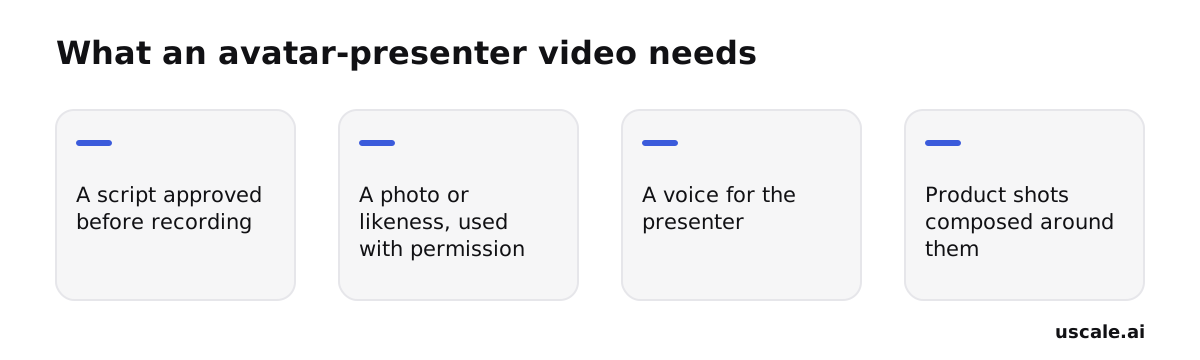
Most teams get this backwards: they choose the presenter before the script. A face doesn't fix a weak message; it only delivers it. Every presenter video rests on the same four inputs, and the first one decides the rest.
What to settle before you pick a tool
Write and approve the lines first, then decide who speaks them. If the presenter uses a real person's likeness, get that person's permission before anything is made. Choose a voice that suits the lines. Then plan the product shots around the presenter. A talking head with no product in frame is an introduction, not a demo.
One honest note: uscale also makes a founder avatar film. One clear photo becomes a presenter who speaks approved lines, with the product composed around them, and only after you confirm the photo is you or someone who agreed. It suits a founder adding a face to a product film. If the presenter is the whole video, week after week, a tool built around avatars is the closer fit.
The next job starts from the opposite place: the footage is already shot and only needs cutting.
Which Higgsfield alternative fits ads cut from footage you already shot?
If you already have a screen recording of your product and want ads in several lengths with captions and text on screen, you need an editor, not a generator. A text-based editor lets you trim the recording by editing its transcript, then add captions and overlays. Descript is the tool we compare for this job, and our Descript alternatives comparison lists its pricing and features as its own page gives them.
Higgsfield starts from a different input. It scrapes product images and text from a URL and renders new creative, so the recording you made never goes into it.
Most teams get one thing backwards here. They treat each shorter ad as a trim of the longest one. A short ad is not the long ad with the ending cut off. It is the one beat that matters, moved to the front.
A worked example (hypothetical)
Say a developer-tools team has one screen recording of its tool. In it, someone installs the tool, runs one command against a messy repository and reads the clean report it prints. The team cuts three ads from that recording:
| Cut | Beats, in order | Opening line |
|---|---|---|
| Shortest | Report on screen, then the command that made it | "One command, and every problem in your repo is listed." |
| Middle | Messy repository, the command, the report | "This repo has problems nobody has found yet." |
| Longest | Install, command, report, fixing the first issue | "Here is the whole loop, from install to the first fix." |
None of the three opens on the install. A viewer decides in the first beat whether the tool is for them, and an install screen tells them nothing about that. Write the captions so each cut still makes sense with the sound off, because the words on screen have to carry the line on their own.
The footage you already have is often your best footage. The editing work is deciding what each length leaves out. That holds while the buyer is still watching. Once they want to try the product themselves, a video of any length is the wrong format.
Which Higgsfield alternative lets a buyer click through the product instead of watching an ad?
When a buyer's next step is trying the product rather than watching another video, the fit is a clickable interactive demo, and Storylane is a common name for that job. It is not a video tool, so it doesn't compete with Higgsfield, HeyGen, Descript or uscale on the same ground. Our Storylane alternatives comparison covers its pricing and features as Storylane publishes them.
The reasoning is short enough to reuse on any tool choice.
- A video sets the pace. The viewer sees what you chose, in the order you chose, and then it ends. Higgsfield turns a scraped product page into video creative formatted for ad channels. uscale makes a narrated film of the real product. Both are watched, not steered.
- A buyer who already gets the idea doesn't want to be told again. They want to check whether the one feature they care about works the way they need it to. Only clicking can answer that.
- So the asset that moves this buyer is one they control. That is a different job, and it needs a different tool.
| Video ad or film (Higgsfield, uscale) | Interactive demo (Storylane) | |
|---|---|---|
| Who sets the pace | You | The buyer |
| What the buyer does | Watches | Clicks through the product's screens |
| Question it answers | "Is this for me?" | "Does it work for my case?" |
| Where it usually sits | Feed, ad placement, landing page | After interest exists, in follow-up |
The easy mistake is the order. A team builds the click-through demo first and sends cold traffic to it, where nobody yet has a reason to click. A video earns the attention, and the demo answers the question the video raised. That makes the two a sequence rather than a choice. Our guide to interactive demos versus demo videos shows where each one sits.
If the job is the film that comes first, showing the real product with a voice over it, that is the gap uscale fills.
Where does uscale fit instead of Higgsfield?
uscale fits when the video should show the real product working, not ad creative assembled from scraped images and copy. You paste a website, app or GitHub repo, and uscale plans, films and renders a narrated video with captions and music in minutes. The picture is your live product, filmed screen by screen. The voice, the timed captions and a music bed mixed under the voice are added.
That is a different job from Higgsfield's. Higgsfield reads a product page and spreads it into many ad variants. uscale films the screens a buyer will actually use. A rule you can reuse: a scraped hero image sells a promise, and a filmed screen shows proof. If your buyer's question is "does it do this?", only the filmed screen answers it.
Approve the storyboard before anything renders
The work happens in the director chat. You change the hook, swap a scene or send a logo in plain words, and the director asks before it spends a credit.
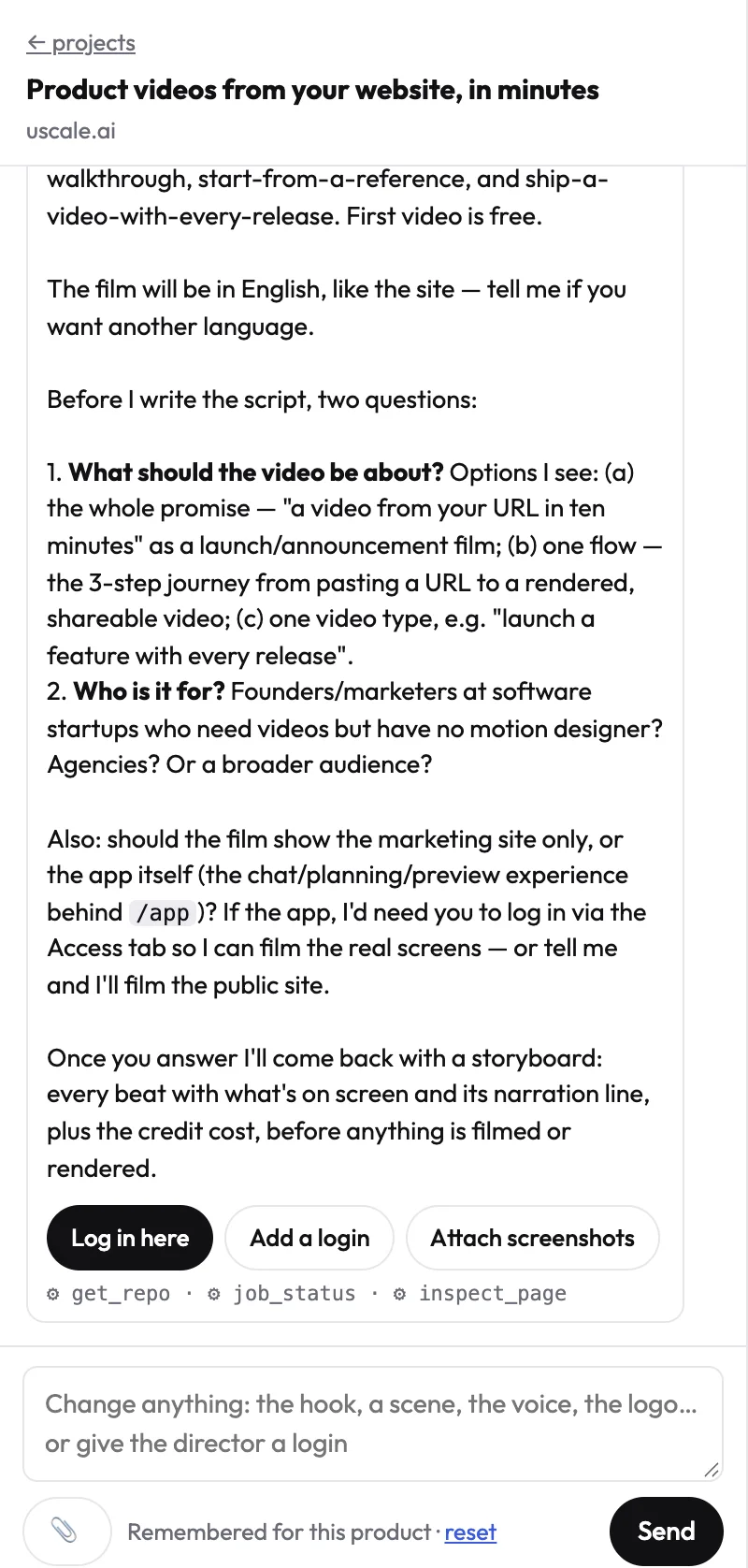
Say you're launching a reporting feature on Tuesday (a hypothetical). You tell the director "start on the dashboard and end on the export", read every proposed narration line, cut the one that oversells, and approve. Only then is anything filmed. If a line still reads wrong after the render, you ask for the fix in the chat and get a new version. The earlier cut stays in the version list.
What comes out
You get a 1080p MP4 with narration, captions and music in the shape each placement needs: tall for Reels, Stories and TikTok, 4:5 for the feed, and wide for YouTube and your site. A post pack for X and LinkedIn comes with it. The film can speak any of 21 languages, voice and captions included. For proof of real output rather than a description, see the films made with uscale on our examples page.
Starting from a chat you already use
Teams that would rather ask for a video from an assistant they already use can connect the uscale MCP server, live since 2026-10-15, to Claude, ChatGPT, Cursor or VS Code. The director's questions and the proposed script come back in that chat, and nothing that costs credits runs until you give the go.
Try it: turn your URL into a video: paste your site, approve every narration line, get a captioned, narrated film.
With each tool's job now named, the side-by-side below puts them on one page with their published prices.
Higgsfield vs uscale vs the others: a side-by-side
These five tools are built for five different jobs, so price only tells part of the story. uscale is our product. The rows where another tool fits better stay in. The criteria:
- Built for: the job decides every other row.
- You start from: a URL, a script, footage and a live app each ask for different work before anything renders.
- Shows your real product: viewers who see the actual screens know what they will get.
- What comes out: an ad, a presenter video, an edit, a clickable demo or a narrated film.
- Pricing model: monthly plan or one-off credits, taken from each tool's own page.
| Higgsfield | HeyGen | Descript | Storylane | uscale | |
|---|---|---|---|---|---|
| Built for | Ad-creative variants at speed | A presenter on camera | Editing footage you already shot | A demo buyers click through | A filmed, narrated product video |
| You start from | A product URL | A script | Your recording | Your product | A website, app or GitHub repo |
| Shows your real product | Images and copy from the product page | Not its main job | Yes, if your footage shows it | Yes, as clickable screens | Yes, filmed from the live product |
| What comes out | Video ads formatted for Meta and TikTok | A presenter video | An edited video with captions | An interactive demo | 1080p MP4 with voice, captions and music, tall, 4:5 and wide |
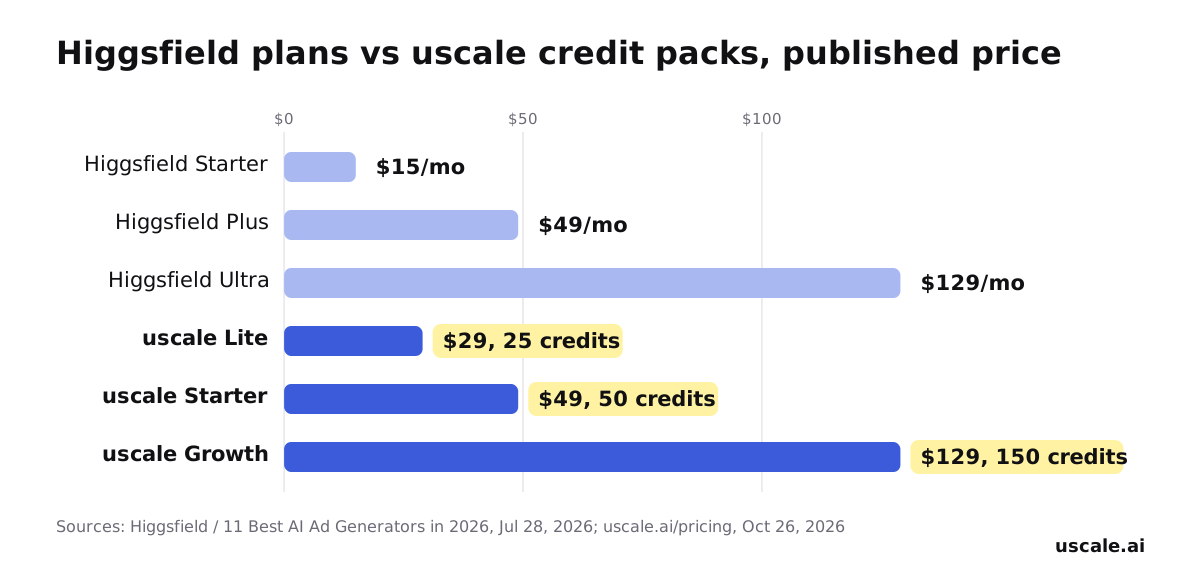
| Pricing model | Monthly plans: Starter $15/month, Plus $49/month, Ultra $129/month | See our HeyGen alternatives comparison | See our Descript alternatives comparison | See our Storylane alternatives comparison | Credit packs paid once: $29, $49, $129 |
Sources: Higgsfield plans come from its own comparison post (published July 28, 2026, prices verified October 2026). uscale prices come from its pricing page (October 2026). We have not sourced HeyGen, Descript or Storylane figures for this page, so we link our dedicated comparisons, which quote their own pages.
At the same price points, the two pricing models buy different things. $49 pays for one month of Higgsfield Plus, or one uscale Starter pack of 50 credits, about 5 product walkthroughs, with no subscription. $129 pays for a month of Ultra, or 150 uscale credits, about 15 walkthroughs.
Which one fits your situation
- Choose Higgsfield if you are a performance marketer who needs many ad variants from a product page for paid placements this week.
- Choose HeyGen if a person or avatar should speak to camera.
- Choose Descript if you already have screen footage and need it cut into ad lengths.
- Choose Storylane if buyers should try the product themselves before a sales call.
- Choose uscale if you are a solo founder before launch who needs one narrated film of the live app, a developer-relations team with a repo and no site yet, or an agency making client films, each in its own brand. The example films show the output.
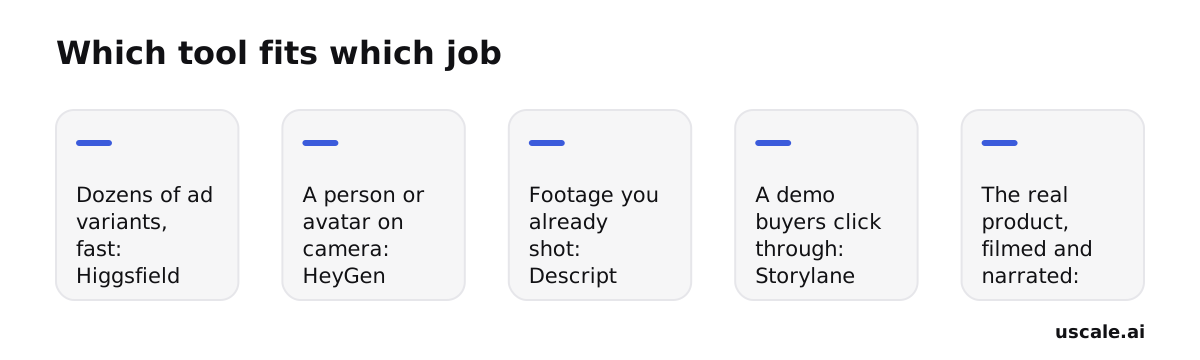
Rule of thumb: decide by what the viewer should see. That might be many ad variants, a face, footage you already have, a product they can click, or your real product filmed and narrated.
That rule points some readers to uscale. The fair test is the case where it doesn't.
When should you not use uscale instead of Higgsfield?
Here is the strongest case against filming the product. Paid social rewards volume. An ad account learns which creative works by running many versions side by side. Higgsfield's Ads Studio makes up to 20 variations of a single product in one run, and its Marketing Studio exports ads ready to upload to Meta or TikTok. A narrated tour of the real product, approved scene by scene, is one film. If your job this week is feeding an ad set fresh creative, one careful film is the slower route to the same answer.
That objection holds for that job. It is also not the only case where uscale is the wrong pick.
Choose something other than uscale when:
- You need many ad variants fast for paid placement. Use Higgsfield. uscale makes one film of your product, cut in the shapes each placement needs (tall, 4:5 and wide). It does not make a batch of creative variations.
- The video is mainly a person speaking. Use HeyGen. uscale's founder avatar film puts one presenter, made from your photo, around your product for up to six lines. The presenter speaks with uscale's voices, not your own.
- You are editing footage you already shot. Use Descript. uscale films your live product. It does not cut your existing screen recording.
- Buyers should click through the product themselves. Use Storylane. Our guide to interactive demos versus demo videos covers that choice.
- You need a REST API to make videos in bulk. uscale has none yet. It does connect to Claude, ChatGPT and Cursor through its MCP server. There you ask for a video in a chat, and nothing that costs credits runs before you say go.
What remains is the case most product marketers comparing these tools actually have: a buyer who wants to see the product work before signing up. Ad variants built from scraped images show the product's photos and copy, not its screens in use. When the job is showing those screens, narrated and captioned, volume stops being the measure, and a filmed product video is the right tool.
Before your next ad goes out
Five tools, five different jobs. The useful question isn't which one is best, but which job your next video has to do.
- Name the job. Many ad variants for paid placement, a presenter on camera, a cut from footage you already have, a demo buyers click through, or the real product filmed and narrated. Match it to the tool in the decision guide above.
- Read the full method. If you're starting from a URL, our step-by-step guide to turning a URL into video covers the whole path from pasted address to finished file.
- Try one film. If the job is a narrated video of the real product, paste your site and make a URL-to-video film with uscale. You get a storyboard with every narration line to approve, then a captioned video with voice and music. Your first video is free, and no card is needed.
A product video doesn't have to start with a shoot. It starts with knowing which job it's for.
Make your higgsfield alternatives from your website — it’s free →
Questions
What is Higgsfield used for?
Higgsfield is used to turn a product page into paid-social ad creative. Its Marketing Studio takes a pasted product URL, pulls the name, description and images, writes a script, adds audio and lip sync, and exports video ads ready to upload to Meta or TikTok. Its Ads Studio, launched October 1, 2026, makes up to 20 static ad variations of a single product in one run, at 4 credits an ad.
What's a free alternative to Higgsfield for product video ads?
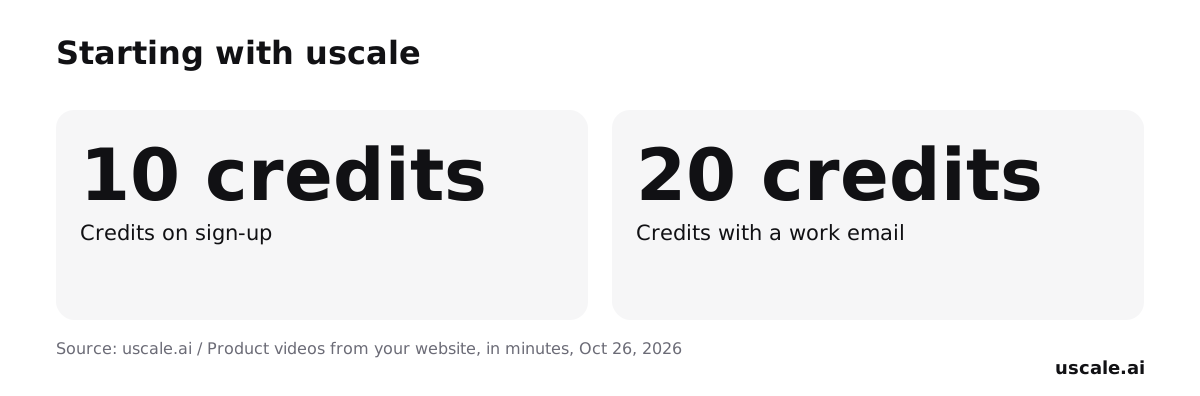
uscale is a free way to start: the first video is free, with 10 credits on a new account (20 with a work email) and no card needed. It films your live website or app and returns a narrated 1080p video with captions and music, rather than ad variants built from scraped images. After the first video, credit packs start at $29, paid once with no subscription.
Can I switch from Higgsfield without redoing my ad creative?
Switching from Higgsfield depends on what the replacement is for. Ads already made in Higgsfield are finished files, so they can keep running in the ad account. uscale does not convert or edit those ads; it films the live product and makes a new narrated video. One option is to keep Higgsfield for feed variants and add a filmed product video for buyers who want to see the screens working.
How much do Higgsfield's plans cost?
Higgsfield's plans start at $15 a month for Starter, with Plus at $49 a month and Ultra at $129 a month, according to Higgsfield's own comparison post, with prices verified in October 2026. Starter allows up to 2 video and 4 image generations in parallel. Usage is billed in credits: on Plus, a 15-second Genjutsu clip at 720p costs 104 credits, about $5.20, and an Ads Studio ad costs 4 credits.
What does uscale cost?
uscale has no subscription for credits. The first video is free: a new account gets 10 credits, or 20 with a work email. After that, packs are paid once: Lite $29 for 25 credits, Starter $49 for 50 credits and Growth $129 for 150 credits. A product walkthrough is about 10 credits and a launch film is 10. Done for you, where uscale makes 40+ videos, is $2,000 a month.

The team behind uscale, which turns a website, web app or GitHub repo into a narrated product video.