Replacing Navattic doesn't mean another click-through demo
Most lists of Navattic alternatives are lists of Navattic lookalikes: another builder for a tour a buyer clicks through. That fits when clicking is the job. It is not the only job.
Picture a different demo of the same product. Nobody clicks anything. The live product plays on screen, a voice explains each step, and captions follow the words. A buyer watches it in a launch post, a feed or an email, and no demo form stands in the way.
Once that counts as a demo, the shortlist splits by job:
- a buyer exploring the product on their own
- a quick async recording for one prospect
- a presenter speaking to camera
- footage you already shot and need to cut
- a narrated video made from the product itself
Each job has a different best tool, and only one of them looks like Navattic. So which job were you hiring Navattic to do?
The answer usually starts with why you're looking for an alternative in the first place.
Why do teams look for a Navattic alternative?
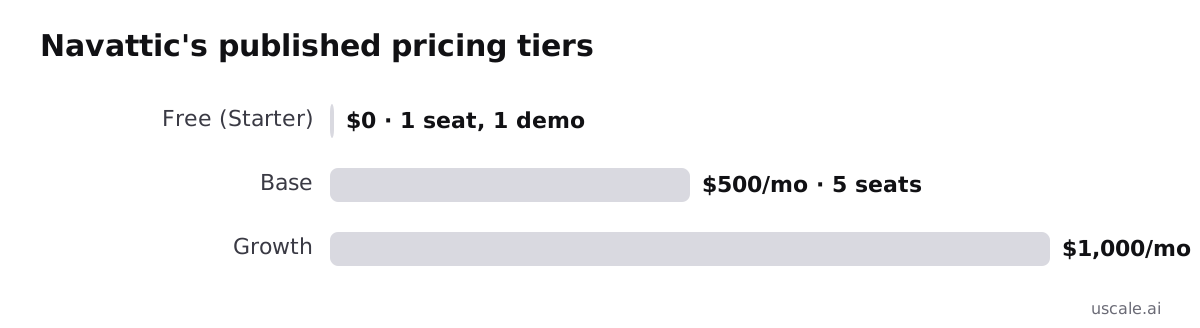
Navattic is good at what it sets out to do. Its own product page calls it "interactive demo software that puts your product at the center of go-to-market," built for Sales, Marketing and Growth teams. Demos are built from your product's real UI. The free Starter plan gives you 1 seat and 1 demo, with unlimited views and basic analytics.
Adoption is real too. Navattic's 2025 State of the Interactive Product Demo report counts over 28,000 demos built on the platform that year, a 56% increase. Its 2024 report says the average customer built 20 demos, up from 9.
So teams rarely leave because the tool failed. They leave over three trade-offs.
The price has no middle step
After the free plan, the next published tier is Base at $500 a month for 5 seats. Growth costs $1,000 a month for 10 seats, and Enterprise is quote-based. Storylane's own comparison page notes that Navattic discloses no price between free and $500. For a product marketer with one launch and a tight budget, that is a big step just to get a second demo.
Seats grow with the team
The cost is tied to seats. If sales, marketing and customer success all need to build or edit demos, the plan you need tracks headcount, not the number of launch assets you make.
A tour is built for a buyer who clicks
The same 2025 report found that 90% of the companies it surveyed had some kind of sales-led motion. The product is shaped around that path: a prospect explores, then talks to sales. That is the right asset when the buyer wants to try the product. It fits less well where nobody clicks, such as a launch post, a social feed, a sales email opened on a phone, or a slide in a pitch deck.
None of these is a flaw. Each one is a sign that the job may be different, and the right alternative depends on which job you need done.
Start with the job Navattic already does: a tour the buyer clicks through. If that is still the job, the only question is which vendor.
Storylane: the closest peer for click-through demos
Switching from Navattic to Storylane changes the vendor, not the format. Storylane does the same core job: a tour that a buyer clicks through on your own site, built from your product's screens. If your buyers already engage that way and the problem is cost or fit, start your shortlist here.
The clearest reason teams compare the two is how the pricing is laid out. Storylane's own Storylane vs Navattic comparison, with prices verified in July 2026, notes that Navattic publishes no dollar amount between its free Starter plan and its $500/month, 5-seat Base plan. That is accurate to Navattic's published tiers, but it is also one vendor making a case against a rival. Check Storylane's own pricing page for its current numbers. We have no sourced figure for it, so we won't quote one.
| Navattic | Storylane | |
|---|---|---|
| Core job | Interactive tour a buyer clicks through | Same |
| Free entry | Starter: 1 seat, 1 demo, unlimited views | See Storylane's pricing page |
| First paid tier | Base: $500/month, 5 seats | See Storylane's pricing page |
| Next tier | Growth: $1,000/month, 10 seats | See Storylane's pricing page |
| Published price between free and first paid | None disclosed (per Storylane, July 2026) | Not in our sources |
Here is a test you can reuse. When two tools do the same job, what separates them is what your second and sixth seats cost, not which features each one lists. Price out your real team size on both pricing pages before you book a demo. Our Storylane alternatives write-up covers the fuller comparison.
Against uscale the split is simple. Storylane keeps the buyer clicking inside the product. uscale turns the same product into a narrated video that a buyer watches without touching it. If clicking is still the right experience for your buyer, the next tool sits in the same category.
Supademo: another interactive demo builder
Supademo does the same job as Navattic and Storylane. You build a clickable tour of your product in the browser, and a buyer steps through it on their own. It belongs on the same shortlist as those two, not on a list of video tools. If you are replacing Navattic with another tour, Supademo is a like-for-like swap.
When two tools do the same job, the choice comes down to plans, seats and editor details. Those change often, so trust the vendor's current page over any roundup, including this one. Within one category, compare on dated pricing pages, not on lists. Our sources include no dated Supademo pricing page or feature list, so this post quotes no numbers for it.
| What you need to know | Where it stands here |
|---|---|
| The job it does | A clickable product tour, the same job as Navattic and Storylane |
| Current plans and prices | Not in our sources. Check Supademo's own pricing page |
| Feature-by-feature detail | See our Supademo comparison |
The gap with uscale is the same one as with Storylane. Supademo is built for a buyer who clicks. uscale films your live product and adds narration, captions and music, so the buyer watches without touching anything.
The next tool leaves the tour behind for a smaller job: a quick recording sent to a few people.
Tella: when a quick async recording is the job
Some demo jobs aren't a tour or a produced film at all. They're a fast screen recording with your own voice over it, sent to one teammate or a handful of prospects. For that job a recorder fits better than a website tour, and Tella is a sensible pick.
A worked example
Say you're a founder. A prospect saw your product on a call last week and asked how the new export works. You open the app, hit record and talk for about two minutes:
| Beat | On screen | What you say |
|---|---|---|
| 1 | Their workspace | "Following up on your export question from Thursday." |
| 2 | The export menu | "Here's the option you asked about." |
| 3 | The finished file | "This is what your finance team would get." |
The value is the personal part: their question, your voice, sent the same day. A prospect who already knows the product wants an answer, not a launch film. If the video only makes sense to one person, record it yourself.
For this case, choose Tella over uscale. Our Tella comparison has the detail. Check Tella's own pricing page for current numbers, since we don't quote them here.
Tella vs uscale
Tella is built for one quick, personal recording. uscale is built to turn the product itself into a repeatable video: it films your live product with no recording on your side, and when the app changes you can film the same tour again. That difference matters once one explanation has to reach many viewers. The next job moves further from the screen, to a person on camera.
HeyGen: when you want a person on camera
HeyGen fits when the presenter is the video. The job is an avatar speaking to camera line after line and carrying the whole piece, with no product screens holding it together. That is a different job from Navattic's, where the buyer's attention stays on the product and their own clicks.
To choose, ask where the viewer's eye should rest. If it should rest on a face that explains, pick a presenter tool. If it should rest on the product doing its work, a presenter across many lines competes with the screens you want people to see.
uscale does offer a founder avatar film, so its scope needs to be stated exactly. One clear photo of you becomes a presenter who speaks your approved lines to camera, with your real product screens composed around them. Each line runs up to about 30 words, or 4 to 15 seconds, and a film has up to six lines. The presenter speaks in a voice chosen from uscale's voices, not your own. It costs 1 credit for the portrait, 30 for the avatar film and 2 for its render.
The difference is scope, not a missing feature. HeyGen gives you an avatar-led video as the whole piece, across many lines. uscale's founder avatar is one photo delivering up to six lines beside your real product screens.
| What the video needs | Better fit |
|---|---|
| A presenter who carries the whole piece, line after line | HeyGen |
| A founder's face for a few lines, framed by the product | uscale founder avatar film |
| The product's screens as the main subject, narrated | uscale |
For HeyGen's current plans, check its own pricing page. The full HeyGen comparison covers the rest. If you already have the footage and only need to cut it, the next tool is a better fit.
Descript: when you already have the footage
If the recording already exists, the job isn't making a video; it's editing one. Descript is a text-based editor. Your recorded footage becomes a transcript, and you cut and tighten the video by editing those words. That suits a team with a folder of screen recordings, a customer interview or a webinar that needs to get shorter and cleaner.
For that team, pick Descript over uscale. uscale isn't built to polish a recording you made. For a software product, it starts from your live site, web app or GitHub repo and films the product itself. If the raw material is already on your drive, a tool that films from scratch skips the work you've done.
Before comparing features, ask what you're starting from. Footage points to an editor. A product with no footage points to something that films it. Choose the tool by your raw material, not by the finished video you picture.
| You start with | Pick | What you do |
|---|---|---|
| Screen recordings or interviews already shot | Descript | Cut and polish by editing the transcript |
| A live site, web app or GitHub repo, no footage | uscale | Approve a storyboard, then get a film of the real screens with voice, captions and music |
Descript edits footage you already have. uscale films the product itself, so there's nothing to edit first. The fuller comparison is in Descript vs uscale, and Descript's own pricing page lists its current plans. That leaves the case where nothing has been recorded yet, which is the job uscale is built for.
uscale: a narrated video made from the product itself
uscale skips both the tour and the recording. Paste your product's address, and it opens the live site or app, clicks through it like a careful user and films each screen. The director in the chat proposes a storyboard with every narration line, and nothing is filmed until you approve it. The film then gets a voice, captions that follow every word, and a music bed. If the screens sit behind a sign-in, you sign in once in a browser streamed into the page.
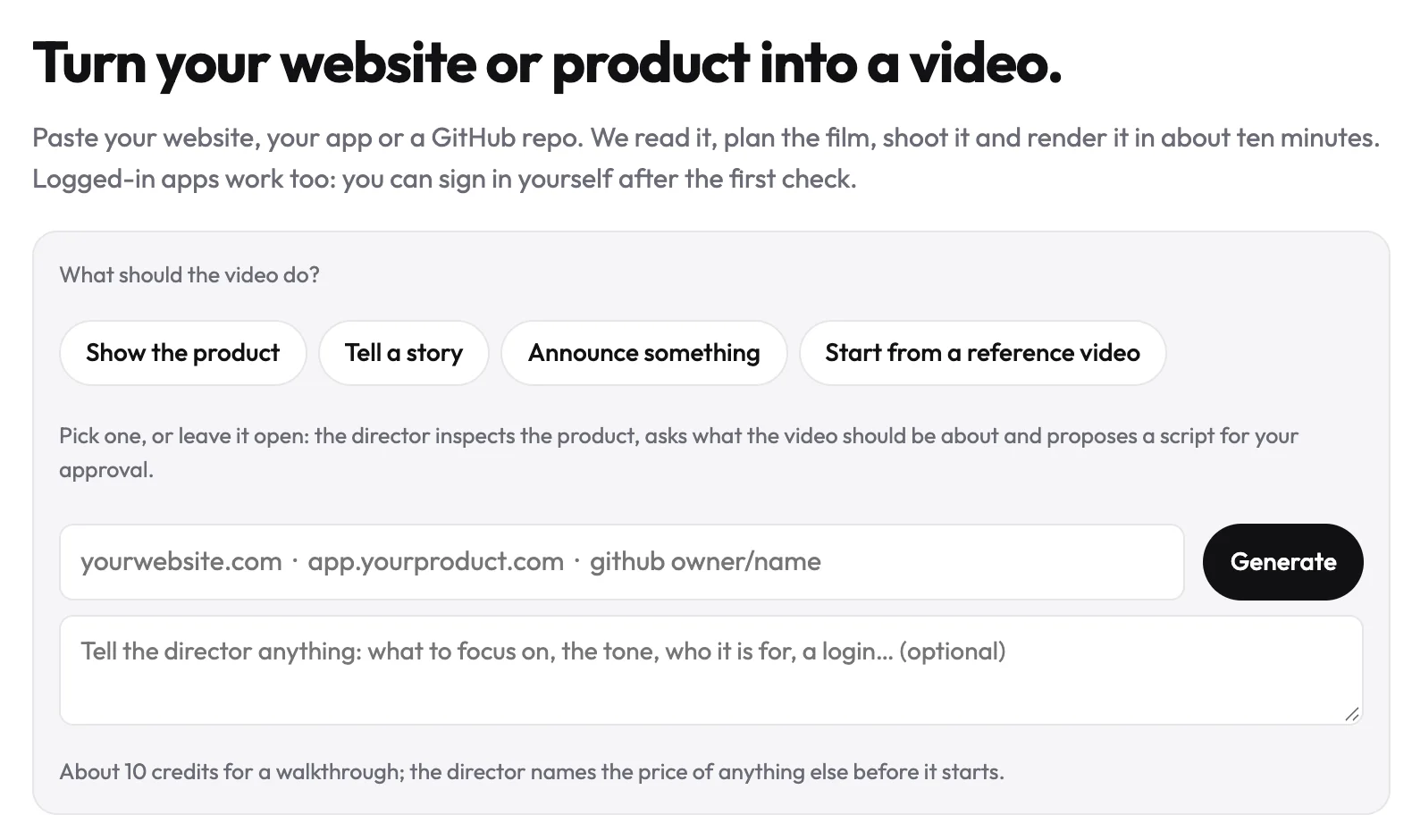
You hand over an address, not footage. Nobody on your side records a screen or builds steps. When the app changes next week, you film it again. The tour is saved with the project, so a new cut picks up the new screens.
What it costs
The pricing page sells credits once, with no subscription and no seats:
| Plan | Price | Credits | What /pricing says it covers |
|---|---|---|---|
| Free | $0 | 10 credits · 20 with a work email | One full first video |
| Lite | $29 | 25 credits | About 2 product walkthroughs |
| Starter | $49 | 50 credits | About 5 product walkthroughs |
| Growth | $129 | 150 credits | About 15 product walkthroughs |
That works out to about 10 credits per product walkthrough. Because nothing is priced per seat, adding a teammate doesn't change the cost.
The decision
You can reuse this test for any demo tool: ask what the buyer's hands are doing. A buyer holding a mouse wants to explore. A buyer scrolling a feed wants to be shown. If your buyers should click through the product themselves, pick one of the interactive-demo tools above. If they should watch a short video of the product on a landing page, in a sales email or in a feed that starts muted, uscale fits that job. It is built for software products and for a product demo video in particular.
The table below lines up all seven tools so you can shortlist by job and starting price.
Try it: make a product demo video: a narrated film of your live product, with every line approved before filming.
Navattic alternatives compared: Storylane, Supademo, Tella, HeyGen, Descript and uscale
Three columns settle a shortlist. Best for is the job each tool was built to do. Starting price is the entry point from the vendor's own page. Buyer experience shows whether your prospect clicks through the product or watches it, and that choice settles the category first. uscale is our product and one row of seven.
| Tool | Best for | Starting price | Buyer experience |
|---|---|---|---|
| Navattic | Interactive demos for B2B SaaS sales and marketing teams | Free Starter plan (1 seat, 1 demo, unlimited views); Base $500/month for 5 seats | Clicks through |
| Storylane | Click-through demos, the closest peer | Not in our sources; see its pricing page | Clicks through |
| Supademo | Clickable product tours | See its pricing page | Clicks through |
| Tella | A quick async recording with your voice | See its pricing page | Watches |
| HeyGen | An avatar presenter across many lines | See its pricing page | Watches |
| Descript | Editing footage you already recorded | See its pricing page | Watches |
| uscale | A narrated video made from your live product | Free plan $0 (10 credits); Lite $29, Starter $49, Growth $129; no subscription | Watches |
Sources: Navattic prices come from its demo-software guide, August 2026. Storylane's comparison page verified its prices in July 2026 and notes that Navattic lists nothing between free and $500/month. uscale prices come from our pricing page. We have not verified prices for Storylane, Supademo, Tella, HeyGen or Descript, so check each vendor's page before you budget.
Which row is yours
- A sales-led SaaS team whose buyers should explore the product: Navattic. If the jump from free to $500 a month is the sticking point, look at Storylane or Supademo.
- One quick personal update: Tella. A presenter carrying the whole video: HeyGen. Footage already shot: Descript.
- A solo founder before launch, or a product marketer who needs a narrated walkthrough without recording anything: uscale.
Rule of thumb: if the buyer should touch the product, shortlist the click-through tools. If the buyer should watch, choose by what you start from: your voice, a presenter, footage you already have, or the product itself.
One row in that table is ours, so the fair question is when it's the wrong pick.
When shouldn't you choose uscale instead of Navattic?
Yes, there are clear cases, and the strongest one comes from Navattic's own customers. A buyer who clicks through a tour is doing something a video viewer is not. They choose what to look at and move at their own pace. On Navattic's customer highlights page, CaptivateIQ says its tour converts at "nearly 40%," higher than any other referrer to its "request a demo" page. If your sales motion depends on that kind of hands-on engagement, a video someone watches does a different job. It is not a cheaper version of the same one.
Here is where uscale isn't the fit today:
- Buyers need to click through the product themselves. Pick Navattic, Storylane or Supademo. A video can't let a prospect explore.
- The whole video is a person on camera. HeyGen is built for avatar-led videos across many lines. uscale's founder avatar is one photo speaking up to six lines beside your product screens.
- You already shot the footage. Descript edits what you have. uscale films the product from scratch, a step you've already done.
- You need one quick, personal recording. Tella is built for that. A storyboard and an approval step are more than a two-minute update needs.
- You need a REST API to generate videos in bulk. uscale has none. It works inside Claude, ChatGPT and Cursor through its MCP server, live since 2026-10-15, but that's a chat with the director, not a bulk-automation tool.
- You need a live-action crew and a shoot. uscale films your product's screens or illustrates it. It doesn't send people with cameras.
If you're still weighing the two formats in general, interactive demo vs demo video covers that choice on its own.
That leaves one case: a buyer who should watch your product before they touch it, on a landing page, in a launch post or in an email. That is the job uscale is built for.
Which Navattic alternative should you pick?
The opening point holds: replacing Navattic doesn't automatically mean another tour builder. It means naming the job first.
- Buyers should click through the product themselves: Storylane or Supademo.
- A quick async update for one prospect: Tella.
- A presenter on camera across many lines: HeyGen.
- Footage you've already shot that needs editing: Descript.
- A narrated video of the product itself, filmed from the live site: uscale, and your first video is free.
If that last job is yours, judge the output rather than the pitch. Watch real narrated product videos made from live products, and see whether one would carry your demo.
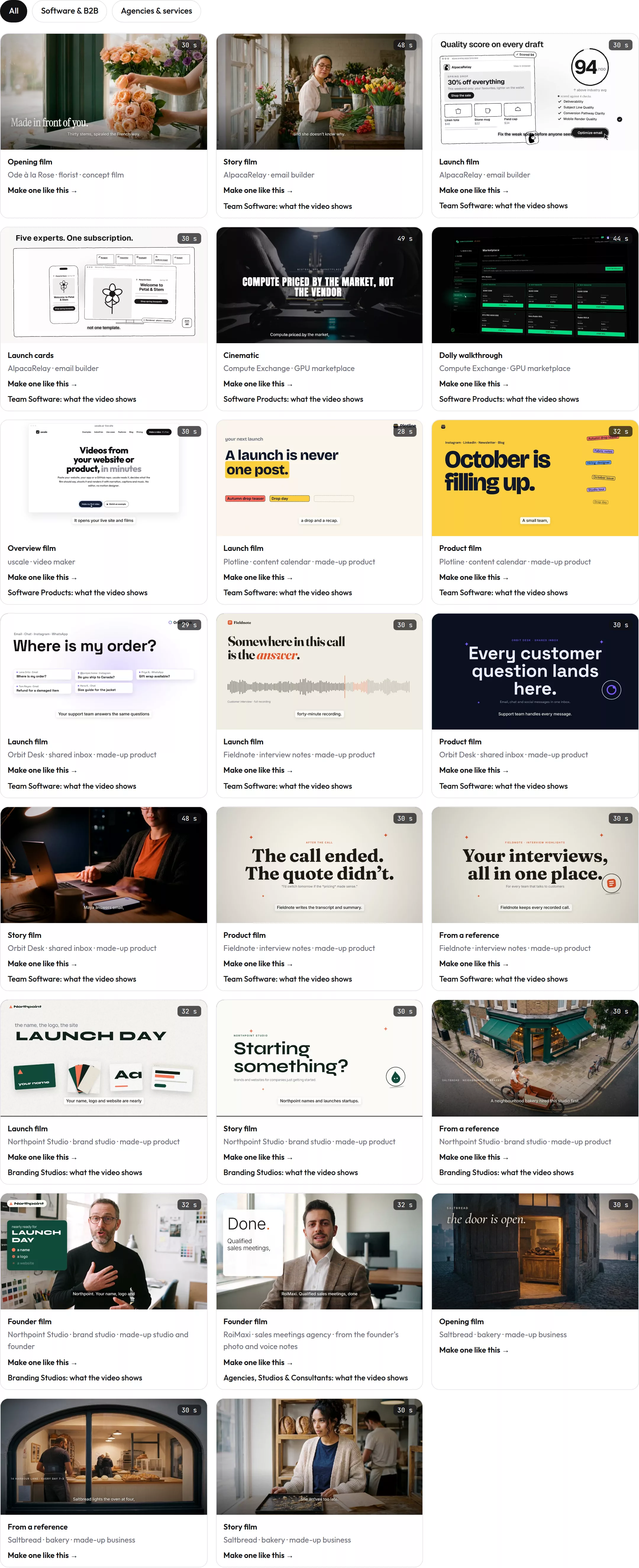
A demo doesn't have to be clicked to be understood. Sometimes the buyer just needs to watch the product do its work.
Make your navattic alternatives from your website — it’s free →
Questions
What is Navattic used for?
A Navattic alternative is a tool that handles the demo job differently from Navattic's click-through tours, such as a narrated video or a presenter on camera. Navattic itself builds interactive product demos: tours made from a product's real interface that a buyer clicks through. Its product page calls it demo software for Sales, Marketing and Growth teams, and its 2025 report counts over 28,000 demos built that year, a 56% increase.
How does Storylane compare to Navattic?
Storylane does the same core job as Navattic: an interactive product tour that a buyer clicks through, built from the product's screens. The main difference teams weigh is pricing. Storylane's own comparison page, with prices verified in July 2026, notes that Navattic discloses no price between its free Starter plan and its $500 a month, 5-seat Base plan. Check Storylane's pricing page for its current numbers before choosing.
What's a free alternative to Navattic for product demos?
A free option depends on the format you need. For a click-through tour, Navattic itself has a free Starter plan with 1 seat, 1 demo, unlimited views and basic analytics; check Storylane's and Supademo's pricing pages for their current free tiers. For a narrated video of the product instead, uscale's free plan gives 10 credits, or 20 with a work email, enough for one full first video with no card needed.
Can I switch from an interactive demo to a video without re-recording everything?
Yes, if the video is filmed from the live product rather than built from the tour. uscale opens a live site or web app, clicks through it and films each screen, so nobody records anything. Screens behind a sign-in work too: you sign in once in a browser streamed into the page. You approve every narration line before filming, and when the app changes, the same tour can be filmed again.
What does uscale cost?
uscale sells credits once, with no subscription and no seats. The free plan is $0 with 10 credits, or 20 with a work email, covering one full first video. Lite is $29 for 25 credits, about 2 product walkthroughs. Starter is $49 for 50 credits, about 5. Growth is $129 for 150 credits, about 15.

The team behind uscale, which turns a website, web app or GitHub repo into a narrated product video.