Synthesia Syren alternatives: what the launch list leaves out
On October 9, 2026, Synthesia launched Syren in beta. You give it a prompt, a preset or a brand document you already have, and it builds a finished video with motion graphics, avatars, voiceover, music and b-roll. Read that list again and one step is missing. Nothing on it opens your live website or app and films the screens your customers actually use.
That gap is why searches for Synthesia Syren alternatives rarely mean one thing. One product marketer typing those words wants a presenter speaking to camera. Another has footage already shot and needs it cut. A third wants a demo buyers click through on their own. Some want the product itself on screen, exactly as it looks today.
Those are four different jobs. A tool built for one can feel clumsy at the other three. So which job is yours?
Start with the job Syren itself was built for, because that's what every alternative gets measured against.
What does Synthesia Syren do well?
Syren turns material you already have into a finished first draft, and it lets you fix that draft by asking instead of rebuilding. Synthesia's own launch materials point to three strengths.
| Strength | What you give it | What you get |
|---|---|---|
| Starts from your material | A prompt, a preset, or docs, images, videos, PowerPoint files and YouTube links | A finished video with motion graphics, animation, avatars, voiceover, music and b-roll |
| Edits by request | A change typed in chat | Playback, a transcript view and the change made, without starting over |
| Nothing to install | A browser | Clips up to three minutes, horizontal or vertical |
It starts from what's already on your desk. For a product marketer, that saves the first day of work. The positioning doc, the launch deck or last quarter's webinar on YouTube can all serve as raw material, so the first cut doesn't wait on a blank script. Synthesia describes the result as a finished video that you then refine with Syren in chat.
Changes are requests, not re-shoots. The editor pairs playback with a transcript view and chat-based editing. When one line needs softening before sign-off, you ask for that change, and you don't have to start the video over.
It fits the formats you already ship. Videos render in the browser with nothing to install. Clips run up to three minutes in horizontal or vertical orientation, so one project can cover a landing-page hero and a social cut.
Why people still look further
Look at what those three strengths have in common. Each one describes what Syren generates from a prompt or a document. None of them describes opening your live web app and filming its real screens, clicking through the dashboard the way a buyer would. That is a trade-off in what the tool is built for, not a flaw.
The gap still matters when your launch assets or sales enablement material need the actual product on screen, especially when that screen changed last sprint. A generated scene can illustrate a feature. It can't show the build your customers log into. So the useful question isn't which tool beats Syren. It's which job this particular video has to do.
The most familiar of those jobs puts a person on screen.
HeyGen: when the video needs a person speaking to camera
If your video's main job is a person talking, HeyGen is the tool in this list to look at first. We place it in the avatar-presenter category, where the point of the video is a digital presenter reading a script to camera. This post has no dated source for HeyGen's features, so confirm what it offers on its own site. Syren does a different job: it builds a finished video from a prompt, a preset or material you already have. Opening a live product and filming its real screens is a third job, separate from both.
Here is a way to choose. Viewers trust a face for some messages: a welcome from the team, a policy change, a sales note that should feel personal. For a product claim, they trust the screen. A line like "export takes one click" is believed when the viewer sees the click. So pick the tool by what the viewer has to see in the first beat, not by whose demo reel looks most polished. Most comparisons rank polish and skip that question.
| What the viewer sees first | Tool to look at |
|---|---|
| A presenter speaking your script to camera | HeyGen |
| A finished video made from a prompt, preset or brand document, with motion graphics, avatars and voiceover | Synthesia Syren |
| Your live site or app, opened and filmed screen by screen | uscale |
There is no sourced price for HeyGen in this post, so there is no number here. Check HeyGen's own pricing page before you compare. Our HeyGen comparison sets the two tools side by side.
HeyGen puts a face on screen; uscale puts the product on screen. uscale can add a presenter made from one photo of you, with up to six lines to camera, but the film stays built around the product. The choice is what your viewer needs to see, not which tool is better. If you already have the footage, that is a different job again.
Descript: when you already have the footage
Descript belongs to the editing job. You reach for it when a recording already exists and needs tightening. This post has no dated source for its feature list, so check Descript's own product pages for what it does today. The point for choosing is simpler: an editor starts from footage, so the footage has to exist first.
A worked example
Say your team screen-recorded a walkthrough of a new export feature last week. The take is usable but loose. It has a slow intro, a wrong click, a wait while a page loads, and the result only at the end.
| Beat | Raw recording | Tightened clip |
|---|---|---|
| 1 | Presenter introduces the team and the release | The finished export, on screen |
| 2 | Opens settings, clicks the wrong tab | The one click that starts the export |
| 3 | Waits for the page to load | Cut |
| 4 | The export finishes | Narration says what the viewer can now do |
The order matters more than the trims. A viewer decides in the first beat whether the clip is for them, so show the outcome before the menu that produces it.
Most teams treat editing as the hard part, and that's backwards. An editor can only cut what the camera caught. If a screen is cropped, or the feature changed after the take, you record again.
This post has no sourced price for Descript. See its own pricing page for current plans, and our Descript alternatives comparison for more on where it fits.
vs uscale: Descript edits what you recorded. uscale does the recording and the editing from your live site or app. It clicks through like a careful user, films each screen sharp, and puts every narration line in a storyboard for you to approve before it adds voice, captions and music. That covers footage someone watches. The next tool is for buyers who would rather click.
Storylane: when buyers should click through the product themselves
Storylane fits the moment a buyer wants to drive. Broadly, it belongs to the interactive-demo category: tools that turn a product into a guided, clickable walkthrough that a prospect steps through at their own pace. Nothing plays on its own. The buyer moves it forward. This is a general description of the category, not a quote, so check Storylane's own site for its current features.
Why a clickable demo fits some pages and not others
Premise one: a visitor on a self-serve trial or pricing page has already chosen to spend time on you. They want to check the part they care about, not the part you picked. Premise two: a video in a feed or a follow-up email reaches someone who hasn't decided anything yet, often with the sound off. Conclusion: the clickable demo belongs where the buyer already wants to look. The film belongs where you still have to win their interest.
Many teams treat an interactive demo as an upgraded video. It is neither better nor worse. It asks for something different. A clickable demo asks the buyer for effort; a film asks only for attention.
| Clickable demo (Storylane) | Narrated film | |
|---|---|---|
| Who moves it forward | The buyer, click by click | It plays on its own |
| Where it fits | Trial page, pricing page, follow-up for an interested buyer | Social feed, launch page, ad, cold email |
| What the viewer must do | Choose a path and act | Watch, even muted |
There is no sourced Storylane price for this post, so check Storylane's own pricing page before you compare. Our Storylane alternative page and our guide to interactive demo vs demo video cover this split in more detail.
vs uscale: Storylane hands the buyer the controls. uscale hands them a finished film. It opens your live site or app, films the real screens and adds voice, captions and music, so the tour plays on its own wherever you post it. Sometimes the job is smaller than either: a quick personal message from you.
Tella: for a quick, async recording of your own screen
The job here is a quick recording of your own screen, sent to someone who already knows you. We place Tella in that job as the quick async option for a message to a teammate or a prospect. Check Tella's own site for exactly what it records. It is a different job from a produced, on-brand video that has to stand on its own on a launch page or in an ad.
Say you're a founder posting a two-minute update to your team's Slack channel. You open the dashboard, talk through what shipped this week, point at the new export button and send the link before lunch. Nobody wants a storyboard or a music bed here, and five retakes would make it sound less like you.
This is the part most people get backwards. They assume more polish is always better. It isn't. A teammate trusts a rough recording because it is plainly yours. A stranger scrolling past an ad has no reason to trust you yet, so the video has to do that work itself, with clear screens, a checked script and captions for a muted feed.
A recording is for people who already know you; a film is for people who don't.
This post has no sourced Tella price, so check Tella's own pricing page before you compare costs. Our Tella alternative comparison has the side-by-side.
| Quick async recording (the Tella job) | uscale | |
|---|---|---|
| Who records | You, at your desk | uscale films your live site or app |
| On screen | Whatever you capture | The product's real screens |
| Finish | Close to as recorded | Voice, captions and music |
| Best audience | Teammates, warm prospects | Launch pages, ads, new viewers |
vs uscale: Tella is quick and personal. uscale is produced and captioned, and the film is ready to publish on its own.
That leaves the job this post started with: a video of the product itself, when nobody has recorded anything yet.
uscale: when the video needs to show the real product
uscale is built for the job Syren's prompt-and-document route leaves open: putting your actual product on screen. Paste the address of your website or web app. uscale opens it, clicks through it like a careful user and films each screen sharp, never cropped. You do no screen recording yourself. Screens behind a sign-in work too: you sign in once in a browser streamed to you. Starting from code? Connect GitHub read-only, and uscale plans a film of the project from the repository, even before there is a live site.
The storyboard comes before the film
Before anything is filmed, the director writes a storyboard with every narration line in it. You ask for changes in the chat and approve it. The chat is free. Each step that films, writes or renders names its credit price before it starts. Voice, captions that follow every word and a music bed are added after you approve.
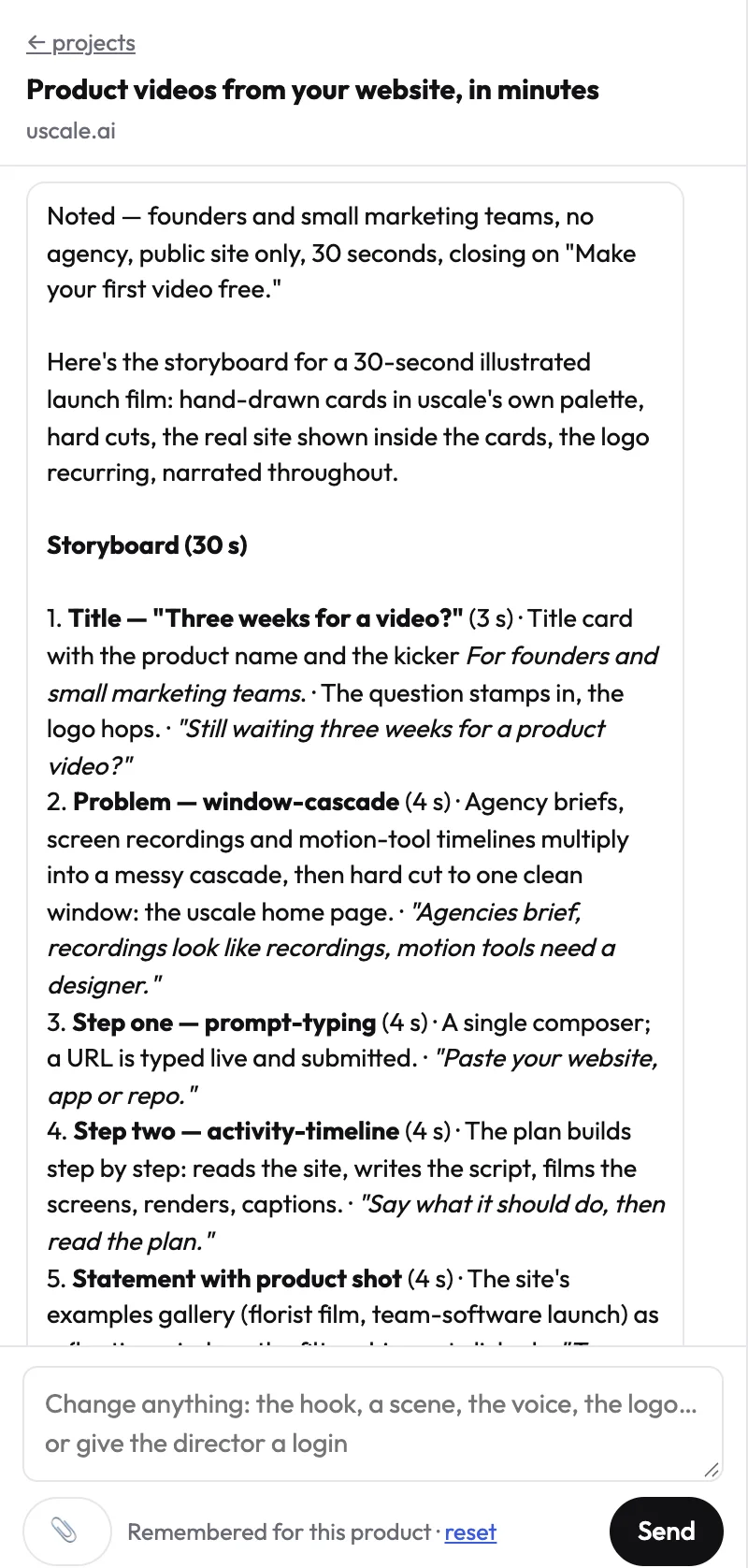
This is the step most teams get backwards. They review the finished video, then argue about the script. Fix the words while they are still words. A changed line in a storyboard costs nothing. A changed line in a finished film means another render.
The limit
uscale is not a presenter studio. Its founder avatar option turns one photo of you into a presenter for up to six lines, voiced with a uscale voice rather than your own. If the video is mostly a person talking to camera, the HeyGen job above fits better. When the viewer needs to see the real product working, use this row as your reference when you compare prices in the table that follows.
Try it: turn your web app into a product video: filmed from the live product, with every narration line approved first.
Synthesia Syren vs its alternatives: price and fit at a glance
uscale is our product, so read its row with that in mind. Four criteria decide the choice:
- The job it fits. A presenter tool, an editor and a product filmer make different videos.
- What you start from. A prompt, a deck, footage or a live product. What you already have narrows the field.
- Starting price. What the first video costs, from each tool's own page.
- How you pay. A monthly plan or credits bought once changes what a quiet month costs.
| Option | Job it fits | What you start from | Starting price | How you pay |
|---|---|---|---|---|
| Synthesia Syren | A generated video with motion graphics, avatars and voiceover | A prompt, a preset, or docs, images, videos, PowerPoint files or YouTube links | Basic $0/month (500 credits, includes Syren); Starter $29/month (1,250 credits); Pro $89/month (6,000 credits) | Monthly plan, billed in credits |
| HeyGen | A presenter or avatar speaking to camera | A script for the presenter | See their pricing page | See their pricing page |
| Descript | Cutting and polishing footage | A recording you already have | See their pricing page | See their pricing page |
| Storylane | A demo buyers click through themselves | Your product, as a guided clickable copy | See their pricing page | See their pricing page |
| Tella | A quick, personal screen recording | Your own screen and camera | See their pricing page | See their pricing page |
| uscale (our product) | Your real product filmed and narrated | The URL of your website or web app, or a GitHub repo | Free $0 (10 credits, 20 with a work email); Lite $29 (25 credits); Starter $49 (50 credits); Growth $129 (150 credits) | Credits bought once, no subscription |
Synthesia prices are from Synthesia's pricing page, checked October 19, 2026. uscale prices are from our pricing page. This post has no checked figures for HeyGen, Descript, Storylane or Tella, so check their own pages for current prices.
Read the table across, not down the price column. Find the row whose job matches the use case you started with, then compare prices only between tools that do that job. A $0 plan built for document-to-video doesn't help if buyers need to see your actual dashboard.
Which row is yours
- A solo founder before launch who needs a launch film of the live app: uscale.
- A developer-relations team with a repo: uscale, which can plan a film from the repository before there's a site to film.
- An agency with many clients: Syren if the material is decks and brand documents, uscale if each client has a live product to show.
- A training or comms team with a script and no product to film: Syren or HeyGen.
- Anyone holding finished footage: Descript. Buyers who want to explore alone: Storylane. A quick update to a teammate: Tella.
Rule of thumb: decide what the viewer has to see first, then pick the cheapest tool that shows them exactly that.
One more check before you pick a row: the jobs where uscale is the wrong buy.
When should you not choose uscale?
A product marketer reading a vendor's list of alternatives has good reason to be wary. The list was written by someone selling one of the entries. The easy move is to cast every other tool as a partial answer and the vendor's own as the complete one. A fair comparison should pass a simple test: name the jobs where its own product is the wrong buy, clearly enough that a reader could act on it and leave. Here are those jobs.
- The video is mostly a person talking. uscale can make a founder avatar film from one photo. The presenter speaks in one of uscale's voices, not yours, and a film holds up to six presenter lines of about 30 words each. For a presenter-led training series or a long talking-head explainer, choose HeyGen.
- You already shot the footage. If the recording exists and the work is cutting it, a text-based editor is the direct tool. Choose Descript.
- Buyers should click through the product themselves. A narrated film is watched, not driven. For a self-serve trial page, choose Storylane. The trade-off is laid out in interactive demo vs demo video.
- You need a REST API to generate videos in bulk. uscale has no public REST API. It does work inside Claude, ChatGPT and Cursor through its MCP server, live since October 15, 2026. You ask for a video in the chat, and nothing that costs credits runs until you say go. If your pipeline needs API calls, look elsewhere for now.
- You need real people on a real set. uscale films your product's screens or illustrates them. It does not replace actors, a crew or a location. Hire a production team.
What's left after that list is a video whose subject is the product itself: its real screens, narrated and captioned, ready to post. Syren's prompt-and-document route isn't built for that job. uscale is.
So, back to the question from the top: which job is yours?
Which Synthesia Syren alternative should you use?
Match the tool to what the viewer needs to see:
- A person speaking to camera: HeyGen.
- Footage you already shot: Descript.
- A demo buyers click through themselves: Storylane.
- A quick, personal message from your own screen: Tella.
- The real product on screen, narrated and ready to post: uscale, made for software products whose screens tell the story.
If you're still unsure, picture the opening shot of the finished video. The row that matches it is your tool.
If you landed on the last row, the next step is short. Watch a few films made from real products, then paste your product's URL or GitHub repo into uscale. You get a storyboard with every narration line to approve before anything is filmed. Your first video is free, and no card is needed.
A product video doesn't need a studio. It needs the right screens, a few lines somebody agreed on, and the product doing its thing.
Make your Synthesia Syren alternatives from your website — it’s free →
Questions
What is Synthesia Syren used for?
Synthesia Syren alternatives are other tools for making video when Syren, the prompt-to-video tool Synthesia launched in beta on October 9, 2026, doesn't fit the job: avatar presenters, footage editors, clickable demos, or filmed tours of a real product. Syren itself is used to turn a prompt, a preset or existing material such as docs, images, PowerPoint files or YouTube links into a finished video with motion graphics, avatars, voiceover, music and b-roll, refined in chat.
What's a free alternative to Synthesia Syren for a product demo?
For a product demo that shows your real software, uscale starts free. The Free plan is $0 with 10 credits, or 20 with a work email, enough for one full first video with no card needed. uscale opens your live site or app and films its real screens. Synthesia's own Basic plan is also $0 per month with 500 credits and includes Syren, but it generates video from prompts and documents rather than filming your product.
Is Synthesia Syren available yet, or still in beta?
Synthesia Syren is available, but as a beta. Synthesia launched Syren in beta on October 9, 2026, and as of October 19, 2026, its free Basic plan, at $0 per month with 500 credits, lists Syren as a feature. Some parts are still unfinished: full custom brand kits with typography and animation styles are listed as coming soon, while a baseline brand look using your own colors is applied automatically.
What does uscale cost?
uscale sells credits bought once, with no subscription and no seats. The Free plan is $0 for 10 credits, or 20 with a work email, which covers one full first video with no card needed. Lite is $29 for 25 credits, Starter $49 for 50 credits and Growth $129 for 150 credits. Each step that films, writes or renders shows its credit price before it starts, and the director chat is free.
Can an alternative to Syren show my actual product on screen?
Yes, an alternative to Synthesia Syren can show your actual product. uscale is built for that job: you paste the address of your website or web app, and it opens the live product, clicks through it like a careful user and films each screen sharp, never cropped. Screens behind a sign-in work too: you sign in once in a browser streamed to you. You approve every narration line in a storyboard before anything is filmed.

The team behind uscale, which turns a website, web app or GitHub repo into a narrated product video.