How should you respond to a negative Google review?
To respond to a negative Google review, thank the reviewer by name, acknowledge the specific problem without arguing, and give a direct phone number or email so you can sort it out offline. Keep the reply to a few sentences and post it promptly.
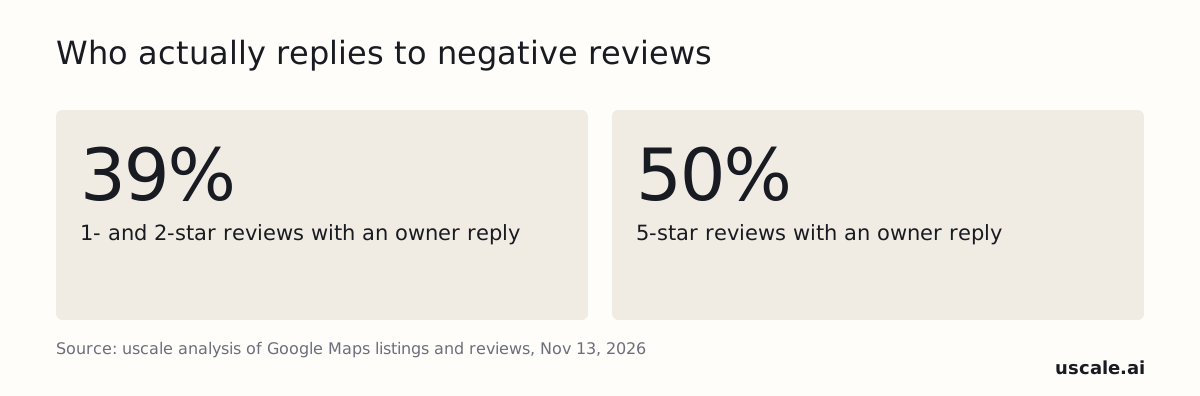
Most owners skip that step on the reviews that need it most. In our November 2026 analysis of Google Maps listings across six US metros, owners replied to only 39% of 1- and 2-star reviews. That is a lower rate than they managed for 5-star praise. The reviews that cost them customers got the fewest answers.
This guide covers the reply formula, copy-ready examples, the rules for getting a review removed, a safer script for dental and med spa practices, and whether a tool should write replies for you. Many owners have a question before any of that: is replying to a bad review worth doing at all?
Should you respond to negative Google reviews at all?
Yes, you should respond to negative Google reviews, because every future customer who scrolls your profile reads the reply, not only the person who wrote the review. A calm reply to a 1-star review can build more trust than a page of nothing but 5-star reviews.
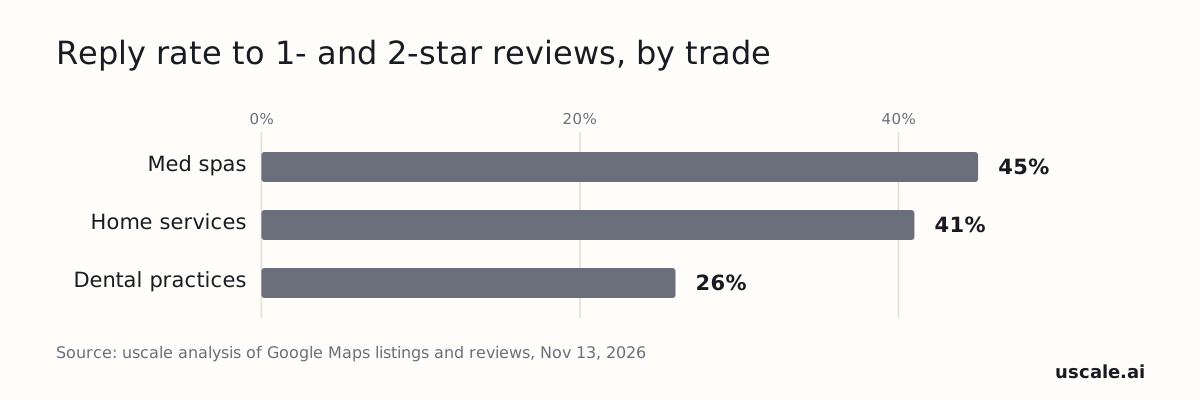
Few owners act on that, and how few depends on the trade. Our November 2026 analysis of Google Maps listings in Charlotte, Raleigh, Nashville, Columbus, Tampa and Indianapolis found that owners replied to 45% of 1- and 2-star reviews at med spas, 41% at home-service businesses and 26% at dental practices. And 29% of the businesses (607 of 2,078) had not replied to any of their 10 most recent Google reviews. Across all trades, replies still lean toward praise over complaints.
Customers notice the silence. BrightLocal's 2026 Local Consumer Review Survey found that an owner response is one of the top factors people weigh when deciding whether to trust a review, cited by 37% of respondents. The same survey found that 42% of consumers are unlikely to use a business that ignores its reviews entirely.
A bad review with no reply reads as a business that doesn't care, and it leaves the reviewer's version as the only one on the page. The same review with a calm, specific reply reads as a business that fixes problems. That leaves one question: what the reply should actually say.
What should a reply to a negative Google review say?
A reply to a negative Google review should do five things in order: thank the reviewer by name, acknowledge the specific problem without arguing, briefly explain the fix, give a direct phone number or email, and sign with your name and title. Keep the whole reply to three to five sentences so it reads as calm and accountable to everyone who sees it later.
Call it the five-step reply formula:
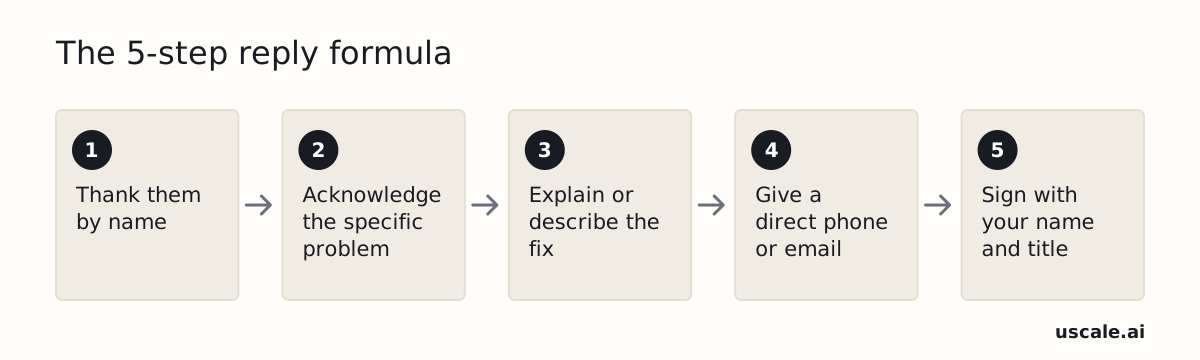
- Thank them by name. This shows a person read the review.
- Acknowledge the specific problem. Say what went wrong in your own words, without defending yourself.
- Explain or describe the fix. Write one sentence on what you changed or will do, with no excuses.
- Give a direct phone or email. This moves the rest of the conversation offline, where the details belong.
- Sign with your name and title. This puts a real owner or manager behind the words.
The order matters. The first two steps lower the temperature. The fix only lands once the reader sees you heard the complaint, and the contact line only works once the fix sounds sincere.
The formula fits the spirit of Google's own guidance. Google's help page on managing customer reviews frames replying as a way to show customers you value their feedback. Its tips for getting more reviews list replying as a best practice.
One habit makes the formula work: write the draft, wait an hour, then edit it before you post. Your first draft is usually the defensive one, so start by finding the reviewer's name.
That defensive first draft is also where the costly mistakes hide, so it helps to know exactly what to cut.
What should you never say in a reply to a negative Google review?
Never argue, never call the reviewer a liar, never blame a staff member, never share a customer's details, and never offer anything for changing or removing a review. The last one can cost you more than a bad rating.
Google calls free or discounted goods or services offered for posting, changing or removing a review "fake & misleading content" that is "strictly prohibited". Its policy says reviews must "reflect a genuine experience", and it bars using its products "to attack other individuals or groups."
The FTC's Consumer Reviews and Testimonials Rule took effect on October 21, 2024. Under that rule, a business can't tie any incentive to a review being positive or negative. The rule counts money, discounts, coupons or contest entries as buying a review. Legal analysis adds that the rule bars selectively suppressing negative reviews.
| Don't write | Write instead |
|---|---|
| "That never happened." | "I'm sorry this was your experience." |
| "Our tech messed up." | "We fell short on this visit." |
| "Your invoice shows you booked a cleaning." | "Please call me directly at [phone]." |
| "We'll give you a discount if you update your review." | "I'd like to make this right. Please call me." |
Fixing the problem privately is fine. Making the fix depend on the review is not.
So much for what to leave out. Here is what the formula looks like with real complaints in it.
What do your Google reviews tell people searching nearby?
Type your business name and I check your Google profile, reviews, website and whether AI answers name you, then show what to fix first.
Check my businessWhat does a good reply to a negative Google review look like?
A good reply to a negative Google review names the exact complaint, owns one thing the business will change, and ends with a direct phone line. The examples below are hypothetical scenarios written for illustration, not real reviews. Swap in your own details before posting.
Contractor: a surprise on the final bill
Review (1 star): "Final bill was way over the estimate and nobody warned me." Reply: "Thank you, [Name], for telling us. You should have heard about the higher cost before the work went ahead, not on the invoice. We now call customers before any change to an estimate. Please call me directly at [phone] so we can go through your bill together. [Your name], Owner"
HVAC company: a no-show
Review (1 star): "Took the day off work and nobody came." Reply: "[Name], thank you for letting us know, and I'm sorry. Missing a booked visit cost you a day, and that should not have happened. We now confirm every appointment the evening before. Please call me at [phone] so we can get your system looked at. [Your name], Service Manager"
Any home-service business: a fill-in template
The template below fits a late arrival, a missed call-back or any other fair complaint.
"Thank you, [Name], for the feedback. I'm sorry about [the specific problem]. That isn't the standard we hold ourselves to at [Business name], and we have [the specific change you made]. Please call me directly at [phone number] so I can make it right. [Your name], [Title]"
Every blank in the template forces a specific answer, and a reply with nothing specific in it reads like a form letter. These replies fit complaints that are fair. When a review gets the facts wrong, the reply needs one more move.
What if the negative review is unfair or just wrong?
When a negative Google review is unfair or factually wrong, correct the facts once, calmly, without blaming the customer. Then own what you could have handled better and invite a call. Future customers judge your tone, not who was technically right.
Google's content policy expects reviews to reflect a genuine experience with a business. A customer who was surprised by a bill had a genuine experience, even if your reasons were sound. Arguing the details in public rarely changes that.
Here is a hypothetical case. A deck repair estimate went up after your crew found rotted joists, and the customer posted that you pulled a bait-and-switch. A reply could read:
Thank you for the review, [Name]. The price changed after we opened up the deck and found rotted joists that had to be replaced before we could finish safely. We should have called you before going further, and I'm sorry we didn't. Please call me at [phone] so we can talk it through. – [Your name], [Title]
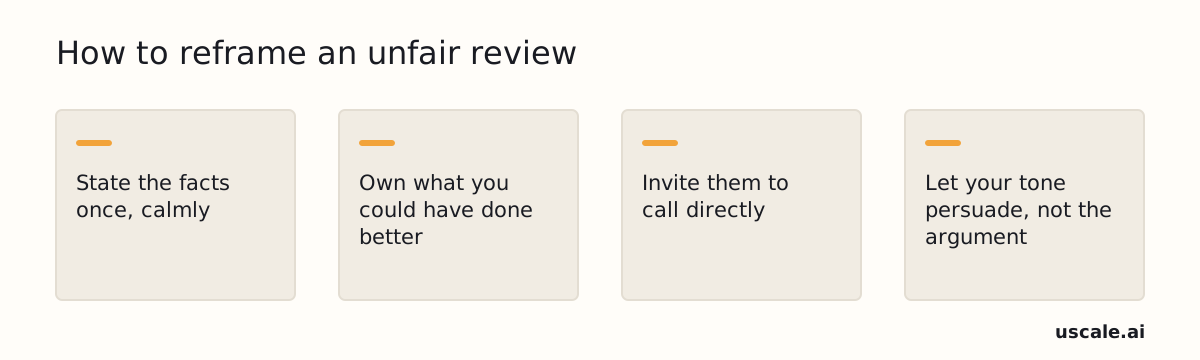
The rule is to correct facts once, then stop arguing. If the customer replies again, take the conversation offline. A reviewer you can't place at all is a different case.
What if you don't recognize the reviewer or think the review is fake?
If you don't recognize the reviewer or suspect a fake review, do two separate things. First, post a short, neutral reply. Then report the review to Google. The reply is for future customers, and the report is for Google.
Hi [Name], we take every review seriously, but we can't find a record of your visit. Please call [Your Name] at [phone] so we can look into it. — [Your Name], [Title]
Never accuse the reviewer of lying in public. If the review is genuine and your records are wrong, that accusation is what readers will remember.
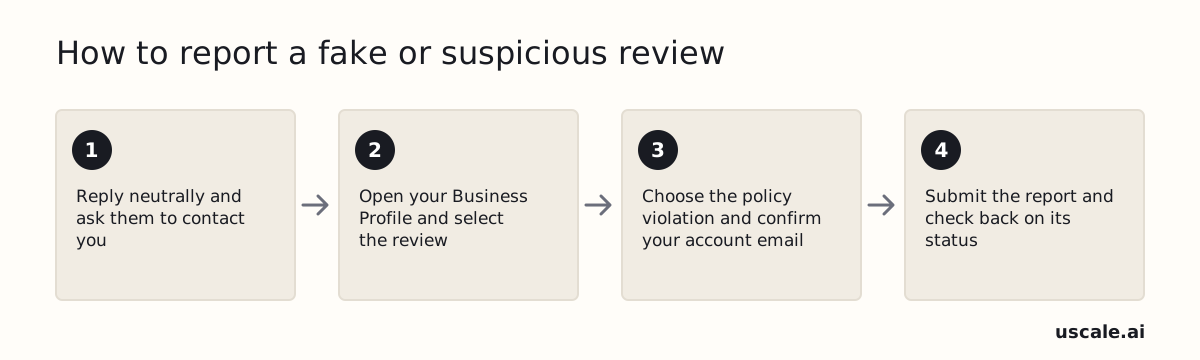
To report the review, open your Business Profile and select it. Choose the policy it breaks, confirm your account email and send the report. Google's content policy says reviews must reflect a genuine experience. It treats fake engagement and rating manipulation as violations that can be removed.
Don't expect a quick answer. As of November 2026, Google's help page warns that processing times are extended because of an unusually high volume of review appeals. Your calm reply keeps working while you wait. Whether Google removes the review depends on which policy it breaks.
Can you get a bad Google review removed?
A bad Google review can be removed only when it breaks Google's content rules. A low star rating on its own breaks none. Google requires reviews to "reflect a genuine experience" and treats rating manipulation and fake engagement as violations subject to removal. It also prohibits using its products "to attack other individuals or groups" and removes obscene and profane content on Maps. A harsh review from a real customer passes those tests. For that review, the reply is your tool, not the report button.
Where to send a report (as of November 2026)
The report steps are the same ones described for fake reviews above. You can also open the Reviews Management Tool and choose "Report a new review for removal." Google promises no fixed turnaround. Post your reply first and assume the review stays up until Google acts.
| Review type | Breaks Google's rules? | What to do |
|---|---|---|
| Spam or fake, with no record of the visit | Yes: not a genuine experience | Report it and post a short, neutral reply |
| Off-topic, not about a visit to your business | Likely: fails the genuine-experience test | Report it and reply |
| Harassment, slurs or profanity | Yes: an attack, or obscene content | Report it and keep any reply to one calm line |
| Genuine but harsh | No | Reply only |
| Genuine and fair | No | Reply only, and fix the problem |
Most bad reviews fall in the last two rows, so you will use the reply far more often than the report button. Dental and med spa owners need one more rule for that reply.
Can a dental office or med spa use the same reply formula?
Dental offices and med spas should not use the five-step reply formula as written. Thanking a reviewer by name or describing their visit in a public reply can confirm the reviewer is a patient, and that can create a HIPAA privacy problem. The risk holds even when the reviewer posted their own name, procedure and provider first. A reviewer can share their own details. The practice's reply should not repeat or confirm them.
The fix is to keep the calm tone and the direct contact line, and drop anything that ties the reviewer to the practice's records. That means no name, no treatment, no appointment date and no "we looked into your visit." Use the same reply for a vague one-liner and for a long, detailed review that is clearly from a real patient.
Thank you for taking the time to share this feedback. We take every concern seriously, and privacy rules mean we can't discuss anyone's care in a public reply. Please call our office manager, [Name], at [phone number] so we can talk it through directly. — [Your name], [Title], [Practice name]
Save this script as the practice's default reply for every critical review, so no one at the front desk writes one from scratch in a hurry.
This guide is not legal advice. Have a compliance officer or a healthcare attorney review the practice's exact script before anyone posts it.
Whichever script you use, someone still has to write every reply. That raises a practical question for a busy office: can software take that job?
Can a tool write and post your Google review replies?
Yes, software can draft replies to Google reviews, and some tools can post them for you. Google stays in the loop whichever tool you use. Your Business Profile must be verified before anyone can reply. Google screens every owner reply against its content policies before posting it, and asks for an edit if a reply isn't approved. You can still edit or delete a posted reply later from Read reviews.
Google lists replying to reviews as a best practice for getting more reviews. The real choice is who writes the first draft.
| Option | Best for | Who approves | Cost (as of November 2026) |
|---|---|---|---|
| Google Business Profile, built in | Owners with a few reviews a month who write, post, edit or delete each reply themselves | You | Part of your Business Profile |
| Third-party reply tools | Owners who want replies across many review sites from one place, often posted automatically | Rules you set | Not checked for this guide. Check each vendor's page before buying |
| uscale, which we make | Owners who want review replies drafted in your voice along with help on customer messages, missed calls, after-hours calls and booking, and Business Profile updates | You, in chat | Starter plan at $29.99/month. $1 for the first 7 days, card required |
With only a handful of reviews a month, the built-in Google tool is enough. If you want replies posted automatically across many review sites, a third-party reply tool fits better. uscale is the wrong pick if you need replies posted straight to Google today. That feature is coming soon. Until then, it hands you the finished text to paste.
The tool matters less than one rule about which replies a person must read before they go live.
Should AI write your Google review replies?
Let software auto-post replies to 4- and 5-star reviews, but read and approve every reply to a 1-, 2- or 3-star review before it goes live. Use AI for praise, and keep a person in the loop for complaints.
Google screens every owner reply against its content policies before posting it, and asks you to edit any reply that fails. That screen catches policy breaks. It cannot know the job ran late because of a parts delay, or that a cheerful "Thanks for the feedback" reads as mockery under a review about a flooded basement.
A template thanks a happy customer well. An angry customer needs proof that someone read the review, and only a person who knows what happened can give that.
| Review | Who sends the reply | Why |
|---|---|---|
| 4–5 stars | Software can post it | Low risk; a warm thank-you is enough |
| 3 stars | You approve first | Mixed praise and complaint needs judgment |
| 1–2 stars | You approve first | Facts, tone and the fix must be right |
The approval step is short, and the checklist below builds it into your week.
What should you do about your Google reviews this week?
This week, reply to every open negative Google review, turn on Google's review link or QR code, and book a weekly slot to keep up. Do the four steps in this order, because each one builds on the one before it.
Reply to every open 1- and 2-star review today. Use the five-step formula above, starting with the oldest review, because an unanswered bad review is what new customers see. Done when every negative review on your profile has a reply. If you do only one thing this week, do this.
Save a privacy-safe template if you run a dental office or med spa. Put the generic script from the HIPAA section in a shared note and have your compliance contact check it once. Done when anyone on staff can paste it without adding patient details.
Turn on your review link or QR code. As of November 2026, Google lets you create a shareable link or QR code from the Business Profile's "Get more reviews" option (Google Business Profile Help). This is your quick win for the next hour. Print the code for the counter or add the link to your invoice emails. Done when a happy customer can reach your review form in one tap.
Block a weekly slot to check and reply. Make it a short recurring calendar appointment on the same day each week. In BrightLocal's 2026 survey, 81% of consumers expect a reply within a week, so a weekly check keeps you inside that window. Done when the slot is booked for the next month.
You'll know it's working when every bad review has an answer, a review code sits at the counter, and replies no longer depend on someone remembering.
That checklist covers this week. The reason to keep at it after that is back in the numbers from the top.
Reply where it counts
Owners reply to 39% of 1- and 2-star reviews and 50% of 5-star reviews, which is the wrong way round. A happy customer's review already does its job. A bad review sits on your profile with nobody explaining it, and the next customer reads it in silence.
Closing that gap doesn't take a bigger budget or a new hire. It takes a five-sentence habit: thank them by name, own the specific problem, say what's being fixed, give a direct number, sign your name. Do it every week, and the replies add up to a record any stranger can scroll through.
For the full numbers behind the gap, including how reply rates split by trade, read our study of Google review response rates.
The businesses future customers trust aren't the ones with no bad reviews. They're the ones that answered them.
Questions
How do I respond to a negative review on Google?
To respond to a negative review on Google, thank the reviewer by name, acknowledge the specific problem without arguing, briefly explain the fix, give a direct phone number or email, and sign with your name and title. Keep the reply to three to five sentences. Dental offices and med spas should leave out the reviewer's name and any visit details to protect patient privacy, and simply invite the reviewer to call the office.
How fast should I respond to a negative Google review?
Google's own help page on managing reviews does not recommend any time frame for replying to a review. Customers do have expectations: BrightLocal's 2026 Local Consumer Review Survey found that 19% of consumers expect a same-day response and 81% expect one within a week. A fixed weekly check of new reviews keeps most replies inside that window, and urgent complaints can be answered sooner.
Should I offer a refund or discount in my reply to a negative review?
A refund or discount should never be tied to a review. Google calls free or discounted goods or services offered for posting, changing or removing a review fake and misleading content that is strictly prohibited, and the FTC's Consumer Reviews and Testimonials Rule bars conditioning any incentive on a review being positive or negative. Fixing the problem privately is fine, so invite the customer to call and keep any remedy separate from the review.
How do I respond to a rude review or a one-star rating with no comment?
A rude review or a one-star rating with no comment still deserves a short, calm reply, because future customers read it. Thank the reviewer, say you would like to hear what happened, and give a direct phone number. Never trade insults. If the review contains harassment, slurs or profanity, report it to Google, which removes obscene and profane content on Maps, and keep any public reply to one calm line.
What should I do after I reply to a negative Google review?
After replying to a negative Google review, take the conversation offline when the customer calls, fix the problem, and report the review to Google only if it breaks a content rule, such as a fake review. Owners can edit or delete a posted reply later from Read reviews. Then make replies a weekly habit and share Google's review link or QR code so happy customers post reviews too.