The ranking you can't buy
To rank higher on Google Maps, you work on the three things Google says decide local results: relevance, distance and prominence. Money is not on the list. Google's own help page says, "There's no way to request or pay for a better local ranking on Google," so ad spend does not change where you sit in the organic map results.
Two facts are worth knowing before you spend an hour on anything. The biggest lever you control is your primary Google Business Profile category, which the experts in Whitespark's 2026 ranking-factors survey scored above every other Maps factor. The one you cannot buy your way past is distance. Google measures how far each business is from the location in the search, and no budget moves your front door.
Plenty of owners start somewhere else: more Google posts, another tool, a city name added to the business name. This guide takes the signals in order (category, distance, reviews, profile completeness, your website, local links, the business name and software) and shows which ones move the map and which only feel like progress.
What actually decides who ranks higher on Google Maps?
Google ranks Maps results mainly on three factors: relevance, distance and prominence. Google's help page defines distance as how far each result is from the location in the search. It defines prominence as how well-known a business is, based on links, articles and directories across the web plus how many reviews it has.
Money is not one of the three. In Google's words, "There's no way to request or pay for a better local ranking on Google." An ad can buy you a paid slot, but it doesn't change where you rank organically.
To see which signals you can actually work on, Whitespark's Local Search Ranking Factors 2026 survey, published November 6, 2025, asked 47 local search experts to score 187 factors across eight signal groups. This is how the main groups split:
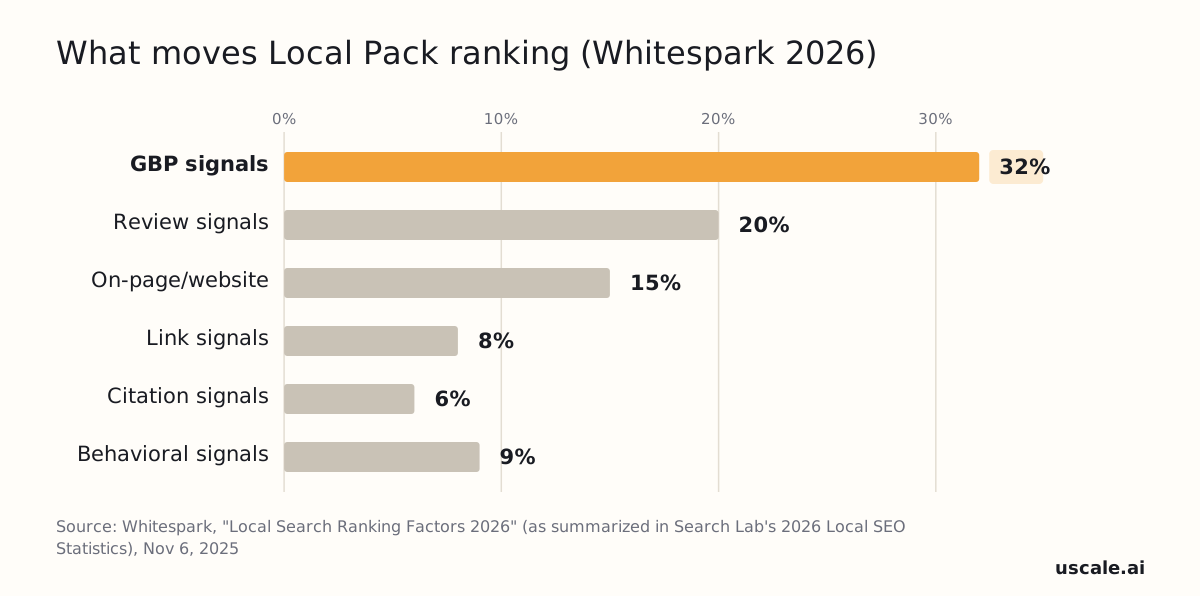
Google Business Profile signals lead at roughly 32%. Reviews follow at roughly 20% and your website at roughly 15%. Behavioral signals sit near 9%, links near 8% and citations near 6%.
Where to put your first hour this week
Spend your first hour on your Google Business Profile, not on a new tool or an ad budget. The profile is the largest group in the survey, and you can change it today from your phone. Reviews come second because they build over weeks, not in an afternoon.
The rule to keep: fix what Google reads about you before you pay for something Google won't count. Within the profile, the field that scores highest is your primary category.
Which Google Business Profile category should I pick?
Pick the most specific Google Business Profile primary category that truthfully describes your main service. Primary category is the highest-scored Local Pack and Maps factor in Whitespark's 2026 survey: the 47 experts surveyed scored Primary GBP Category at 227, just ahead of proximity of address to the searcher at 225.
How to choose it
- Search Google Maps for your main keyword the way a customer near you would, such as "plumber" plus your city.
- Open the top three listings and note the primary category shown under each name.
- Pick the most specific category that matches the work you actually do. If the leaders use "Plumber" and you are a plumber, use "Plumber."
- Add secondary categories only for services you really offer.
Categories come from Google's fixed list, and you can't type your own. Labels such as "Emergency plumber" are not real category names, so put that wording in your services and description instead. A category tells Google what you are. It is not a wish list.
| Your trade | Primary category to search for |
|---|---|
| Heating and air | HVAC contractor |
| Plumbing | Plumber |
| Electrical | Electrician |
| Roofing | Roofing contractor |
| Dental office | Dentist |
| Med spa | Medical spa |
Distance decides how far from your door it counts, and you control it far less.
Why does my business rank near my shop but not across town?
A business ranks best near its own address because distance from the searcher is one of the three core factors in Google's local results, and no setting removes it. Google defines distance as how far each potential result is from the location term used in a search. A searcher across town is simply farther away.
A wide service area tells customers where you work. It does not move your address closer to anyone, so service-area settings mostly change what is shown, not where you rank.
Don't try to solve this with an address you don't work from. As of November 2026, Google's guidelines say a rented mailing address you don't operate out of (a virtual office) isn't eligible for a Business Profile. Service-area businesses can't list one unless it is staffed during business hours.
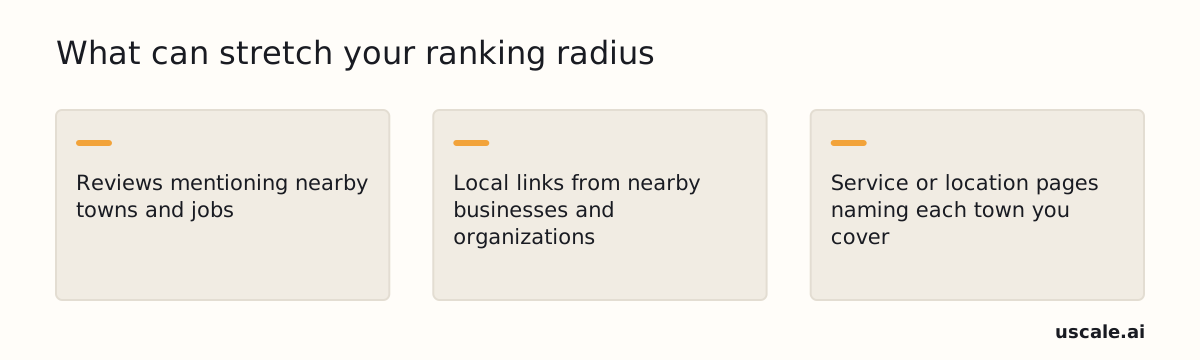
The honest limit is that one address rarely ranks across a whole metro. Prominence, which Google ties to reviews and links from across the web, can stretch the radius somewhat:
How much do reviews, replies, and review requests affect Google Maps ranking?
Reviews are the ranking signal an owner can grow every week, and Google says so directly: "More reviews and positive ratings can help your business's local ranking." Whitespark's 2026 survey puts review signals at roughly 20% of Local Pack ranking influence. That group covers how many reviews you have, how steadily new ones arrive, and reviews on Google and on other sites.
Replies are different. Google's guidance says replying "shows that you value [customer] feedback" and that "Positive reviews and helpful replies can help your business stand out." Google does not say replies raise your ranking. Reply anyway, because the next customer reads them, but don't expect replies alone to move your position.
Most owners worry about asking too little. The bigger risk is asking the wrong way. A review request that tells customers what to write breaks Google's rules, even when the request is polite.
A request you can send to every customer
Hi [first name], thanks for choosing [business name]. If you have a minute, we'd be grateful for an honest review on Google: [your review link]. Thanks either way. [your name]
Send it to every customer, not only the happy ones. Don't add "mention the service" or a staff member's name.
A reply you can adapt
Thank you, [first name], for taking the time to write this. We're glad the visit went well and hope to see you again. [your name], [business name]
What Google's review policy prohibits (as of November 2026)
| Don't | What Google's policy says |
|---|---|
| Offer a discount, payment or free service for a review | Content posted because of a business incentive is prohibited |
| Ask only customers you expect to be happy | Selectively asking for positive reviews is prohibited |
| Discourage or block negative reviews | Discouraging or prohibiting negative reviews is prohibited |
| Push people to review while they're on site | Requiring or pressuring reviews on the premises is prohibited |
| Ask for specific wording or a staff member's name | Requesting specific content is prohibited, including when staff do the asking |
Copying a link to a review
Google's "Manage customer reviews" help page lists these steps. In Google Maps, search your business name and city and select Reviews. On the review, choose More > Share review, then Send a link and copy the link that appears.
New reviews build up over months. The profile fields in the next section are work you can finish this week.
What should I fill out on my Google Business Profile to rank better?
Your Google Business Profile is the largest single slice of Maps ranking. Whitespark's 2026 survey puts the profile signal group at roughly 32% of Local Pack ranking influence. Fill in every field Google offers, because a profile can only be matched to searches it actually describes.
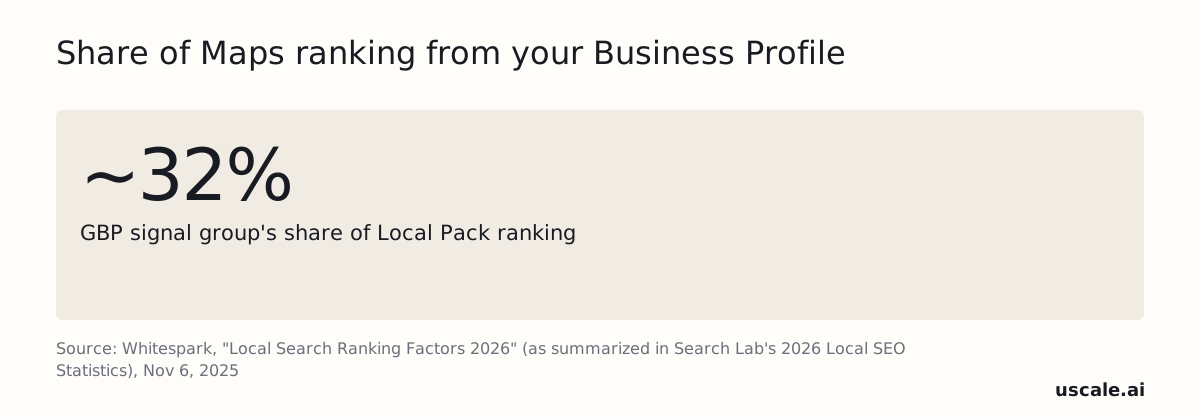
That 32% includes proximity and the business name, and you can't change either by filling out more fields. What you control is accuracy and completeness. Google ranks local results primarily on relevance, distance and prominence. Empty fields give relevance nothing to read.
Fields worth finishing this week
- Business name: exactly as it appears on your signage, and verified.
- Categories: primary and secondary, set in the step above.
- Address or service area: a service area if customers don't come to you.
- Hours: regular hours, plus holiday hours entered before each holiday.
- Services: each one with a short, plain description.
- Attributes: only the ones that are true for you, such as online appointments.
- Booking and contact links: each one pointing to a page that works on a phone.
- Photos: real storefront, team, vehicles and finished work, with no stock images.
A finished profile is the floor, not the ceiling. The next lever is the website your profile links to.
Do my website and local links matter for Google Maps ranking?
Your website and local links do matter for Google Maps ranking, but they carry less weight than your Business Profile or your reviews. In Whitespark's 2026 survey, on-page signals account for roughly 15% of Local Pack influence, links roughly 8% and citations roughly 6%. The Google Business Profile group sits at roughly 32%.
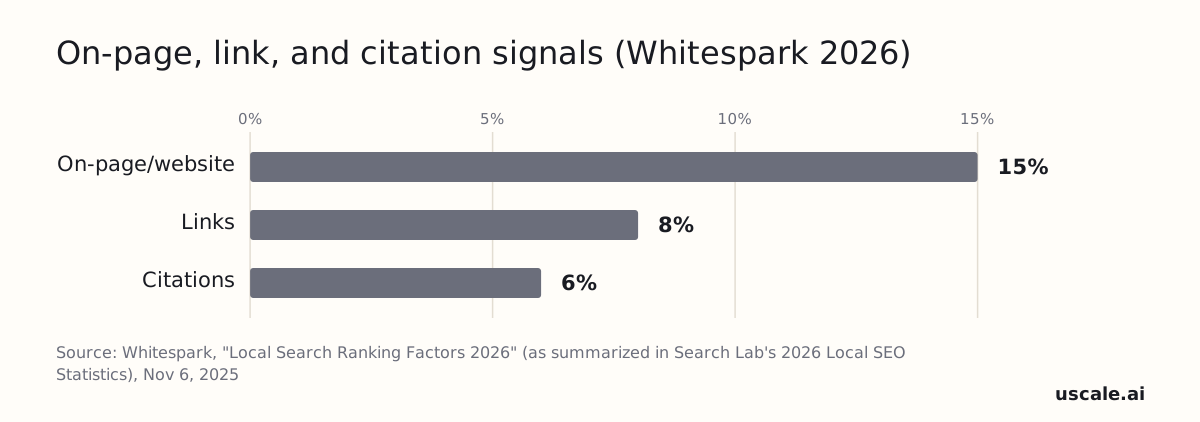
Google says prominence is based partly on how many websites link to your business. Links feed the same factor as reviews. The page your profile links to also tells Google what you do and where.
What to put on the page your profile links to
- The service and city in the title tag. For example: "Furnace Repair in Dayton | Your Business Name."
- Your name, address and phone written as plain text, matching your profile exactly.
- One page for each main service, not a single page that lists everything.
The local SEO guide covers the rest of the site.
Which links are worth chasing
Prioritize local links: your chamber of commerce, the local paper, a supplier's dealer page, a team you sponsor. Each one says people in your town know you, and that is what prominence measures. A generic link from a big national site says little about where you work.
Directory listings are upkeep, not a lever. Fix mismatched details when you find them, but a hundred cleaned-up listings won't outrank a better category. Your business name is a different matter.
Should I put keywords in my business name on Google Maps?
Put keywords in your Google Maps business name only if those words are part of the real name on your signage, invoices and van. Say your sign reads "Smith Plumbing": the profile name is "Smith Plumbing," not "Smith Plumbing – 24/7 Emergency Plumber Denver."
Owners are tempted because keyword-stuffed names sometimes rank. Whitespark's 2026 survey lists keywords in the business name inside the Google Business Profile signal group, the largest group at roughly 32% of Local Pack influence. But Google's guidelines for representing your business ask for your real-world name, and a profile that breaks them can be edited or suspended. A position you can lose overnight is not worth the risk.
Put the service words in the fields built for them:
| Field | Stuffed (avoid) | Accurate |
|---|---|---|
| Business name | Smith Plumbing – Emergency Plumber Denver | Smith Plumbing |
| Primary category | (left vague) | Plumber |
If a competitor stuffs their name, open their listing in Google Maps and use Suggest an edit to propose the real one.
That leaves the activity owners pile on top: posts, photos and clicks.
Do Google posts, photos, and clicks help my Maps ranking, and how long until it improves?
Google posts score low among Google Maps ranking factors, so posting more often will not fix a weak position. In Whitespark's 2026 survey of local search experts, primary category scores 227 points and proximity to the searcher scores 225. Frequency of Google posts scores 55.
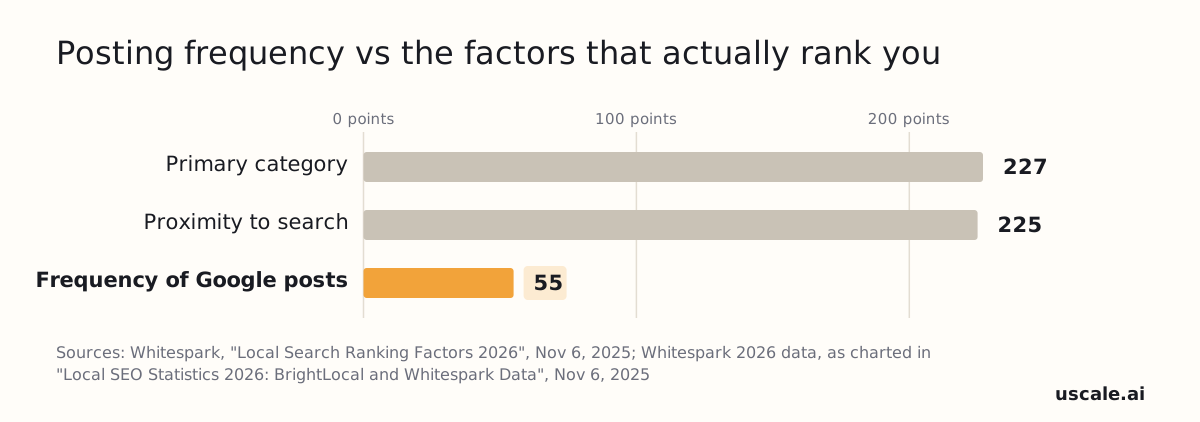
Posts and fresh photos still do a job. They show a customer that you're open and active. Treat them as upkeep for people, not as a ranking lever.
Clicks, calls and direction requests are harder to read. Higher-ranked businesses get more of them, so the numbers rise together. Nobody outside Google has shown that the clicks cause the ranking. Don't chase them with tricks.
How long until it improves
A category or profile fix is the fastest change you control, and it can show within weeks. Reviews and local links build prominence slowly, over months.
How to check honestly
Don't judge your rank by searching from your own phone at the shop. Your position changes block by block, so one phone shows only one spot on the map. A geo-grid rank tracker runs the same search from a grid of points around your address. It shows where you win and where you drop off. That map is the baseline you measure every later fix against.
A rank tracker is one kind of software. Owners usually ask about the rest next.
Is there software that handles Google reviews and my Business Profile?
Yes. Software for Google reviews and Business Profiles covers four jobs: profile management, review requests and replies, Maps rank tracking, and directory sync. No tool can guarantee a ranking, because Google says there's no way to request or pay for a better local ranking.
Pick by job, not by brand, and match the job to the signal it touches:
- Review replies and requests. Reach for these if reviews sit unanswered. They work on review signals, which Whitespark's 2026 survey puts at roughly 20% of Local Pack influence.
- A rank tracker. Use one if you don't know where you rank. It measures your position but doesn't change it.
- Directory sync. This touches citation signals, at roughly 6%. It is upkeep, not a lever.
| Tool | What this guide verified | Price confirmed here |
|---|---|---|
| Whitespark | Publishes the Local Search Ranking Factors 2026 survey of 47 experts scoring 187 factors. Useful for deciding what to fix first | Not confirmed |
| BrightLocal, Local Falcon, Localo, Semrush Local, Podium, Birdeye, Yext | Not verified here. Check each vendor's own page for which of the four jobs it covers | Not confirmed |
| uscale, which we make | Replies to Google and Yelp reviews. Keeps your Google profile and Yelp up to date | Starter, $29.99 a month for 50 credits, as of November 2026 |
This guide lists only what its sources confirm. On each vendor's page, check which of the four jobs it names and whether the price is listed.
A tool speeds up the work. It doesn't change which signals Google counts.
When does this advice not apply?
The standard Google Maps playbook needs adjusting in three cases: a one-person shop with no spare hours, a small town with few competitors, and a dental or med-spa practice bound by patient-privacy rules. The order of work stays the same. The pace and the wording change.
One-person shops. If weekly upkeep isn't realistic, don't try to do all of it. Fix the category and profile fields once, because those are one-time jobs. Then keep one routine: ask every finished job for a review, and reply to new reviews on one fixed day. Skipping Google posts costs little. In Whitespark's 2026 survey, post frequency scores far below primary category.
Small towns. With few businesses in your category nearby, distance and relevance do more of the work. A correct category and steady reviews can move you faster than in a crowded metro. Keep the routine going anyway, because one new competitor changes the picture.
Dental and med-spa practices. Leave out a patient's condition, treatment and reason for the visit in every public reply and every review request. Privacy rules such as HIPAA limit what a practice can say about a patient in public, so reply as if you can't confirm the reviewer is a patient. Google's review policy already bars asking for specific content in a review, which points the same way. Before you automate text requests, check your state's rules on texting patients and keep consent on file.
What to do this week to rank higher on Google Maps
To rank higher on Google Maps this week, fix your primary category and finish every profile field first. Then start asking for reviews and answering them. Local links, pages and rank checks become a monthly habit after that.
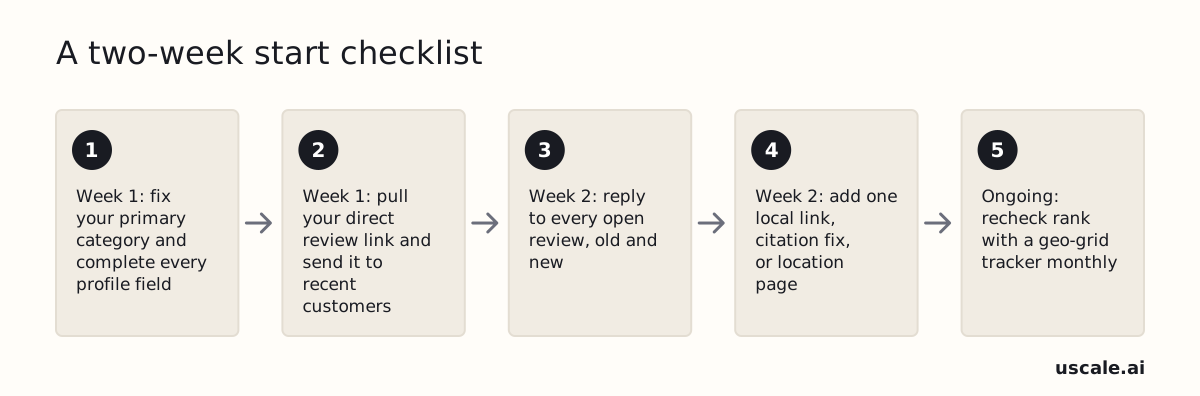
Fix your primary category and complete every profile field. You're done when your category is the most specific truthful option the top nearby competitors use. Your hours, services, attributes, booking link and real photos should also be filled in. If you do only one thing, change the category. It is a single edit you can finish within the hour.
Send your direct review link to recent customers. Use the request template from the reviews section. Send the same wording to everyone, with no incentive and no request for specific content. You're done when every recent customer has the link.
Reply to every open review, old and new. Start with unanswered negative reviews. You're done when every review has a reply. For how fast and how often to reply, see our guide to Google review response rate.
Add one local link, citation fix or location page each month. Book it into the first week of every month.
Recheck your rank with a geo-grid tracker monthly. Compare this month's grid with last month's, not with a search from your own phone.
All of this is free in Google's own profile manager. If you'd rather not do it by hand, uscale, which we make, answers Google reviews and keeps the Business Profile up to date, and you approve each piece in chat. The tools named earlier cover rank tracking and directory sync. Missed calls also cost you reviews, so see missed-call text back.
Success looks like this: the right category, a complete profile, a reply under every review, new reviews arriving steadily, and a rank grid you check every month.
The order that moves your Maps position
Ranking higher on Google Maps follows a set order: get the primary category right, then finish every profile field, then build a steady flow of reviews. Everything after that, including posts and directory listings, is upkeep that keeps you in place. It is not a shortcut to the top. Google says plainly that there's no way to request or pay for a better local ranking, so no tool or ad budget skips the line.
Your next steps:
- Open your profile today and check your primary category against the top three businesses for your main search.
- Work through the week-by-week checklist above, starting with week 1.
- Send your first review requests and reply to every open review.
- For the picture beyond Maps, read our guide to local SEO for small businesses.
The map rewards the nearby business that is easiest to trust, and you already know how to do that work.
Questions
What factors does Google use to rank businesses on Google Maps?
Google uses three main factors to rank businesses on Google Maps: relevance, distance and prominence. Distance is how far each business is from the location used in the search. Prominence is how well-known a business is, based on links, articles and directories across the web plus how many reviews it has. Google states there is no way to request or pay for a better local ranking, so ads do not change organic Maps position.
How long does it take to rank higher on Google Maps?
How long it takes to rank higher on Google Maps depends on which signal changes. A primary category or profile fix is the fastest change an owner controls, because it is a single edit. Reviews and local links build prominence gradually, over months, since they accumulate one at a time. Distance does not change unless the business moves. To measure progress, compare a geo-grid rank check month to month rather than searching from one phone.
Does posting on my Google Business Profile help my Maps ranking?
Posting on a Google Business Profile helps customers more than it helps ranking. In Whitespark's 2026 survey of 47 local search experts, frequency of Google posts scored 55 points, far below primary category at 227 and proximity to the searcher at 225. Posts still show customers that a business is open and active, so treat them as upkeep and put ranking effort into the category, profile fields and reviews first.
Can my business rank on Google Maps outside its own service area?
A business can sometimes rank outside its service area, but rarely across a whole metro, because distance from the searcher is one of Google's three core local factors. Service-area settings tell customers where the business works; they don't move its address. Reviews and links build prominence, which can stretch the radius somewhat. A rented virtual office isn't a workaround: Google says an address the business doesn't operate from isn't eligible for a Business Profile.
Is it against Google's rules to offer a discount for a review?
Yes. Google's Maps user-generated-content policy prohibits content posted because of a business incentive, including payment, discounts, or free goods and services. The same policy bars asking only happy customers, discouraging negative reviews, pressuring people to review on the premises, and requesting specific content such as a staff member's name. The safe approach is one plain request with a review link, sent the same way to every customer.