What's the best after-hours answering service for HVAC and plumbing?
The best after hours answering service for a small HVAC or plumbing shop routes every closed-hours call so emergencies reach the on-call tech and routine jobs get booked for the morning. As of October 2026, AI receptionist plans run from about $49 a month to $500 a month. Live receptionist plans run from about $300 a month to $2,100 a month. A hybrid passes harder calls from AI to a person.
The right pick depends on how many calls come in after close and how much your callers care about hearing a human voice.
This guide covers cost, which option fits which shop size, a copyable call script, an emergency checklist and an escalation plan. First, the question most owners ask: why pay for anything when calls can go to voicemail or your cell?
Can I just forward after-hours calls to my cell or let them go to voicemail?
Sending after-hours calls to voicemail and forwarding them to your cell both lose jobs, just in different ways. Voicemail loses the emergency. Forwarding costs you your evening, and sometimes the emergency too.
A homeowner with water on the kitchen floor at 10pm doesn't leave a message and wait. They hang up and call the next shop in the search results. The job is gone before you hear the voicemail.
Forwarding every call to your cell does catch the emergencies. It also catches every price-shopper, every "do you cover my area" and every billing question at 11pm. You screen calls in bed, and the burst pipe sounds like everything else until you pick up.
Passing an on-call phone between techs costs nothing. It works until whoever is holding it misses a ring, is under a house on another call, or sleeps through it. Then nobody answers, and nobody knows until morning.
In practice, a shop's after-hours line ends up in one of four places. The rest of this guide compares the on-call phone with a live answering service, an AI receptionist and a hybrid of the two.
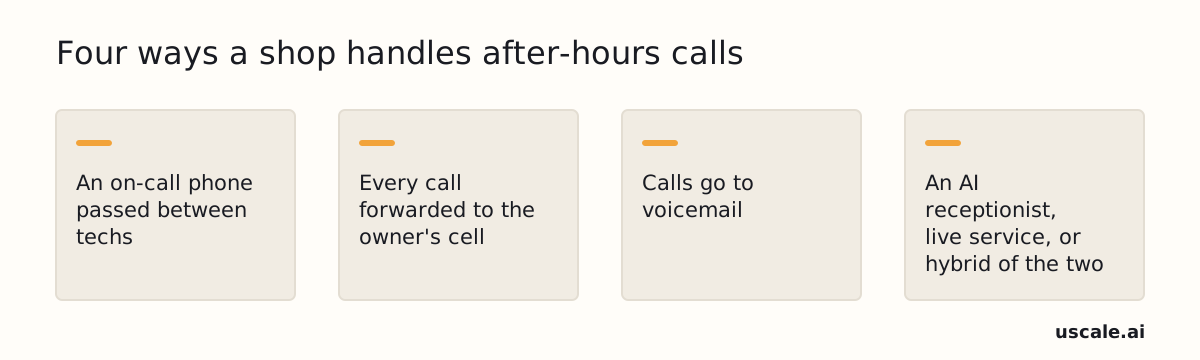
The paid options close the voicemail gap, not the on-call one. An AI layer like uscale, which we make, answers calls when the business is closed, books the caller in and texts back anyone who still gets missed, but a tech still has to roll the truck on a real emergency. Which paid option fits your shop comes down to who your callers are and how many of them call.
Should I use an AI receptionist or a live answering service for after-hours calls?
For most one-to-five-truck HVAC and plumbing shops, an AI receptionist is the better first step for after-hours calls. Night calls follow a predictable pattern (emergency, quote, booking), and software is not limited by how many agents are on shift. A live answering service earns its higher price when your callers skew older, calls run long and complicated, or a human voice is part of how you sell.
A hybrid is AI that hands the call to a person, and it covers both needs. It is often a higher plan from the same vendor, not a separate product. Rosie, for example, adds warm transfers on its $149/month Scale plan. A warm transfer means the AI briefs your team before connecting the caller. The feature is not listed on Rosie's $49/month Professional plan.
| AI receptionist | Live answering service | Hybrid (AI with transfer) | |
|---|---|---|---|
| Typical monthly cost | About $49–$500 | About $300–$2,100 | From $149 (Rosie Scale) |
| Two calls at once | Not tied to agents on shift. Confirm the limit with the vendor | Depends on how many agents are free. Not stated on their pages (checked October 2026) | AI answers first. The transfer depends on who on your team picks up |
| Human voice | No | Yes | Yes, your own team after a transfer |
Prices as of October 2026, from vendor pages and the review sites linked in the cost section below. AI range: Rosie Professional to Smith.ai AI Enterprise. Live range: Smith.ai human Starter to its largest tier.
Choose an AI receptionist if you run a few trucks and most night calls are bookings or clear emergencies.
Choose a live service if your customers are mostly older homeowners, or your calls need back-and-forth that a script can't cover.
Choose a hybrid if you want AI to screen every call and a tech to speak with the real emergencies.
Rule of thumb: start with AI, and pay for a human voice only for the callers who need one. That rule leans heavily on price, so here is what each option actually costs.
How much does an after-hours answering service cost?
For a shop with roughly 100 after-hours calls a month at about 3 minutes each, or around 300 minutes in total, an after hours answering service costs about $49 to $500 a month for an AI receptionist and about $300 to $2,100 a month for a live service. The top of each range is a large bundle: Smith.ai's $500 AI Enterprise plan and Smith.ai's $2,100 human tier for 300 calls. Live entry plans list for less, but at this volume most of the bill comes from overage. Prices are as published in October 2026. PATLive's prices were rechecked September 22, 2026.
Sources: heyrosie.com, mapcommunications.com, patlive.com and Smith.ai pricing as cited by Upfirst.ai, Dooza.ai, AnsweringLegal.com, OnCrew.ai, ServiceAgent.ai, HelloCounsel.ai, PhoneAgent.ai and Imisofts.com, October 2026.
The plans side by side
| Plan | Type | Monthly price | Included | Overage |
|---|---|---|---|---|
| Rosie Professional | AI | $49 | 250 min | not published in sources |
| Rosie Scale | AI | $149 | 1,000 min, adds warm transfers | not published in sources |
| Smith.ai AI Free | AI | $0 | 25 calls | $3.00/call |
| Smith.ai AI Pro | AI | $150 | 75 calls | about $2.10–$3.00/call across AI plans |
| Smith.ai AI Enterprise | AI | $500 | 300 calls (about $1.67/call) | about $2.10–$3.00/call across AI plans |
| MAP pay-as-you-go | Live | $49 | 0 min | $1.37/min |
| MAP 125-minute | Live | $179 | 125 min | $1.30/min |
| MAP Enterprise | Live | $339 | 250 min | $1.28/min |
| PATLive entry | Live | $99 | 50 min | $2.29/min |
| PATLive 300-minute | Live | $479 | 300 min | not listed; $1.69/min on larger bundles |
| Smith.ai human Starter | Live | $300 | 30 calls | $11.50/call |
Rosie's top published plan is $299 a month for 2,000 minutes and adds waterfall transfers. PATLive also sells a $49 pay-as-you-go option with no minutes included.
Watch the MAP rate
The $1.28 per minute rate often quoted for MAP Communications belongs to its 250-minute Enterprise plan. MAP's 125-minute plan is billed at $1.30 per minute. A comparison that mixes up the two understates what a mid-size shop pays.
Minutes and calls are different units
Rosie, MAP and PATLive count minutes. Smith.ai counts calls. At 100 calls a month, Smith.ai's AI Pro plan covers 75, so a normal month already runs into overage. The human Starter plan covers 30 calls, and each one after that costs $11.50 however short it is.
Convert every quote into your own unit before you compare. Count last month's after-hours calls and how long they ran. Minute-based plans favor shops with short calls, and call-based plans favor shops with long ones.
Before signing, ask each vendor to quote your bill at double your normal call volume. The base price is rarely the number that hurts. On per-minute and per-call plans the cost sits in the overage, and a heat wave or cold snap is exactly when call counts climb past normal.
Price is only half the setup, though. Whichever service you pick has to know which of those calls are worth waking someone for.
What counts as an after-hours emergency for HVAC and plumbing?
An after-hours emergency for an HVAC or plumbing shop is a call where waiting until morning puts someone's health or the property at risk. Typical cases are no heat in freezing weather, no cooling with a vulnerable person in the home, active water or sewage, or a commercial customer that's down. Everything else gets booked for the next business day.
A gas smell comes before either column. Whoever answers tells the caller to leave the property and call the gas utility or 911 first, then logs the call for the on-call tech.
| Dispatch tonight | Book for the next business day |
|---|---|
| No heat in freezing weather | Dripping faucet |
| No cooling with someone elderly, an infant or medically vulnerable in the home | Slow drain |
| Active leak or burst pipe | AC that runs but can't keep the house cool |
| Leaking water heater | Maintenance and tune-ups |
| Sewage backup | Estimates and quotes |
| Commercial customer that's down | Billing questions |
Your shop decides what "freezing" or "too hot" means. No standard sets a temperature cutoff, so write your own into the list. Print it by the phone or load it into the script. That way a person and an AI receptionist sort calls the same way. Once you've settled the split, the next question is what the answering service says on every call.
What should my after-hours call script and fee line say?
An after-hours call script should do two things, in this order: state the emergency dispatch fee and get the caller's yes before a truck rolls, then collect six facts before the call ends. Many shops get the order backwards. They gather details first and mention the fee last, or leave it to the tech at the door, which is where billing arguments start.
The fee line
Say the fee early, plainly and once. Fill in the blank with your own figure. No source gives a typical after-hours fee.
"Our after-hours emergency dispatch fee is $___, which covers the visit; repairs are quoted once the technician diagnoses the issue. Would you like us to send the on-call technician?"
If the caller turns down the fee, offer the first open morning slot. The call still ends with a booking.
The intake list
Once the caller says yes, collect these before hanging up:
| Ask | Why the tech needs it |
|---|---|
| Name, address and phone | To find the house and call ahead |
| New or existing customer | Existing records show past work |
| The problem and the equipment involved | So the right parts go on the truck |
| Is water actively leaking? Is the main shutoff off? | So the caller can limit damage before the tech arrives |
| Is anyone vulnerable in the home? | Sets how fast the tech needs to move |
| Confirmation of the after-hours fee | A repeated yes means no surprise on the invoice |
Who reads it
The same script works whether a person or an AI receptionist answers. Write it once and hand it to your answering service or load it into the AI receptionist's instructions. Every caller then hears the same fee and the same questions. The next decision is who gets woken up once a call qualifies.
How do I set up an on-call rotation so only real emergencies wake my techs?
An on-call rotation that wakes techs only for real emergencies starts with one business number and time-based routing. Calls ring the office during business hours and go to your after-hours answering layer once you close. When that layer logs an emergency, it texts the on-call tech the full call notes right away, including the address, the problem and whether the caller agreed to the fee. Everything else is booked for the morning.
Behind the routing sits an escalation ladder. Here is a common pattern you can adapt:
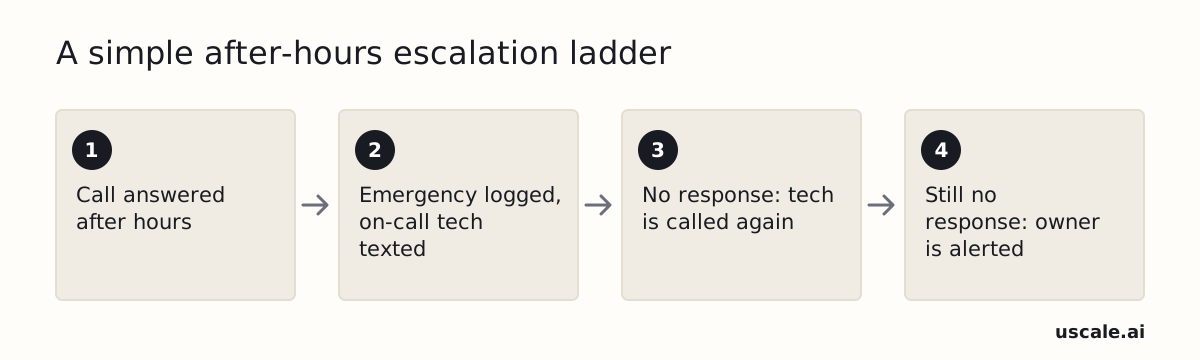
The ladder is your shop's policy, not a fixed rule from a vendor or regulator. You decide how long counts as "no response." A few minutes is a common place to start. You also decide who sits at the top and whether that person gets a call or a text. Write it down so the answering service, the techs and you all work from the same version.
You don't need a big team to start. A two-person weekend swap already counts as a rotation. A rotation fails when a missed ring has nowhere to go, not when the team is small.
Routing and escalation decide who wakes up. The next question is what those busy nights do to the bill.
What happens to my after-hours answering service bill during a heat wave?
On a per-minute or per-call after hours answering service plan, the busiest month is also the most expensive one. Every emergency call past the included minutes or calls is billed on top. A heat wave or cold snap pushes you into overage exactly when the phone matters most.
This worked example takes one 4-minute "no heat" call that arrives after your allowance runs out, using rates as published in September and October 2026:
- MAP Communications, $179 plan: $1.30 a minute, so $5.20.
- PATLive entry plan: $2.29 a minute, so $9.16.
- Smith.ai human Starter plan: a flat $11.50 per extra call, whatever its length.
- Rosie Professional: our sources list no overage rate. At $49 for 250 minutes, an included minute works out to about $0.20, so the call uses roughly $0.80 of the plan.
Bigger plans lower the rate but don't remove it. MAP's 250-minute Enterprise plan charges $1.28 a minute. Smith.ai's human tiers drop to $10.50 and then $8.50 a call.
Your slowest month tells you the price. Your busiest month tells you the bill. That is why the quote at double your normal call volume matters most on per-minute and per-call plans. Before you compare quotes, check whether your shop needs a paid service at all.
When does this advice not fit, and do I need consent to record or text customers?
An after-hours answering service is not the right fix for every HVAC or plumbing shop. A one-truck shop in a small town may get so few calls after closing that a two-person on-call swap covers them, and even the cheapest AI plan could cost more than the jobs it saves. If you or a partner reliably pick up the rare after-hours call, keep the swap and look again when call volume grows.
For every other shop, two legal checks come before you switch on automated answering or texting. This guide does not settle either one. Confirm both with a lawyer or your state's own rules page.
Open items before you automate
- Call-recording consent. Recording rules vary by state, and some states require every party on the call to agree. Look up your state's rule, then add a recording notice to the greeting:
"Thanks for calling. This call may be recorded so we get your details right."
- Automated calls and texts. Automated or prerecorded calls and texts can trigger consent requirements under the TCPA (the federal law on automated calls and texts). If the service texts customers on its own, get that consent in writing first.
Neither check changes the recommendation. Each one is a short task, and doing both keeps the new phone setup from becoming a legal problem. With those settled, what's left is whether a service pays for itself, and the cheapest way to find out is a test.
Is an after-hours answering service worth it, and how do I test one first?
An after-hours answering service is usually worth it for an HVAC or plumbing shop if it books even one or two extra emergency jobs a month. As of October 2026, AI plans run roughly $49 to $500 a month. You can test one before paying. Rosie offers a 7-day free trial with all features, and Smith.ai's AI Receptionist has a free tier covering 25 calls a month.
| Step | What you do | Done when |
|---|---|---|
| Forward the after-hours line | Send only closed-hours calls to one candidate service for one to two weeks. | After-hours calls reach the service and daytime calls still reach the office. |
| Place test calls | Call in as "no heat, elderly person in the home" and as "water coming through the ceiling." | Both calls reach the on-call tech with full notes. |
| Listen to the recordings | Check the fee line, the intake facts and the tone. | You'd be glad for a customer to hear the call. |
| Track five numbers weekly | Record after-hours calls received and answered, emergencies dispatched, non-emergency jobs booked, bad escalations and after-hours revenue. | You have a month of numbers to decide whether to keep, upgrade or drop the plan. |
The first two steps fit in an hour. If you do only one thing, forward the line, place both test calls and listen to what a customer would hear.
If you're testing an AI option, uscale, which we make, can also be tried free before you choose a paid plan. It texts back any call it misses.
A successful test leaves you with a phone that answers itself after closing. Emergencies reach the right tech, and routine jobs are waiting on the morning schedule.
What to do this week
This week, an HVAC or plumbing shop can test an after-hours answering service without touching its daytime phones.
- Pick one service and start its free trial or free tier. Forward only the after-hours line, and leave daytime calls with the office.
- Write your fee line. Fill in the blank with your own dispatch fee before the first test call.
- Put the emergency list where it gets used. Print it next to the on-call phone, or load it into the AI script.
- Set your escalation ladder. Decide who gets called first, who gets called next, and when the owner gets alerted.
- Track the five weekly numbers for a month. Then keep the plan, move up a tier, or drop it. Base that choice on what the numbers show, not on how the first night felt.
A missed call at night can also turn into a bad review by morning. For that side of after-hours reputation, read how to raise your Google review response rate.
The call at midnight deserves the same answer as the call at noon.
Questions
What is an after-hours answering service?
An after-hours answering service is a phone service that picks up calls when your business is closed. For HVAC and plumbing shops, it separates emergencies, which go to the on-call tech right away, from routine jobs, which get booked for the next business day. It can be an AI receptionist, a live team of human agents, or a hybrid where AI answers first and hands harder calls to a person.
Is an AI receptionist good enough for after-hours HVAC and plumbing calls, or do I need a live answering service?
For most one-to-five-truck HVAC and plumbing shops, an AI receptionist is good enough as a first step, because night calls follow a predictable pattern of emergencies, quotes and bookings. As of October 2026, AI plans run about $49 to $500 a month, against about $300 to $2,100 for live plans. A live service earns its price when callers skew older or calls run long and complex. A hybrid adds a human transfer.
What counts as an emergency call after hours for HVAC and plumbing?
An after-hours emergency for HVAC or plumbing is a call where waiting until morning risks someone's health or the property. Common cases are no heat in freezing weather, no cooling with an elderly, infant or medically vulnerable person at home, an active leak or burst pipe, a leaking water heater, a sewage backup, or a commercial customer that is down. For a gas smell, the caller should leave and call the gas utility or 911 first.
Do I need customer consent to record or text-automate after-hours calls?
Consent for after-hours calls depends on your state and on what the service does. Call-recording rules vary by state, and some require every party on the call to agree, so add a recording notice to the greeting. Automated or prerecorded calls and texts can trigger consent requirements under the TCPA, the federal law on automated calls and texts, so get written consent before a service texts customers. Confirm both with a lawyer.
How do I test an after-hours answering service before signing up?
To test an after-hours answering service, forward only closed-hours calls to one candidate for one to two weeks. Place two test calls, such as no heat with an elderly person home and water coming through the ceiling, and check that both reach the on-call tech with full notes. Then listen to the recordings. Rosie offers a 7-day free trial with all features, and Smith.ai's AI Receptionist has a free tier covering 25 calls a month.