Local SEO for Small Business: The Short Answer
For local SEO for small business, the best move that costs nothing is a complete, verified Google Business Profile plus a steady stream of honestly earned Google reviews. For a one-truck plumber or a small contractor, those two habits beat any paid tool until they're solid.
Both are free. As of November 2026, Google says a Business Profile costs nothing to create or manage, including for service-area businesses that meet customers face-to-face. Google's local-ranking page also says review count and score factor into where a business shows up.
So why does a profile with good work behind it still lose the map spot? Next: free listings, a simple website, free backlinks, and when, if ever, a paid tool or agency earns its fee. Part of the answer is the order you fix things in, so start there.
Where Should I Start With Local SEO for Small Business if I Have No Budget?
Start local SEO for small business with two free things: a finished, verified Google Business Profile, then a steady flow of honestly earned Google reviews. As of November 2026, a Google Business Profile is free to create and manage.
Here is the full no-budget order for this month:
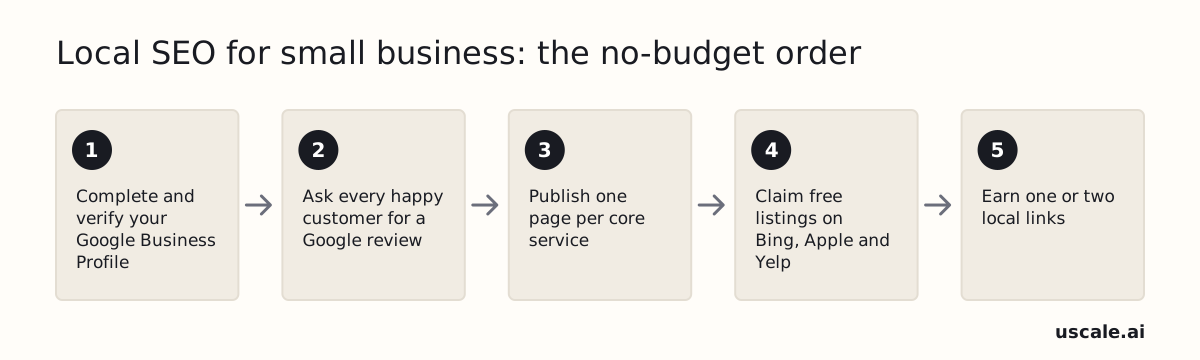
The no-budget order: profile first, reviews second, then pages, listings and links. Every step costs time, not money.
- Complete and verify your Google Business Profile. Fill in services, hours, service area and real job photos.
- Ask every customer for a Google review. Text your review link after each job to every customer, not only the happy ones.
- Publish one page per core service. A search for water heater repair should land on a water heater page.
- Claim your listings on Bing, Apple and Yelp. Use the same name, phone and website as your Google profile.
- Earn one or two local links. Ask a supplier or builder you already work with to link to your site.
None of these steps requires a tool or a hire. Each costs only your time.
The order matters. Many owners start with a website, but the profile is what shows in the map results, and reviews help a stranger pick you over the next plumber.
Fix the listing people actually see before you build anything they might never find.
Why do the profile and reviews carry so much weight? It comes down to how Google picks the map pack.
How Does Google Decide Which Plumbers Show Up in the Map Pack?
Google decides which plumbers show up in the map pack using three factors: relevance, distance and prominence. Google's help page on local ranking (as of November 2026) says local results are based primarily on those three, measured against the words someone searched.
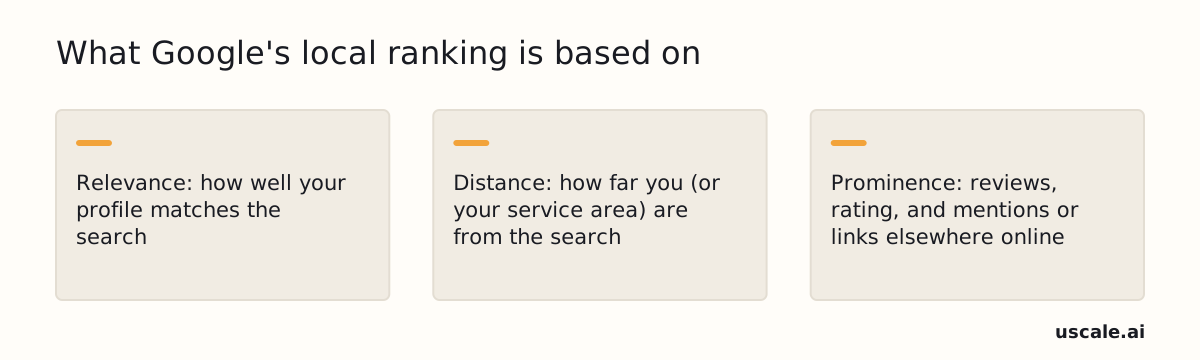
Google's three local ranking factors, as its help page describes them (as of November 2026).
- Relevance is how well your profile matches the search. For "water heater repair," Google checks the categories and services on your profile. A service you never added is harder to match.
- Distance is how far you, or the service area you set, are from the person searching or the town they named.
- Prominence is how well known you are. Google uses what it knows about you from across the web, such as links, articles and directories. It also says review count and score count toward ranking, so more reviews and good ratings can help.
Distance is the one factor you can't change. Your base is where it is, and Google limits how far a service area can reach. Relevance and prominence are both free to work on: categories and services for one, reviews and local mentions for the other. With no budget, spend your hours on relevance and prominence, because those are the only two factors you can move.
That makes the profile setup the next job.
How Do I Set Up My Google Business Profile as a Service-Area Business?
To set up a Google Business Profile as a service-area business, hide your home address, list the towns or zip codes you actually serve, pick your real trade as the primary category, and fill in every field. The profile is free to create and manage, so the only cost is an hour of your time.
Why service-area is the right type
Google defines a service-area business as one that visits or delivers to customers directly but doesn't serve them at its business address. Its own example is a plumber. Google also says a business without permanent on-site signage can't be listed as a storefront. If you work out of a truck and a home office, you are a service-area business. Hiding the address keeps your house off the map and keeps the listing within the rules.
The limits on your territory
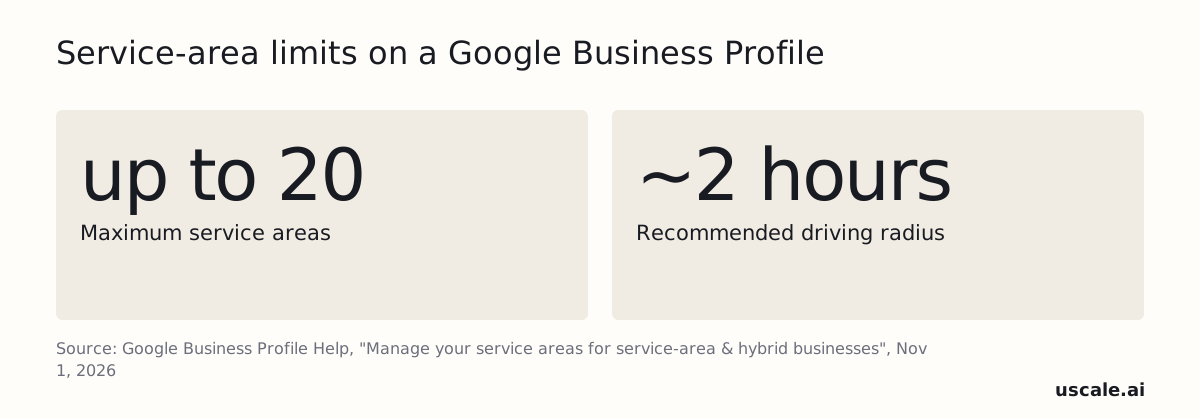
As of November 2026, you can set up to 20 service areas. Google says the whole territory shouldn't be more than about 2 hours of driving time from your base. You also get only one Business Profile for the whole area, not one per town.
The mistake most owners make
Most owners try to reach more customers by adding more: more towns, more listings, more keywords in the name. Google's guidelines say the name field must match your real-world name as it appears on your truck, website and invoices. Keyword stuffing is not permitted and can get the listing suspended. Say your truck reads "Smith Plumbing." The profile should read the same, not "Smith Plumbing Emergency Plumber Springfield."
A profile wins on what's true: a real name, a real territory and every field filled in. Once that is in place, reviews are what set you apart from the next plumber.
How Do I Get More Google Reviews Without Breaking Google's Rules?
The safe way to get more Google reviews is to text every customer your own Google review link right after the job, and never offer money, a discount or a freebie in return. Ask everyone, not only the customers who seemed pleased. Asking only the happy ones is called review gating, and Google bans it.
As of November 2026, here is how to get your link. Open your Business Profile, select "Read Reviews," then tap the "Get more reviews" share icon. That gives you a short link to paste into texts. For a QR code on a leave-behind card, use a computer browser, because Google currently doesn't generate review QR codes on mobile.
Hi [name], thanks for having us out today for the [job]. If you have a minute, a Google review helps other people in [town] find us: [your review link]. Thanks, [your name], [business]
| Don't do this | What Google's policy calls it |
|---|---|
| Offer payment, a discount or a free service for a review | Rating manipulation, or "fake engagement" |
| Ask only customers you think are happy, or discourage bad reviews | Review gating |
| Pressure a customer to write one while you're still on site | Pressuring customers on the premises |
| Tell them what the review should say | Requesting specific content |
Google can respond to a violation with anything from suspending account privileges to fully terminating the account. A slow month of reviews is a small problem next to losing the profile. An honest review you asked for plainly is worth more than ten you paid for, because only the honest one can't get you shut down. Once the reviews start coming in, the next habit is answering them.
Should I Reply to Every Google Review, and What Do I Say to a Bad One?
Yes, reply to every Google review, good or bad. Google's own review tips tell businesses to reply so customers see their feedback matters. The same page says "a mix of positive and negative feedback often feels more trustworthy." One catch: your Business Profile must be verified before you can reply at all.
The reply is mostly for the stranger who reads it next month before deciding whether to call you, not for the reviewer.
| Review | What the reply does | Length |
|---|---|---|
| Positive | Thanks them, names the job and town | Two sentences |
| Neutral | Thanks them, owns the gap | Two sentences |
| Negative | Apologizes, moves it to a phone call | Two sentences |
Copy these, swap the brackets, and send from your phone between jobs:
Positive: Thanks, [Name]. Glad the water heater swap in [Town] went smoothly. Call us anytime.
Neutral: Thanks for the honest feedback on the drain job in [Town], [Name]. You're right that we ran late, and we're fixing that.
Negative: [Name], I'm sorry the leak repair in [Town] didn't go the way it should have. Please call me at [number] so I can make it right.
On a bad review, never argue and never add details the customer didn't post.
If replies keep piling up, uscale, which we make, can draft each one in your voice for you to approve.
Reviews build trust on Google. The next step is getting the same name, phone and website onto the other free listings.
Which Free Listings and Local Backlinks Should I Claim Besides Google?
Besides Google, a small contractor should claim Bing Places, Apple Business Connect, Yelp, Facebook and Nextdoor, then BBB, Angi and the state licensing board's license lookup, all under the exact same business name, phone number and website. These listings matter because Google says prominence is based partly on what it knows about a business from across the web, including links, articles and directories.
Apple's own announcement calls Apple Business Connect a free tool for managing how a business appears across Apple Maps, Messages, Wallet and Siri, for more than a billion Apple users. For the other listings, check each sign-up page for what the basic listing includes as of November 2026.
| Listing | Where customers see it |
|---|---|
| Bing Places | Bing search and maps |
| Apple Business Connect | Apple Maps, Messages, Wallet, Siri |
| Yelp | Yelp search and app |
| Facebook page | Facebook search and recommendations |
| Nextdoor | Neighborhood feeds and recommendations |
| BBB | BBB business directory |
| Angi | Angi's pro directory |
| State licensing board | License lookup |
Keep the name, phone and website in one note on your phone and paste from it every time. "Smith Plumbing LLC" on one site and "Smith Plumbing & Drain" on another can look like two different businesses.
Free local backlinks
The easiest backlink to earn is from someone who already buys from you or sends you work. Think of the supply house you order from, a builder or remodeler you sub for, or a realtor or property manager who calls you for repairs. Ask whether they keep a "trusted pros" or "partners" page and if you can be on it. Sponsoring a youth sports team or a local charity that lists its supporters online works the same way.
These links count because they come from real local relationships, which is what prominence measures. They also need somewhere to point, and that brings us to the website.
Do I Need a Website, and What Pages Should It Have?
Yes, a home-service business needs a website, but a simple one: one page per core service and a click-to-call phone number at the top of every page. A plumber's site doesn't need a blog or animations to start. It needs to show a caller what you fix and let them reach you in one tap.
Say you run a one-truck plumbing business. The page plan could look like this:
| Page | What goes on it |
|---|---|
| Home | Your trade, towns served, hours, click-to-call button, license number |
| Drain cleaning | What you clear, how a visit goes, real job photos |
| Water heaters | Repair or replace, photos of your own installs |
| Leak repair | Signs of a hidden leak, what you do on arrival |
| Sewer lines | Inspection and repair options, job photos |
| Emergency service | When you answer, what counts as urgent, the number again |
Put your license number on every page. Use photos of your own trucks and jobs, not stock images. A customer about to let a stranger into the house is looking for proof you're real, and a license plus your own work is that proof.
The trap most owners fall into is copying one service page for every nearby town and swapping only the town name. That reads as thin, duplicated content, and it tells neither Google nor a customer anything new. A town page earns its place only when it says something true about that town: jobs you've done there, the housing you usually work on, the neighborhoods you cover. Otherwise, list your towns once on the home page.
Those service pages are also where your weekly profile updates should point people next.
How Often Should I Post Updates, and What Free Tools Keep My Profile Current?
Post one real job update to your Google Business Profile every week. A photo of the truck at a job, the crew at work, or a before-and-after of a repair is enough. Keep customers' faces, house numbers and street signs out of the frame unless the customer has said yes.
A steady rhythm matters more than polish. A phone photo with one plain line ("Swapped out a leaking water heater in [town] this morning") shows searchers that you are active and shows the work you actually do. A glossy stock image does neither.
The habit is the tool: a profile updated every week beats a perfect profile updated once.
The tools that keep the profile current cost nothing. Google states that a Business Profile is free to create and manage, and the profile is where your posts, photos and review replies go.
| Free tool | What to use it for | How often |
|---|---|---|
| Google Business Profile (in Search and Maps) | A weekly photo or update, review replies, and checking hours and services | Weekly |
| Google Search Console | Seeing which searches bring people to your website and which service pages they click | Monthly |
| PageSpeed Insights | Checking your site once for slow loading or anything broken on a phone | Once, then after big changes |
If the weekly habit keeps slipping, uscale, which we make, is one option. It keeps the Google Business Profile up to date and makes posts, and you approve the work in chat before anything goes out.
Once weekly posting and steady reviews are routine, the next question is whether a paid tool would add anything.
Which Paid Local SEO Tools or Agencies Are Worth It for a Small Contractor?
Most solo contractors don't need a paid local SEO tool until the free basics are a weekly habit: a finished Google Business Profile, a steady flow of reviews, a reply to every review, and one page per service. After that, an all-in-one listings-and-review tool is the usual next step. A block-by-block rank tracker comes later, once the profile and reviews are solid.
A paid tool can only measure or spread what already exists. A rank tracker on a half-finished profile shows a weak position in more detail without improving it.
The names owners usually compare are BrightLocal, Moz Local, Whitespark and Local Falcon, plus freelancers and small agencies for hands-off help. Plans change often, so this post gives no prices. Check each vendor's current pricing page before you buy, and pay only for the job you can't do yourself.
| What you'd pay for | Worth it when | Check before buying |
|---|---|---|
| All-in-one listings and reviews tool | Your profile is finished and keeping other listings accurate eats real time | Which listings it covers, and whether you can cancel monthly |
| Rank tracking (for example Local Falcon) | Profile and reviews are solid and you want to see where you show up across your area | That it tracks the searches and towns you actually serve |
| Freelancer or small agency | You'd rather pay to have the work done | The monthly work in writing, and who owns your accounts |
Some paid offers are worth refusing at any budget, and a few free shortcuts do more harm than any of them.
What Should I Skip or Avoid in Local SEO?
In local SEO for a small business, skip three traps: "guaranteed page 1" packages, paid directory blasts, and heavy blogging before your Google Business Profile and service pages are solid. Google says local results come mainly from relevance, distance and prominence. Nobody can sell you those, so a page 1 guarantee is a promise nobody can keep.
The bigger risk is a suspended profile, and owners often cause it themselves. As of November 2026, Google's rules name three ways:
- Stuffing keywords into the name. Adding "24/7 emergency drain cleaning" after your name breaks Google's business-name guidelines. Use the name on your truck, website and invoices.
- A fake address. A virtual office or PO box can get a listing suspended. Set up as a service-area business instead.
- Buying reviews. Paying, discounting or gift-carding customers for reviews counts as rating manipulation under Google's Maps policy.
These shortcuts can feel like progress when the phone is quiet. None of them adds relevance or prominence. A suspension takes away the one free channel that works.
So if you take the slow, honest route, how do you tell whether it's paying off?
How Do I Know if My Local SEO Is Working?
Local SEO is working when the calls, direction requests and website clicks in your Google Business Profile's performance numbers climb and new reviews keep coming in. Check those once a month, along with your average rating and which service pages get clicks in Google Search Console.
| When | Weekly habit | Done when |
|---|---|---|
| First month | Finish and verify the profile; text your review link after every job | Every field filled, an ask sent after each job |
| Second month | Reply to every review; post one job photo; add missing service pages | No unanswered reviews |
| Third month | Claim the free listings; ask one partner for a link | Same name and phone everywhere |
If calls are flat after a few months, re-check your categories first, then your reviews. Google ranks on relevance, and review count and rating feed into local ranking.
A missed call never shows up as a call, so stop missing calls before you judge the SEO. You can text missed callers back yourself.
All of that starts with the first month's row, which fits into a single week.
Local SEO for Small Business: The Two Things to Do This Week
The two things to do this week for local SEO for small business are to finish your Google Business Profile and to start asking for reviews the right way. Give them this week's hour before any paid tool.
- Fill in every field, hide your home address, and list only the towns you really serve.
- Copy your review short link from a computer and save it to your phone.
- Text the link to every customer after each job, happy or not.
Once both habits run on their own, read up on Google review response rates and texting back missed calls.
A finished profile and honest reviews cost nothing but the hour you just found.
Questions
What is local SEO for a small business?
Local SEO for a small business is the work of showing up when nearby people search Google and Google Maps for what you do. For a home-service business, it starts with a complete, verified Google Business Profile, which Google says is free to create and manage, plus a steady flow of honestly earned reviews. Google ranks local results mainly on relevance, distance and prominence.
How much does local SEO cost if I hire someone?
Hiring someone for local SEO has no single price. Freelancers, agencies and tools set their own rates and change them often, so check each vendor's current pricing page. Before paying anyone, do the free basics yourself: a Google Business Profile costs nothing to create or manage, and reviews, replies and free listings cost only time. If you do hire, get the monthly work in writing and keep ownership of your accounts.
Which paid local SEO tools are worth it for a small contractor?
Most small contractors don't need a paid local SEO tool until the free basics are a weekly habit: a finished Google Business Profile, steady reviews, a reply to every review and one page per service. After that, an all-in-one listings and review tool is the usual next step, and a rank tracker such as Local Falcon comes later. Pay only for the job you can't do yourself.
What should I skip or avoid in local SEO?
In local SEO, skip guaranteed page 1 packages, paid directory blasts and heavy blogging before the basics are solid. Also avoid the shortcuts that can get a Google Business Profile suspended: stuffing keywords into the business name, using a virtual office or PO box as an address, and paying or discounting customers for reviews. Google's Maps policy calls paid reviews rating manipulation and also bans review gating.
How do I know if my local SEO is working?
Local SEO is working when the calls, direction requests and website clicks shown in your Google Business Profile's performance numbers climb and new reviews keep arriving. Check them monthly, along with your average rating and which service pages get clicks in Google Search Console. If calls stay flat after a few months, re-check your categories first, then your reviews, and make sure missed calls aren't hiding real demand.