Which plumbing software should a plumber start with?
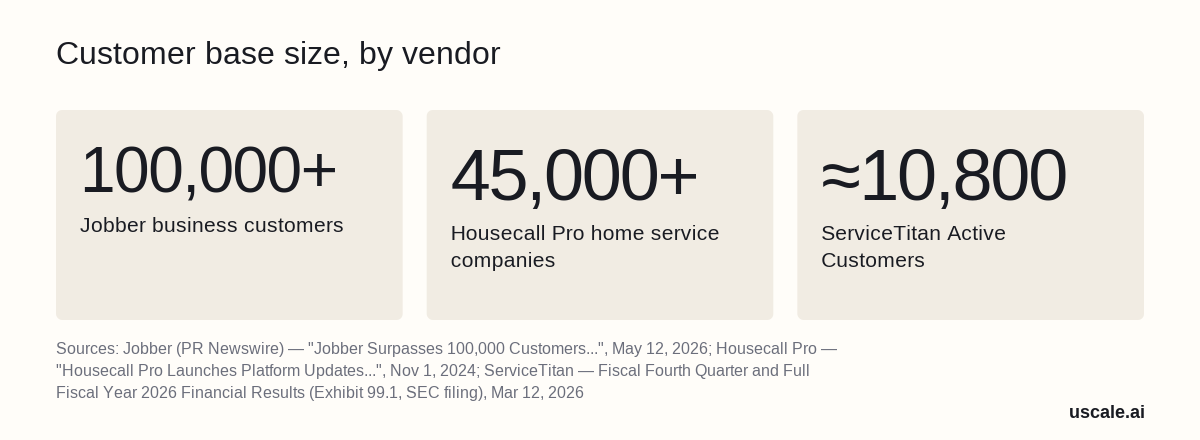
For a solo plumber or a small shop, the best plumbing software is usually Jobber or Housecall Pro. For a bigger operation with dispatchers, it is usually ServiceTitan. Jobber reports more than 100,000 business customers, and Housecall Pro says it serves more than 45,000 home service companies, so most small shops end up on one of the two for scheduling, quoting and invoicing. ServiceTitan reported about 10,800 Active Customers as of January 31, 2026. Each one has over $10,000 of annualized billings, so its customers are fewer and larger.
That answers who runs the jobs. It doesn't answer who picks up a burst-pipe call late at night, who replies to the Google review that came in during a job, or who texts back the caller who hung up. Those tools sit on top of the scheduling app, and they aren't always in the plan you're quoted.
This comparison is grouped by shop size, and every price comes from the vendor's own page as of 2026. It is not a vendor-written list that ranks itself first. That leaves the first real question: what does each plan include before the add-ons start? Before the plans, though, start with the size of shop each tool is built for.
Which plumbing software fits your shop size?
Jobber and Housecall Pro fit most plumbing shops from a single truck up to around 10. ServiceTitan fits larger operations that run a dispatcher in the office. You can see the split in what each vendor publishes: Jobber and Housecall Pro list prices a solo plumber can sign up for today, and ServiceTitan asks you to request a quote.
| Tool | Best for | Starting price (vendor's own page) | Scale signal |
|---|---|---|---|
| Jobber | Solo plumbers and small crews | Core: $29/month billed annually, $49/month billed monthly, single user (as of September 2026) | 100,000+ business customers; 400,000+ service pros use it daily (May 2026) |
| Housecall Pro | Small to mid-size crews | Pricing page says plans start at $49/month. A 2026 tracker lists Basic at $59/month annually or $79/month monthly, 1 user | 45,000+ home service companies (November 2024) |
| ServiceTitan | Larger shops with dispatchers | Not published. Package names (Starter, Essentials, The Works) with a "Request Pricing" button | About 10,800 Active Customers (January 31, 2026) |
Read the seat counts, not just the sticker price
The crew-size line comes from how the plans are built. Jobber's four listed plans are all single-user. Housecall Pro's Essentials covers 5 users and Max covers 8, and extra seats cost $100/month on Essentials or $75/month on Max. Once your crew outgrows those seat counts, per-seat fees start to add up. That is roughly where the case for a bigger system begins.
The two Housecall Pro figures in the table don't match: the pricing page says $49, and the tracker's lowest tier is $59 annual. Check the live page before you budget.
What ServiceTitan's customer count actually tells you
ServiceTitan's number looks small next to Jobber's, but the two companies count customers differently. ServiceTitan only counts an "Active Customer" if it billed that organization in the prior three months at over $10,000 of annualized billings. Those roughly 10,800 accounts make up over 97% of its annualized billings.
So the figure doesn't measure popularity. It describes shops that already pay ServiceTitan more than $10,000 a year.
A customer count tells you who a tool is built for, not how good it is. Many owners get this backwards. They copy the biggest shop in town, then pay for dispatch boards and price books that a three-truck crew never opens.
The starting price is also rarely what a shop ends up paying, so the next question is what each tool costs per month once seats and add-ons are in.
What does plumbing software cost per month?
Plumbing software runs from $29 a month to $329 a month on the plans vendors publish. The low end is Jobber's single-user Core plan billed annually. The high end is Housecall Pro's Max tier billed monthly. ServiceTitan isn't in that range at all. Its pricing page lists package names (Starter, Essentials, The Works) with a "Request Pricing" button instead of dollar figures, so you only get a number after talking to sales.
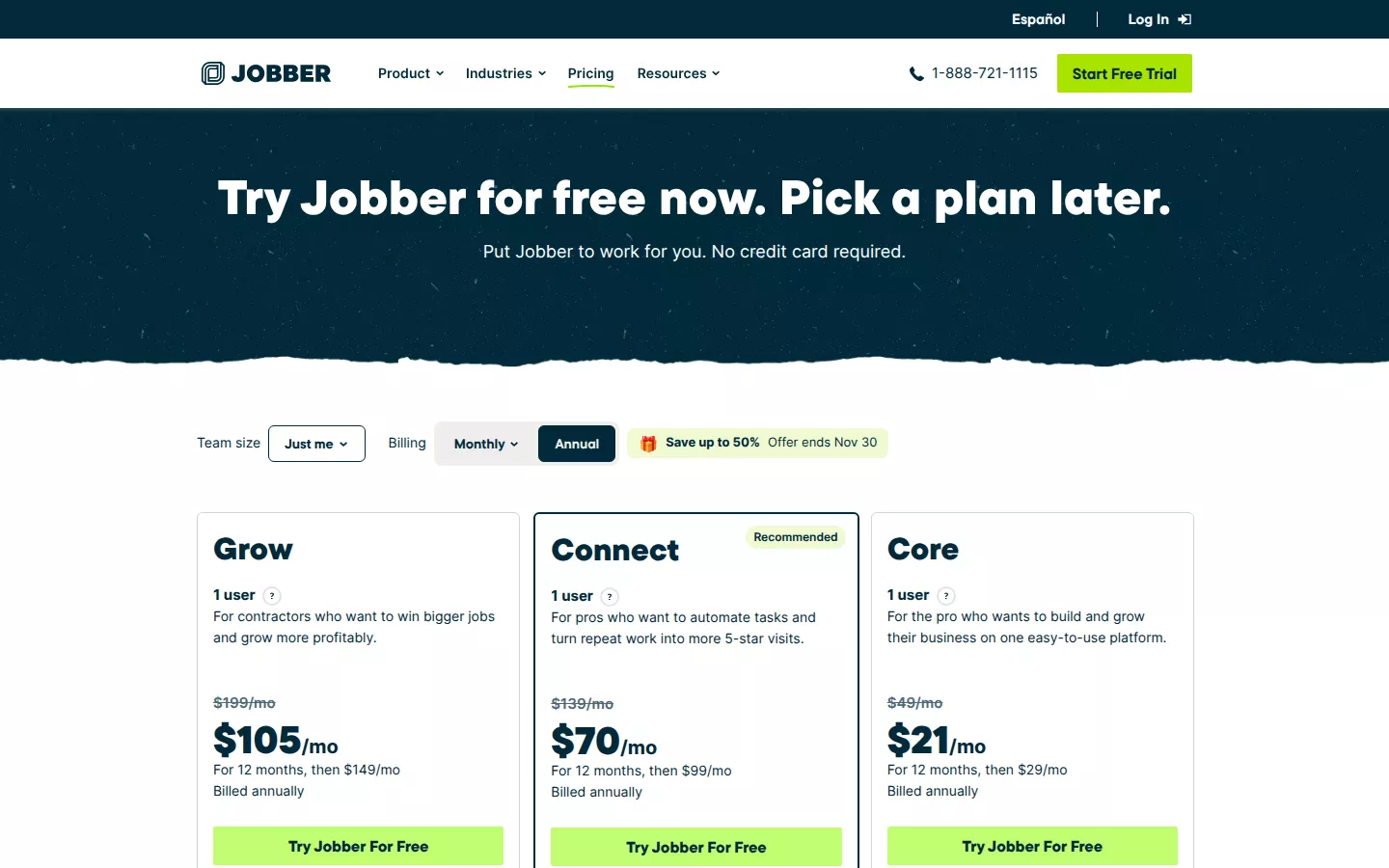
Jobber (pricing page, as read September 2026)
Jobber lists four single-user plans:
- Core: $29/month billed annually, or $49/month billed monthly
- Connect: $139/month
- Grow: $199/month
- Plus: around $449–$499/month, depending on billing term
The add-ons are where the bill grows:
- Receptionist (AI answering for calls and texts): a $99/month add-on on Grow, with 100 conversations a month included. It comes at no extra cost on Plus ($449/month).
- Marketing Suite (Reviews, Referrals and Campaigns): $79/month on plans below Plus, included free on Plus.
The sources here don't give Jobber's price for extra users. Ask before you add a second tech or an office manager.
Housecall Pro (pricing page, 2026)
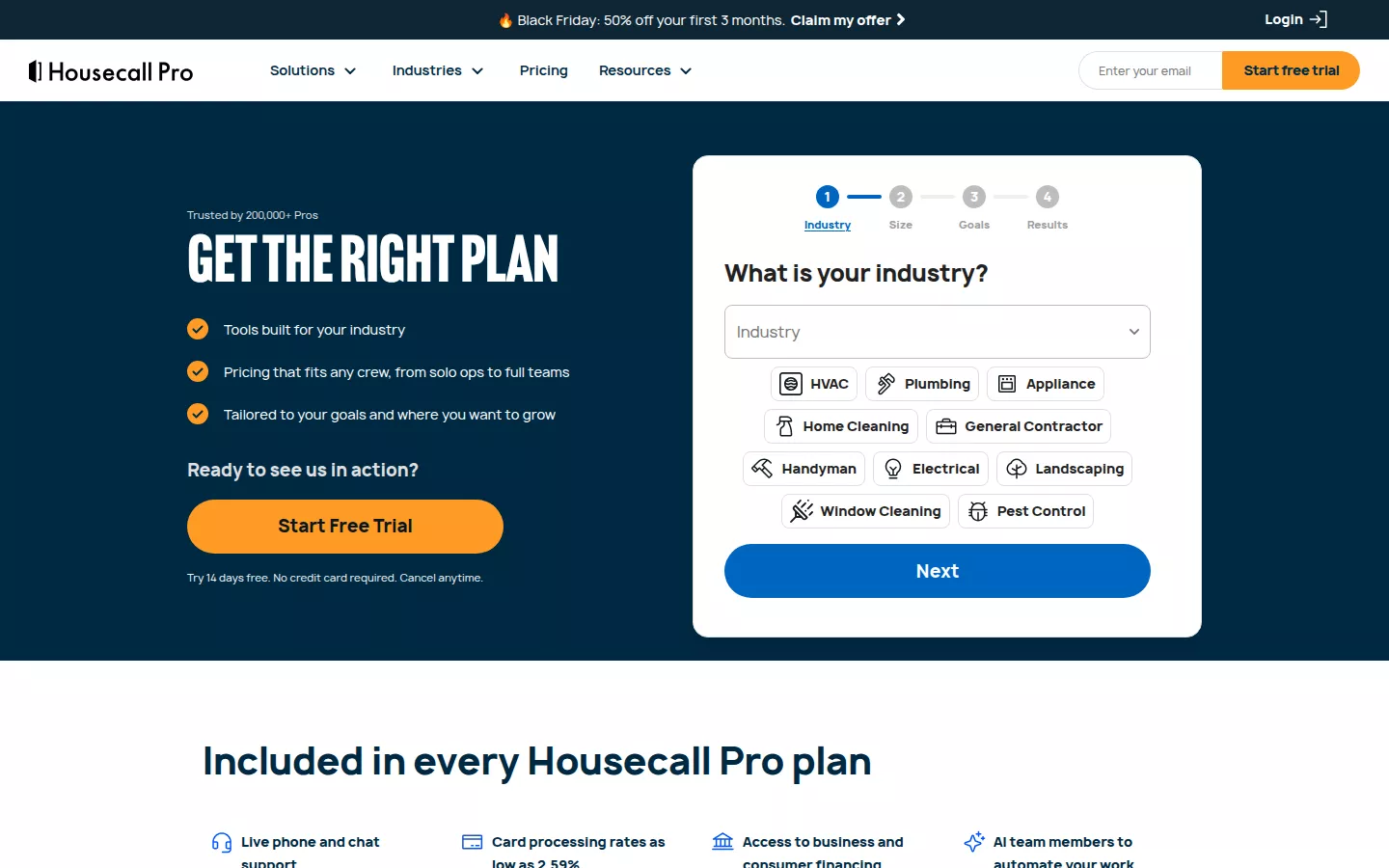
Housecall Pro's pricing page says plans start at $49/month. A third-party tracker reading the same page lists these 2026 tiers:
- Basic: $79/month, or $59 billed annually, 1 user
- Essentials: $189/month, or $149 billed annually, 5 users
- Max: $329/month, or $299 billed annually, 8 users
Extra seats cost $100/month on Essentials and $75/month on Max. The $49 headline and the $59 Basic price don't match, so check the page on the day you sign.
How to compare the numbers
The sticker price is the floor. The plan you'll grow into and the add-ons you'll need decide the real bill.
- Jobber: on Grow, adding Receptionist and Marketing Suite means paying $199 + $99 + $79 a month. That sum is still below the $449 Plus price, so Plus only pays off if you also want its other features.
- Housecall Pro: a crew of six on Essentials pays $100/month for the sixth seat. At that size, price out Max, which includes 8 users.
If call answering is the add-on you're weighing, our answering service cost calculator shows what a human service would cost for the same coverage.
These prices matter most at the small end, and that's where the next question starts: what a one-person shop actually needs.
How does your plumbing business look to people searching nearby?
Type your business name and I check your Google profile, reviews, website and whether AI answers name you, then show what to fix first.
Check my businessWhich plumbing software is best for a one-person business?
For a one-person plumbing business, the best plumbing software is usually the cheapest single-user plan from Jobber or Housecall Pro, not ServiceTitan. A solo plumber needs three things from a phone: a quote and an invoice sent from the truck, a way for customers to book a time, and a request for a Google review after the job. Start with a plan that covers the first two, and add the third when you are ready to pay for it.
As of September 2026, Jobber's pricing page lists Core at $29/month billed annually, or $49/month billed monthly. Housecall Pro's own pricing page says plans start at $49/month. A third-party tracker reading the same page lists Basic at $59/month billed annually ($79 billed monthly) for one user. Because those two Housecall Pro numbers differ, check the vendor's page on the day you sign.
Pay monthly until the app proves itself
The monthly price is higher, but you can leave after a few weeks if the app doesn't fit how you work. Move to annual billing once you've sent real quotes and invoices from it. Buy for the truck you drive this year, not the fleet you hope to run.
Check which features are add-ons
Solo plumbers often assume automatic review requests come with the plan. On Jobber they are not part of Core. They come with the Reviews add-on or the Marketing Suite, both priced on top of your plan.
What the customer counts tell you
Jobber says it has passed 100,000 business customers, with more than 400,000 service professionals using it daily across over 50 industries, including plumbing (May 2026). Housecall Pro describes itself as serving more than 45,000 home service companies. Neither number tells you which app suits your shop better. Both show that these apps are common among small shops. That makes it more likely that a bookkeeper, a part-time office helper or your first hire has used one before.
The entry plans leave out answering the phone at night. Both vendors sell that separately, and the next section covers it.
How do plumbers stop losing emergency calls after hours?
Plumbers stop losing after-hours emergency calls by having something answer the phone and book the job instead of sending it to voicemail. A burst pipe or a dead water heater usually goes to whichever plumber picks up first, so Jobber and Housecall Pro now both sell an AI answering add-on that takes calls when the shop is closed.
The reason is simple. A customer with water on the floor is unlikely to leave a voicemail and wait. They call the next number on the list.
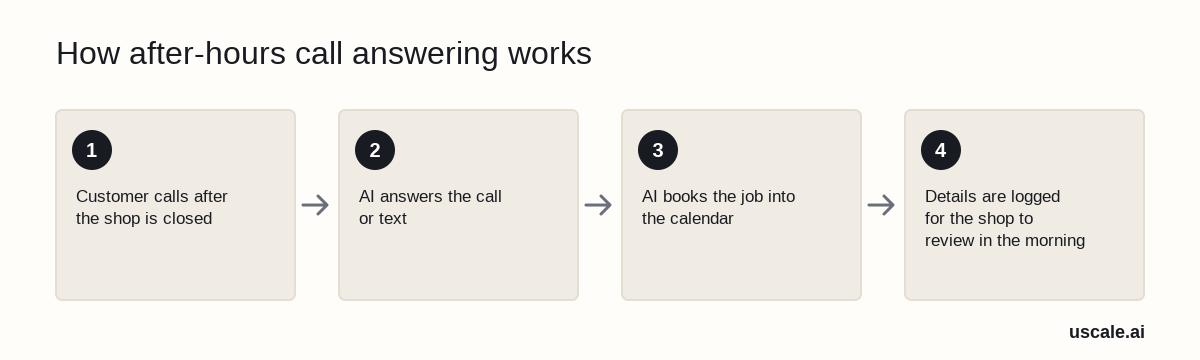
Jobber: Receptionist
Jobber made Receptionist generally available on August 18, 2025. Receptionist answers customer calls and texts 24/7 and books jobs. By launch day it had handled more than 200,000 conversations for participating businesses. That figure covers Jobber's whole network. It doesn't tell you how many calls one shop will see.
As of 2026, Receptionist is a $99/month add-on on the Grow plan, which itself costs $199/month. It is included at no extra cost on Plus, which costs $449/month. The add-on includes 100 conversations per month. Before you sign, ask Jobber what happens after the 100th conversation in a month. A cold snap can bring in a lot of calls in a few days.
Housecall Pro: CSR AI
Housecall Pro includes its "AI Team" features by default on its accounts. CSR AI is the exception. It is an optional add-on that answers calls and chats 24/7, captures leads, books jobs and logs each conversation inside Housecall Pro. It runs after hours and when call volume spikes during the day. The sources we checked don't show a published price for CSR AI. Get the current number from Housecall Pro before you compare it with Jobber's $99.
When a text-back may be enough
A full answering add-on pays off when you miss calls often and most of them are real jobs. If you miss only a few calls a month, start with a cheaper option. A missed-call text-back sends a text right after a missed call that asks what the caller needs and offers a time. That may cover you before you pay for an answering add-on. To compare the cost of a human answering service with an add-on, plug in your own call numbers in the answering service cost calculator.
The rule you can reuse: compare the add-on's price with the jobs you're losing, not with your plan price. Answering the call wins tonight's job. What that customer writes about you afterward helps win the next one, and that is where review requests come in.
Which plumbing software asks for Google reviews automatically?
Jobber is the only one of the three with a published price for automatic review requests. Its standalone Reviews add-on automates Google review requests for $39/month. Its Marketing Suite, which bundles Reviews, Referrals and Campaigns, costs $79/month on plans below Plus and is included free on the Plus plan. Housecall Pro and ServiceTitan don't list a separate review-request price in the sources used for this comparison, so check their own pages before you assume review requests come with your plan.
| Option | What it covers | Price (as of 2026) |
|---|---|---|
| Jobber Reviews add-on | Automated Google review requests | $39/month |
| Jobber Marketing Suite | Reviews, Referrals and Campaigns | $79/month below Plus; included on Plus ($449/month) |
| Housecall Pro | Not confirmed in the sources here | Check Housecall Pro's pricing page |
| ServiceTitan | No public price list | Quote only, through a pricing request |
| Podium, Birdeye, NiceJob | Stand-alone review tools | Not verified here; check each vendor's page |
Why automation beats remembering to ask
The best time to ask for a review is right after the job, while the customer still has hot water and remembers who fixed it. If the ask depends on a tech remembering, it goes out on slow days and gets skipped on busy ones. That is backwards, because busy weeks bring the most finished jobs. A review request that fires every time a job closes beats a perfect request that goes out only when someone remembers.
Pay only for the part you'll use
If you won't run referral programs or email campaigns, the Reviews add-on alone costs about half as much as the full Marketing Suite. If you're already weighing the $449/month Plus plan for other reasons, the Marketing Suite comes with it, so don't buy it twice.
For Housecall Pro, its AI Team features are included free by default, apart from the CSR AI answering add-on. The sources here don't say whether review requests are part of that set on every tier. Ask the sales rep, or check the pricing page, before you sign.
If you want reviews outside your field-service app
Some shops keep review tools separate, so they can switch scheduling software later without losing their review setup. Podium, Birdeye and NiceJob all sell review automation. None of their current prices are verified here, so read each vendor's own pricing page. Our guides to Podium alternatives and Birdeye alternatives compare what each one covers.
Asking for reviews is one job, and replying to them is another. The sources here describe these tools as sending requests, so check how each one handles replies. The next section covers the cases where a small shop doesn't need these add-ons yet.
Do I need flat-rate pricing software?
A solo plumber who quotes on the spot usually doesn't need flat-rate pricing software yet. A flat-rate price book is worth paying for when several techs have to quote the same job the same way without calling the office. When you are the only one quoting, the price book is in your head, and quoting job by job works fine.
The broader point behind that question is fair. A list of apps and add-ons can make a small shop feel it needs every one of them, and it doesn't. The advice above bends in three common cases.
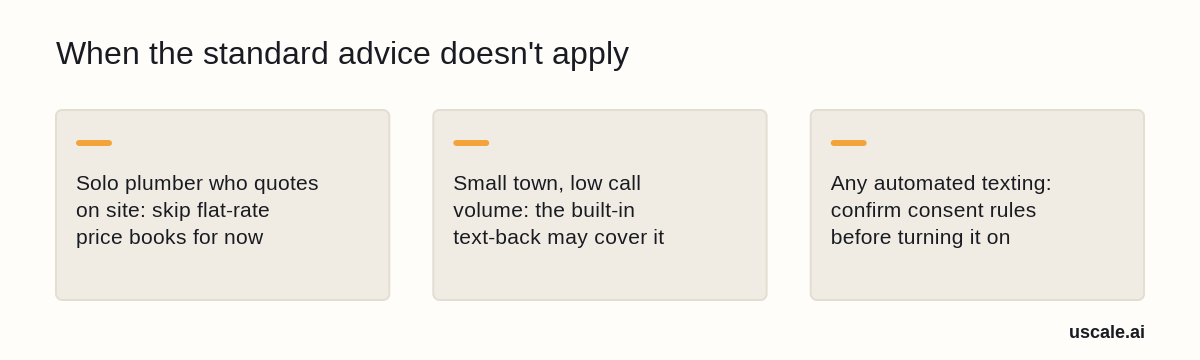
Solo plumber who quotes on site
Skip the flat-rate price book for now. Look at it again when you hire a second tech who will quote without you. That is when prices start to drift between trucks and customers start comparing notes.
Small town, few after-hours calls
A one-truck shop that rarely gets night calls may not need a paid answering add-on at all. Count your missed and after-hours calls for one month before you pay for something like Jobber's $99/month Receptionist add-on. If the count is small, a quick text-back reply, if your app has one, may cover it. If the count is higher, set it against what one lost emergency job is worth to you. The answering service cost calculator helps with that math.
Any shop that texts customers automatically
Check consent rules before you turn on automated missed-call text-back. Whether you may text a number, and what the message has to include, is a legal question. The software sends whatever you set up, and it doesn't make that call for you. Ask your texting provider or an attorney what applies where you work, and keep a record of how each customer gave you their number. Our guide to missed-call text-back covers how the reply itself should read.
None of these exceptions changes the main advice. Pick the field-service app that fits your crew size, then add only the customer-facing pieces your own call log and reviews show you need. Once you're down to two apps, the contract is where the remaining surprises hide.
What should a plumber check before signing a software contract?
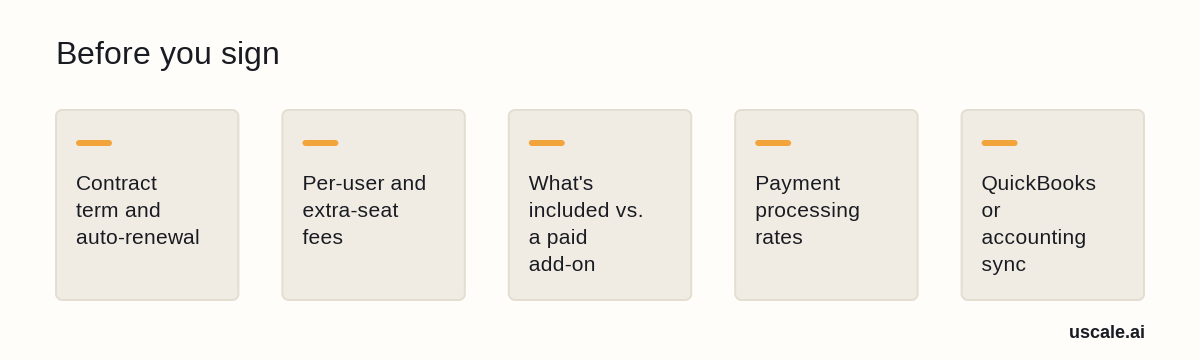
Before signing a plumbing software contract, a plumber should check six things: the contract term and auto-renewal, per-user and extra-seat fees, which features are paid add-ons, payment processing rates, QuickBooks or accounting sync, and whether the shop can export its own data after leaving. Run the same six checks against the two tools you're down to, side by side, before either sales rep gets a signature.
The questions to send both vendors
You can finish this one today. Paste the list into an email to both vendors:
1. How long is the contract, does it auto-renew, and how much notice do I need to give to cancel? 2. What does each extra user or seat cost per month, and does a tech who only views jobs count as a user? 3. Which features you showed me are included in my plan, and which are paid add-ons? Do any have a monthly usage cap? 4. What rate do you charge on card and bank payments my customers make through the app? 5. Does the app sync with QuickBooks or my accounting tool, and does it sync both ways? 6. If I leave, can I export my customers, jobs, quotes and invoices myself, and in what file format?
This step is done when both vendors have answered in writing and you have the answers in two columns.
Where the surprises usually are
Seats. A cheap starting plan stops being cheap when you add techs. As of 2026, Housecall Pro lists extra seats at $100/month on Essentials and $75/month on Max.
Add-ons with caps. Jobber's Receptionist add-on includes 100 conversations a month, so ask what happens during a busy freeze week. The answering service cost calculator puts an answering add-on and a separate service on one page.
No price page. ServiceTitan doesn't publish prices. Get the term, seats, add-ons and processing rate in the written quote, not only on the demo call.
Processing rates. The plan price doesn't show this cost, and you pay it on every job paid through the app. Compare both vendors' rates with what you pay now.
If you only do one thing
Ask question 6 in writing. If a vendor gives a clear yes and names a file format, you can switch later without retyping years of customer records. If the answer is vague, look harder at the other tool.
Once those answers sit in two columns, the choice gets a lot smaller. What's left is putting the decisions in the right order.
What should a plumber do this week?
This week a plumbing shop needs to make two separate decisions. First, pick the field-service app that fits your crew. Second, decide who answers the phone at night and who replies to your reviews. The scheduling app runs the jobs. The second layer wins and keeps the customers. None of the three tools in this post covers both without an add-on, so treat them as two choices made in order.
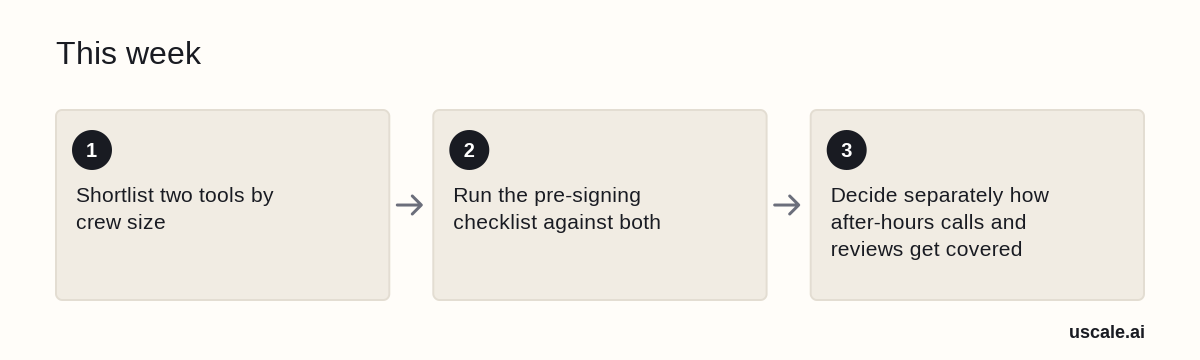
- Shortlist two tools by crew size. If you work alone or run a handful of trucks, compare Jobber and Housecall Pro. If you have dispatchers and a bigger board, put ServiceTitan on the list and keep one of the others as a price check.
- Run the pre-signing checklist against both. Check contract term, seat fees, add-ons, processing rates, QuickBooks sync and data export. Get the answers in writing and note the date you got them.
- Decide separately how after-hours calls and reviews get covered. Look back at last month's missed calls and unanswered reviews. Then choose between the vendor's own add-on, a stand-alone tool or a person.
For step three, uscale, which we make, is one option that doesn't depend on which app you pick. It answers the phone when the shop is closed and books the caller in. It texts back callers who hang up and writes replies to your Google reviews and customer emails. It works next to Jobber, Housecall Pro or ServiceTitan and does not replace them. Nothing goes out without your OK. The scan of your business is free and needs no account, and plans start at $29.99 a month on the pricing page.
The right setup isn't the one with the longest feature list. In the right setup, the job gets scheduled and the late-night burst-pipe call gets answered.
Questions
What is the best plumbing software for a small business?
The best plumbing software for a small business is the field-service app that schedules jobs, sends quotes and invoices, and fits the crew size. For solo plumbers and shops under about 10 trucks, that is usually Jobber or Housecall Pro, which both publish prices you can sign up for. ServiceTitan suits larger shops with dispatchers and gives prices only on request. After-hours call answering and review requests often cost extra.
How much does plumbing software cost per month?
Plumbing software costs from $29 to $329 a month on published plans. Jobber's single-user Core plan is $29 a month billed annually or $49 monthly, with Connect at $139, Grow at $199 and Plus around $449 to $499. Housecall Pro's Basic, Essentials and Max tiers are listed at $79, $189 and $329 billed monthly. ServiceTitan does not publish prices. Add-ons such as Jobber's $99 Receptionist raise the bill.
What is the best plumbing estimating software?
Plumbing estimating software is the part of a field-service app that builds quotes and turns them into jobs and invoices. For most small shops, the quoting built into Jobber or Housecall Pro is enough. The right choice depends on crew size: one person quoting can price job by job, while several techs quoting without calling the office benefit from a shared price book. Ask each vendor which estimating features are add-ons.
What is the best software for plumbing business management?
Plumbing business management software runs scheduling, quotes, invoices and payments in one app. Jobber and Housecall Pro cover this for most shops from one truck to around 10. ServiceTitan fits larger operations with dispatchers; it reported about 10,800 Active Customers as of January 31, 2026, each with over $10,000 of annualized billings. Before signing, check contract term, seat fees, add-ons, processing rates, accounting sync and data export.
Do I need flat-rate pricing software for my plumbing business?
A solo plumber who quotes on site usually does not need flat-rate pricing software yet, because the price book lives in one head and job-by-job quoting works fine. Flat-rate pricing pays off once several techs must quote the same job the same way without calling the office. Revisit it when you hire a second tech who will quote alone, since that is when prices start to drift between trucks.