The search for one best HVAC software
There is no single best HVAC software, and the vendors' own numbers show why. Jobber says more than 100,000 businesses use it. Housecall Pro is used by over 45,000 home service companies. ServiceTitan reported roughly 10,800 active customers for the fiscal year ended January 31, 2026. As of November 2026, ServiceTitan publishes no prices and asks for a demo instead.
Many owners search for one app to run the whole shop, and that app doesn't exist. A small HVAC shop needs a field-service platform to schedule, dispatch and invoice, and for most that means Jobber or Housecall Pro. It also needs tools or add-ons that win and keep customers: review replies, missed-call text-back and after-hours answering.
Below are the tools grouped by job, a cost table from each vendor's own page, when ServiceTitan is worth it, and a checklist to run before you sign. The platform comes first, because every other tool connects to it. The harder question is what that platform leaves undone.
What Is the Best HVAC Software for a Small HVAC Company?
The best HVAC software for a small HVAC company is usually Jobber or Housecall Pro. ServiceTitan is the pick for larger contractors that have dispatchers and a sales team. That answer covers the jobs side only: scheduling, dispatch, quotes and invoices. Winning and keeping customers is a separate job. That job covers review replies, missed calls and after-hours answering, which platforms handle through add-ons or leave to other tools.
The customer counts below come from each vendor's own announcements and filings. They don't measure quality, but they show who each platform is built around.
Jobber: the broadest small-business base
Jobber says it is used by more than 100,000 businesses and 400,000 service professionals across more than 50 industries (May 2026). That breadth is both its strength and its limit: Jobber is built for owner-operators across many trades, not for HVAC alone. As of November 2026, its Core plan is $49/month for 1 user with no commitment, or $29/month billed annually. For a shop where the owner still quotes and schedules, Jobber is the easiest place to start.
Housecall Pro: home services first
Housecall Pro is used by over 45,000 home service companies (November 2024 report). That base is smaller than Jobber's and focused on home services rather than every trade. As of September 2026, the Basic plan is $59/month billed annually for 1 user, or $79/month month-to-month.
ServiceTitan: built for the larger contractor
ServiceTitan reported roughly 10,800 total active customers for its fiscal year ended January 31, 2026. It does not publish prices and asks you to request a personalized demo instead. A much smaller customer count combined with quote-only pricing points to bigger accounts: contractors with dispatchers, office staff and a sales process of their own.
How to shortlist
Pick the platform for the shop you run this year, not the one you hope to run in five years.
| Your shop | Shortlist |
|---|---|
| Owner plus a few trucks, owner books the jobs | Jobber and Housecall Pro, trialed side by side |
| Dispatcher on payroll, several crews, a sales team | Add a ServiceTitan demo |
| Already run QuickBooks | Whichever platform passes a real sync test |
Workiz is another platform HVAC owners ask about. Check its own pricing page before you add it to the shortlist.
If you already keep your books in QuickBooks, test the sync first. Ask each vendor whether it syncs with your version and in which direction, then push one test invoice through before you commit. A platform that schedules well but breaks your books costs more than its monthly fee. The next section puts those monthly fees side by side.
How Much Does HVAC Software Cost per Month?
HVAC software costs from $29 a month (Jobber's one-user Core plan, billed annually) to $499 a month (Jobber's five-user Plus plan). Housecall Pro runs from $59 to $329 a month depending on plan and billing. ServiceTitan, the third major vendor, does not publish prices at all. As of November 2026, your real bill depends on how many people use the app, whether you pay yearly or monthly, and which add-ons you switch on.
What to compare
- Starting price and billing. Annual billing lowers the entry price at both Jobber and Housecall Pro.
- Users included. Every tech who opens the app on a truck may count as a user.
- Extra-user cost. This is where the bill grows each time you hire.
- Add-ons. Review requests and AI phone answering can cost extra.
- Commitment. Check whether you can leave month to month.
| Vendor and plan | Monthly price | Users included | Extra user | Notes |
|---|---|---|---|---|
| Jobber Core | $49, or $29 billed annually | 1 | Not stated in our source | No commitment on monthly billing |
| Jobber Connect | $139 | Not stated in our source | Not stated in our source | Receptionist available as an add-on |
| Jobber Grow | $199 | Not stated in our source | Not stated in our source | Receptionist available as an add-on |
| Jobber Plus | $499 | 5 | $29 each | Receptionist included |
| Jobber Marketing Suite (add-on) | $79 | Not applicable | Not applicable | Google review requests, email campaigns, referral program |
| Jobber Receptionist (add-on) | Not stated in our source | Not applicable | Not applicable | 24/7 call and text answering, books jobs. Needs a dedicated Jobber number (US, Canada, UK) |
| Housecall Pro Basic | $59 billed annually, or $79 monthly | 1 | Not stated in our source | |
| Housecall Pro Essentials | $149 billed annually, or $189 monthly | 5 | $100 each | |
| Housecall Pro MAX | $299 billed annually, or $329 monthly | 8 | $75 each | |
| ServiceTitan | Not published | Not published | Not published | Asks about your business, then offers a demo and a custom package |
| uscale Starter, which we make (not field-service software) | $29.99 (our pricing page) | Not applicable | Not applicable | 50 credits a month for customer messages, review replies and calendar booking. Cancel any time |
Sources: Jobber pricing page (checked November 1 and 5, 2026). Jobber Help Center on Receptionist (November 19, 2026). The Marketing Suite price comes from a January 2025 report citing Jobber's Help Center, so confirm the current price. Housecall Pro pricing page (September 2026). ServiceTitan pricing page (November 2026). Starter price from our own pricing page (checked November 2026).
Which price fits your shop
- Choose Jobber Core if you work solo and want the lowest entry price or a plan you can drop month to month.
- Choose Housecall Pro Essentials if you run three to five techs. It includes five users at $149 a month billed annually. Ask Jobber how many users Connect and Grow cover before you compare.
- Choose Housecall Pro MAX or Jobber Plus if you are hiring fast. Compare MAX's $75 per extra user with Plus's $29 against your headcount.
- Talk to ServiceTitan if you are a larger contractor and want a package built around your operation, and you are fine with a sales call before seeing a number.
- Add a separate customer-winning tool if you want review replies and booked messages without switching your field-service app.
Rule of thumb: price each plan for the number of techs you expect to have in a year, plus the add-ons you would actually turn on, before comparing headline prices.
That leaves the one vendor with no number in the table, and the question most owners ask about it.
Is ServiceTitan Worth It for a Small HVAC Company?
ServiceTitan is worth it for an HVAC company that already runs like a larger contractor, with several crews, a dispatcher, and people whose job is selling. For a small shop where the owner still answers the phone and writes the quotes, ServiceTitan is usually more system than the business can use.
ServiceTitan's own product updates show who it is built for. Its Fall 2025 release (ST-75) added AI Voice Agents for its Basic Phones and Phones Pro products. These agents recognize callers, create or find customer records, and book jobs for overflow, after-hours and emergency calls. The same release added Autopilot SMS campaigns to Marketing Pro v2 for targeted homeowner outreach. Overflow handling and automated campaigns are built for a call volume and a customer list that a shop with a few trucks usually doesn't have yet.
The buying process points the same way. As of November 2026, ServiceTitan's pricing page shows no set prices. It asks about your business and offers a personalized demo and a custom package. You can't compare it line by line with Jobber or Housecall Pro until you have been through that process.
Here is a test you can use on any software: look at who each feature expects to be sitting at the desk. If a feature needs a dispatcher to watch it or a marketer to run it, and you have neither, you are paying for an empty chair.
| ServiceTitan is worth it if | ServiceTitan is not worth it if |
|---|---|
| You run multiple crews and someone dispatches full time | The owner or one office person books every job |
| Overflow and emergency calls come in often enough to need AI voice agents | Missed calls are occasional, and a text-back or answering add-on covers them |
| You want automated SMS campaigns across a large customer list or several locations | You have one location and send review requests from a basic plan |
| You have a sales team that builds quotes and follows up on them | You have no sales team |
| You're fine sitting through a demo before you see a custom quote | You want a published price you can compare today |
For most small shops, the useful question isn't which platform does everything. It is which smaller tool fills the gap that is costing you jobs, and for many shops that gap is reviews.
How does your HVAC company look to people searching nearby?
Type your business name and I check your Google profile, reviews, website and whether AI answers name you, then show what to fix first.
Check my businessWhich HVAC Software Asks for Google Reviews Automatically?
Jobber is the clearest case of a field-service platform with automatic Google review requests: its Marketing Suite add-on covers review requests and review management for $79/month, according to a January 2025 report citing Jobber's Help Center. The other route is a stand-alone review tool. Podium, Birdeye, NiceJob and Broadly are the names owners usually compare when they look outside their job app.
The Marketing Suite is an add-on, not part of the base plan. The same $79 also covers email campaigns and a referral program. If you only want review asks, you are paying for the whole bundle. Before you turn it on, check Jobber's help center to see exactly what sends each request and when.
For Housecall Pro, check the plan pages on its current pricing page to see whether review requests come with your tier or cost extra. Do the same for any stand-alone tool. Prices and bundles change, so this post doesn't list numbers for them.
| Option | Kind of tool | Review requests | Price (dated) |
|---|---|---|---|
| Jobber Marketing Suite | Add-on to a field-service platform | Google review requests and management, plus email campaigns and referrals | $79/month (reported January 2025) |
| Housecall Pro | Field-service platform | Check your plan | Check its current pricing page |
| Podium, Birdeye, NiceJob, Broadly | Stand-alone review tools | Check each tool | Check their current pricing pages |
Many owners shop for the lowest price first. The better first question is where the tool gets its trigger. A built-in add-on already has your job records, so it knows when a job closes. A stand-alone tool needs a connection to your job app, or someone in the office has to send each request by hand. The best review request is the one that goes out without anyone having to remember it.
If you just need a link to text customers today, the free Google review link and QR code tool gives you one. For a side-by-side look at the stand-alone options, see our Podium alternatives comparison. Getting reviews is only half the job, though. Replying to them also counts, and our post on Google review response rate covers why. The other half of winning customers happens on the phone.
What Answers the Phone and Texts Back Missed Calls for an HVAC Company?
An AI receptionist add-on is now the usual way an HVAC company answers the phone after hours and catches missed calls. Jobber, Housecall Pro and ServiceTitan each sell their own version, and stand-alone tools do the same job next to whichever app a shop already runs.
The useful test is not how natural the voice sounds. It is whether the call ends as a booked job, and what you have to change to get there.
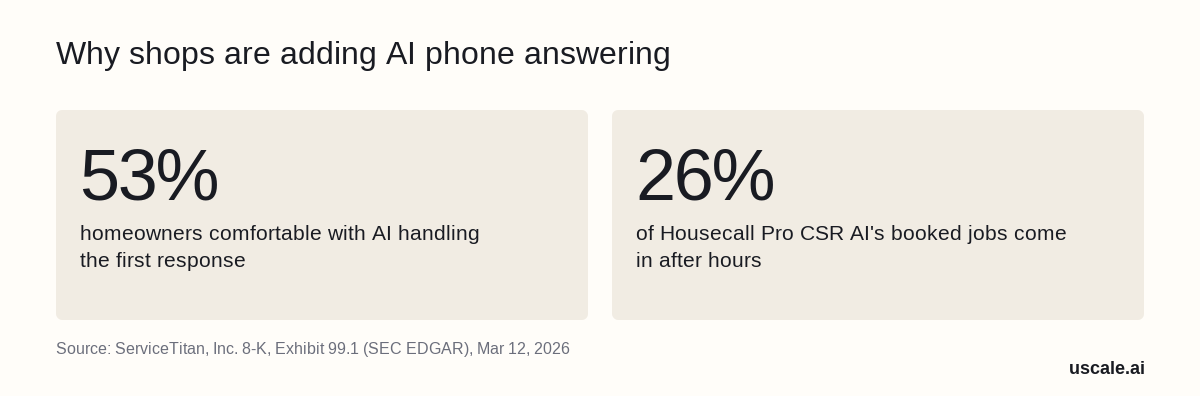
Source: Housecall Pro, "How AI Booking and Dispatch Works for Home Services", August 14, 2026.
Jobber's Receptionist
Jobber's Receptionist, powered by Jobber AI, handles calls and texts 24/7 and can book jobs on the calendar. It is included on the Plus plan and sold as an add-on on Core, Connect and Grow. Receptionist needs a dedicated Jobber phone number in the US, Canada or the UK (Jobber Help Center, as of November 2026). If your trucks and Google profile carry a number you've had for years, plan how calls will reach the new one.
Housecall Pro's CSR AI
Housecall Pro launched its AI Team on May 15, 2024. Its CSR AI answers calls and chats 24/7, captures leads, books jobs and logs each conversation in the platform for review. By Housecall Pro's own data, 26% of the jobs CSR AI books come in after hours. In its 2025 survey of over 1,000 U.S. homeowners, 97% said response time matters when hiring a pro and 53% were comfortable with AI handling that first response. Treat these vendor numbers as a signal, not a forecast for your shop.
ServiceTitan's AI Voice Agents
ServiceTitan's Fall 2025 release added AI Voice Agents for Basic Phones and Phones Pro. They recognize callers, create or find customer records, and book jobs for overflow, after-hours and emergency calls.
A stand-alone option
uscale, which we make, answers the phone when a shop is closed and books the caller in. It also picks up missed calls during the day, texts back callers who hang up and keeps a call-back list. It sits beside your field-service app rather than replacing it. See what it does.
For the deeper comparison, read our guides to an after-hours answering service and missed-call text-back. Answering the call is one piece. The next question is whether the marketing built into your app covers the rest.
Do I Need Separate Marketing Software If My Field-Service App Already Has It?
Most small HVAC shops do not need separate marketing software at first. The review requests and AI phone answering built into field-service apps cover the basics. Jobber's Receptionist answers calls and texts around the clock and books jobs on the calendar. Housecall Pro's CSR AI answers calls and chats 24/7 and logs each conversation inside the platform.
The review add-ons, the AI receptionists and the larger platforms covered above share one trait: each built-in tool starts from the platform's own records. The review ask runs off a job in the system. The receptionist answers the number the platform controls, and Jobber's requires a dedicated Jobber phone number. Built-in tools are strong at anything that begins with a finished job or a call to that number. They are weaker at work that lives on Google itself, such as writing a reply to each review in your own voice or keeping hours, services and photos correct on your profile.
The review section suggests marketing is an add-on you buy. The answering section suggests the phone is already handled. Inside the app, both are true. The gap appears when a customer reaches you somewhere the app does not see.
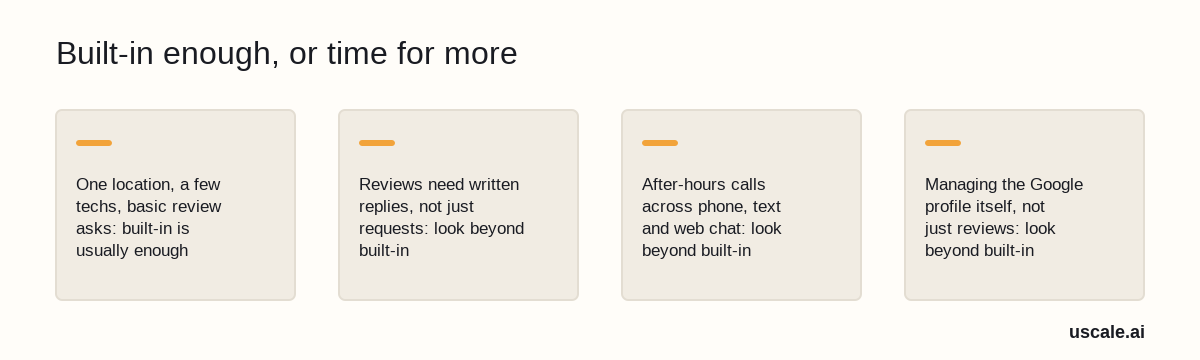
The rule is simple. With one location, a few techs and basic review asks, the built-in tools are usually enough. A separate tool starts to earn its cost when reviews need written replies, when after-hours customers arrive by phone, text and web chat in different places, or when the Google profile needs regular upkeep. Most of that outside work starts with one free asset: the Google Business Profile.
What Free Tools Should Every HVAC Company Set Up First?
Every HVAC company should set up a free Google Business Profile first. The profile is what a homeowner sees when they search for heating or cooling repair on Google Search and Maps. Google Local Services Ads come second, and only after the pay-per-lead cost is paying back in booked jobs.
The profile comes first because everything else points back to it. Review requests, ads and AI answers all lead to that listing. If the hours are wrong or the services are missing, the shop loses the call before any software can help.
| Tool | What it does for the shop | When to set it up |
|---|---|---|
| Google Business Profile | Lists the shop on Maps and in local results, and collects reviews | Day one |
| A review link and QR code | Lets a customer leave a review in one tap | Right after the profile |
| Google Local Services Ads | Paid leads, charged per lead | Once the value of a job covers the cost of a lead |
To find what your listing is missing, run a free Google Business Profile audit. Then make a Google review link and QR code and read how to rank higher on Google Maps.
All of this assumes a shop busy enough to use it. Not every shop is.
When This Advice Doesn't Fit Your Shop
The usual HVAC software advice doesn't fit three kinds of shop: an owner who works alone, a shop in a small town where reviews trickle in, and any shop about to turn on automatic texting without checking the consent rules. The strongest objection comes from that first owner. One van, a phone that rings a few times a day, customers who know you by name. For that owner, a monthly platform, an AI receptionist and a review tool add cost and setup time without paying anything back. In these cases the objection wins.
You work alone
A one-person shop can run on a calendar app, a phone and a simple invoicing app for now. A field-service platform starts to earn its fee when someone besides you needs to see the schedule. It also earns its fee when jobs slip because you're on a roof every time the phone rings.
Your town is small
If only a few reviews come in each year, automated review requests have little to work with. Ask happy customers in person and answer each review yourself. Look at the tools again when reviews arrive faster than you can reply to them.
Check the texting rules first
Automatic text-back means your business sends texts to people who called you. Before you switch it on in any app, check the current FCC guidance on business texting and consent. You can also ask a lawyer how it applies to your shop.
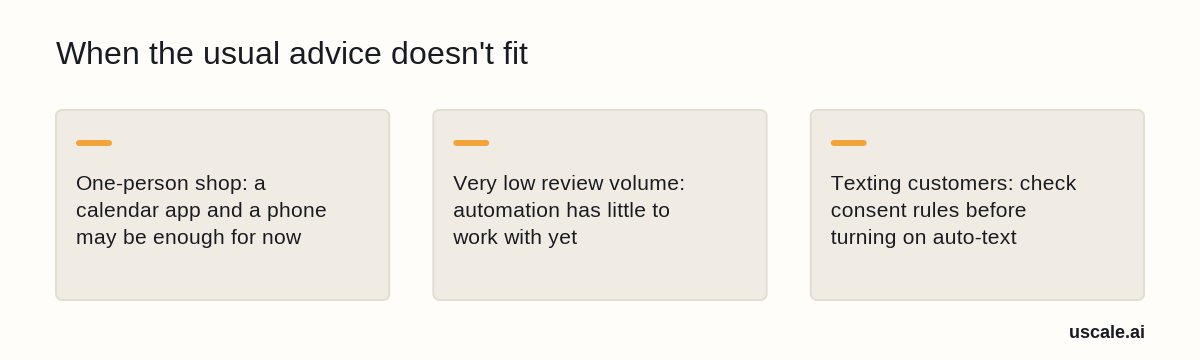
None of this cancels the guide. It changes the timing. Buy a tool when the missed calls, lost jobs or unanswered reviews cost you more than the tool does. When that test says buy, the next step is getting real numbers out of the vendors.
What Should I Ask Before I Sign Up for HVAC Software?
Before you sign up for HVAC software, ask every vendor on your shortlist the same seven questions, and get the answers in writing. The questions cover contract terms, per-tech fees, add-ons, onboarding, data export, QuickBooks sync, and whether review and marketing tools come with the plan. The written answers give you a real monthly total to compare instead of a starting price.
| Ask | Why it matters | A good answer |
|---|---|---|
| How long is the contract, and does it auto-renew? | Jobber and Housecall Pro both list a lower price for annual billing than for month-to-month. | The term, the renewal date and the cancellation steps, in writing |
| What does each extra tech cost? | Per-user fees grow with every truck you add. | A price for your headcount today and in a year |
| Is the AI receptionist included or an add-on? | Jobber includes Receptionist on Plus and sells it as an add-on on Core, Connect and Grow. | A line on the quote with its monthly price |
| Are review requests and marketing in my plan? | Jobber sells its Marketing Suite as a $79/month add-on. | Listed as included, or priced separately |
| Is there an onboarding or setup fee? | Setup costs rarely show on the plan card. | A fee in writing, or "none" in writing |
| Can I export customers, jobs and invoices if I leave? | Your customer list should leave with you. | The export format and who runs the export |
| Does it sync with QuickBooks, and which way? | Typing invoices twice eats office hours. | Which QuickBooks version, and what syncs each way |
Your quick win for this hour
Copy this into an email and send it to each vendor you are considering:
Hi, I run an HVAC company with [number] techs. Before I sign up, please reply in writing with: the contract length and auto-renewal terms; the monthly price for my tech count; the price of the AI receptionist and any marketing or review add-ons; any onboarding fee; how I export my data if I leave; and how your QuickBooks sync works. Thanks.
You are done when the answers sit side by side in one spreadsheet. ServiceTitan publishes no prices, so the written quote is the only way to put it on that sheet.
If you ask only one question, ask for the total monthly price for your actual tech count with every add-on you will use. That email is the last of three moves, and the order matters.
What to Do This Week Before You Sign Anything
Before you sign any HVAC software contract, do three things this week, in this order.
- Shortlist one field-service platform. Count your trucks and techs. Smaller shops usually land on Jobber or Housecall Pro. A contractor with dispatchers and a sales team can request a ServiceTitan demo. Trial one platform, not three.
- Decide whether its built-in marketing is enough. If the plan already asks for reviews and handles missed calls, start there. Add a separate tool only for a gap you can name, such as review replies, after-hours booking or Google profile upkeep.
- Run the checklist above before you sign. Ask every question in writing and keep the answers with your contract.
Once scheduling and invoicing run on their own, the next job is getting found and getting the call. Our HVAC marketing ideas pick up from there.
Software books the job, but the answer a customer gets at 9 PM is what wins it.
Questions
What is the best HVAC business software?
The best HVAC business software is the field-service platform that fits your shop's size. No single product wins for everyone. For most small and mid-size HVAC shops that means Jobber or Housecall Pro, which handle scheduling, dispatch, quotes and invoicing. ServiceTitan suits larger contractors with dispatchers and a sales team. As of November 2026, Jobber's Core plan starts at $29 a month billed annually, while ServiceTitan publishes no prices.
What are the best commercial HVAC software solutions?
Commercial HVAC contractors with several crews, full-time dispatchers and a sales team usually look at ServiceTitan. ServiceTitan publishes no prices and offers a personalized demo and custom package instead. A mid-size commercial shop can also trial Housecall Pro MAX, which includes 8 users at $299 a month billed annually. Ask each vendor in writing how it handles multiple sites, extra users and QuickBooks sync before signing.
What CRM software is best for HVAC contractors?
For most HVAC contractors, the CRM is the field-service platform itself, so a separate CRM is rarely needed at first. Jobber and Housecall Pro keep customers, jobs and invoices in one place. ServiceTitan's AI Voice Agents can find or create customer records during calls. Choose by shop size: Jobber or Housecall Pro for owner-run shops with a few trucks, and ServiceTitan for contractors with dispatchers and a sales team.
Which HVAC software gives the best ROI?
The HVAC software with the best ROI is the plan priced for your real tech count, with only the add-ons you will actually use. Price each plan for the headcount you expect in a year: Jobber Plus adds users at $29 each, Housecall Pro MAX at $75 each. Phone answering can pay back quickly. Housecall Pro reports that 26% of the jobs its CSR AI books come in after hours.
Is there an all-in-one software for HVAC contractors?
No single HVAC app does everything well. A field-service platform such as Jobber, Housecall Pro or ServiceTitan covers scheduling, dispatch and invoicing, and each now sells AI phone answering. Marketing is usually an add-on. Jobber's Marketing Suite covers review requests, email campaigns and referrals, and was reported at $79 a month in January 2025. Work on Google itself, such as review replies and profile upkeep, often needs a separate tool.